 Destinations
 Data sources
 AI insights
 About us
 Careers
 Security
 Customer reviews
 Contact us
 Affiliate program
 Solution partners
 Template gallery
 Looker Studio templates
 Power BI templates
 Excel templates
 Google Sheets templates
 Tableau templates
 Facebook Ads templates
 Google Ads templates
 Data fields & Metrics
 AI prompt library & Guides
 Product documentation
 API documentation
 Case studies
 Blog
Blog Data models
 Windsor vs Supermetrics
 Windsor vs Funnel.io
 Windsor vs Fivetran
 Windsor vs Rivery
 Windsor vs Portermetrics
 Windsor vs Coupler.io
Connect Facebook Ads (Meta Ads) to Lovable
Automatically sync your Facebook Ads data to Lovable using the Windsor.ai connector.
Stream Facebook Ads data into Lovable to catch budget leaks early, monitor campaign performance, and make insights visible to everyone with live, self-serving dashboards.
Forget CSVs. Stop copy/paste. Connect data in minutes. No code required.
 Sign up with Google
 Free forever plan
No credit card needed
Free forever plan
No credit card needed










Optimize your Meta Ads performance with AI-powered analysis in Lovable
Stream your Facebook Ads data into Lovable for instant analysis through conversation and visual dashboards. Key use cases for marketing teams:

Detect creative fatigue early
Analyze frequency, CTR, and conversion rate at the ad level to identify which creatives are losing performance. Refresh them before rising CPA drains your budget.

Optimize video ad hook
Ask Lovable to break down completion rates at 25%, 50%, 75%, and 100% per video creative. Identify where viewers drop off, and rework that section to increase watch time and reduce CPA.

Fix checkout funnel leaks
Compare link_clicks, add_to_carts, checkouts_initiated, and purchase_per_campaign metrics to find where users drop off. Use these insights to fix the weakest step before it affects your conversion rate.

Measure true ROAS
Combine Meta Ads spend with Shopify revenue, GA4 conversions, or CRM pipeline data to see true ROAS beyond what Meta attributes to itself. Shift budget based on actual downstream revenue, not last-click credit.

Monitor budget leaks
Track daily spend, remaining budget, and CPA across all active campaigns and ad sets to catch overspending before it compounds. Stop losing money on campaigns that burn through budget without generating conversions.
Using Windsor.ai to connect data from Meta Ads to Lovable
Most methods for getting Facebook Ads data into Lovable require manual exports, data prep, or API work. Windsor MCP eliminates these challenges by pulling, normalizing, and delivering Meta Ads data into Lovable.
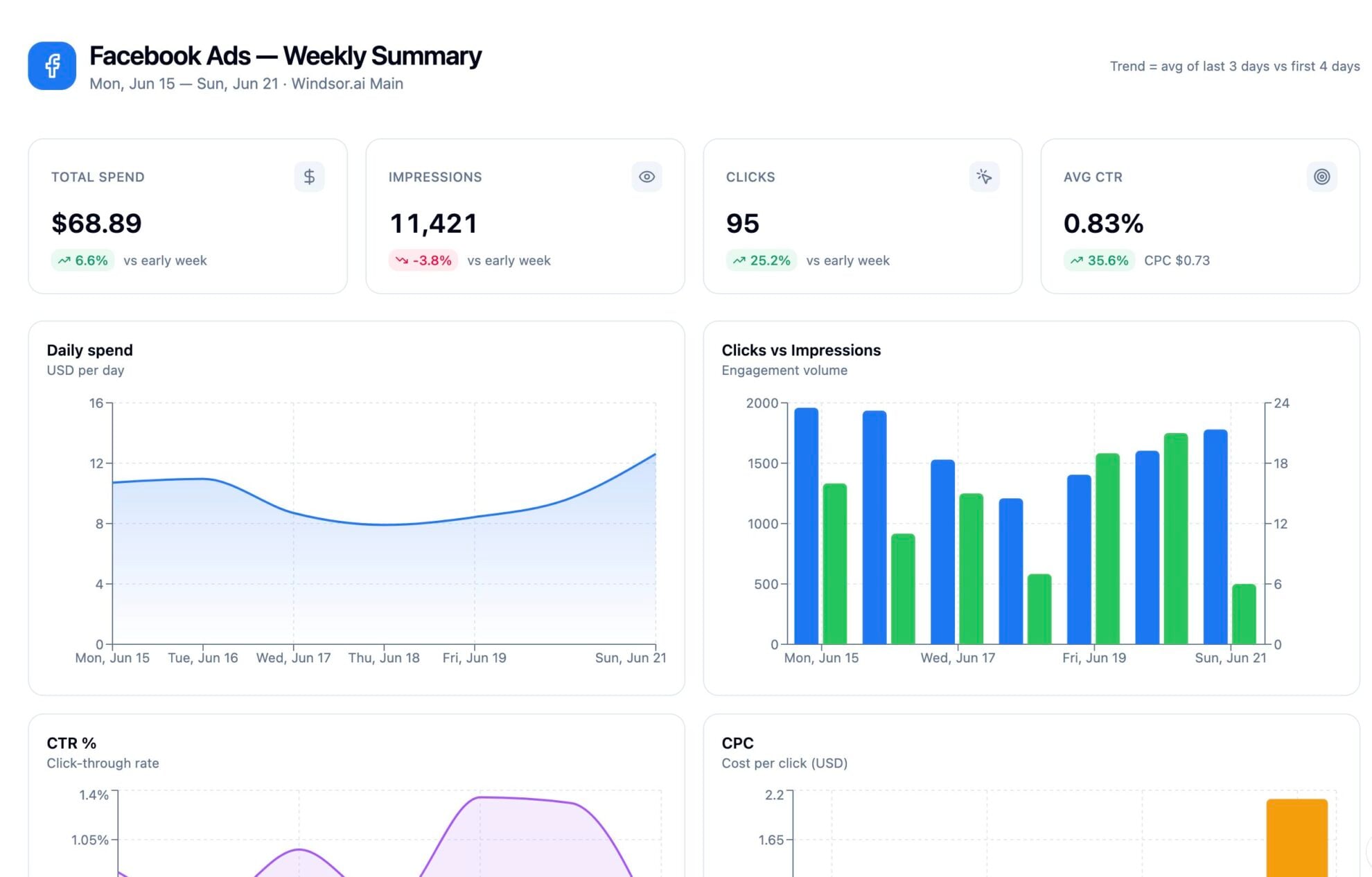
Analyze your advertising data using natural language prompts and generate performance dashboards in seconds.














How to connect Facebook Ads to Lovable with Windsor.ai
Explore our video tutorial and a step-by-step guide to integrate your Meta Ads data into Lovable with the Windsor.ai connector.
Select your data source
Choose Facebook Ads as your data source and grant access to Windsor.ai.

Select custom connector in Lovable
In Lovable, open Connectors and select Custom MCP.

Add MCP server
Enter the following details:
- Name: Windsor.ai
- URL: https://mcp.windsor.ai/
Click Add & Authorize to save the connector and authorize access to Windsor.ai.

Authorize and start querying your data
Once added, Windsor will appear in your list of connectors. Enable Always allow permissions for faster access.
Open a new chat and start querying your connected data.

FAQs
Can I analyze my Facebook Ads data alongside other ad, CRM or e-commerce sources?
Yes. Windsor.ai supports integration with 350+ data sources. Combine Facebook Ads with Google Ads, TikTok, GA4, Shopify, or HubSpot data, all flowing into a single Lovable conversation through Windsor MCP.
Can Lovable detect creative fatigue in my Meta Ads campaigns?
Yes. Lovable can highlight fatigue signals, such as rising frequency and falling CTR, in an easy‑to‑read dashboard and help you identify which creatives are good candidates to pause or refresh.
How much does it cost to integrate Facebook Ads with Lovable using Windsor.ai?
Windsor.ai offers a Forever Free plan with 1 data source, 1 account, and 1 user. If you need more data sources, paid plans start at $19/month. Lovable requires a paid plan to use custom MCP connectors.
How long does it take to integrate Facebook Ads with Lovable via Windsor.ai?
The entire setup takes about 60 seconds. Connect your Meta Ads account to Windsor via OAuth, copy the Windsor MCP server URL into Lovable’s connector settings, authorize, and start analyzing your ad data.
Can Lovable flag campaigns that are wasting budget?
Yes. Ask Lovable to analyze your spend, CPA, and ROAS data to identify campaigns burning budget below your targets, so you can pause them or reallocate spend quickly.
What prompts can I use to analyze my Facebook Ads data in Lovable?
Beyond basic performance summaries, you can use more advanced, specific prompts to uncover deeper insights. For example:
-
Analyze creative fatigue across all active ad sets for the last 30 days. For each ad, track frequency, CTR, CPA, and conversion rate week over week. Flag ads where frequency crossed 3 and CTR dropped more than 15% compared to the first week of delivery. Return a prioritized refresh list.
-
Break down checkout funnel drop-off for the last 14 days. For each campaign, compare link clicks, landing page views, add to carts, checkouts initiated, and purchases. Identify where the biggest drop-off happens and which campaigns lose the most people between add to cart and purchase.
-
Calculate true blended ROAS for the last 30 days by combining Meta spend with Shopify revenue. Compare it against Meta-attributed ROAS. Show the gap per campaign and flag where Meta is overclaiming credit.
-
Analyze video ad performance for the last 30 days. For each video creative, compare 25%, 50%, 75%, and 100% completion rates against CPA and CTR. Identify the drop-off point where viewers lose interest and correlate it with conversion performance.
Do you have helpful links to get started with integrating Facebook Ads and Lovable using Windsor.ai?
Yes, we have helpful resources to help you get started. You can explore our official documentation and tutorials for seamless Facebook Ads to Lovable integration with Windsor.ai:
Can I build a custom Facebook Ads dashboard in Lovable?
Yes. Tell Lovable what you want to track: spend by campaign, ROAS trends, creative performance, CPA by audience, or a full account performance summary. It builds an interactive app with charts, filters, and date pickers without any engineering support or BI setup, so you quickly get visual insights.
Tired of manual Facebook Ads data exports? Try Windsor.ai today to automate your reporting


