 Destinations
 Data sources
 AI insights
 About us
 Careers
 Security
 Customer reviews
 Contact us
 Affiliate program
 Solution partners
 Template gallery
 Looker Studio templates
 Power BI templates
 Excel templates
 Google Sheets templates
 Tableau templates
 Facebook Ads templates
 Google Ads templates
 Data fields & Metrics
 AI prompt library & Guides
 Product documentation
 API documentation
 Case studies
 Blog
Blog Data models
 Windsor vs Supermetrics
 Windsor vs Funnel.io
 Windsor vs Fivetran
 Windsor vs Rivery
 Windsor vs Portermetrics
 Windsor vs Coupler.io
Connect Facebook Page Insights to Copilot Agent
Automatically sync your Facebook Page Insights data to Microsoft Copilot using the Windsor.ai connector.
Uncover organic reach patterns, top-performing content, and the best times to publish with Copilot. Refine your social media strategy to drive higher engagement and business growth. Copilot can also publish a new post or photo post directly to your connected Facebook Page.
Forget CSVs. Stop copy/paste. Connect in minutes. No code required.
 Sign up with Google
 Free forever plan









Boost organic reach with Facebook Page Insights to Copilot Agent integration
Connect Facebook Page Insights with Microsoft Copilot to analyze organic performance and uncover strategies to grow your audience. Explore the key benefits and use cases of this integration:

Detect viral content
Ask the agent to flag any organic post that exceeds your average reach by 50% within the first four hours. This allows you to quickly boost the post with ad spend while the organic momentum is at its peak.

Audit follower retention
Let Copilot Agent correlate specific posting frequencies and ‘Unfollow’ rates over 90 days. This helps you determine if you are over-posting and causing audience fatigue or under-posting and losing mindshare.

Increase profile visit-to-follow conversion
Measure the efficiency of your page by comparing ‘Page Views’ to ‘New Likes’ to see if your bio and pinned posts are compelling. If the conversion rate is low, the agent can suggest optimizing your ‘About’ section or profile imagery.

Monitor community sentiment
Have the agent summarize the top three themes emerging in the comments on your most popular posts this month. This provides a quick view of audience sentiment around recent brand announcements or product launches.

Get instant AI insights
Query your Facebook data directly in Copilot Agent or within tools like Excel and Power BI. Get quick answers in natural language (no switching between platforms) and improve team collaboration across the Microsoft ecosystem.
Using Windsor.ai to connect data from Facebook Page Insights to Copilot
Bring your Facebook Page Insights data into Microsoft Copilot with zero engineering support or costly tools. Windsor.ai automatically collects, normalizes, and delivers your Facebook organic metrics to Copilot Agent for advanced AI analysis.
Set up in minutes and get actionable insights into content performance and audience engagement.
Available actions
Create Photo Post Publish a single image post to a connected Facebook Page. Provide a publicly accessible image URL and an optional caption. For a text/link-only post use create_post instead.
Publish a single image post to a connected Facebook Page. Provide a publicly accessible image URL and an optional caption. For a text/link-only post use create_post instead.
Create Post Publish a post to a connected Facebook Page's feed. Provide a message (post text), a link (shared URL), or both - at least one is required. For an image post use create_photo_post instead.
Publish a post to a connected Facebook Page's feed. Provide a message (post text), a link (shared URL), or both - at least one is required. For an image post use create_photo_post instead.














How to connect Facebook Page Insights to Copilot Agent with Windsor.ai
Explore our step-by-step guide to integrate your Facebook Page Insights data into Copilot with the Windsor.ai connector.
Connect data source in Windsor.ai dashboard
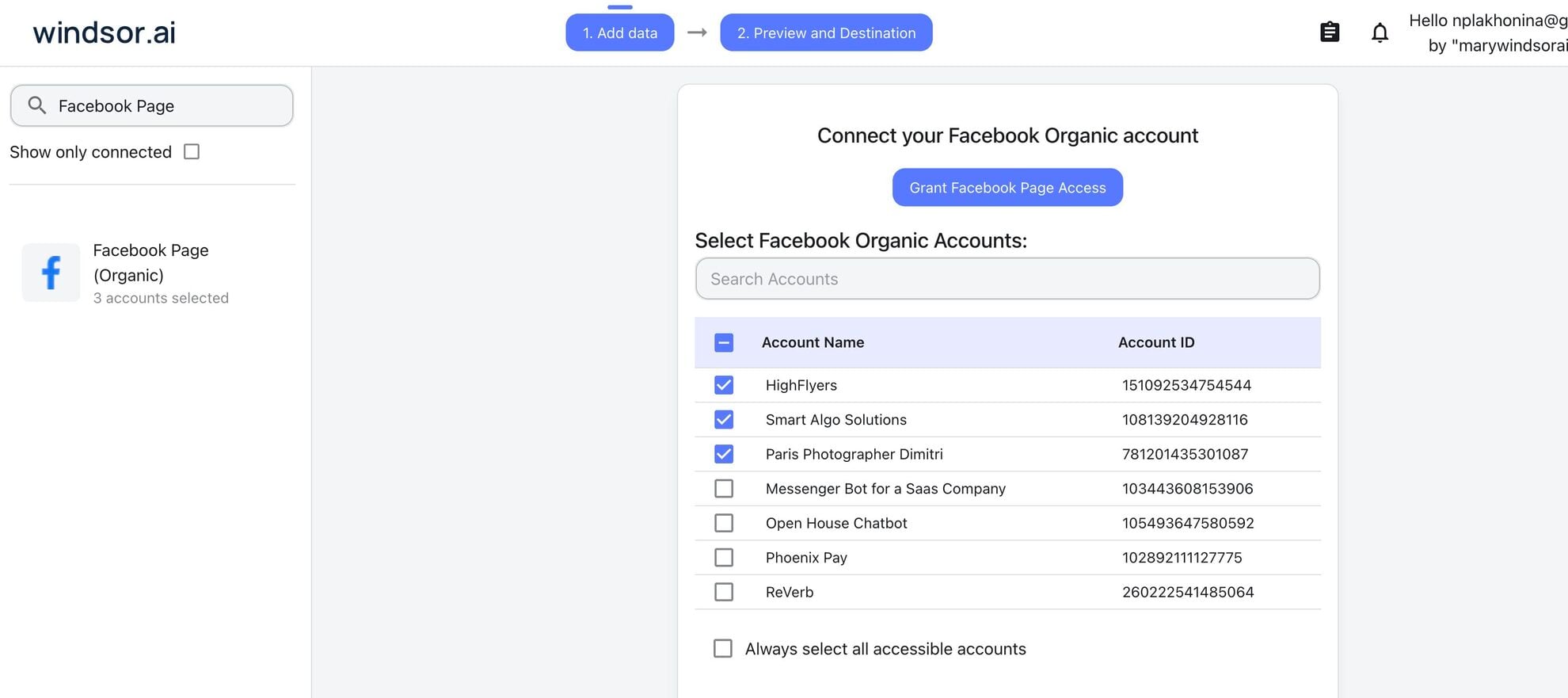
Connect your Facebook Page Insights to Windsor.ai. Select the necessary account(s) you want to pull data from and click “Next.”
Create a new agent (Windsor MCP) in Copilot
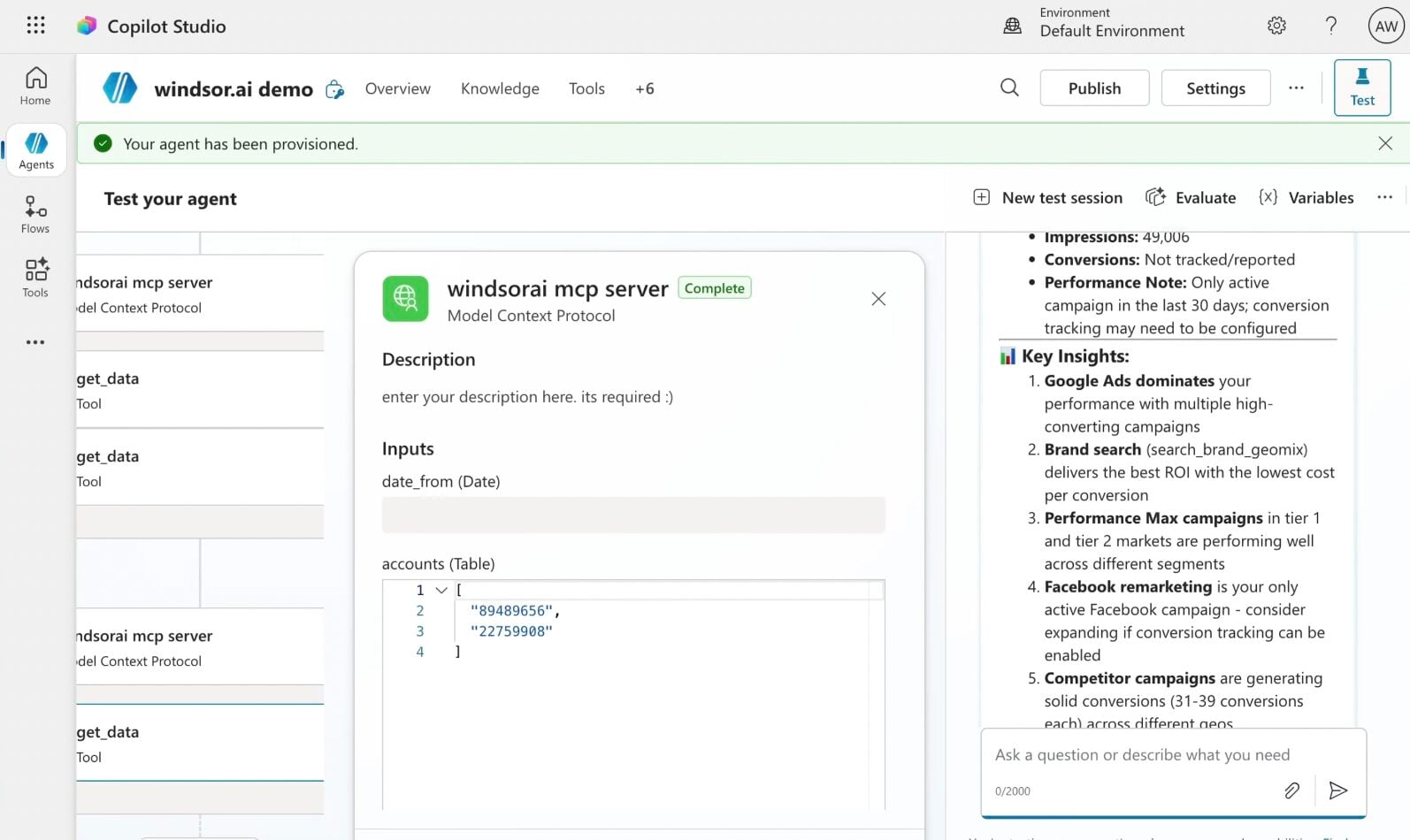
In Microsoft Copilot Studio, create a new agent.
Click + Add tool and select + New tool -> Model Context Protocol.
- Server Name: Windsor MCP
- Server URL: https://mcp.windsor.ai
- Authentication: API Key
- Header name: Authorization

Create a new connection
On the next screen, click the dropdown under ‘Not connected’ and select Create new connection.
⚠️ Important: Enter your Windsor API key with the Bearer prefix.

Confirm credentials and start querying
Start a new chat. Copilot will prompt you to connect to Windsor MCP via the Connections manager. Click Connect -> Submit.
Return to the chat and click Retry in your agent prompt.
You can now ask questions about your integrated Windsor.ai data.
FAQs
Can Copilot Agent identify which organic posts I should turn into ads?
Yes. You can ask Copilot Agent to ‘Find organic posts with a high engagement-to-reach ratio.’ These are your proven winners, and the agent can recommend promoting them to a broader audience to ensure a higher ROAS on your ad spend.
How far back can the Copilot Agent see my page history?
The Copilot Agent can access as much historical Facebook Page Insights data as is available through your Windsor.ai connection.
Can the agent help me find the best time to post on Facebook?
Yes. By analyzing historical engagement data across time-of-day and day-of-week patterns, the agent identifies optimal posting times, helping you schedule content to maximize organic visibility.
Does the integration include video-specific metrics?
Yes, the integration provides detailed video and Reels metrics, including short views (3s, 10s, 15s, 30s), completion rates, average watch time, total and unique views, and Reels plays and replays, giving you a clear picture of engagement and retention.
Can I compare my Facebook Page growth to my Instagram growth?
Yes, Windsor.ai integrates with 350+ data sources, including Instagram. You can ask questions like ‘Which platform had a higher follower growth rate this month, Facebook or Instagram?’ and get an instant side-by-side comparison of cross-platform performance.
What prompts can I use when analyzing Facebook Page Insights data in Copilot Agent?
Here are examples of more advanced prompts you can use to dive deep into your organic performance:
-
Run a correlation analysis between our organic post reach and our website's 'Direct' traffic. Do spikes in viral organic content lead to a lift in site visits within 24 hours?
-
Analyze video retention using 3-second, 10-second, and 30-second views, completion rate, and average watch time over the last quarter. Identify where the largest drop-offs occur and recommend how to improve video hooks.
-
Identify users who have commented or shared our content more than five times this month. Suggest strategies for rewarding and activating this highly engaged segment.
-
Calculate reach-per-follower over the past 6 months and perform a trend analysis to detect saturation or algorithmic decline. Identify whether changes in posting frequency, content format, or engagement rate correlate with shifts in reach efficiency.
How much does it cost to integrate Facebook Page Insights into Copilot using Windsor.ai?
Windsor.ai’s pricing for Microsoft Copilot data integration varies depending on the number of connected accounts and data sources. We offer absolutely transparent pricing plans for diversified business needs and budgets, including a forever-free plan.
How long does it take to connect Facebook Page Insights to Copilot?
With Windsor MCP, the integration process takes a few minutes. No technical expertise or coding is required; connecting data to Copilot is simple, straightforward, and accessible to everyone.
Do you have helpful links to get started with integrating Facebook Page Insights and Copilot Agent using Windsor.ai?
Yes, we have helpful resources to help you get started. You can explore our official documentation and tutorials for seamless Facebook Page Insights to Copilot Agent integration with Windsor.ai:
Tired of manual Facebook Page Insights data exports? Try Windsor.ai today to automate your reporting


