 Destinations
 Data sources
 AI insights
 About us
 Careers
 Security
 Customer reviews
 Contact us
 Affiliate program
 Solution partners
 Template gallery
 Looker Studio templates
 Power BI templates
 Excel templates
 Google Sheets templates
 Tableau templates
 Facebook Ads templates
 Google Ads templates
 Data fields & Metrics
 AI prompt library & Guides
 Product documentation
 API documentation
 Case studies
 Blog
Blog Data models
 Windsor vs Supermetrics
 Windsor vs Funnel.io
 Windsor vs Fivetran
 Windsor vs Rivery
 Windsor vs Portermetrics
 Windsor vs Coupler.io
Connect Google Analytics 4 (GA4) to Copilot Agent
Automatically sync your Google Analytics 4 data to Microsoft Copilot using the Windsor.ai connector.
Quickly stream GA4 data to Copilot Agent to help you interpret complex user behavior and maximize conversions through AI-driven optimization.
Forget CSVs. Stop copy/paste. Connect in minutes. No code required.
 Sign up with Google
 Free forever plan
No credit card needed
Free forever plan
No credit card needed










Unlock deeper user behavior insights with GA4 to Microsoft Copilot integration
Connect Google Analytics 4 to Copilot Agent via Windsor MCP to analyze your website performance, understand user journeys, and uncover revenue drivers. Explore the key benefits and use cases:

Identify friction points
Use the Copilot Agent to instantly flag pages with high traffic but abnormally low engagement or high bounce rates. With these insights, your UX and development teams can prioritize fixes on specific landing pages that are currently leaking potential customers.

Find key conversion paths
Ask the agent to identify the most common path users take from your homepage to a completed purchase. Understand which intermediate pages (like ‘About Us’ or ‘Case Studies’) are essential touchpoints in your conversion funnel.

Evaluate traffic quality
Combine data from Google Analytics, CRM, and ad platforms to determine which acquisition channels, such as organic search, paid social, and email, drive the highest lifetime value or average order value. Optimize your budget toward the most profitable sources.
Predict user churn
While GA4 provides retention data, Copilot goes further by automatically detecting early signs of churn and identifying at-risk users, so you can take action before they drop off.
Using Windsor.ai to connect data from Google Analytics 4 to Copilot
With Windsor.ai, you can send your GA4 data to Microsoft Copilot in minutes. Eliminate the need for engineering support or expensive tools with a connector that automatically collects, normalizes, and delivers your GA4 metrics to Copilot Agent.
Connect your GA4 account and start querying your data using natural language.














How to connect Google Analytics 4 to Copilot Agent with Windsor.ai
Explore our step-by-step guide to integrate your Google Analytics 4 data into Copilot with the Windsor.ai connector.
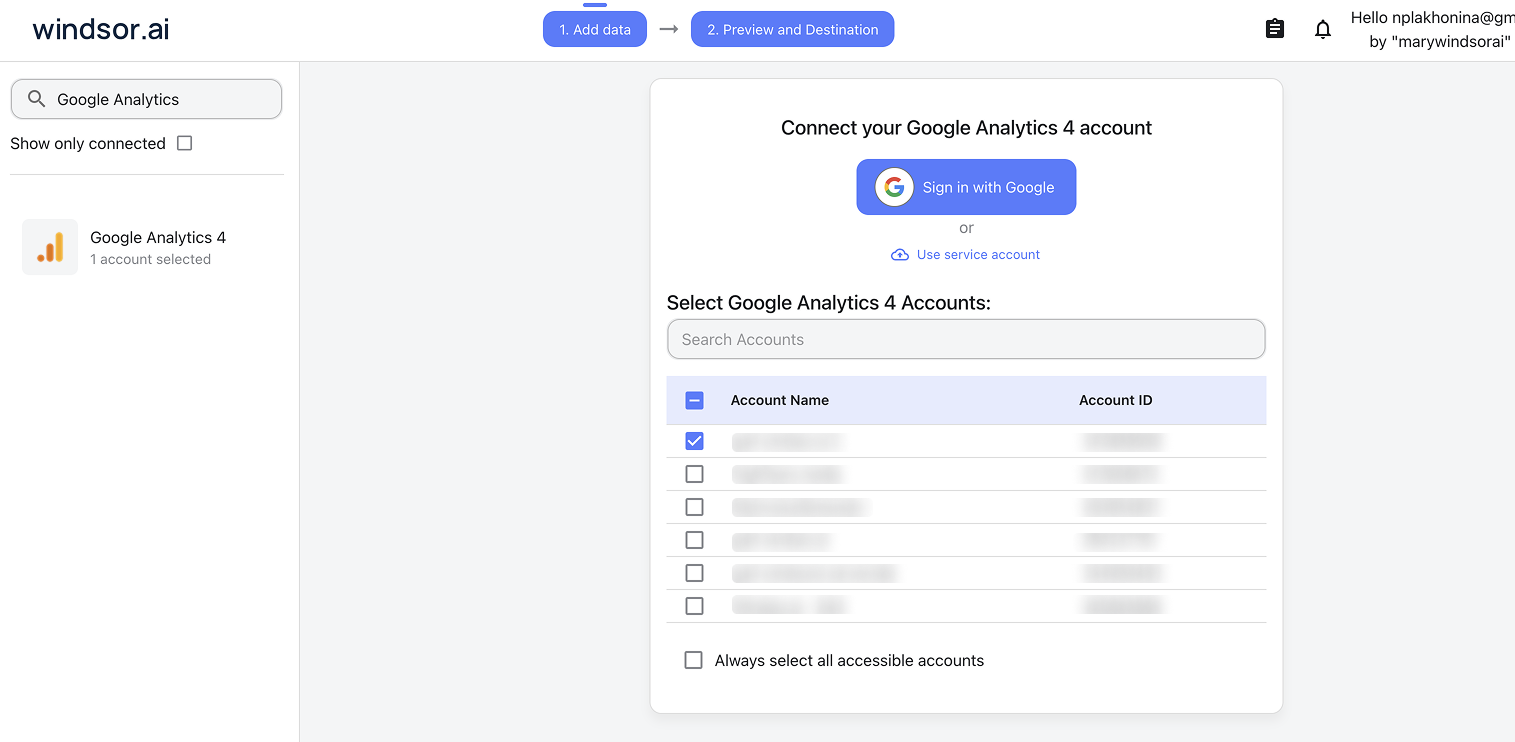
Connect data source in Windsor.ai dashboard
Connect your Google Analytics 4 to Windsor.ai. Select the necessary account(s) you want to pull data from and click “Next.”
Create a new agent (Windsor MCP) in Copilot
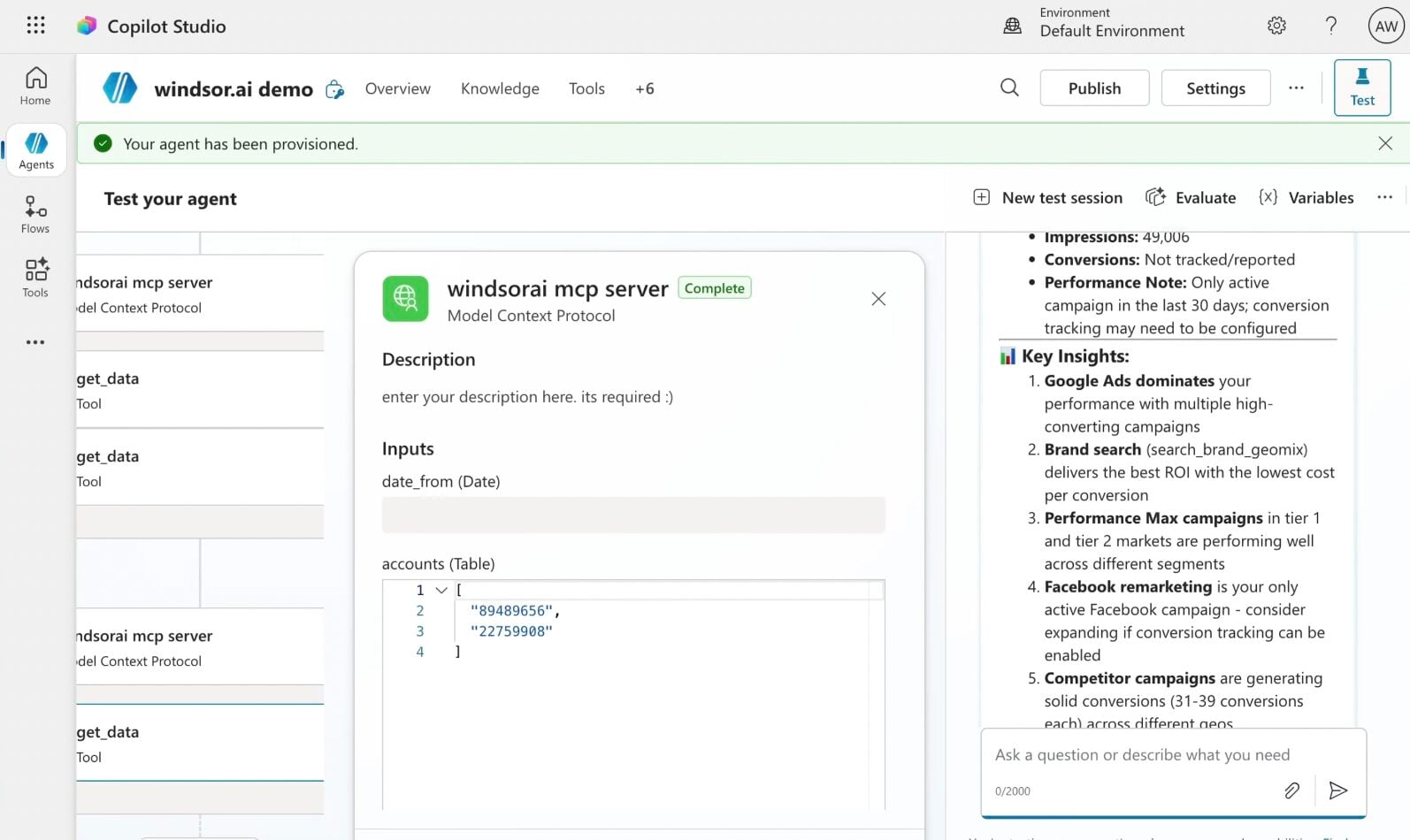
In Microsoft Copilot Studio, create a new agent.
Click + Add tool and select + New tool -> Model Context Protocol.
- Server Name: Windsor MCP
- Server URL: https://mcp.windsor.ai
- Authentication: API Key
- Header name: Authorization

Create a new connection
On the next screen, click the dropdown under ‘Not connected’ and select Create new connection.
⚠️ Important: Enter your Windsor API key with the Bearer prefix.

Confirm credentials and start querying
Start a new chat. Copilot will prompt you to connect to Windsor MCP via the Connections manager. Click Connect -> Submit.
Return to the chat and click Retry in your agent prompt.
You can now ask questions about your integrated Windsor.ai data.
FAQs
How far back can the agent analyze my data?
Windsor.ai can pull historical data from GA4 based on your property’s data retention settings, which typically range from 2 to 14 months for event-level data.
Can Copilot Agent help me identify why my traffic dropped?
Yes, the agent can perform a ‘Root Cause Analysis’ by looking at specific dimensions like source, medium, and landing page to see exactly where the decline occurred.
Does this integration support custom events and parameters?
Absolutely. Copilot Agent can analyze any custom ‘Key Events’ or parameters you have set up in your GA4 property, provided in the Windsor.ai connector.
Can I analyze the Google Analytics 4 data in real-time?
Copilot Agent can analyze the most recent data available. Windsor.ai retrieves the latest data from the GA4 API when a query is made, allowing you to monitor the latest performance with minimal delay.
Can I compare GA4 data with my Google Ads data in the same chat?
Yes, this is a key benefit. Windsor.ai integrates with 350+ marketing and business data sources, enabling cross-channel analysis. For example, you can ask, ‘Which Google Ads campaign drove the most engaged sessions in GA4?’ and get insights into marketing effectiveness.
What prompts can I use when analyzing GA4 data in Copilot Agent?
Here are examples of more specific prompts you can use to dive deep into your GA4 data:
-
Identify a segment of users who have spent more than 10 minutes on the site and triggered at least 3
scrollevents but 0add_to_cartevents. What is the top 'Exit Page' for this specific high-intent/no-purchase segment? Provide a summary of the content on that page. -
Analyze the checkout funnel and identify any segments (e.g., device, location, browser) with unusually high drop-off between steps. Suggest possible technical or UX reasons for this friction.
-
Analyze the relationship between promotion views and purchases over the last 90 days. Do users who interact with internal promotions convert at a higher rate?
-
Create a 12-week user retention cohort and identify when the largest drop in active users occurs. Analyze which pages or content are most associated with that drop-off.
How much does it cost to integrate GA4 into Copilot using Windsor.ai?
Windsor.ai’s pricing for Microsoft Copilot data integration varies depending on the number of connected accounts and data sources. We offer absolutely transparent pricing plans for diversified business needs and budgets, including a forever-free plan.
How long does it take to connect GA4 to Copilot?
With Windsor MCP, the integration process takes a few minutes. No technical expertise or coding is required; connecting data to Copilot is simple, straightforward, and accessible to everyone.
Do you have helpful links to get started with integrating GA4 and Copilot Agent using Windsor.ai?
Yes, we have helpful resources to help you get started. You can explore our official documentation and tutorials for seamless Google Analytics 4 to Copilot Agent integration with Windsor.ai:
Tired of manual Google Analytics 4 data exports? Try Windsor.ai today to automate your reporting


