 Destinations
 Data sources
 AI insights
 About us
 Careers
 Security
 Customer reviews
 Contact us
 Affiliate program
 Solution partners
 Template gallery
 Looker Studio templates
 Power BI templates
 Excel templates
 Google Sheets templates
 Tableau templates
 Facebook Ads templates
 Google Ads templates
 Data fields & Metrics
 AI prompt library & Guides
 Product documentation
 API documentation
 Case studies
 Blog
Blog Data models
 Windsor vs Supermetrics
 Windsor vs Funnel.io
 Windsor vs Fivetran
 Windsor vs Rivery
 Windsor vs Portermetrics
 Windsor vs Coupler.io
Connect HubSpot to Copilot Agent
Automatically sync your HubSpot data to Microsoft Copilot using the Windsor.ai connector.
Use Copilot Agent to analyze pipeline and campaign performance, forecast revenue, and identify at-risk deals before they impact your quarter.
Forget CSVs. Stop copy/paste. Connect in minutes. No code required.
 Sign up with Google
 Free forever plan
No credit card needed
Free forever plan
No credit card needed










Spot revenue risks and opportunities with HubSpot data in Copilot
Ask Copilot anything about your HubSpot data (pipeline health, email performance, ticket resolution times) and get AI-driven insights in seconds based on live data. Explore key benefits and use cases below:

Benchmark sales rep performance
Compare closed won revenue, average deal size, and win rate across your entire sales team for any time period. Spot underperformers and replicate what your top closers do differently.

Prioritize high-value leads
Surface all contacts with a high lead score but zero logged activity in the last 7 days. Prioritize outreach before high-intent leads lose interest.

Calculate cross-channel ROAS
Combine HubSpot closed won revenue with Google Ads or Facebook Ads spend via Windsor.ai. Calculate true ROAS per campaign and cut spend where paid media fails to generate actual customers.

Monitor email campaign health
Analyze open rate, click-through rate, and revenue attribution across all campaigns to identify which emails move prospects closer to a deal, scale what works, and cut what doesn’t.

Enhance your Microsoft ecosystem
Ask Copilot to summarize your pipeline and export it as a formatted Excel table, draft a sales performance report in Word, or paste a revenue update directly into a Teams message, all without leaving the Microsoft ecosystem.
Using Windsor.ai to connect data from HubSpot to Copilot
With MCP, your HubSpot data reaches Microsoft Copilot in minutes, removing the need for engineering support or manual work. The connector automatically pulls, normalizes, and streams your entire HubSpot dataset into the Copilot workspace, ready for AI analysis.
Connect once and start analyzing your sales and marketing performance via natural language prompts.
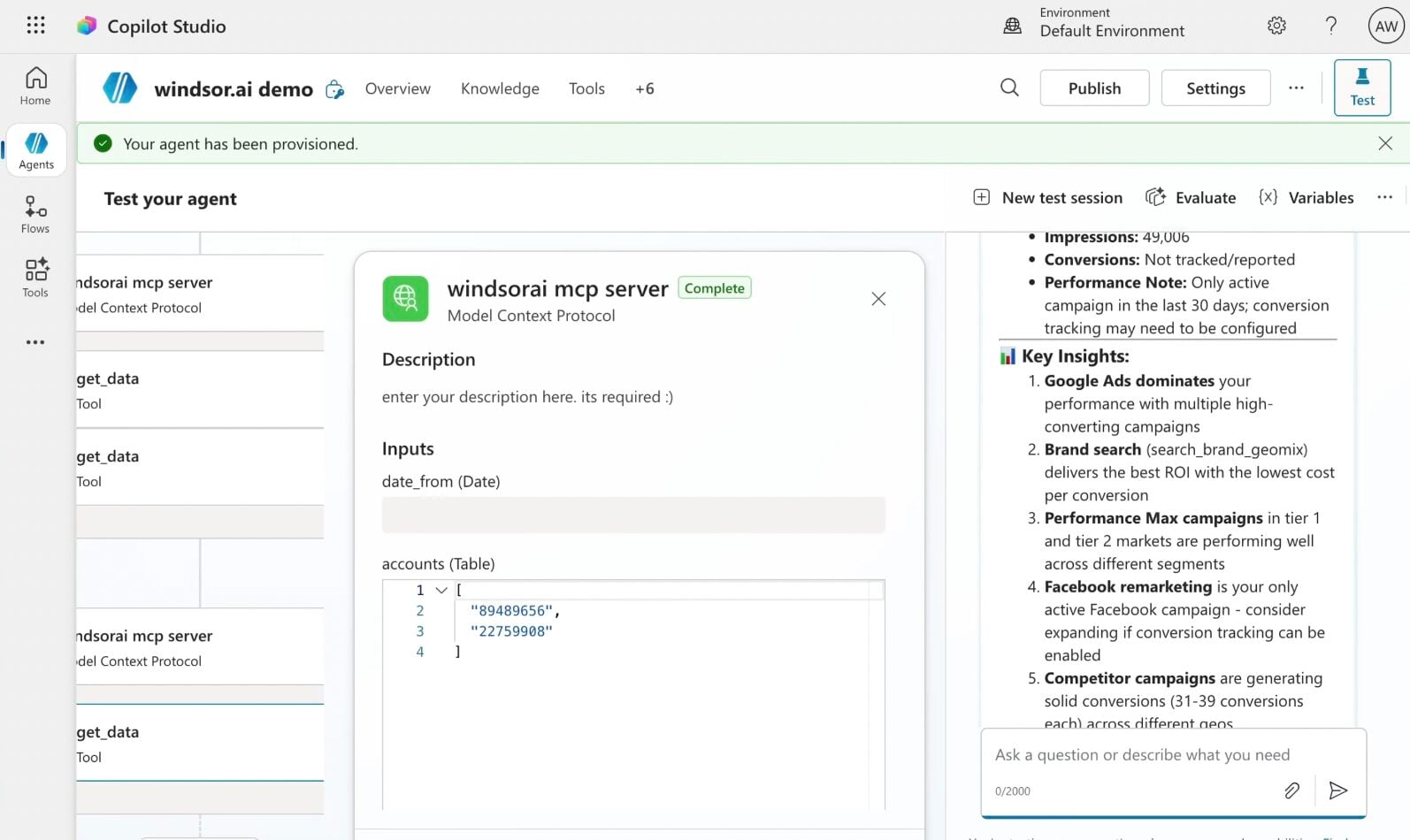














How to connect HubSpot to Copilot Agent with Windsor.ai
Explore our step-by-step guide to integrate your HubSpot data into Copilot with the Windsor.ai connector.
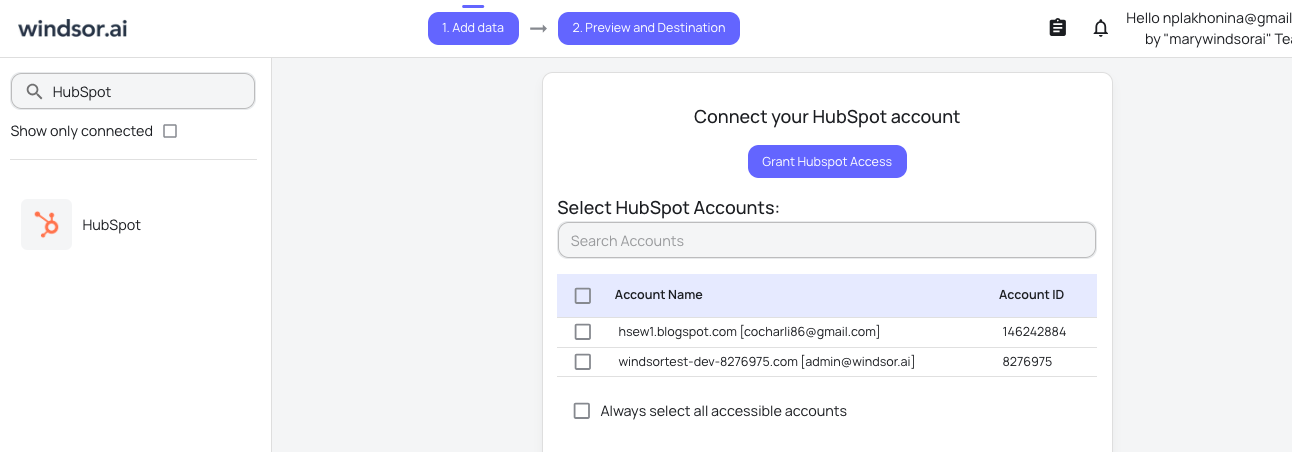
Connect data source in Windsor.ai dashboard
Connect your HubSpot to Windsor.ai. Select the necessary account(s) you want to pull data from and click “Next.”
Create a new agent (Windsor MCP) in Copilot
In Microsoft Copilot Studio, create a new agent.
Click + Add tool and select + New tool -> Model Context Protocol.
- Server Name: Windsor MCP
- Server URL: https://mcp.windsor.ai
- Authentication: API Key
- Header name: Authorization

Create a new connection
On the next screen, click the dropdown under ‘Not connected’ and select Create new connection.
⚠️ Important: Enter your Windsor API key with the Bearer prefix.

Confirm credentials and start querying
Start a new chat. Copilot will prompt you to connect to Windsor MCP via the Connections manager. Click Connect -> Submit.
Return to the chat and click Retry in your agent prompt.
You can now ask questions about your integrated Windsor.ai data.
FAQs
What HubSpot data can I analyze in Copilot Agent?
Windsor.ai gives you access to 275 metrics and 782 dimensions from your entire HubSpot account: contacts, deals, companies, tickets, calls, meetings, emails, campaigns, forms, pipelines, and custom objects. Analyze everything from deal pipeline health and contact lifecycle stages to email campaign performance, support ticket resolution times, and revenue attribution. Custom objects and custom properties are fully supported.
Can Copilot help me identify which deals are at risk of going cold?
Yes. You can ask Copilot to find all open deals where no call, email, or meeting has been logged in the last 14 days, cross-referenced with their expected close date. For each at-risk deal, Copilot can show the current stage, deal value, assigned owner, and whether a next step has been defined, giving your sales team a prioritized list of deals that need immediate attention before they go silent.
Is it possible to analyze HubSpot data alongside other channels in Copilot?
Yes. Windsor.ai supports 350+ data sources, so you can combine HubSpot with any of them in a single Copilot chat. Connect it with Facebook Ads or Google Ads to analyze which paid campaigns generate contacts with the highest lifetime value, or cross-reference lead source data with deal close rates to understand which channels deliver actual revenue.
Can I use Copilot to analyze email campaign performance?
Yes. Windsor.ai pulls full email stats, including open rate, click rate, click-through rate, unsubscribe rate, hard bounce rate, and spam report rate. You can ask Copilot to rank your last 10 campaigns by click-through rate, identify emails with unusually high unsubscribe rates, or compare mobile vs. desktop open performance across your sends.
Can Copilot help me forecast revenue based on my current pipeline?
Yes. Ask Copilot to calculate your weighted pipeline forecast by close month, compare current pipeline value against the same period last quarter, or flag high-value deals with low forecast probability that need sales attention.
What prompts can I use when analyzing HubSpot data in Copilot Agent?
Here are examples of more specific prompts you can use to dive deep into your HubSpot data:
-
Show total closed won revenue this month compared to last month. Rank sales reps by revenue closed and include the number of deals won and average deal size for each. For any rep where revenue increased or decreased by more than 15%, explain what drove the change based on deal activity, pipeline stage progression, and call and meeting logs.
-
Compare average sales cycle length (from contact creation to closed won) across my top 5 lead sources over the last 6 months. Which source produces the fastest deals, and which ones stall most frequently at the opportunity stage?
-
Analyze my email campaign performance over the last 90 days. Find any campaigns where the unsubscribe rate exceeded 0.5% and cross-reference with the subject line and send volume to identify patterns.
-
Show all deals that were lost in the last 90 days. Group them by closed lost reason and by sales rep. Identify if any rep has a disproportionately high loss rate in a specific stage.
How much does it cost to integrate HubSpot into Copilot using Windsor.ai?
Windsor.ai’s pricing for Microsoft Copilot data integration varies depending on the number of connected accounts and data sources. We offer absolutely transparent pricing plans for diversified business needs and budgets, including a forever-free plan.
How long does it take to connect HubSpot to Copilot?
With Windsor MCP, the integration process takes a few minutes. No technical expertise or coding is required; connecting data to Copilot is simple, straightforward, and accessible to everyone.
Do you have helpful links to get started with integrating HubSpot and Copilot Agent using Windsor.ai?
Yes, we have helpful resources to help you get started. You can explore our official documentation and tutorials for seamless HubSpot to Copilot Agent integration with Windsor.ai:
Tired of manual HubSpot data exports? Try Windsor.ai today to automate your reporting


