 Destinations
 Data sources
 AI insights
 About us
 Careers
 Security
 Customer reviews
 Contact us
 Affiliate program
 Solution partners
 Template gallery
 Looker Studio templates
 Power BI templates
 Excel templates
 Google Sheets templates
 Tableau templates
 Facebook Ads templates
 Google Ads templates
 Data fields & Metrics
 AI prompt library & Guides
 Product documentation
 API documentation
 Case studies
 Blog
 Data models
 Windsor vs Supermetrics
 Windsor vs Funnel.io
 Windsor vs Fivetran
 Windsor vs Rivery
 Windsor vs Portermetrics
 Windsor vs Coupler.io
Connect Instagram Public to ChatGPT
Connect your Instagram Public data to ChatGPT using the Windsor.ai plugin.
Use ChatGPT to compare public Instagram profiles: how often they post, likes and comments per post, and which formats get the most engagement.
Connect data in minutes. No code required.
 Sign up with Google
 Free forever plan
No credit card needed








Benchmark public profiles with Instagram Public to ChatGPT integration
With the Windsor.ai plugin, ChatGPT reads the public profiles you track when you ask. Use cases:

Benchmark competitor engagement
Compare the average Like-to-Follower ratio across five competitor profiles to see who has the most active audience. ChatGPT can help you identify which brands are truly engaging their fans versus those with large but less active followings. Tracking more than one profile needs a paid plan. The free forever plan includes 1 account.

Compare post type popularity
ChatGPT can scan the posts of the public profiles you track to see if Reels, Carousels, or Static Images receive the highest average number of comments. This shows which content format consistently gets the most interaction.

Compare caption topics
List the topics rival brands cover in their post captions next to the likes and comments each post gets, to see which topics get the most replies on their accounts.

Validate trends across TikTok and Instagram
Compare your TikTok Organic video engagement with Instagram Public likes and comments on posts about the same topic, to see whether a format works on both platforms or only on one. Combining sources needs a paid plan. The free forever plan includes 1 data source.
Using Windsor.ai to connect data from Instagram Public to ChatGPT
Windsor.ai looks up the public profiles you track through Meta’s API and returns their posts, captions, likes and comments to ChatGPT when you ask.
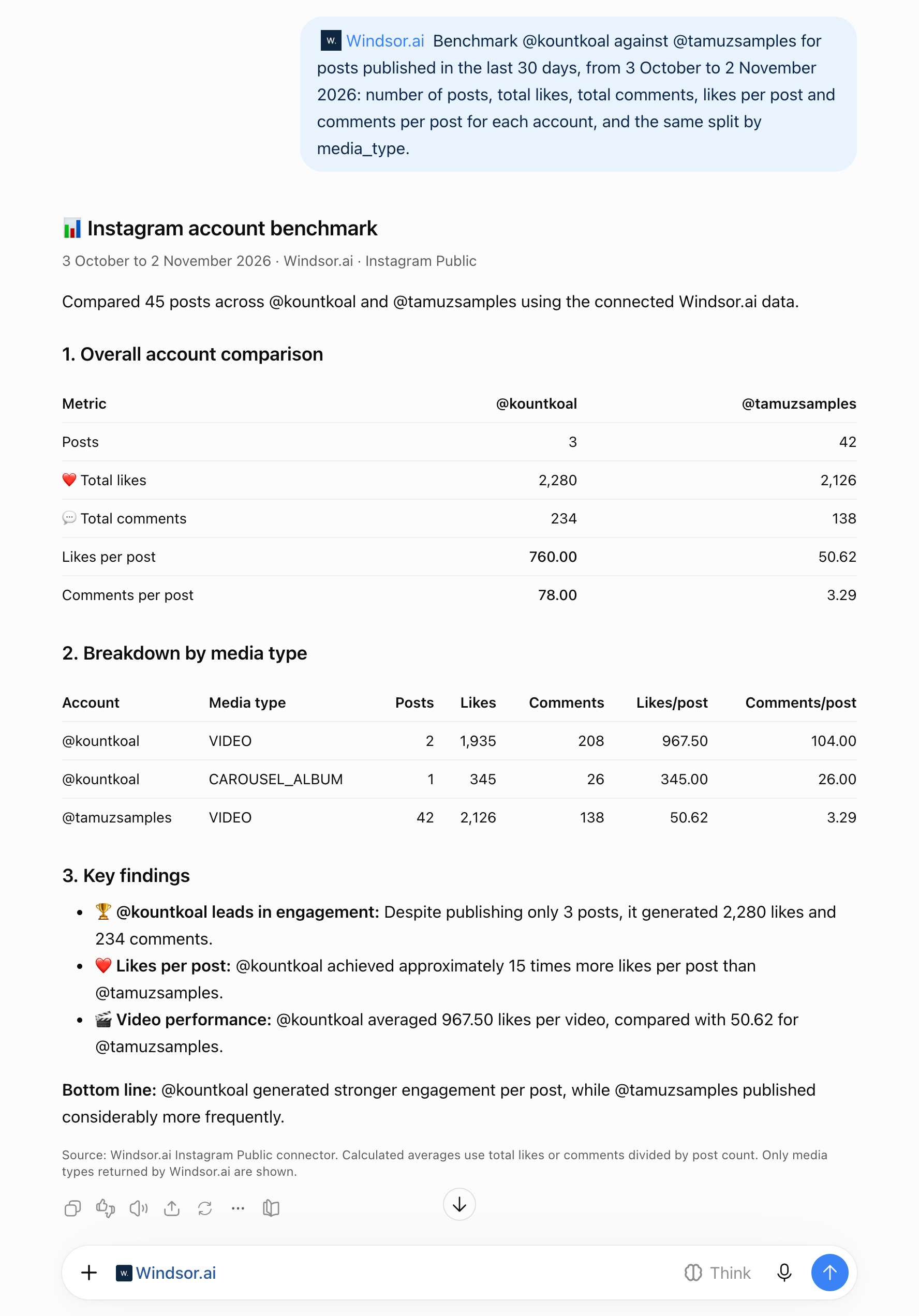
We tracked two public profiles, @kountkoal and @tamuzsamples, in Windsor.ai and asked ChatGPT through the Windsor.ai plugin: “Benchmark @kountkoal against @tamuzsamples for posts published in the last 30 days, from 3 October to 2 November 2026: number of posts, total likes, total comments, likes per post and comments per post for each account, and the same split by media_type.”
- Posts: @tamuzsamples published 42 posts in the 30 days, all videos. @kountkoal published 3, two videos and one carousel.
- Engagement per post: @kountkoal averaged 760 likes and 78 comments per post, and @tamuzsamples 51 likes and 3.3 comments.
- Totals: the two accounts got a similar number of likes, 2,280 for @kountkoal and 2,126 for @tamuzsamples, from 3 posts and 42 posts.
We checked the averages against the list of all 45 posts from the same chat, and the totals matched. Tracking two profiles needs a paid plan. The free forever plan includes 1 account. The setup steps, a second example and fixes for empty results are in how to connect Instagram Public data to ChatGPT.


How to connect Instagram Public to ChatGPT data with Windsor.ai
Explore our video tutorial and a step-by-step guide to integrate your data from any source into ChatGPT with the Windsor.ai plugin.
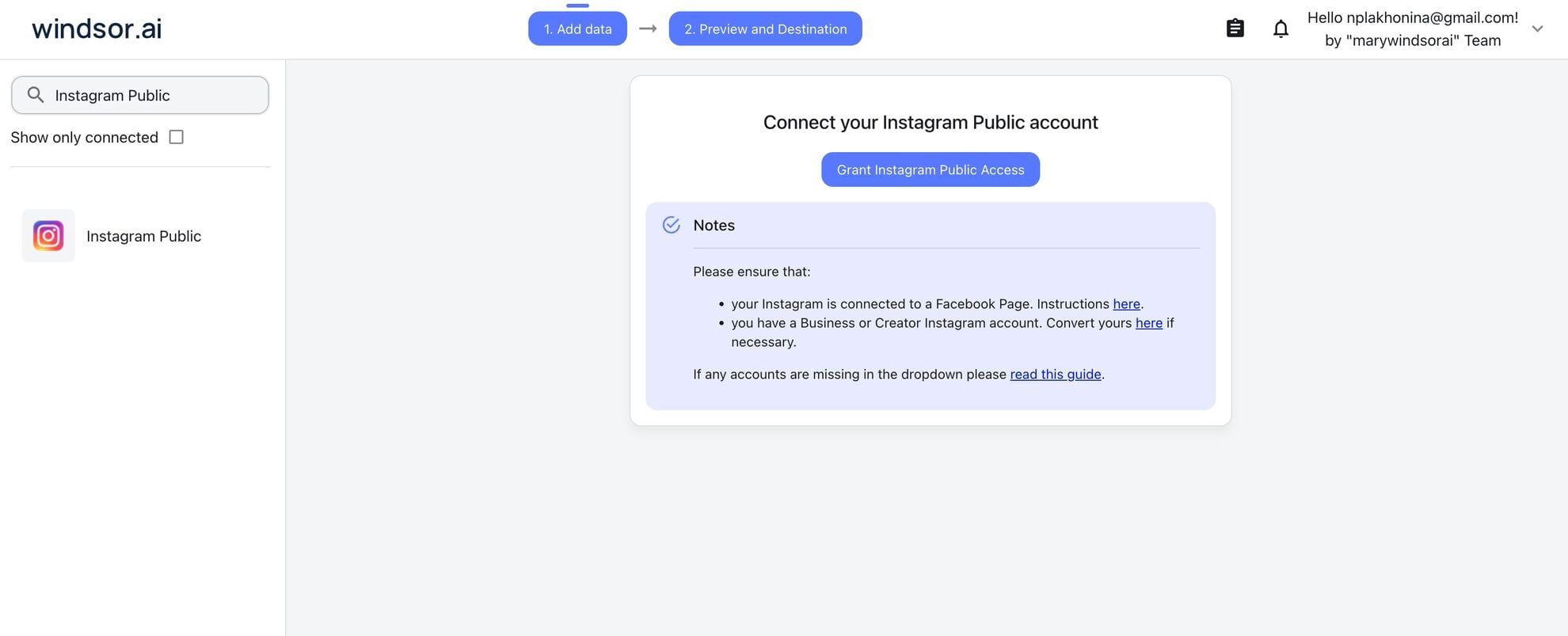
Select your data source
Choose Instagram Public as your data source and grant access to Windsor.ai.
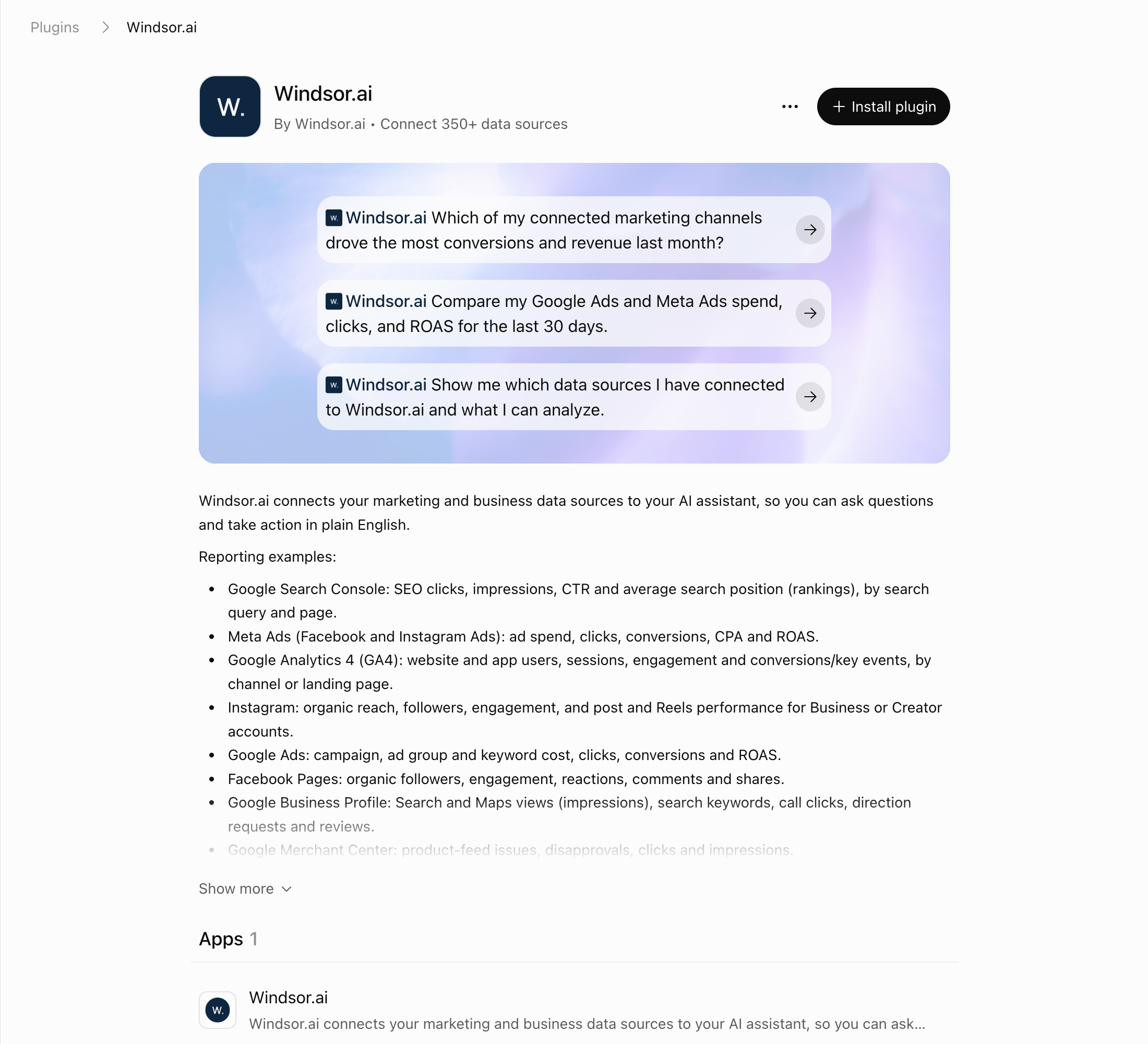
Install the Windsor.ai plugin
Log in to your ChatGPT account and open this Windsor.ai plugin page.
Click Connect, or Install plugin if that is the button you see, then authorize access. You can also click Plugins in the ChatGPT sidebar and search for Windsor.ai.
Query your Instagram Public data in ChatGPT
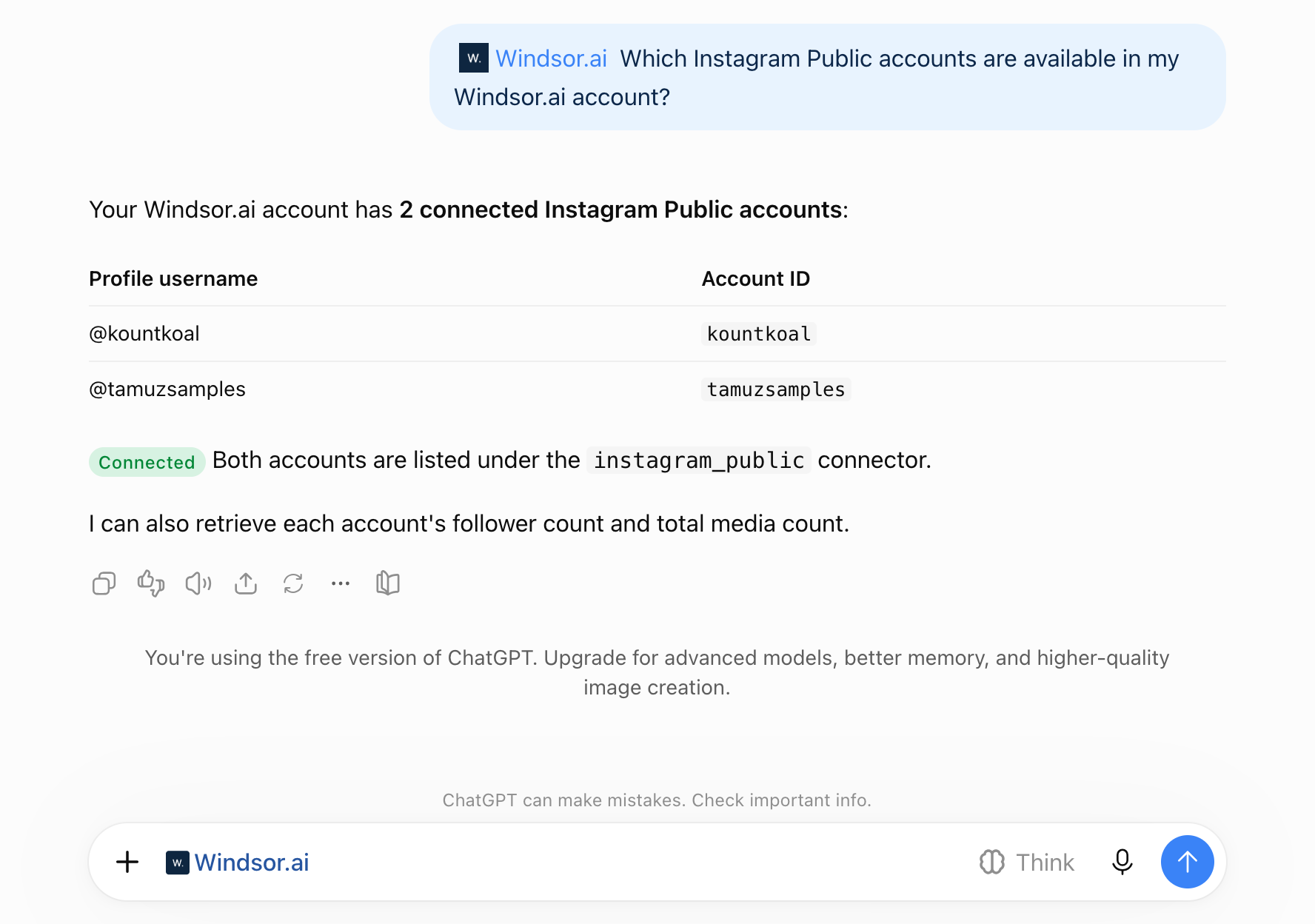
Open a new chat and start asking questions about your connected Instagram Public data using natural language.
Make sure that the Windsor.ai plugin is enabled (click + and choose Windsor.ai, or type @Windsor).
FAQs
Can ChatGPT analyze a competitor's Instagram account?
Yes, if it is a public Business or Creator account. Windsor.ai reads its profile counts and posts through Meta’s API, and ChatGPT queries that data through the Windsor.ai plugin. Private accounts, most personal accounts and age-gated accounts return no data.
Is there an official Instagram app for ChatGPT?
No. Meta’s official MCP servers cover Meta Ads, developer tools and WhatsApp Business, and none reads organic or public Instagram data (Meta’s MCP servers). In ChatGPT’s Plugins directory, public profiles are covered by third-party plugins: the Windsor.ai plugin, the separate Windsor.ai Instagram Public plugin, which reads public profile data only, and other vendors’ apps such as Minter.io, which answers from Minter.io’s own competitor reports.
What metrics are available in the Instagram Public connector?
With Windsor.ai, you have access to 42 metrics and dimensions, including Like counts, Comment counts, and Media types (Image, Video, Carousel, Reel).
Can ChatGPT analyze Instagram comments for sentiment?
No. The Instagram Public connector returns the number of comments on each public post, not the comment text, so ChatGPT cannot categorize comments into positive, negative, or neutral sentiment.
Is this integration useful for influencer marketing?
Yes. Analyze public Instagram data from influencers and competitor accounts to compare engagement rates, identify high-performing content formats, and evaluate which creators drive the most interaction. This helps you shortlist the right influencers, understand what content works in your niche, and make more informed partnership decisions.
Can I analyze Instagram Public data alongside my own Instagram Insights?
Yes. Windsor.ai can connect both sources at the same time. With your own account’s private metrics (such as reach and story exits) and competitors’ public likes and comments in the same ChatGPT chat, you can compare your account with theirs. Combining sources needs a paid plan. The free forever plan includes 1 data source.
What prompts can I use when analyzing Instagram Public data in ChatGPT?
To gain deeper insights from Instagram Public data, use more advanced prompts such as:
-
Compare my internal 'Average Reach' from Instagram Insights with the public 'Engagement Rate' of [Competitor A] and [Competitor B]. If their engagement-to-follower ratio is higher than mine, analyze their last 5 posts and tell me what content themes they are using that I am currently missing.
-
Analyze the likes and comments on each post from [Influencer] in the last 30 days. Flag any post where likes spiked without a matching rise in comments, and say how consistent their engagement is from post to post.
-
Compare the posting frequency vs. average engagement for [Competitor A, B, and C]. Who is the most 'efficient' creator (highest engagement with the fewest posts)? Describe their content style and suggest a posting schedule that allows me to match their results with less manual effort.
Prompts that cover more than 30 days, combine sources or compare more than one profile need a paid plan. The free forever plan includes the last 30 days, 1 data source and 1 account.
Can ChatGPT change anything on the profiles I track?
No. The Instagram Public connector has no write actions (write actions list). The Windsor.ai plugin can post and comment only on accounts you own, through connectors that support it, such as Instagram, and ChatGPT asks you to confirm each action first.
How much does it cost to integrate Instagram Public into ChatGPT using Windsor.ai?
Windsor.ai has a free forever plan, no credit card required. Paid plans start at $19/month, billed annually, and scale by the number of sources and accounts. See the pricing page.
How long does it take to connect Instagram Public to ChatGPT?
The setup takes a few minutes and needs no code.
Which ChatGPT plans can use the Windsor.ai plugin?
We set this up on ChatGPT’s Free plan. OpenAI says plugin availability depends on your plan, region, workspace and the ChatGPT interface you use, and in a Business, Enterprise or Edu workspace an admin can turn plugins on or off.
Where are the setup guide and the field list?
The step-by-step setup, a second example and troubleshooting are in how to connect Instagram Public data to ChatGPT. Every field is in the Instagram Public field reference, and the same workflow in Claude is in Instagram competitor analysis with Claude.
Tired of manual Instagram Public data exports? Try Windsor.ai today to automate your reporting


