 Destinations
 Data sources
 AI insights
 About us
 Careers
 Security
 Customer reviews
 Contact us
 Affiliate program
 Solution partners
 Template gallery
 Looker Studio templates
 Power BI templates
 Excel templates
 Google Sheets templates
 Tableau templates
 Facebook Ads templates
 Google Ads templates
 Data fields & Metrics
 AI prompt library & Guides
 Product documentation
 API documentation
 Case studies
 Blog
Blog Data models
 Windsor vs Supermetrics
 Windsor vs Funnel.io
 Windsor vs Fivetran
 Windsor vs Rivery
 Windsor vs Portermetrics
 Windsor vs Coupler.io
 Last updated: 21 September 2026




To run an Instagram competitor analysis in Claude, add the public usernames you want to track at onboard.windsor.ai/app/instagram_public, connect Windsor.ai inside Claude, and ask about those accounts in a new chat. No login to the other accounts, no scraping, and the first account is free.
This guide is about accounts you do not own: competitors, creators you might sponsor, category leaders, or your own brand seen from the outside. For your own account’s private analytics (reach, saves, Stories, audience), see how to connect Instagram Insights to Claude.
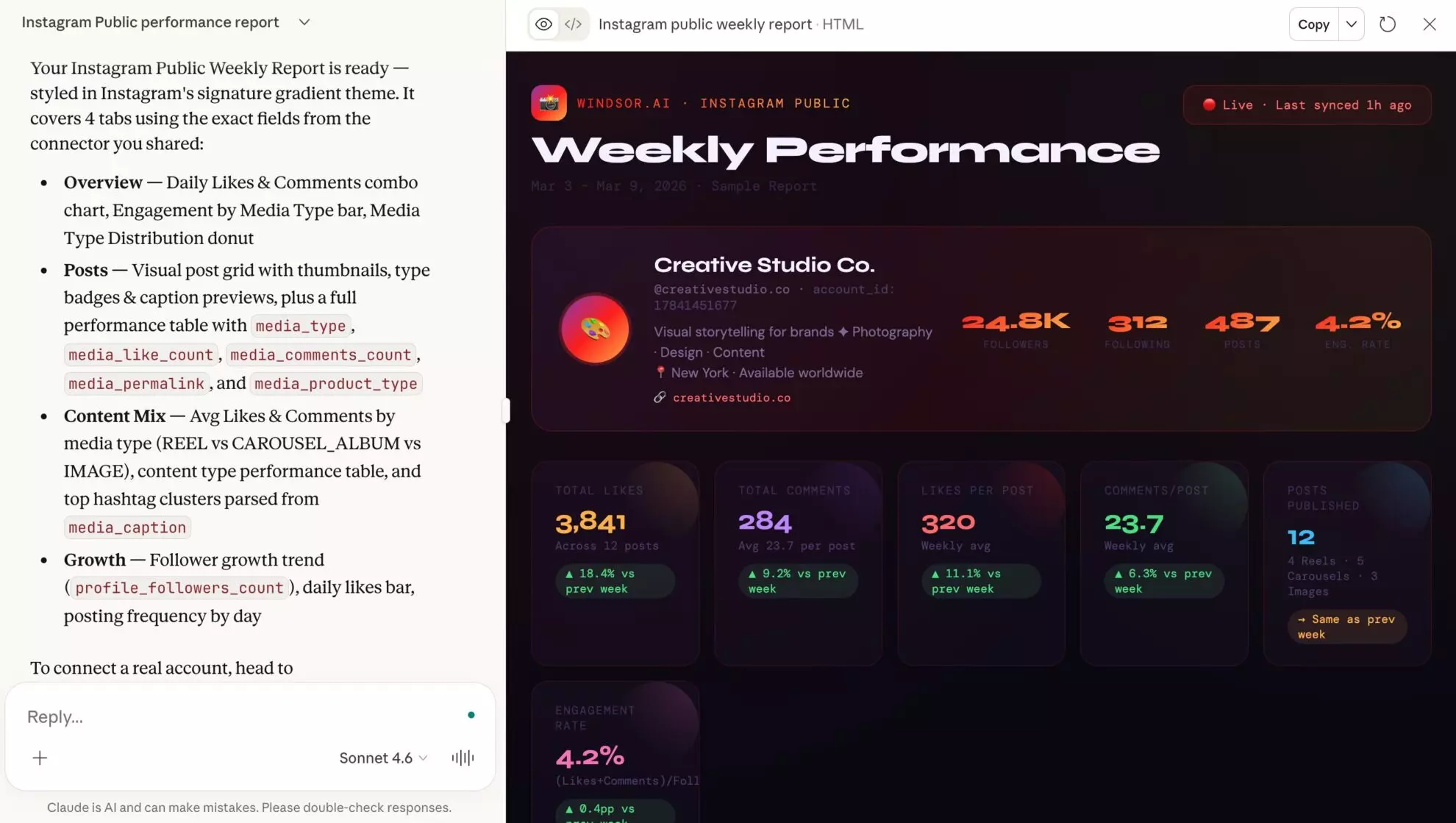
Claude does not scrape Instagram and cannot log in to it. What it can do is read structured public profile data through a connector, then compare, rank and summarize. Below: what public data covers, the three legitimate ways to get it in front of Claude, the setup, and the prompts teams run most, with the field codes they use.
🚀 Build your first competitor set for free: https://onboard.windsor.ai/.
What Claude can and cannot see on a public Instagram account
Public data is what any visitor sees on a profile, delivered as tables instead of screenshots. That sets the boundaries of every competitor analysis.
Claude can see
- Profile: followers, following, post count, biography, website
- Every public post: caption, type (image, carousel, Reel), date, permalink, likes and comments
- Derived by Claude: engagement rate against followers, likes and comments per post, posting cadence by weekday, content mix, caption themes and hashtags
- Follower count over time, if you keep the account connected so daily snapshots accumulate
Claude cannot see
- Reach, impressions, saves, shares, watch time, Stories, audience demographics. Those exist only in the account owner’s Insights
- Private accounts, and personal accounts with no public media, which return nothing
- Instagram’s hidden like counts on posts where the owner turned them off
Engagement rate from likes and comments is the honest benchmark for accounts you do not own. Claude will estimate reach if you ask, but nothing in public data supports that number.
Three ways to get competitor Instagram data into Claude
| Windsor.ai Instagram Public connector | Claude in Chrome | Instagram Competitive Insights | |
| Best for | Tracking a set of accounts over time and asking questions across them | A one-time look at a single profile | A quick side-by-side inside the Instagram app |
| How it works | You type usernames, Windsor pulls their public data through the API, Claude queries it | Claude reads a profile page open in your browser | Instagram’s Professional Dashboard compares up to 10 accounts you pick |
| Accounts | One on the free plan, more on paid plans | One page at a time | Up to 10, business and creator accounts only |
| Data | Profile plus every public post with captions, likes, comments, dates | Whatever is visible as you scroll | Follower growth, posting frequency, content mix, top posts |
| In Claude | Yes, as tables Claude can compute on | Yes, on paid Claude plans (Max, Team, Pro rolling out) | No, screenshots only |
| Cost | Free plan, no card | Paid Claude plan | Free with a professional account |
Developers have a fourth route: the Instagram Graph API’s business discovery endpoint returns the same public fields for professional accounts, and you can wrap it in your own MCP server. It needs a Meta developer app and app review, so it only makes sense for a custom workflow.
Connect Instagram Public data to Claude in 3 steps
The connector runs on Windsor MCP. Setup takes a few minutes and needs no code.
Prerequisites
- A Windsor.ai account (free or paid plan)
- A Claude account on a plan that supports connectors
- The Instagram usernames of the public profiles you want to track
Step 1: Add the public profiles in Windsor
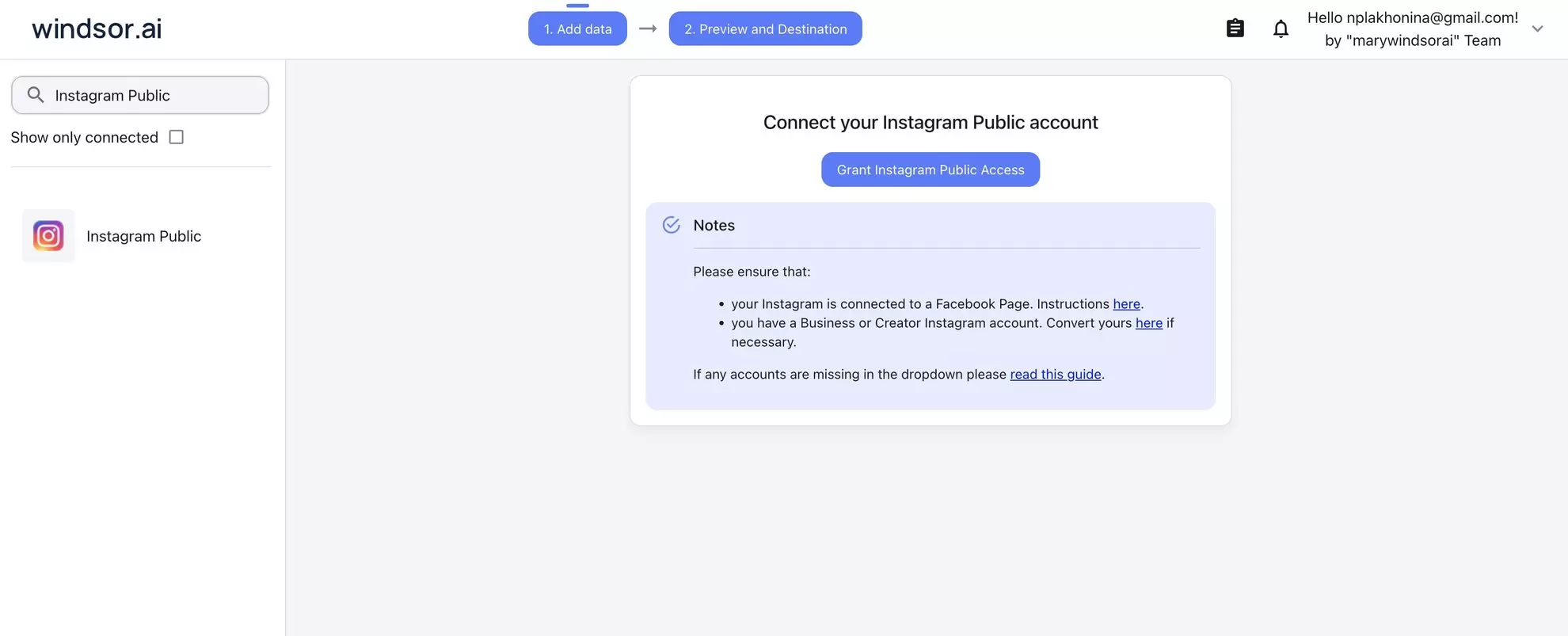
- Log in to onboard.windsor.ai.
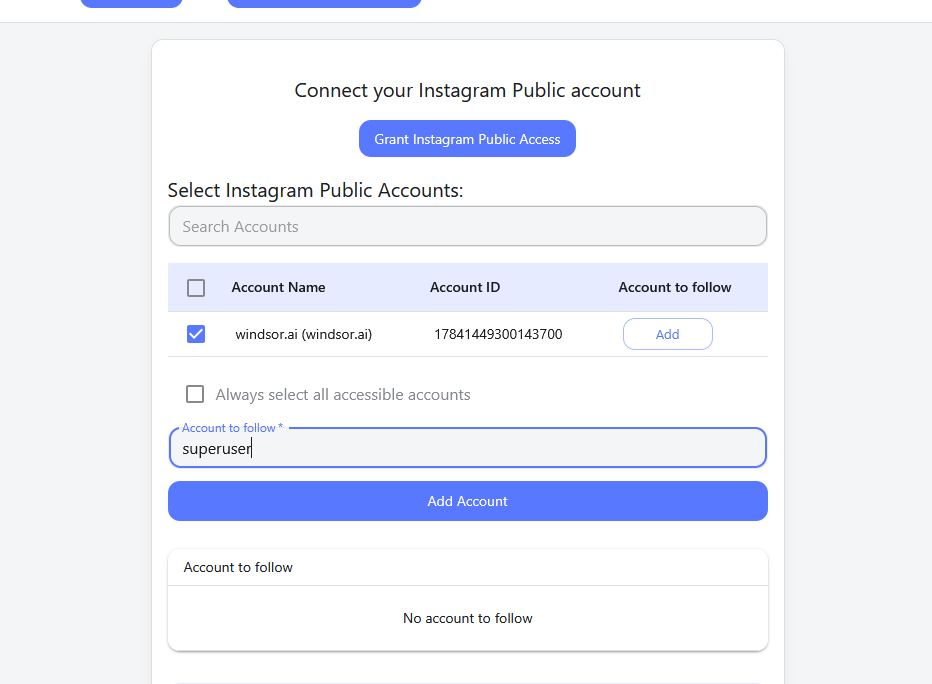
- Select Instagram Public as your data source and authorize with your own Meta login. Windsor uses your Business or Creator account to look up public profiles; the accounts you track do not have to grant anything.
- Type the usernames you want to pull data from. Most teams start with one account; agencies add a set of two to five.
Windsor reads the public endpoints of the Instagram Graph API and normalizes the result, so Claude gets the same 42 fields for every account you add. Full list in the Instagram Public field reference.
Step 2: Add the Windsor.ai connector in Claude
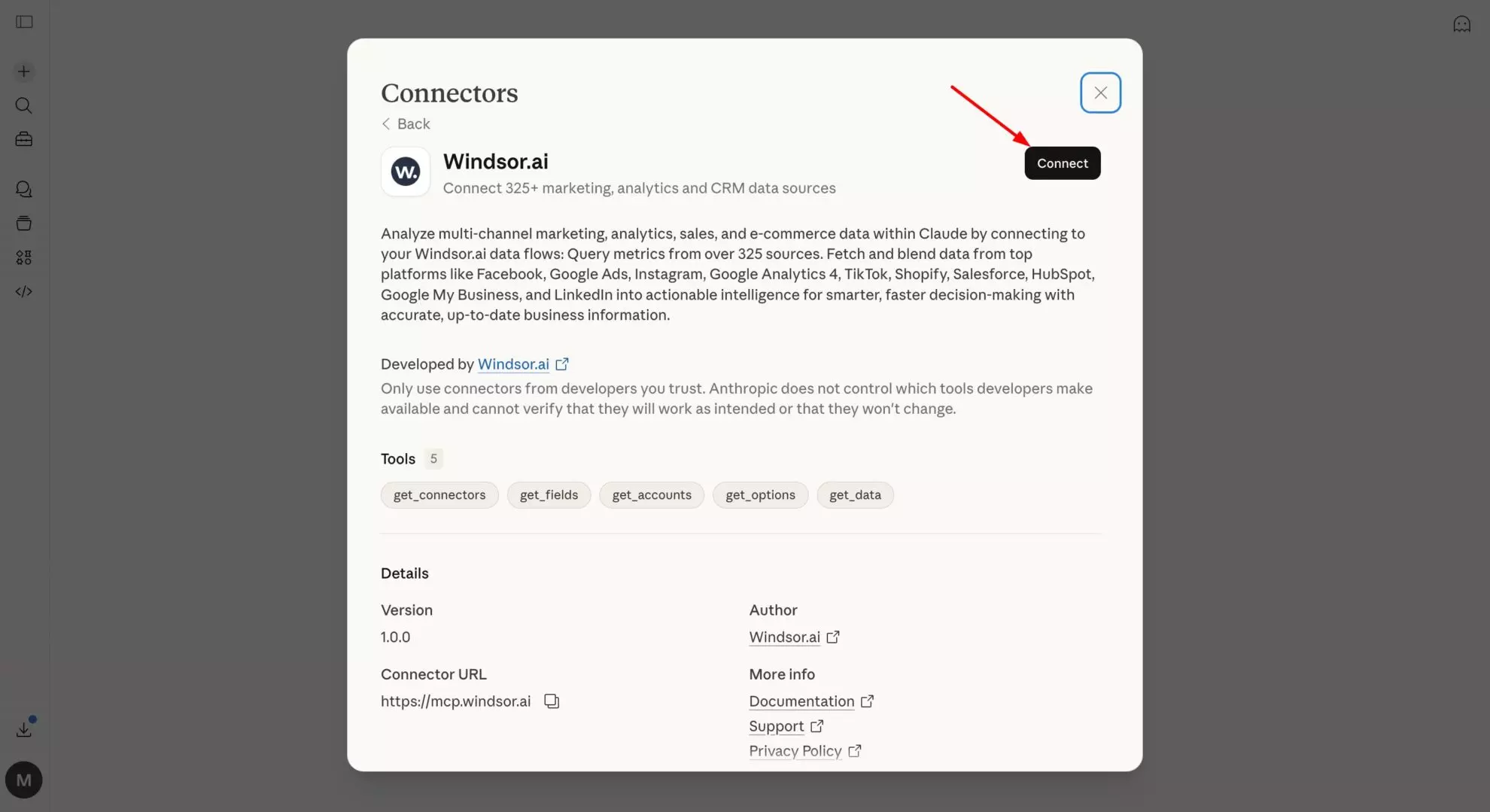
Open the Windsor.ai connector page in Claude’s directory and click Connect. It works in the Claude web app and Claude Desktop, and in any other MCP-compatible client, including Claude Code, following the setup guide.
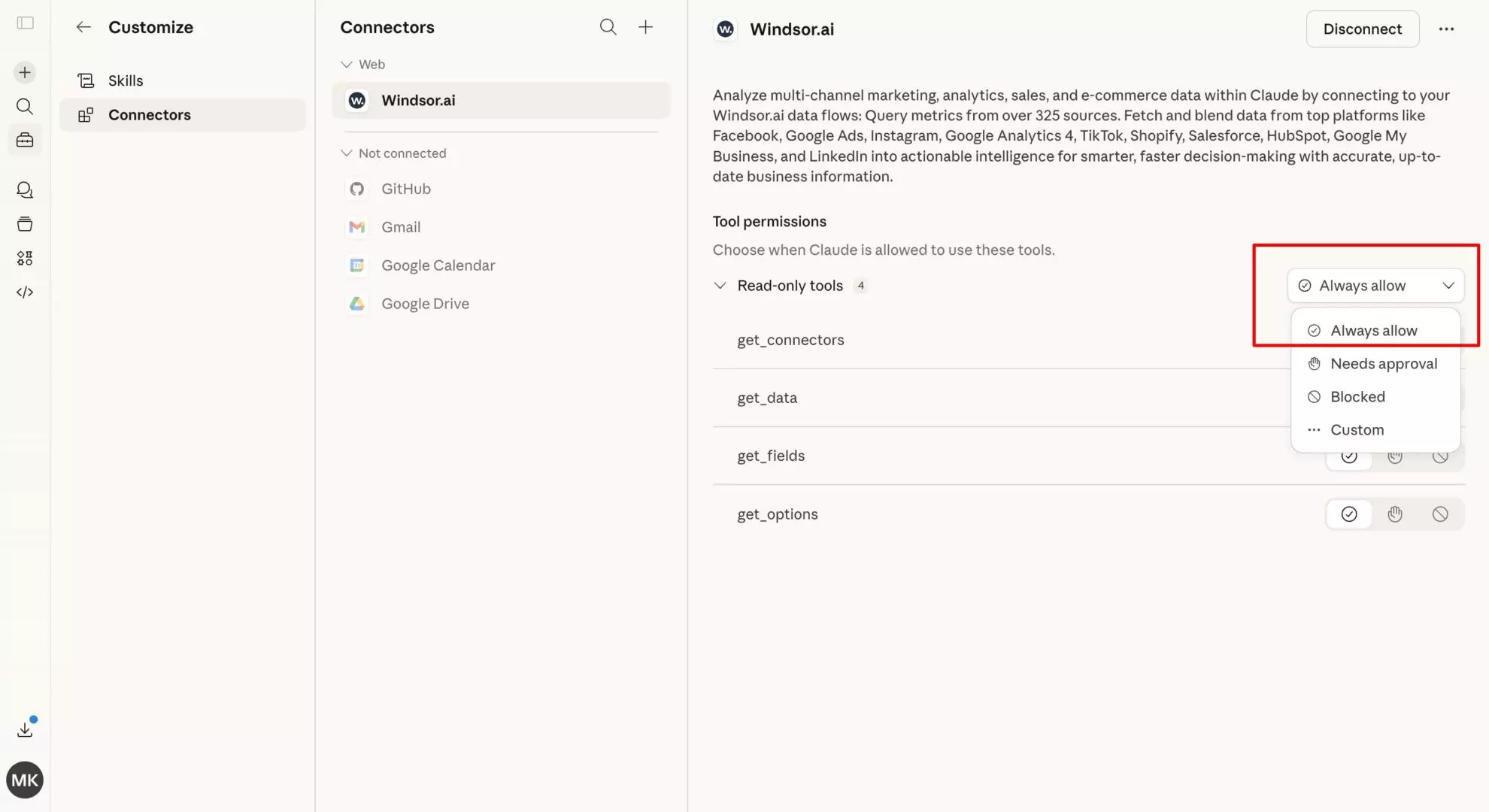
💡 Tip: Set permissions to “Always allow” so you can query the same accounts across chats without re-authorizing.
Step 3: Ask Claude about the accounts
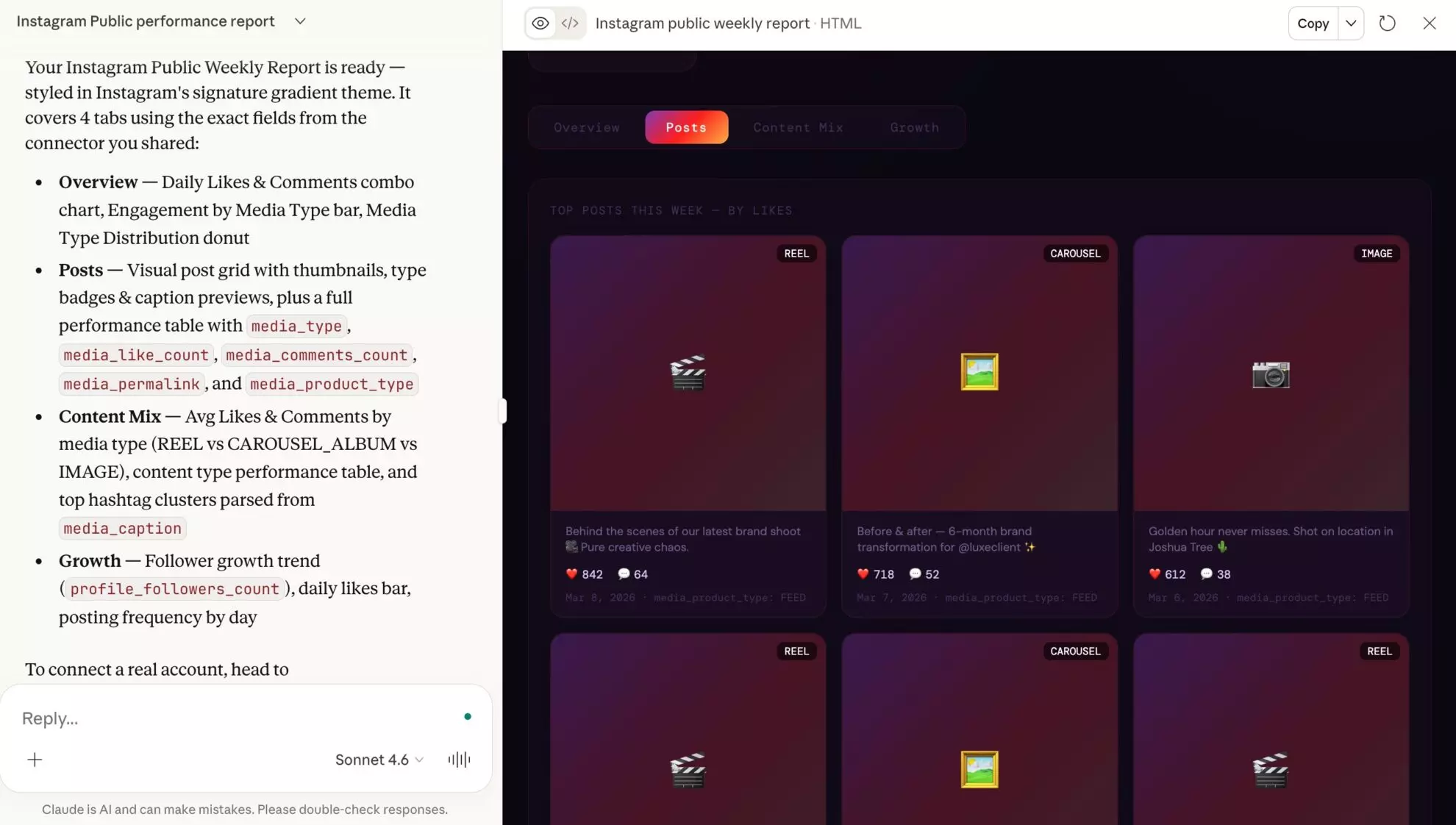
Open a new chat, enable the Windsor connector, and ask in plain language:
- “Which of @competitor’s posts got the most engagement last month?”
- “Compare the follower counts and posting frequency of @brand_a and @brand_b over the last 30 days.”
- “What does @creator post most: Reels, carousels or single images? Which format gets the most comments?”
💡 Tip: Ask for a comparison table, a weekly change summary, or a client-ready report. Claude builds the format from the same data.
Instagram competitor analysis prompts for Claude, in the order teams use them
These follow the query patterns on the connector. The most common window is the last 7 days, which fits weekly monitoring, then 30 and 90 days, with a smaller group pulling two years for trend work. Each prompt names the fields it uses.
Profile snapshot across a set of accounts
The single most common request, and the right first step for any benchmark.
For @brand_a, @brand_b and @brand_c, show profile_username, profile_followers_count, profile_follows_count, profile_media_count, biography and website in one table. Which account is largest, which posts most, and what does each bio promise?
Competitor content audit
List every post from @competitor in the last 30 days with media_timestamp, media_type, media_product_type, media_caption, media_like_count, media_comments_count and media_permalink. Rank by likes plus comments, and tell me which content themes and formats sit at the top.
Engagement rate benchmark
For these five accounts, compute engagement rate as (likes_per_post + comments_per_post) divided by profile_followers_count for the last 90 days. Present a comparison table and flag which account has the highest engagement relative to its size.
Posting cadence and timing
Using media_timestamp for @competitor over the last 90 days, how many posts per week do they publish, on which weekdays, and do posts on certain days earn more comments? Suggest a cadence for us to test.
Caption themes and hashtags
Take the 20 most engaged posts from @competitor in the last 90 days (media_caption, media_like_count, media_comments_count). Which hashtags and topics repeat, and which three ideas could we adapt without copying?
Follower growth over time
Show date and profile_followers_count for @competitor for the last 6 months. Where are the growth spikes, and which posts (media_timestamp, media_caption) went out in those weeks?
Influencer vetting
Review the last 60 posts from @creator: engagement rate per post, comment-to-like ratio, share of Reels versus images, and whether recent posts perform better or worse than three months ago. Give me a yes, no or maybe on a sponsorship, with reasons.
🤖 More prompts in the Windsor AI Prompt Library.
Instagram Public fields Claude can read through Windsor
| Area | Fields | What Claude can do with it |
| Profile | profile_username, profile_name, profile_followers_count, profile_follows_count, profile_media_count, biography, website | Snapshots, size and positioning comparisons |
| Posts | media_timestamp, media_type, media_product_type, media_caption, media_like_count, media_comments_count, media_permalink, media_url, media_thumbnail_url | Content audits, top-post lists, format and theme analysis |
| Per-post averages | likes_per_post, comments_per_post | Engagement benchmarks across accounts |
| Time | date, week_day, week_iso, year_month | Cadence analysis, follower trends from daily snapshots |
Data is fetched live when you ask. Follower history builds up from the day you add an account, so connect the accounts you care about early.
What teams use this for
1. Agency competitive intelligence
Keep a competitor set per client in Windsor and ask Claude for the same weekly summary each Monday: new posts, best post, cadence change, follower change. The 7-day window is the most used one on this connector for exactly this reason.
2. Influencer shortlisting
Add candidate handles and rank them by engagement rate, posting consistency and content mix before anyone opens a profile by hand. Public data will not tell you audience demographics, so treat it as the first filter, not the final decision.
3. Market entry research
Feed Claude the leading accounts in a category and ask what topics dominate, which formats win, and where nobody is posting. That is a content plan before you produce anything.
4. Cross-platform benchmarking
Windsor’s TikTok Organic, YouTube and LinkedIn Pages connectors sit in the same Claude chat, so a competitor’s Instagram cadence can be compared with their activity elsewhere.
Developer setup for Claude Desktop
If you prefer a config file to the directory install, add Windsor MCP to Claude Desktop manually:
- Install the proxy: run
uv tool install mcp-proxyin your terminal. - Open your Claude Desktop config file,
claude_desktop_config.json. - Add the Windsor server block, replacing the placeholder with your Windsor.ai API key:
{
  "mcpServers": {
    "windsor": {
      "command": "mcp-proxy",
      "args": ["https://mcp.windsor.ai/", "--transport=streamablehttp"],
      "env": { "API_ACCESS_TOKEN": "<your-api-key>" }
    }
  }
}
- Save the file and restart Claude Desktop. Windsor appears in your MCP options.
The manual ways, and where they stop
- Screenshots and copy-paste. Fine for one profile once. Claude can read a screenshot, but you get no table, no history and no way to compare five accounts.
- Social listening tools plus CSV export. Works if you already pay for one. The export is a snapshot, captions are often truncated, and each refresh is a new download.
- Instagram Graph API. The business discovery endpoint gives developers the same public fields, behind a Meta app review and token handling you maintain yourself.
Conclusion
For a look at one profile, Claude in Chrome or Instagram’s own Competitive Insights will do. For a competitor set you want to question every week, connect the accounts through Windsor.ai’s Instagram Public connector: free for the first account, no login to anyone else’s profile, and every public post as a table Claude can compute on. Keep the analysis to what public data supports, engagement, cadence, content and follower trend, and it holds up in front of a client.
🚀 Start for free at Windsor.ai and add your first competitor account today.
FAQs
Can Claude scrape Instagram?
No. Claude has no built-in Instagram access and does not scrape websites. There are three legitimate routes: a connector such as Windsor.ai’s Instagram Public, which reads public profile data through Instagram’s API by username; Claude in Chrome on paid Claude plans, which reads a profile page you have open; and Instagram’s own Competitive Insights inside the Professional Dashboard, which is not connected to Claude. This guide uses the first.
Do I need permission from the competitor or influencer to pull their public data?
No. Windsor pulls information that is publicly visible on the profile, through Instagram’s API rather than by scraping. You authorize Windsor with your own Meta login; the accounts you track do not have to grant anything, and they are not notified.
How many public Instagram profiles can I track at once?
The free plan covers one public account; paid plans scale by the number of accounts and sources. In practice most teams query one account at a time, and agencies keep sets of two to five per client. There is no technical cap on how many you add on a paid plan.
Does it work on private or personal accounts?
Private accounts return nothing, and personal accounts with no public media return no posts. If a username comes back empty in Claude, that is usually why. Business, creator and most public brand accounts work as expected.
Can Claude analyze the text of competitors' captions?
Yes. The connector sends the full caption for every public post alongside likes, comments, type and date, so Claude can group posts by topic, pull out recurring hashtags, and connect what a post said with how it performed.
Can I get a competitor's reach, saves or audience demographics?
No. Those metrics exist only in the account owner’s Insights and never appear in public data. Ask Claude for engagement rate (likes plus comments over followers), posting cadence, content mix and follower trend instead. If Claude offers an estimated reach for a competitor, treat it as a guess, because no public field supports it.
Is the data live, and does it keep history?
Post data is fetched live from the API each time you ask. Follower counts are stored as daily snapshots from the day you add an account, so follower trend lines get longer the earlier you connect the accounts you care about.
Can I use Claude in Chrome instead of a connector?
For a single profile, yes. Claude in Chrome, part of Claude Cowork on Max and Team plans and rolling out to Pro, can read the profile page you have open and summarize what it sees. It works one page at a time, has no table to compute rates from, and keeps no history, so it does not replace a connector for a competitor set you revisit weekly.
How does this compare with Instagram's own Competitive Insights?
Instagram’s Competitive Insights, in the Professional Dashboard, compares your account with up to ten others on follower growth, posting frequency and content mix. It is useful and free, but it lives inside the Instagram app and cannot be queried from Claude. The connector gives Claude the underlying post-level data, so you can ask follow-up questions, compute your own metrics and write reports.
Can I combine Instagram Public data with other data sources in Claude?
Yes. Windsor connects to 350+ sources, so a competitor’s Instagram posts can sit next to their TikTok or YouTube activity, or next to your own Instagram Insights and Meta Ads data, in the same chat.
Is it free? What plan do I need?
The Claude connector is included on every Windsor.ai plan, including the free forever plan, which covers one data source and one account, so one public Instagram profile. Paid plans depend on how many accounts and sources you connect; see the pricing page.


