 Destinations
 Data sources
 AI insights
 About us
 Careers
 Security
 Customer reviews
 Contact us
 Affiliate program
 Solution partners
 Template gallery
 Looker Studio templates
 Power BI templates
 Excel templates
 Google Sheets templates
 Tableau templates
 Facebook Ads templates
 Google Ads templates
 Data fields & Metrics
 AI prompt library & Guides
 Product documentation
 API documentation
 Case studies
 Blog
Blog Data models
 Windsor vs Supermetrics
 Windsor vs Funnel.io
 Windsor vs Fivetran
 Windsor vs Rivery
 Windsor vs Portermetrics
 Windsor vs Coupler.io
Connect Klaviyo to Copilot Agent
Automatically sync your Klaviyo data to Microsoft Copilot using the Windsor.ai connector.
Chat with your Klaviyo data in Copilot Agent to find your best-performing campaigns, catch churn early, and connect every purchase to the email behind it. Copilot can also create new flows and turn existing flows on or off directly in Klaviyo.
Forget CSVs. Stop copy/paste. Connect in minutes. No code required.
 Sign up with Google
 Free forever plan
No credit card needed
Free forever plan
No credit card needed










Improve campaign performance and grow revenue with Klaviyo data in Copilot
Query your Klaviyo data in Copilot using natural language prompts and get AI-driven insights in seconds. Explore key benefits and use cases below:

Identify revenue leaks
Ask Copilot to rank your active flows by conversion rate and revenue generated. Spot which automated sequences, welcome series, abandoned cart, and post-purchase are underdelivering and get a clear starting point for optimisation.

Run cross-channel analysis
Combine Klaviyo campaign data with your Shopify orders via Windsor.ai to understand which emails drive purchases, measure the average order value, and determine whether refund or cancellation rates differ across campaigns.

Catch subscriber churn early
Monitor unsubscribe rates and list growth trends week over week. Ask Copilot to flag segments where churn is accelerating and correlate it with recent campaign sends, so you can spot what triggered the drop-off and course-correct quickly.

Analyze data inside Microsoft 365
Your Klaviyo insights flow directly into the tools your team already uses every day. Summarise campaign performance in a Teams message, export a flow revenue breakdown to Excel, or brief stakeholders with a Word report, all without leaving Microsoft 365.
Using Windsor.ai to connect data from Klaviyo to Copilot
With Windsor MCP, your Klaviyo data reaches Copilot Agent in minutes, without manual exports or engineering support. The connector automatically pulls, normalizes, and streams your email and SMS marketing data into Copilot, ready for instant AI analysis.
Connect once and analyze your campaigns, flows, and audience in plain language.
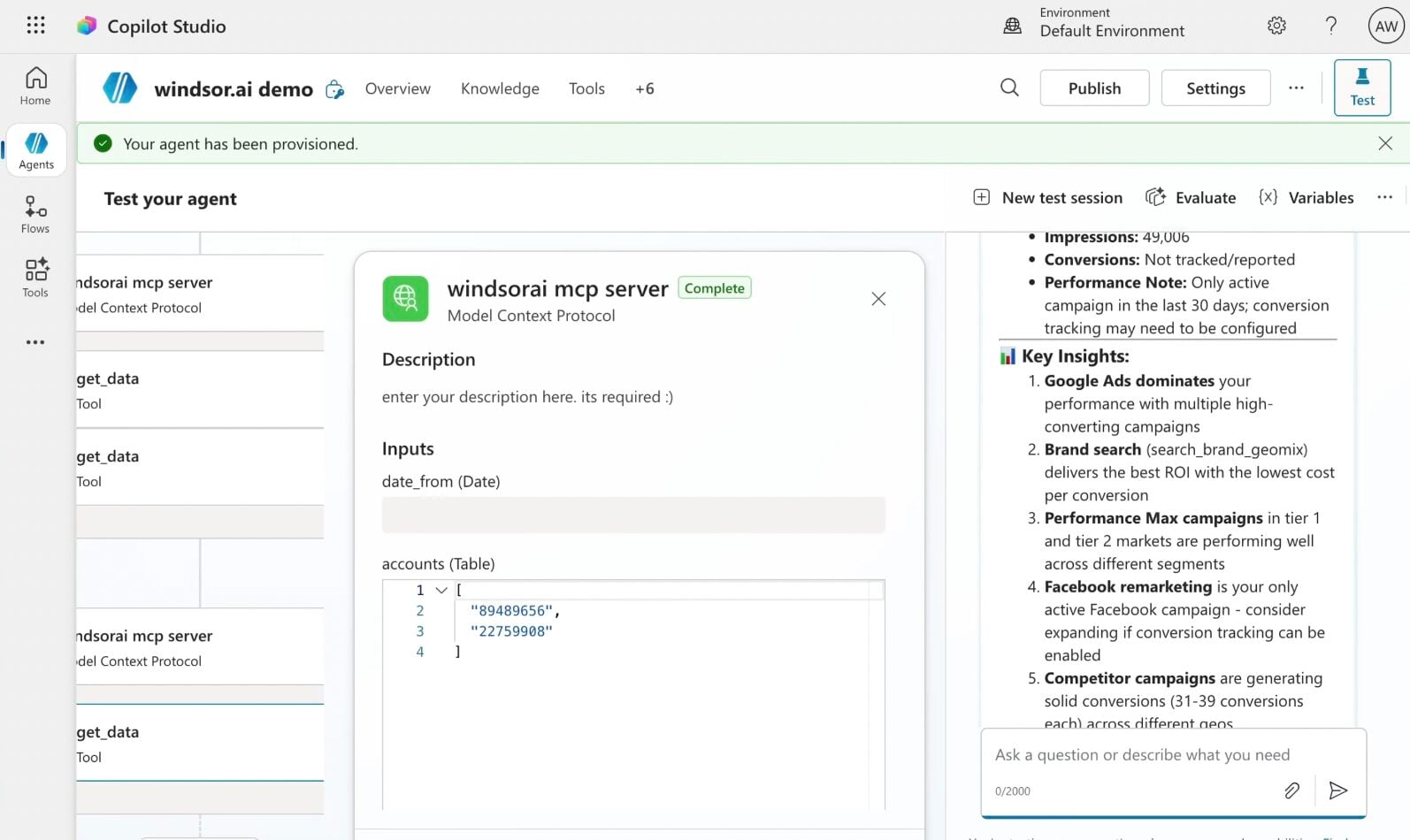














How to connect Klaviyo to Copilot Agent with Windsor.ai
Explore our step-by-step guide to integrate your Klaviyo data into Copilot with the Windsor.ai connector.
Connect data source in Windsor.ai dashboard
Connect your Klaviyo to Windsor.ai. Select the necessary account(s) you want to pull data from and click “Next.”

Create a new agent (Windsor MCP) in Copilot
In Microsoft Copilot Studio, create a new agent.
Click + Add tool and select + New tool -> Model Context Protocol.
- Server Name: Windsor MCP
- Server URL: https://mcp.windsor.ai
- Authentication: API Key
- Header name: Authorization

Create a new connection
On the next screen, click the dropdown under ‘Not connected’ and select Create new connection.
⚠️ Important: Enter your Windsor API key with the Bearer prefix.

Confirm credentials and start querying
Start a new chat. Copilot will prompt you to connect to Windsor MCP via the Connections manager. Click Connect -> Submit.
Return to the chat and click Retry in your agent prompt.
You can now ask questions about your integrated Windsor.ai data.
FAQs
Can Copilot create flows in Klaviyo, not just analyze data?
Yes. Copilot can create a new flow in Klaviyo, with a trigger and delay, saved as a draft, and turn an existing flow on or off. You review the flow before it’s created.
What Klaviyo data is available for analysis through Windsor.ai?
Windsor.ai makes 101 metrics and 79 dimensions from Klaviyo available in Copilot Agent, covering every major area of your email and SMS marketing. The data is organised across four report types:
- Campaign performance: metrics like open rate, click rate, click-to-open rate, bounce rate, unsubscribe rate, spam complaint rate, and revenue per recipient for every campaign you send.
- Flow analytics: everything you need to evaluate your automated sequences, including delivery rate, conversion rate, conversion value, average order value, revenue per recipient, and unsubscribe rate, broken down by individual flow and message.
- E-commerce events: Shopify-linked purchase data such as placed orders, checkout starts and completions, fulfilled orders, cancelled orders, refunded orders, and total attributed revenue.
- Audience and list data: subscriber-level information including list and segment membership, member counts, subscription status, location (city, country, region), and account-level totals.
Can Copilot Agent analyse Klaviyo flow performance?
Yes. The integration provides full flow-level analytics so you can ask Copilot to break down every stage of your automated sequences. You can query flow_delivered, flow_opens, flow_clicks, flow_conversions, flow_conversion_value, and flow_revenue_per_recipient by individual flow name or trigger type. This makes it straightforward to identify which welcome series, abandoned cart, or post-purchase flows are generating the most revenue, and which ones need to be rebuilt.
Can I use Copilot to detect Klaviyo campaigns with high unsubscribe or spam complaint rates?
Yes. With access to campaign_report_unsubscribe_rate, campaign_report_spam_complaint_rate, campaign_report_unsubscribes, and campaign_report_spam_complaints, you can ask Copilot to flag any campaigns that crossed a defined threshold.
For example:
List campaigns sent in the last 90 days where the unsubscribe rate exceeded 0.5%, or the spam complaint rate exceeded 0.1%. Suggest what the likely cause might be.
This allows your team to act quickly and protect sender reputation before deliverability is impacted.
Can I analyse Klaviyo campaign performance alongside Shopify revenue in Copilot?
Yes. Windsor.ai connects to 350+ data sources, and Klaviyo natively tracks Shopify-linked events, including shopify_placed_order, shopify_revenue, shopify_checkout_started, shopify_fulfilled_order, shopify_cancelled_order, and shopify_refunded_order.
Ask Copilot to correlate the revenue attributed to specific Klaviyo campaigns or flows against actual Shopify order data, for example:
Which campaign drove the highest Shopify revenue last month, and what was the ratio of placed to refunded orders?
What prompts can I use when analyzing Klaviyo data in Copilot Agent?
Here are examples of more specific prompts you can use to dive deep into your Klaviyo data:
-
Analyse the full conversion funnel across all campaigns sent in the last 30 days, from delivery through to placed order. At which stage is the biggest drop-off occurring, and which campaigns have the widest gap between click rate and conversion rate?
-
Compare revenue per recipient across all active flows. Which flow generates the most revenue relative to its audience size, and which flow has the highest delivery rate but the lowest conversion value, suggesting a messaging or offer problem?
-
Look at campaigns sent over the last 90 days and identify whether there is a correlation between send frequency to the same segment and rising unsubscribe rates. At what send frequency does unsubscribe rate begin to climb?
-
Break down Shopify revenue by campaign and flow for the last 60 days. What percentage of total attributed revenue comes from automated flows versus one-off campaigns, and which single flow or campaign drove the highest average order value?
-
Identify segments or lists where open rate is high but click rate and conversion rate are disproportionately low. Does this pattern repeat across multiple campaigns sent to these audiences, or is it isolated to specific sends? What does that tell us about whether the issue is with the content, the offer, or the landing page?
Can Copilot Agent help me improve Klaviyo email deliverability?
Yes. Copilot can flag campaigns and lists where bounce rates are rising, delivery rates are dropping, or failed sends are increasing. You can ask it to correlate these issues with specific audience segments or send times, helping you catch list hygiene problems before they damage your sender reputation.
Can the Copilot Agent send Klaviyo performance alerts in Microsoft Teams?
Yes. You can configure the Copilot Agent to automatically push alerts into Microsoft Teams when key Klaviyo metrics cross defined thresholds, such as a drop in open rate, a spike in bounces, or a rising unsubscribe rate, keeping your team informed without anyone manually checking the dashboard.
How much does it cost to integrate Klaviyo into Copilot using Windsor.ai?
Windsor.ai is free to start, no credit card required. Paid plans start at $19/month and scale by the number of sources and accounts. See the pricing page.
How long does it take to connect Klaviyo to Copilot?
With Windsor MCP, the integration process takes a few minutes. No technical expertise or coding is required; connecting data to Copilot is simple, straightforward, and accessible to everyone.
Do you have helpful links to get started with integrating Klaviyo and Copilot Agent using Windsor.ai?
Yes, we have helpful resources to help you get started. You can explore our official documentation and tutorials for seamless Klaviyo to Copilot Agent integration with Windsor.ai:
Tired of manual Klaviyo data exports? Try Windsor.ai today to automate your reporting


