 Destinations
 Data sources
 AI insights
 About us
 Careers
 Security
 Customer reviews
 Contact us
 Affiliate program
 Solution partners
 Template gallery
 Looker Studio templates
 Power BI templates
 Excel templates
 Google Sheets templates
 Tableau templates
 Facebook Ads templates
 Google Ads templates
 Data fields & Metrics
 AI prompt library & Guides
 Product documentation
 API documentation
 Case studies
 Blog
Blog Data models
 Windsor vs Supermetrics
 Windsor vs Funnel.io
 Windsor vs Fivetran
 Windsor vs Rivery
 Windsor vs Portermetrics
 Windsor vs Coupler.io
Connect LinkedIn Ads to Copilot Agent
Automatically sync your LinkedIn Ads data to Microsoft Copilot using the Windsor.ai connector.
Analyze your LinkedIn Ads data in Copilot Agent to cut acquisition costs, double down on your best B2B audiences, and turn performance insights into action in seconds.
Forget CSVs. Stop copy/paste. Connect in minutes. No code required.
 Sign up with Google
 Free forever plan









Improve B2B campaign results with LinkedIn Ads data in Copilot Agent
While LinkedIn Ads generates some of the richest B2B audience data available, Copilot Agent helps you make sense of it, without dashboards or manual analysis. Explore the key use cases and benefits below:

Optimize lead gen form performance
Compare form completion rates across all active campaigns. Identify where prospects are dropping off between form open and submission, and use those findings to simplify your forms, adjust your offer, or test a different audience.

Cut budget waste before it adds up
Ask Copilot to surface campaigns with high spend, but low conversions. It quickly spots underperformers, allowing you to pause the campaign or trim its budget right in the chat, without switching to LinkedIn Campaign Manager.

Compare lead quality across platforms
Connect LinkedIn Ads and Google Ads through Windsor.ai and ask Copilot to compare cost per lead and conversion rate across both platforms. Find out whether the professional targeting premium of LinkedIn translates into higher-quality leads than search intent traffic.

Bring LinkedIn Ads into your Microsoft workflow
By connecting LinkedIn Ads to Copilot Agent via Windsor MCP, your campaign data becomes part of your entire Microsoft workflow: discuss performance in Teams, build reports in Excel, and brief stakeholders in Word, all without logging into another tool.
Using Windsor.ai to connect data from LinkedIn Ads to Copilot
Forget manual exports and complex technical setups. With Windsor MCP, your LinkedIn Ads data reaches Copilot Agent in minutes. Our connector automatically pulls, cleans, and delivers your ad data directly into the Copilot workspace.
Set up once and generate AI-powered insights into campaign performance, audience segments, and lead generation costs.
Available actions
Enable Campaign Group Enable a paused LinkedIn Ads campaign group. Reversible via pause_campaign_group.
Enable a paused LinkedIn Ads campaign group. Reversible via pause_campaign_group.
Pause Campaign Group Pause an active LinkedIn Ads campaign group. Reversible via enable_campaign_group.
Pause an active LinkedIn Ads campaign group. Reversible via enable_campaign_group.
Enable Campaign Enable a paused LinkedIn Ads campaign. Reversible via pause_campaign.
Enable a paused LinkedIn Ads campaign. Reversible via pause_campaign.
Pause Campaign Pause an active LinkedIn Ads campaign. Reversible via enable_campaign.
Pause an active LinkedIn Ads campaign. Reversible via enable_campaign.
Enable Creative Enable a paused LinkedIn Ads creative. Reversible via pause_creative.
Enable a paused LinkedIn Ads creative. Reversible via pause_creative.
Pause Creative Pause an active LinkedIn Ads creative. Reversible via enable_creative.
Pause an active LinkedIn Ads creative. Reversible via enable_creative.
Set Campaign Group Budget Set the total budget of a LinkedIn Ads campaign group. The amount is in the account currency major unit (e.g. 100.00 means one hundred); the currency is resolved automatically from the account. The campaign group must have a schedule end date for a total budget to apply.
Set the total budget of a LinkedIn Ads campaign group. The amount is in the account currency major unit (e.g. 100.00 means one hundred); the currency is resolved automatically from the account. The campaign group must have a schedule end date for a total budget to apply.
Set Campaign Budget Set the daily or total budget of a LinkedIn Ads campaign. The amount is in the account currency major unit (e.g. 100.00 means one hundred); the currency is resolved automatically from the account. A total budget requires the campaign to have a schedule end date.
Set the daily or total budget of a LinkedIn Ads campaign. The amount is in the account currency major unit (e.g. 100.00 means one hundred); the currency is resolved automatically from the account. A total budget requires the campaign to have a schedule end date.
Rename Campaign Change the name of a LinkedIn Ads campaign. Only the name changes; budget, schedule, targeting and status are left untouched, and reporting stays attached because it keys on the campaign id.
Change the name of a LinkedIn Ads campaign. Only the name changes; budget, schedule, targeting and status are left untouched, and reporting stays attached because it keys on the campaign id.
Set Campaign Schedule Change the run schedule of a LinkedIn Ads campaign. Provide start_date and/or end_date as YYYY-MM-DD; at least one is required. The unspecified bound keeps its current value. The end date is exclusive: the campaign stops at the start of that day. The start date cannot be changed once the campaign has started.
Change the run schedule of a LinkedIn Ads campaign. Provide start_date and/or end_date as YYYY-MM-DD; at least one is required. The unspecified bound keeps its current value. The end date is exclusive: the campaign stops at the start of that day. The start date cannot be changed once the campaign has started.
Create Creative Create a new ad (creative) in a LinkedIn Ads campaign from an existing post. post_urn must reference a published post or InMail content (urn:li:ugcPost:..., urn:li:share:... or urn:li:adInMailContent:...); the connector does not build post content from scratch. Created as DRAFT by default so it does not serve until enabled with enable_creative.
Create a new ad (creative) in a LinkedIn Ads campaign from an existing post. post_urn must reference a published post or InMail content (urn:li:ugcPost:..., urn:li:share:... or urn:li:adInMailContent:...); the connector does not build post content from scratch. Created as DRAFT by default so it does not serve until enabled with enable_creative.
Set Campaign Targeting Replace the target audience (targetingCriteria) of a LinkedIn Ads campaign. include and exclude map a facet name to a list of full entity URNs, for example {"locations": ["urn:li:geo:103644278"], "interfaceLocales": ["urn:li:locale:en_US"], "industries": ["urn:li:industry:9"]}. Included facets are AND-ed together and the values within a facet are OR-ed. interfaceLocales is required. locations and profileLocations cannot be used together. The resulting audience must have at least 300 members. This replaces the campaign's entire audience.
Replace the target audience (targetingCriteria) of a LinkedIn Ads campaign. include and exclude map a facet name to a list of full entity URNs, for example {"locations": ["urn:li:geo:103644278"], "interfaceLocales": ["urn:li:locale:en_US"], "industries": ["urn:li:industry:9"]}. Included facets are AND-ed together and the values within a facet are OR-ed. interfaceLocales is required. locations and profileLocations cannot be used together. The resulting audience must have at least 300 members. This replaces the campaign's entire audience.














How to connect LinkedIn Ads to Copilot Agent with Windsor.ai
Explore our step-by-step guide to integrate your LinkedIn Ads data into Copilot with the Windsor.ai connector.
Connect data source in Windsor.ai dashboard
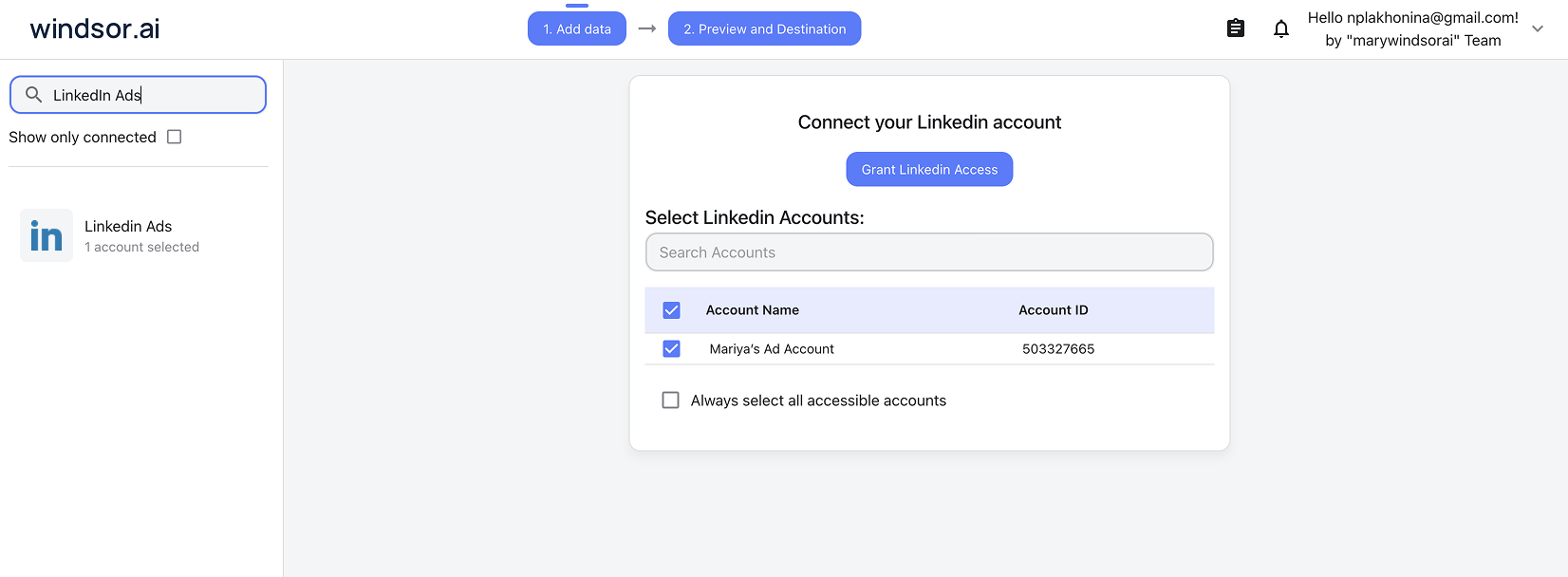
Connect your LinkedIn Ads to Windsor.ai. Select the necessary account(s) you want to pull data from and click “Next.”
Create a new agent (Windsor MCP) in Copilot
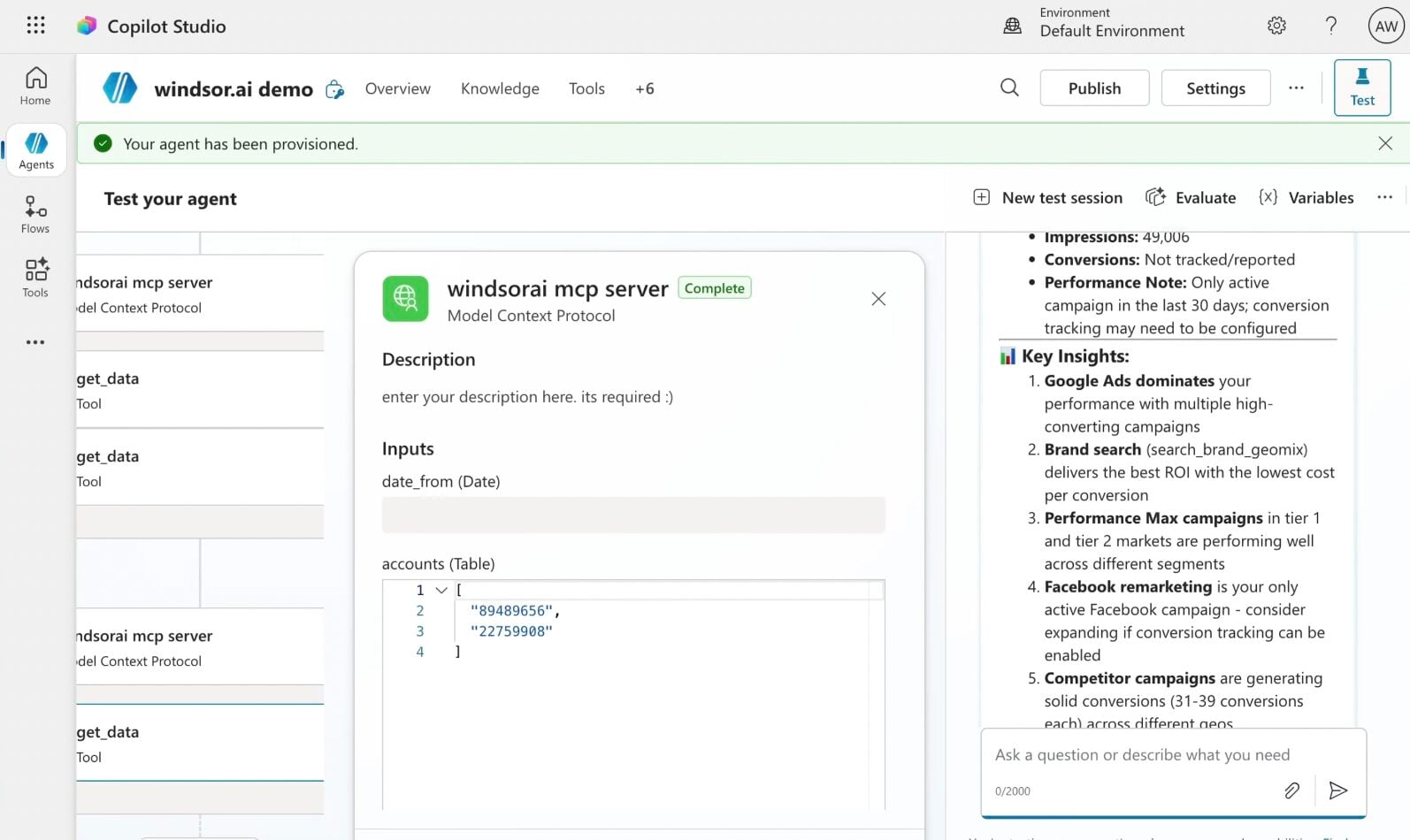
In Microsoft Copilot Studio, create a new agent.
Click + Add tool and select + New tool -> Model Context Protocol.
- Server Name: Windsor MCP
- Server URL: https://mcp.windsor.ai
- Authentication: API Key
- Header name: Authorization

Create a new connection
On the next screen, click the dropdown under ‘Not connected’ and select Create new connection.
⚠️ Important: Enter your Windsor API key with the Bearer prefix.

Confirm credentials and start querying
Start a new chat. Copilot will prompt you to connect to Windsor MCP via the Connections manager. Click Connect -> Submit.
Return to the chat and click Retry in your agent prompt.
You can now ask questions about your integrated Windsor.ai data.
FAQs
What LinkedIn Ads data is available for analysis with Windsor.ai?
Windsor.ai makes 81 metrics and 139 dimensions from LinkedIn Ads available in Copilot Agent, covering every major area of your B2B advertising, including:
- Campaign performance: spend, impressions, clicks, CTR, CPC, CPM, engagement rate, and conversions across all campaign types and objectives.
- Audience demographics: breakdowns by job title, job function, seniority, industry, company size, and geographic region, so you can see exactly who is engaging with your ads.
- Video performance: play rates, completions, and view-through data at the 25%, 50%, 75%, and 100% marks to measure creative effectiveness.
- Lead gen forms: form opens, submissions, completion rates, and cost per lead for your LinkedIn Lead Gen Form campaigns.
- Viral and social actions: likes, comments, shares, reactions, follows, and viral impressions to measure organic amplification of your sponsored content.
Can Copilot help me reduce wasted LinkedIn Ads spend?
Yes. You can ask Copilot to highlight campaigns where spend has exceeded a defined threshold but generated zero conversions, flag audience segments with a cost per click well above your account average, or surface campaigns where impressions are high but CTR is consistently below benchmark.
From there, don’t stop at the list; pause underperforming campaigns or update their budgets right in the chat. Windsor.ai’s write actions for LinkedIn Ads mean you go from ‘here’s what’s wasting spend’ to ‘here’s that fixed,’ without ever opening LinkedIn Campaign Manager.
Can I analyze LinkedIn Ads data alongside other ad channels in Copilot?
Absolutely. Windsor.ai supports 350+ data sources, so you can combine LinkedIn Ads with Google Ads, Meta Ads, or your CRM in a single Copilot chat. For B2B teams, this is particularly valuable; you can ask Copilot to compare cost per MQL across all paid channels or identify whether LinkedIn-sourced leads have a higher close rate than leads from other platforms.
Can Copilot help me optimize LinkedIn Ads targeting?
Yes. By combining demographic performance data with engagement and conversion metrics, Copilot can identify which targeting inclusions and exclusions are delivering results and which are diluting your audience quality.
What prompts can I use when analyzing LinkedIn Ads data in Copilot Agent?
Here are examples of more specific prompts you can use to dive deep into your LinkedIn Ads data:
-
Break down cost per lead by job title, seniority, and industry over the last 60 days. Are we spending more to reach senior decision-makers than mid-level titles? Does the difference in lead quality justify that cost gap?
-
Look at all campaigns over the last 90 days. Which ones have spent more than 20% of their total budget but generated less than 10% of total conversions? Is the underperformance consistent across the full period or concentrated in specific weeks?
-
Compare lead gen form completion rates across all active campaigns. Which forms have the biggest gap between opens and submissions? Is the drop-off linked to a specific audience segment, campaign type, or time period?
-
Analyse spend and cost per lead by company size segment over the last 90 days. Are we allocating budget proportionally to enterprise versus SMB audiences? Does the cost per lead justify that split against our target customer profile?
-
Look at campaigns running for more than 60 days. Has cost per click increased over time while CTR declined? At what point did performance start to deteriorate, and which audience segments show the strongest signs of ad fatigue?
How fresh is my LinkedIn Ads data in Copilot Agent?
Every time you query your data in Copilot Agent, Windsor.ai pulls it directly from the LinkedIn Ads API. This means you are always working with up-to-date campaign performance, spend, and audience data.
How much does it cost to integrate LinkedIn Ads into Copilot using Windsor.ai?
Windsor.ai is free to start, no credit card required. Paid plans start at $19/month and scale by the number of sources and accounts. See the pricing page.
How long does it take to connect LinkedIn Ads to Copilot?
With Windsor MCP, the integration process takes a few minutes. No technical expertise or coding is required; connecting data to Copilot is simple, straightforward, and accessible to everyone.
Do you have helpful links to get started with integrating LinkedIn Ads and Copilot Agent using Windsor.ai?
Yes, we have helpful resources to help you get started. You can explore our official documentation and tutorials for seamless LinkedIn Ads to Copilot Agent integration with Windsor.ai:
Can Copilot manage my LinkedIn Ads campaigns?
Yes. Windsor.ai’s write-enabled MCP gives Copilot the ability to act on your LinkedIn Ads account. Here’s what that looks like in practice:
- Pause campaign groups, campaigns, or creatives. The moment you spot a creative that’s bleeding budget with no conversions, pause it immediately so you don’t waste another dollar.
- Enable campaign groups, campaigns, or creatives. Spotted a creative that’s been sitting idle but outperformed the rest last time it ran? Switch it back on the second Copilot surfaces it.
- Update budgets. Set a new daily or total budget on a campaign, or a total budget on a whole campaign group, the moment you spot room to shift spend.
Every change runs through a confirmation step first, so your live account only updates when you say go. The result: insights and fixes happen in the same Copilot conversation without switching to LinkedIn Campaign Manager.
Tired of manual LinkedIn Ads data exports? Try Windsor.ai today to automate your reporting


