 Destinations
 Data sources
 AI insights
 About us
 Careers
 Security
 Customer reviews
 Contact us
 Affiliate program
 Solution partners
 Template gallery
 Looker Studio templates
 Power BI templates
 Excel templates
 Google Sheets templates
 Tableau templates
 Facebook Ads templates
 Google Ads templates
 Data fields & Metrics
 AI prompt library & Guides
 Product documentation
 API documentation
 Case studies
 Blog
 Data models
 Windsor vs Supermetrics
 Windsor vs Funnel.io
 Windsor vs Fivetran
 Windsor vs Rivery
 Windsor vs Portermetrics
 Windsor vs Coupler.io
Connect TikTok Ads to ChatGPT
Connect your TikTok Ads data to ChatGPT using the Windsor.ai plugin.
Send your TikTok Ads metrics to ChatGPT, spot what’s underperforming, and fix it in the same chat: pause campaigns and adjust budgets without ever opening TikTok Ads Manager.
Connect data in about a minute. No code required.
 Sign up with Google
 Free forever plan









Get more from your marketing analytics with the TikTok Ads to ChatGPT integration
Connect your TikTok Ads data to ChatGPT to analyze creatives, audiences, and ad spend using natural language queries. Here’s what this integration enables:

Ask in plain English
Ask for spend, impressions, ctr and cost_per_conversion per campaign, ad group or ad, and ChatGPT answers with comparison tables, KPI summaries, and charts.

Unify data across channels
Windsor.ai combines TikTok metrics with data from channels like Meta, Google Ads, Shopify, and HubSpot, allowing ChatGPT to perform cross-channel analysis in one conversation. Combining sources needs a paid plan. The free forever plan includes 1 data source.

Audit hook efficiency
Compare short video views with total impressions to estimate your hook effectiveness (play_duration_2s divided by impressions). ChatGPT can show which ads keep viewers past the first 2 seconds and which lose them, helping you improve or replace underperforming creatives.

Map high-performing conversion windows
Ask ChatGPT to group campaign performance by hour of day and day of week to see when your ads perform best. Let it spot specific time periods where CPC is lowest, but conversion rates are highest, helping you schedule ads strategically to improve budget efficiency.

Manage campaigns from ChatGPT
Tell ChatGPT to pause a campaign whose CPA has spiked, turn on a paused ad group, or raise the budget of an ad group that performs well; it makes the change after you confirm it, no tool-switching required.
Example: our TikTok Ads ad groups and budgets in ChatGPT
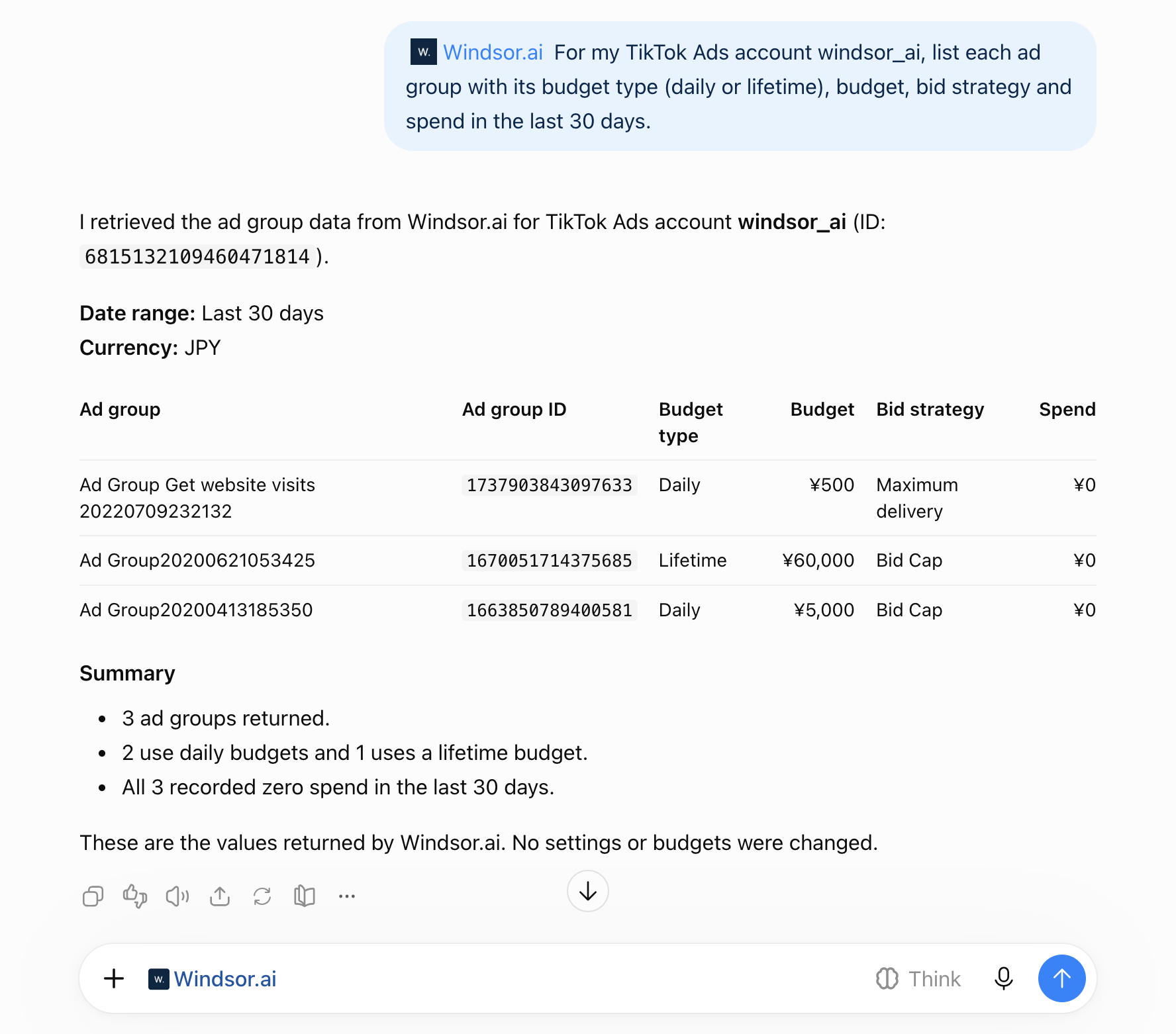
We asked ChatGPT, through the Windsor.ai plugin: “For my TikTok Ads account windsor_ai, list each ad group with its budget type (daily or lifetime), budget, bid strategy and spend in the last 30 days.”
- Budget type and budget (ad_group_budget_mode, budget): two ad groups have a daily budget, 500 and 5,000, and one has a lifetime budget of 60,000. The account currency is Japanese yen (JPY).
- Bid strategy (bid_strategy): the 500 ad group uses Maximum delivery, the other two Bid Cap.
- Spend: 0 on all three in the last 30 days. Our demo account has not run ads since 2022.
The budget type stays as it was set: Set ad group budget changes the amount of the daily or lifetime budget an ad group already has. A second question in the same chat listed the raw rows, and the same data pulled from Windsor.ai directly gave the same values. No setting was changed. The setup steps, a second example (campaigns and their budget types) and fixes for common problems are in how to connect TikTok Ads to ChatGPT.
Available actions
Pause Ad
Pause an active TikTok Ads ad. Reversible via enable_ad.
Pause Ad Group
Pause an active TikTok Ads ad group. Reversible via enable_ad_group.
Pause Campaign
Pause an active TikTok Ads campaign. Reversible via enable_campaign.
Enable Ad
Enable a paused TikTok Ads ad. Reversible via pause_ad.
Enable Ad Group
Enable a paused TikTok Ads ad group. Reversible via pause_ad_group.
Enable Campaign
Enable a paused TikTok Ads campaign. Reversible via pause_campaign.
Set Campaign Budget
Set the budget of a TikTok Ads campaign. The amount is given in the account currency major unit (e.g. 100 means one hundred). The budget mode is fixed when the campaign is created and cannot be changed here: a campaign whose budget is unlimited (BUDGET_MODE_INFINITE) or managed at the ad group level has no campaign budget to update, and this action will report that the budget could not be changed. Use the ad group budget action for those campaigns.
Set Ad Group Budget
Set the budget of a TikTok Ads ad group. The amount is in the account currency major unit (e.g. 100.00 means one hundred). The budget type (daily or lifetime) is fixed when the ad group is created and cannot be changed here; the existing type is detected automatically and its amount is updated. Ad groups whose budget is managed at the campaign level (Campaign Budget Optimization) have no ad group budget to set. Ad groups in Upgraded Smart+ campaigns are not supported by this action; change their budget in TikTok Ads Manager.


How to connect TikTok Ads to ChatGPT data with Windsor.ai
Explore our video tutorial and a step-by-step guide to integrate your data from any source into ChatGPT with the Windsor.ai plugin. For TikTok Ads, the full steps, a worked example and fixes for common problems are in how to connect TikTok Ads to ChatGPT, and the write actions are shown in how to manage TikTok Ads campaigns with an AI assistant.
Select your data source
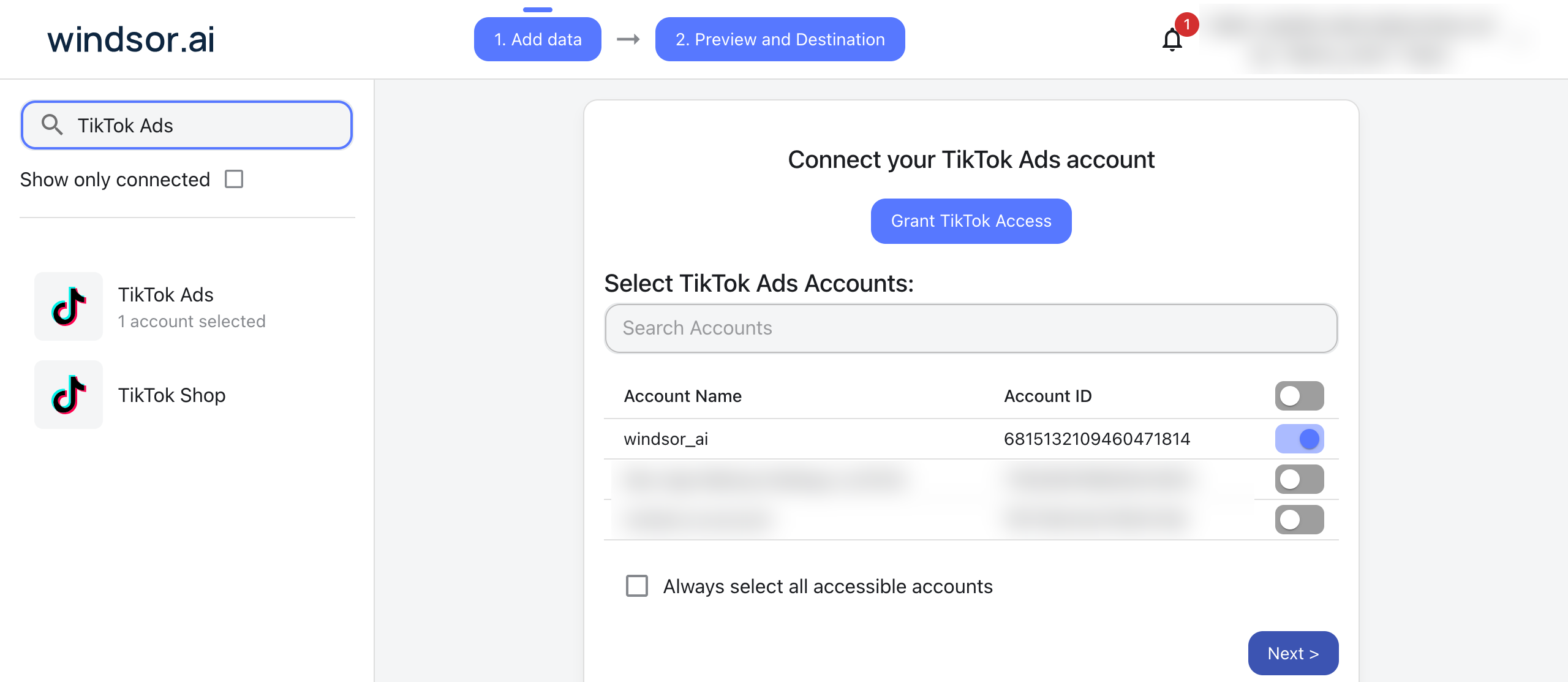
Choose TikTok Ads as your data source, sign in with a TikTok login that has at least Ad account analyst access to your ad account, and grant access to Windsor.ai.
Install the Windsor.ai plugin
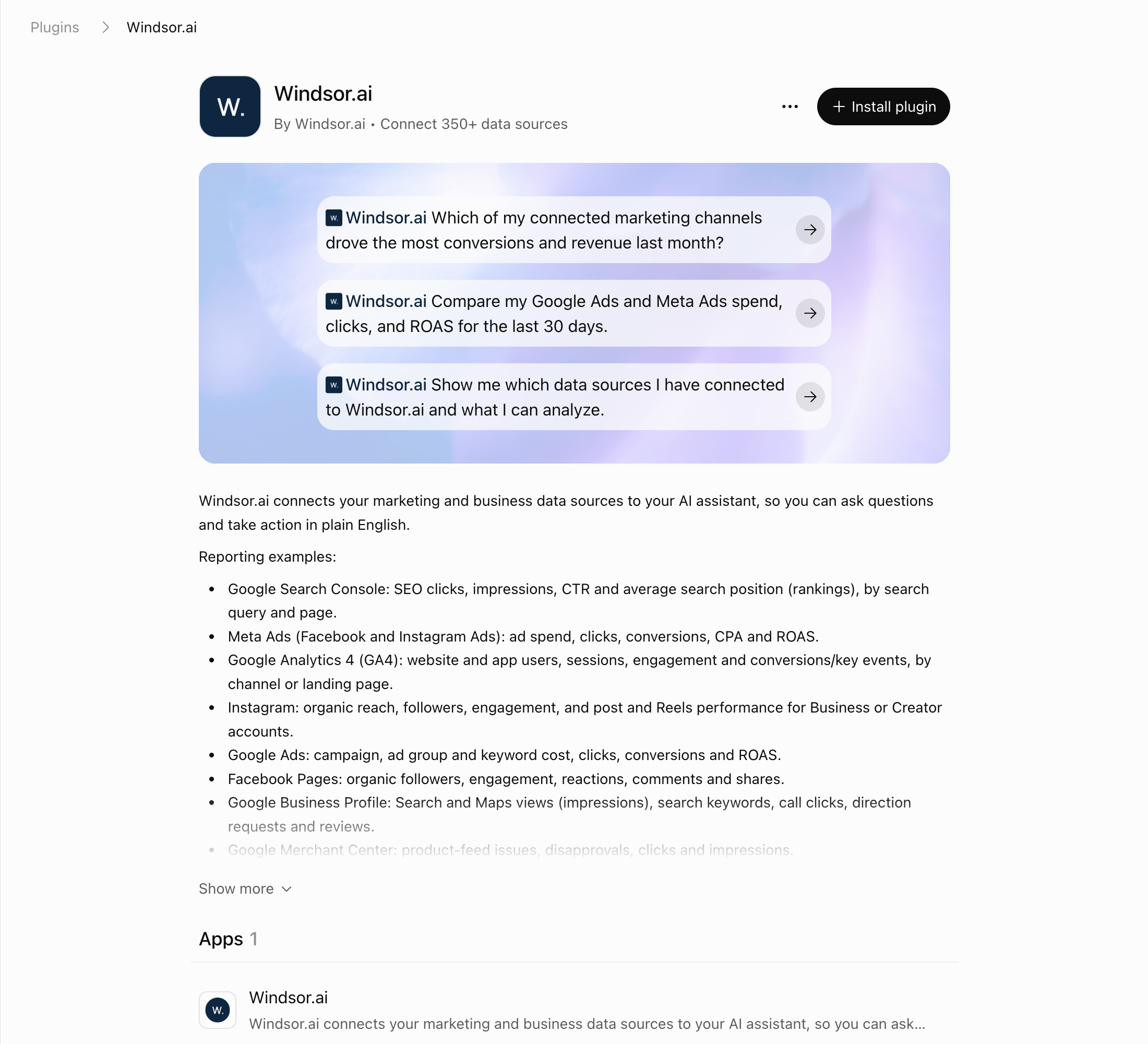
In ChatGPT, select Plugins in the sidebar and search for Windsor.ai, or open the Windsor.ai plugin page.
Select Install plugin, then sign in to Windsor.ai and authorize access. We set this up on ChatGPT’s Free plan.
Query TikTok Ads data and execute changes
Ask questions about your connected TikTok Ads data in natural language, and manage your campaigns right away.
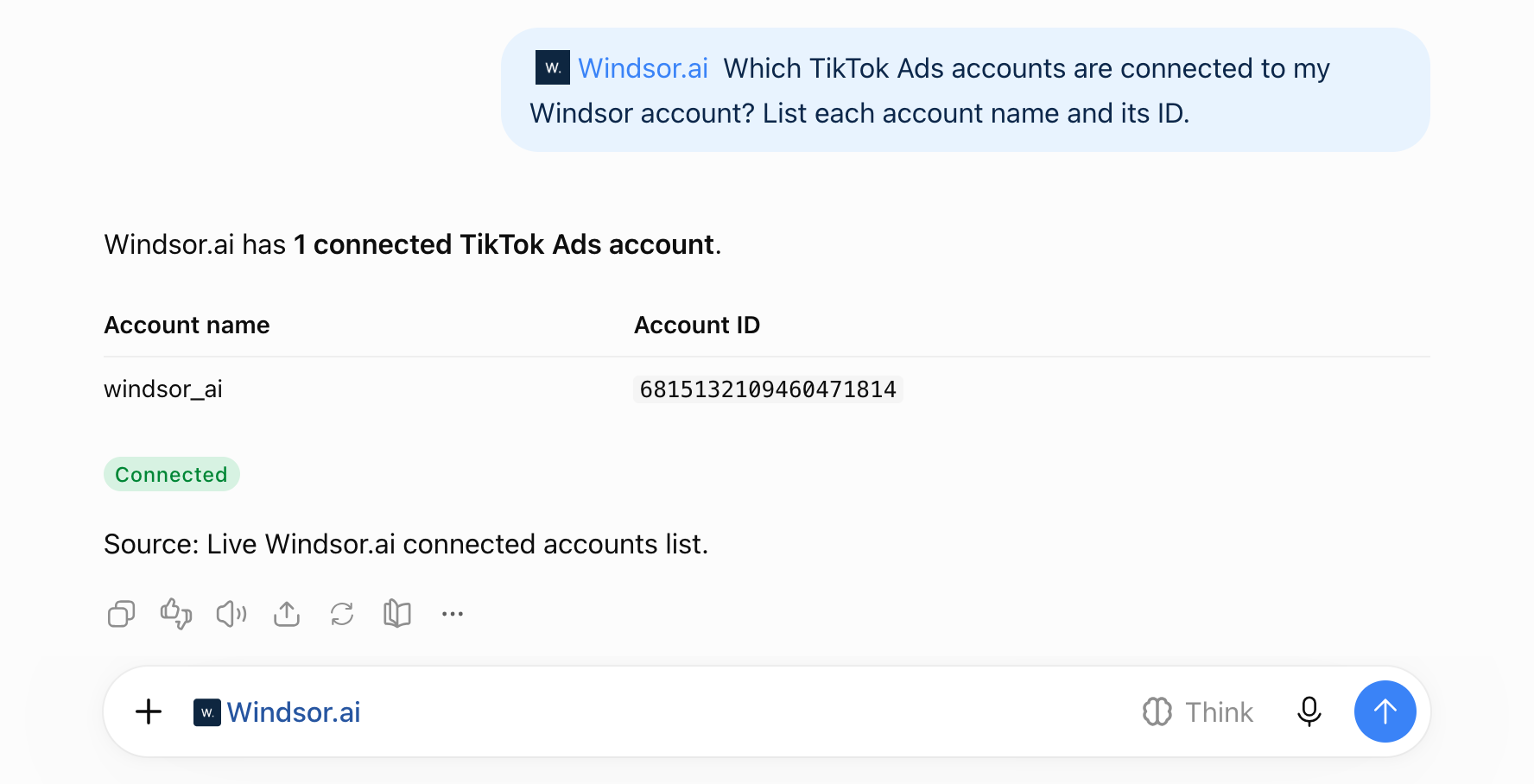
Make sure that the Windsor.ai plugin is enabled: click + and choose Windsor.ai, or type @Windsor. To check the connection, ask: “Which TikTok Ads accounts are connected to my Windsor account? List each account name and its ID.”
FAQs
Is there an official TikTok Ads app for ChatGPT?
No. ChatGPT’s Plugins directory has no TikTok plugin published by TikTok (checked 4 November 2026). TikTok for Business publishes an MCP server with around 400 tools for campaign creation, reporting, audiences and creatives (TikTok’s help article); the article recommends one of its server URLs for Claude and does not mention ChatGPT. In ChatGPT, a custom MCP server gets full support only in Business, Enterprise and Edu workspaces, and Pro gets read and fetch tools only. It fits teams on those plans that want to create campaigns or edit targeting from the chat. Windsor.ai publishes the Windsor.ai plugin, used on this page, and a separate “Windsor.ai TikTok Ads” plugin; third-party plugins include Adzviser TikTok Ads and InsightfulPipe. Through the Windsor.ai plugin, ChatGPT can run 8 TikTok Ads write actions (write actions list). The routes are compared in how to connect TikTok Ads to ChatGPT.
How does this integration help with TikTok Spark Ads management?
ChatGPT can track the performance of organic posts you’ve boosted (Spark Ads) and compare them to your standard ‘In-Feed’ ads to see which format drives better community engagement.
Can ChatGPT take action on my TikTok Ads campaigns, or just analyze them?
Both. Through the Windsor.ai plugin, ChatGPT can pause or enable campaigns, ad groups, and ads, and set campaign and ad group budgets, after you confirm each change. The changes land directly in TikTok Ads Manager, no extra login needed.
How do I use write actions with TikTok Ads in ChatGPT?
Write actions work directly through the Windsor.ai plugin in ChatGPT, the same one you use for reading data. No manual setup, no developer mode, no extra steps.
Can ChatGPT help me identify ad fatigue on my TikTok campaigns?
Yes. Ask ChatGPT to analyze the relationship between frequency and CTR metrics. It can list each ad’s CTR and frequency by day and show the day CTR started to fall.
Can I compare TikTok Ads performance against Meta and Google?
Yes. Windsor.ai supports 350+ data sources, allowing you to merge TikTok Ads with other marketing platforms. Combining sources needs a paid plan. The free forever plan includes 1 data source. You can then use prompts like:
-
Compare impressions, engagement rates, and conversions across TikTok Ads and Facebook Ads to determine which platform drives the most efficient top-of-funnel traffic.
-
Analyze spend and conversions across TikTok Ads, Google Ads, and Facebook Ads, and recommend how to redistribute the budget to maximize total campaign performance.
What prompts can I use when analyzing TikTok Ads data in ChatGPT?
To gain deeper insights into the effectiveness of your TikTok ad campaigns, use more advanced prompts like the examples below:
-
Compare average play time per video view with the value of conversions. Determine whether ads that are watched longer bring a higher conversion value or if ads with shorter play time perform better. Based on the results, recommend what to test in future campaigns.
-
Merge my TikTok Ads campaign performance and spend data with lifecycle and deal-stage data from HubSpot for the past 90 days. Which campaigns generate the highest Lead-to-Opportunity conversion rate? Highlight campaigns producing large numbers of leads but zero closed deals, and recommend where to reallocate the budget to improve revenue performance?
Prompts that cover more than 30 days need a paid plan. The free forever plan includes the last 30 days. Combining sources needs a paid plan. The free forever plan includes 1 data source.
-
Analyze CPM and CPC trends over the past 30 days. If CPM increases while CTR stays the same, check whether frequency and the 2-second view rate changed in the same period. Recommend adjustments to bidding strategy.
-
Compare the performance of Spark Ads and standard In-Feed Ads. Analyze engagement (likes, comments, shares) alongside cost per acquisition to determine which format gets more engagement per impression and which drives more efficient conversions.
-
For all active ad groups, flag any where frequency has risen above 3.5 in the last 7 days while CTR has dropped by more than 20%. Pause those ad groups and list the before-and-after CTR for each.
-
Compare cost per acquisition across all active campaigns for the last 14 days. Set the budget of the lowest-CPA campaign to 150 and lower the highest-CPA campaign's budget to 30 (in the account currency), confirming both changes.
-
Find my top-performing Spark Ad by engagement rate over the last 30 days and show the budget of its ad group. Raise that ad group's budget by 20%, confirming the new amount before applying it.
How much does it cost to integrate TikTok Ads into ChatGPT using Windsor.ai?
You can start on Windsor.ai’s free forever plan, no credit card. It covers 1 user, 1 data source and 1 account with the last 30 days of data. Paid plans start at $19/month for 3 sources (Basic) and $99/month for 7 sources (Standard), billed annually. See the pricing page for every plan.
Do you have helpful links to get started with integrating TikTok Ads and ChatGPT using Windsor.ai?
Yes. These pages cover TikTok Ads in ChatGPT with Windsor.ai:
- How to connect TikTok Ads to ChatGPT: setup steps, a worked example and fixes for common problems
- How to manage TikTok Ads campaigns with an AI assistant: pausing, enabling and budget changes
- How to use Windsor.ai for paid media: TikTok Ads next to your other ad platforms
- TikTok Ads Field Reference: every field and its description
- ChatGPT Integration Documentation: the Windsor.ai plugin for any source
- Write actions documentation: every write action by connector
Can I connect TikTok GMV Max campaigns to ChatGPT?
Yes. Windsor.ai’s TikTok Ads data source reports GMV Max campaigns with their cost (gmv_max_cost), gross revenue of the TikTok Shop orders TikTok credits to them (gmv_max_gross_revenue), orders (gmv_max_orders) and ROI (gmv_max_roi), also per product (gmv_max_product_id). For TikTok Shop orders and payouts, see how to connect TikTok Shop to ChatGPT.
Can ChatGPT open TikTok links?
No. In our test (ChatGPT Free, 4 November 2026), ChatGPT tried to open a link to one of our TikTok videos, TikTok blocked the request, and ChatGPT suggested uploading the video file instead. The Windsor.ai plugin does not send video files either: it gives ChatGPT the data about each ad, such as impressions, plays at 2 and 6 seconds, average play time, the ad text and the results. For organic videos, see how to connect TikTok Organic to ChatGPT.
Tired of manual TikTok Ads data exports? Try Windsor.ai today to automate your reporting


