 Destinations
 Data sources
 AI insights
 About us
 Careers
 Security
 Customer reviews
 Contact us
 Affiliate program
 Solution partners
 Template gallery
 Looker Studio templates
 Power BI templates
 Excel templates
 Google Sheets templates
 Tableau templates
 Facebook Ads templates
 Google Ads templates
 Data fields & Metrics
 AI prompt library & Guides
 Product documentation
 API documentation
 Case studies
 Blog
Blog Data models
 Windsor vs Supermetrics
 Windsor vs Funnel.io
 Windsor vs Fivetran
 Windsor vs Rivery
 Windsor vs Portermetrics
 Windsor vs Coupler.io
Connect TikTok Ads to Microsoft Copilot
Automatically sync your TikTok Ads data to Microsoft Copilot using the Windsor.ai connector.
Query your TikTok Ads data in plain language to find your best creatives and spot wasted spend. Pause underperforming campaigns, ad groups, or ads, and shift budgets, all without leaving the chat.
Forget CSVs. Stop copy/paste. Connect in minutes. No code required.
 Sign up with Google
 Free forever plan









Get instant TikTok Ads insights with Microsoft Copilot
Connect TikTok Ads to Copilot Agent via Windsor.ai and replace manual analysis with live conversational insights across creatives, ad spend, and conversion funnels. Key use cases and benefits include:

Detect creative fatigue
Cross-reference frequency against CTR and cost per result at the ad level to identify the exact point where engagement starts declining. Act before performance drops further, and the budget continues flowing to creatives your audience has already stopped responding to.

Analyze video drop-off points
Query video views at 25%, 50%, 75%, and completion rate for each active creative to pinpoint exactly where viewers stop watching. Use these insights to decide whether a creative needs a stronger opening, a better hook in the middle, or a clearer call to action at the end.

Unify marketing data
Ask Copilot to compare TikTok Ads against Facebook Ads or Google Ads spend, purchases, and ROAS in a single conversation. Find out which channel delivers the best return and move budget to where it works hardest.

Share TikTok Ads insights in Microsoft 365
Since Copilot Agent runs inside Microsoft 365, your team can access TikTok Ads insights in the tools they already use daily. Analyze data in Excel, discuss findings in Teams, and incorporate insights into presentations or reports, all without leaving the Microsoft environment.

Pause underperformers instantly
Ask Copilot to flag ad groups with a cost per result well above your account average, then pause the ad group, campaign, or ad directly in the chat and shift the budget to what’s working. No need to open TikTok Ads Manager.
Using Windsor.ai to connect data from TikTok Ads to Copilot
TikTok Ads generates rich campaign data across creatives, audiences, and conversion events, but getting it into your AI workspace often requires engineering support or manual work. Windsor MCP automates the entire process by pulling, cleaning, and streaming your TikTok Ads data directly into Microsoft Copilot Agent.
Connect in minutes and start querying your ad data using natural language.
Available actions
Pause Ad Pause an active TikTok Ads ad. Reversible via enable_ad.
Pause an active TikTok Ads ad. Reversible via enable_ad.
Pause Ad Group Pause an active TikTok Ads ad group. Reversible via enable_ad_group.
Pause an active TikTok Ads ad group. Reversible via enable_ad_group.
Pause Campaign Pause an active TikTok Ads campaign. Reversible via enable_campaign.
Pause an active TikTok Ads campaign. Reversible via enable_campaign.
Enable Ad Enable a paused TikTok Ads ad. Reversible via pause_ad.
Enable a paused TikTok Ads ad. Reversible via pause_ad.
Enable Ad Group Enable a paused TikTok Ads ad group. Reversible via pause_ad_group.
Enable a paused TikTok Ads ad group. Reversible via pause_ad_group.
Enable Campaign Enable a paused TikTok Ads campaign. Reversible via pause_campaign.
Enable a paused TikTok Ads campaign. Reversible via pause_campaign.
Set Campaign Budget Set the budget of a TikTok Ads campaign. The amount is given in the account currency major unit (e.g. 100 means one hundred). The budget mode is fixed when the campaign is created and cannot be changed here: a campaign whose budget is unlimited (BUDGET_MODE_INFINITE) or managed at the ad group level has no campaign budget to update, and this action will report that the budget could not be changed. Use the ad group budget action for those campaigns.
Set the budget of a TikTok Ads campaign. The amount is given in the account currency major unit (e.g. 100 means one hundred). The budget mode is fixed when the campaign is created and cannot be changed here: a campaign whose budget is unlimited (BUDGET_MODE_INFINITE) or managed at the ad group level has no campaign budget to update, and this action will report that the budget could not be changed. Use the ad group budget action for those campaigns.
Set Ad Group Budget Set the budget of a TikTok Ads ad group. The amount is in the account currency major unit (e.g. 100.00 means one hundred). The budget type (daily or lifetime) is fixed when the ad group is created and cannot be changed here; the existing type is detected automatically and its amount is updated. Ad groups whose budget is managed at the campaign level (Campaign Budget Optimization) have no ad group budget to set.
Set the budget of a TikTok Ads ad group. The amount is in the account currency major unit (e.g. 100.00 means one hundred). The budget type (daily or lifetime) is fixed when the ad group is created and cannot be changed here; the existing type is detected automatically and its amount is updated. Ad groups whose budget is managed at the campaign level (Campaign Budget Optimization) have no ad group budget to set.














How to connect TikTok Ads to Copilot Agent with Windsor.ai
Explore our step-by-step guide to integrate your TikTok Ads data into Copilot with the Windsor.ai connector.
Connect data source in Windsor.ai dashboard
Connect your TikTok Ads to Windsor.ai. Select the necessary account(s) you want to pull data from and click “Next.”

Create a new agent (Windsor MCP) in Copilot
In Microsoft Copilot Studio, create a new agent.
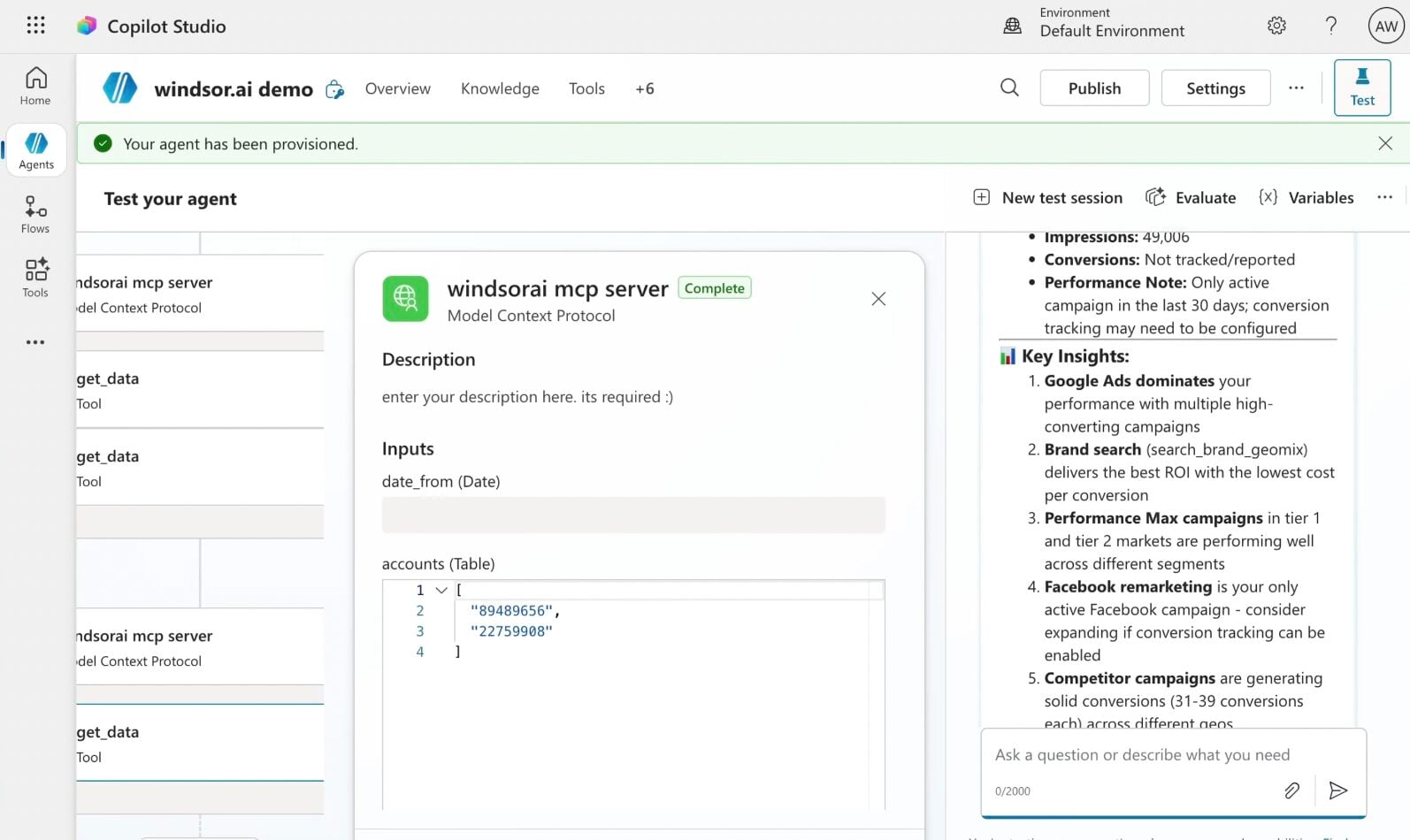
Click + Add tool and select + New tool -> Model Context Protocol.
- Server Name: Windsor MCP
- Server URL: https://mcp.windsor.ai
- Authentication: API Key
- Header name: Authorization

Create a new connection
On the next screen, click the dropdown under ‘Not connected’ and select Create new connection.
⚠️ Important: Enter your Windsor API key with the Bearer prefix.

Confirm credentials and start querying
Start a new chat. Copilot will prompt you to connect to Windsor MCP via the Connections manager. Click Connect -> Submit.
Return to the chat and click Retry in your agent prompt.
You can now ask questions about your integrated Windsor.ai data.
FAQs
Which TikTok Ads metrics and dimensions are available in Copilot Agent through Windsor.ai?
Windsor.ai gives Copilot Agent access to 787 metrics and 142 dimensions, including:
- Spend and performance: spend, CPC, CPM, CTR, cost per result, cost per conversion, frequency, reach, impressions.
- Website conversions: purchases, purchase ROAS, purchase value, add to cart, initiate checkout, page views, landing page views, registrations, form submissions.
- App conversions: app installs, purchases, checkout, add to cart, registrations, Day 1 and Day 7 retention, cost per app install, purchase ROAS.
- TikTok Shop: Shop purchases, gross revenue, add to cart, checkout initiations, product page views, Shop ROAS.
- Video engagement: video views, views at 25%/50%/75%/100%, average play time per view, 2-second views, 6-second views, 15-second focused views.
- Audience dimensions: age, gender, country, platform, interest category, purchase intention, device brand, and language.
Can Copilot Agent compare TikTok Ads performance against other ad channels?
Yes. Connect TikTok Ads alongside Facebook Ads, Google Ads, or Snapchat Ads through Windsor.ai and ask Copilot to compare spend, purchase ROAS, CPC, and conversion volume across all channels in a single conversation.
Does Windsor.ai support TikTok Ads SKAN data for iOS campaigns?
Yes. Windsor.ai pulls SKAdNetwork (SKAN) conversion data for iOS 14+ campaigns, including SKAN purchases, SKAN purchase ROAS, SKAN app installs, SKAN registrations, and CTA/VTA attribution breakdowns.
Can Copilot Agent help me identify wasted TikTok Ads spend?
Yes. Ask Copilot to list active ad groups that have exceeded a spend threshold but generated zero purchases, zero add-to-cart events, or below-average CTR. It pinpoints exactly where the budget is leaking across your account, so you can act on it without manually checking each ad group.
Can I pause TikTok Ads campaigns or adjust budgets from Copilot?
Yes. Windsor.ai’s write-enabled MCP lets Copilot act directly on your TikTok Ads account, not just report on it:
- Pause or enable campaigns, ad groups, and ads. Spot a creative burning budget with zero purchases, and shut it off in the same chat. No need to open TikTok Ads Manager.
- Update campaign and ad group budgets. Move spend toward what’s converting the moment Copilot flags it.
Every change runs through a confirmation step first, so your account only updates when you approve it.
What prompts can I use when analyzing TikTok Ads data in Copilot Agent?
Here are examples of more specific prompts you can use to dive deep into your TikTok Ads data:
-
Compare my TikTok Ads purchase ROAS against my Facebook Ads spend over the last 30 days. For each channel, show total spend, purchase value, and blended ROAS. Flag any channel where spend increased week-over-week but purchase value stayed flat or declined.
-
Break down my website funnel for the last 30 days across all campaigns: landing page views, add to cart, initiate checkout, and purchases. For each campaign, calculate the drop-off rate between initiate checkout and purchase. Flag campaigns where checkout initiation is high but purchases are low.
-
For my top 10 spending ad groups, compare Day 1 and Day 7 app retention rates. Which ad groups are acquiring users who actually come back, and which are driving installs that churn immediately?
-
Analyze my TikTok video ad performance for the last 30 days. For each ad, show views at 25%, 50%, 75%, and 100% completion rate alongside total purchases and purchase ROAS. Which creatives have a video completion rate of above 40%, but a low purchase conversion rate?
How much does it cost to integrate TikTok Ads into Copilot using Windsor.ai?
Windsor.ai is free to start, no credit card required. Paid plans start at $19/month and scale by the number of sources and accounts. See the pricing page.
How long does it take to connect TikTok Ads to Copilot?
With Windsor MCP, the integration process takes a few minutes. No technical expertise or coding is required; connecting data to Copilot is simple, straightforward, and accessible to everyone.
Do you have helpful links to get started with integrating TikTok Ads and Copilot Agent using Windsor.ai?
Yes, we have helpful resources to help you get started. You can explore our official documentation and tutorials for seamless TikTok Ads to Copilot Agent integration with Windsor.ai:
Tired of manual TikTok Ads data exports? Try Windsor.ai today to automate your reporting


