Destinations
 Data sources
 AI insights
 About us
 Careers
 Security
 Customer reviews
 Contact us
 Affiliate program
 Solution partners
 Template gallery
 Looker Studio templates
 Power BI templates
 Excel templates
 Google Sheets templates
 Tableau templates
 Facebook Ads templates
 Google Ads templates
 Data fields & Metrics
 AI prompt library & Guides
 Product documentation
 API documentation
 Case studies
 Blog
 Data models
 Windsor vs Supermetrics
 Windsor vs Funnel.io
 Windsor vs Fivetran
 Windsor vs Rivery
 Windsor vs Portermetrics
 Windsor vs Coupler.io
Connect TikTok Ads to Cursor
Connect your TikTok Ads data to Cursor with the Windsor.ai connector, so the dashboards and scripts Cursor builds use your real campaign, ad group, ad and video data.
Ask Cursor for a video hook canvas, a creative fatigue script or a ROAS report built on your own 6-second video views, Frequency, Purchase ROAS (website) and Cost fields.
Forget CSVs. Stop copy/paste. Connect in minutes. No code required.
 Sign up with Google
 Free forever plan










Build creative and campaign reports on live TikTok Ads data in your Cursor project
Cursor works inside your project, so what it builds from your TikTok Ads data stays with you as files, scripts and canvases you can rerun. Key use cases:

Score video hooks
Cursor can build a canvas that ranks each Ad name by 2-second video views and 6-second video views per Impressions, with Average play time per video view beside it.

Catch creative fatigue
Ask for a script that tracks Frequency and CTR (destination) by ad over time and flags ads where frequency rises while CTR falls.

Rank ads by return
Purchase ROAS (website) with Cost and Purchases (website) by Ad group name shows which ads pay back.

See which audiences convert
Cursor can compare Cost and Conversions by Age and Gender in a report you rerun each week.
Using Windsor.ai to connect data from TikTok Ads to Cursor
Without Windsor.ai, Cursor builds on placeholder numbers or on CSV exports you paste into the project. Windsor MCP gives Cursor live TikTok Ads data with the real field names, so the dashboards and scripts it writes match your account.
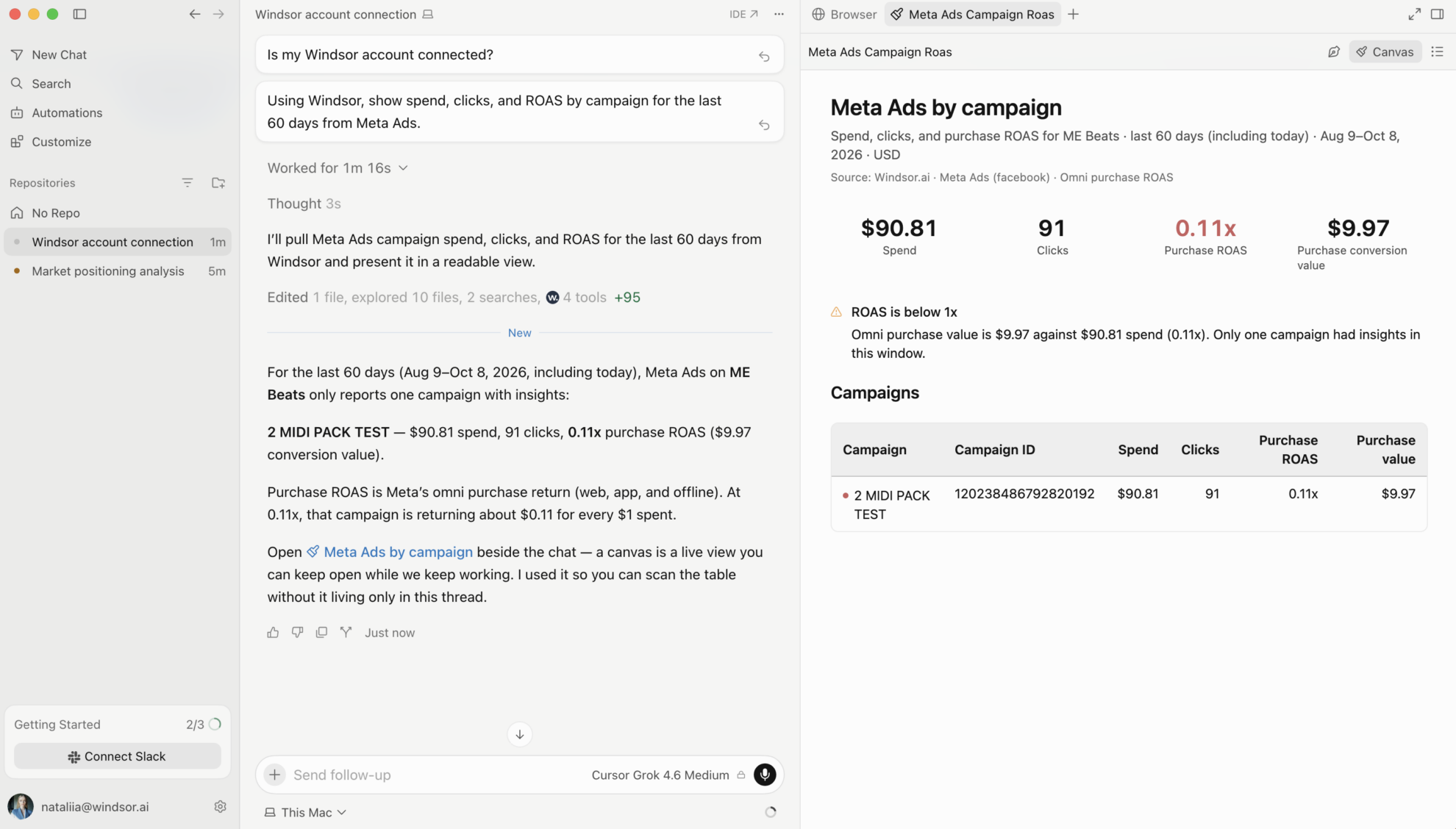
Connect in minutes, then ask Cursor to build something with your TikTok Ads data.
Available actions
Pause Ad
Pause an active TikTok Ads ad. Reversible via enable_ad.
Pause Ad Group
Pause an active TikTok Ads ad group. Reversible via enable_ad_group.
Pause Campaign
Pause an active TikTok Ads campaign. Reversible via enable_campaign.
Enable Ad
Enable a paused TikTok Ads ad. Reversible via pause_ad.
Enable Ad Group
Enable a paused TikTok Ads ad group. Reversible via pause_ad_group.
Enable Campaign
Enable a paused TikTok Ads campaign. Reversible via pause_campaign.
Set Campaign Budget
Set the budget of a TikTok Ads campaign. The amount is given in the account currency major unit (e.g. 100 means one hundred). The budget mode is fixed when the campaign is created and cannot be changed here: a campaign whose budget is unlimited (BUDGET_MODE_INFINITE) or managed at the ad group level has no campaign budget to update, and this action will report that the budget could not be changed. Use the ad group budget action for those campaigns.
Set Ad Group Budget
Set the budget of a TikTok Ads ad group. The amount is in the account currency major unit (e.g. 100.00 means one hundred). The budget type (daily or lifetime) is fixed when the ad group is created and cannot be changed here; the existing type is detected automatically and its amount is updated. Ad groups whose budget is managed at the campaign level (Campaign Budget Optimization) have no ad group budget to set. Ad groups in Upgraded Smart+ campaigns are not supported by this action; change their budget in TikTok Ads Manager.


How to connect TikTok Ads to Cursor with Windsor.ai
Explore a step-by-step guide to add Windsor MCP to Cursor and start building on your TikTok Ads data.
Connect TikTok Ads in the Windsor.ai dashboard
Choose TikTok Ads as your data source and sign in to grant Windsor.ai access to your account.

Add Windsor MCP in Cursor
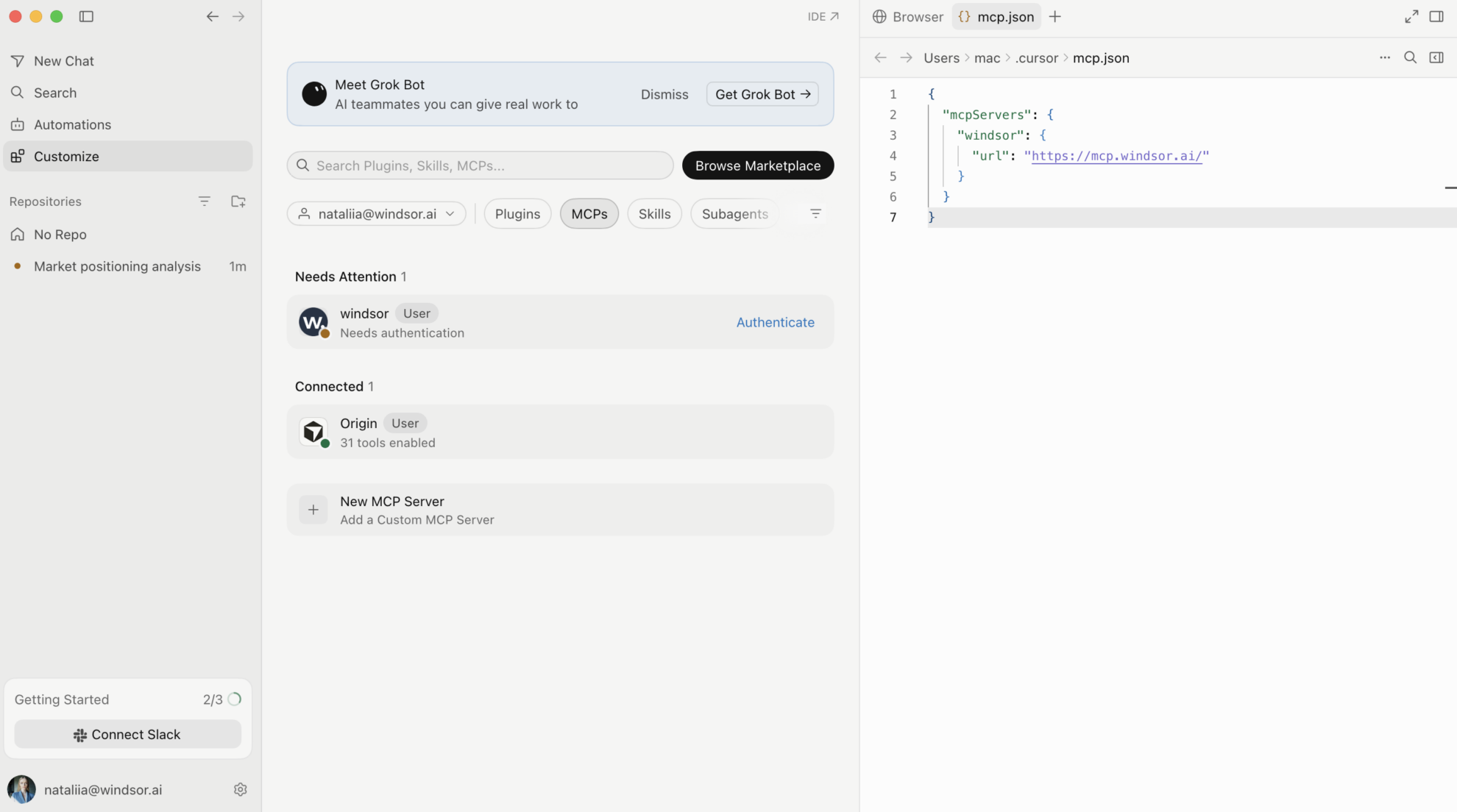
Open Settings in Cursor Desktop and go to Tools & Integrations → New MCP Server. When mcp.json opens, add Windsor:
{
  "mcpServers": {
    "windsor": {
      "url": "https://mcp.windsor.ai/"
    }
  }
}
Authenticate with Windsor.ai
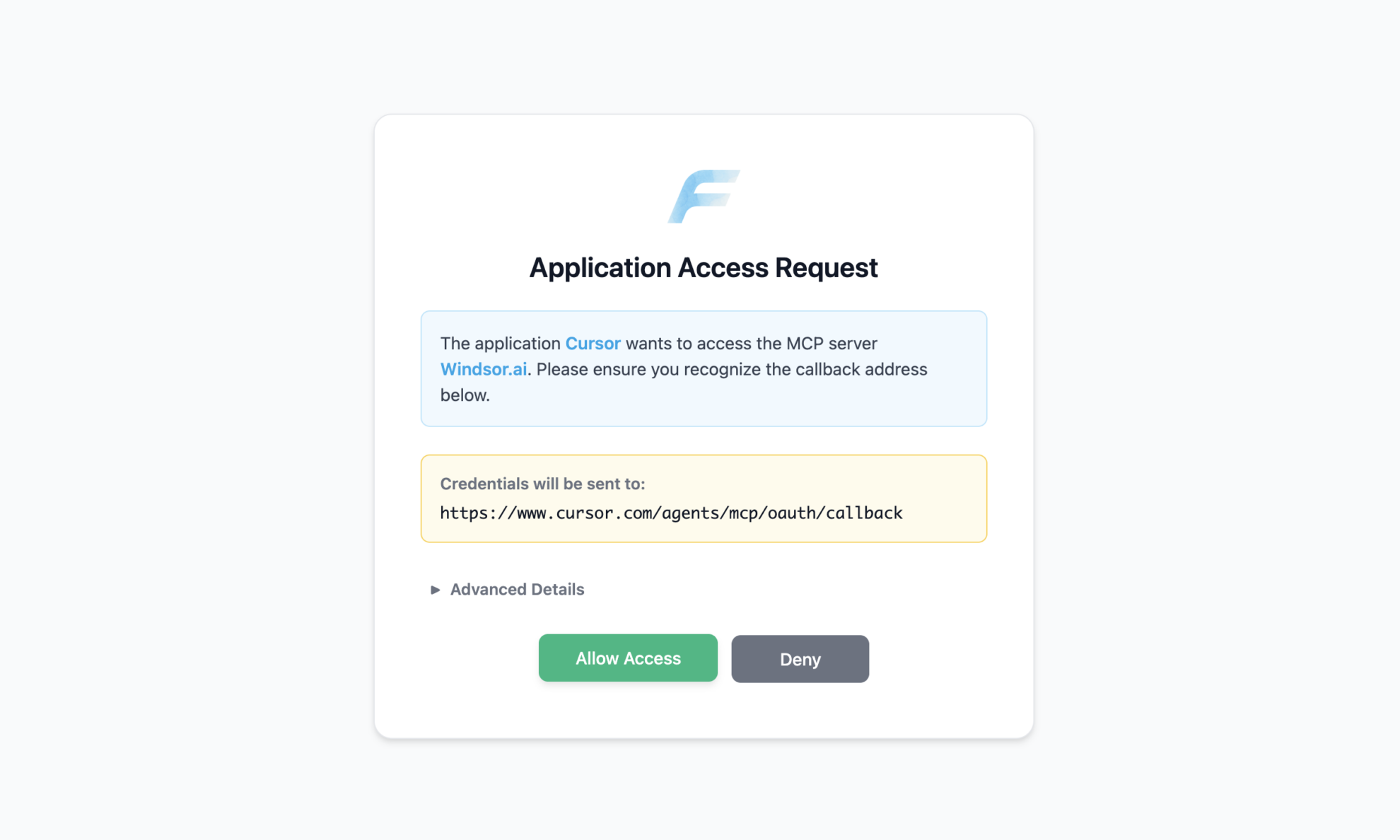
Save mcp.json. Windsor appears in your MCP list and asks you to authenticate. Click Authenticate and sign in to Windsor.ai in the browser.
Ask Cursor to build on your TikTok Ads data
Open a chat in your project and ask about your TikTok Ads data.
FAQs
What TikTok Ads data can Cursor use?
Windsor.ai gives Cursor access to 952 TikTok Ads fields. These are some of the groups; the TikTok Ads field reference lists all of them:
- Delivery: Cost, Impressions, Reach, Frequency, CPM, Clicks (destination), CTR (destination), CPC (destination).
- Results: Conversions, Results, Cost per result, Purchases (website), Purchase value (website), Purchase ROAS (website).
- Video: 2-second video views, 6-second video views, Average play time per video view.
- Structure: Campaign, Campaign budget, Ad group name, Ad group budget, Ad name, Placement type.
- Audience: Age, Gender.
What prompts can I use to build with TikTok Ads data in Cursor?
Cursor works best when you ask it to build something with a clear output. Each of these names the fields to use and the file or canvas you want back:
-
Pull Ad name, Impressions, 2-second video views, 6-second video views and Average play time per video view for the last 14 days. Build a canvas that ranks ads by the share of impressions that reach 6 seconds, and split the list into strong and weak openings with the numbers.
-
Pull Ad name, Date, Frequency, CTR (destination), Impressions and Cost for the last 28 days. Write a Python script that fits a simple trend per ad, flags ads where frequency is rising and CTR is falling with at least 5,000 impressions, and writes creative_fatigue.csv sorted by cost.
-
Pull Ad name, Ad group name, Cost, Purchases (website), Purchase value (website) and Purchase ROAS (website) for this month. Build a chart of ROAS by ad, mark ads with fewer than 10 purchases as low confidence, and list the ads with the most cost and the lowest ROAS.
-
Pull Cost, Conversions and Cost per result by Age and Gender for last month. Write a script that ranks segments by cost per conversion, drops segments with fewer than 20 conversions, and saves audience.csv.
-
Write a weekly report as tiktok_weekly.md with Cost, Reach, Conversions and Cost per result by Campaign, compared with the week before, and Campaign budget beside each campaign. Keep the script in the project so I can rerun it every Monday.
Can Cursor turn TikTok Ads data into dashboards I can share?
Yes. Cursor can render a dashboard, analysis or report as a canvas next to the chat, and it saves the canvas so you can reopen and rerun it later with fresh data. On paid Cursor plans you can publish a canvas to a read-only share link that members of your Cursor team can open. See the Cursor canvas documentation for the current plan requirements.
Can I combine TikTok Ads data with other sources in Cursor?
Yes. Windsor.ai supports 350+ data sources, so you can connect TikTok Ads alongside tools such as Shopify, Facebook Ads or GA4 and ask Cursor to work with them together. For example, ask Cursor to join TikTok Ads Cost by day with Shopify Order Net Sales, and write a script that reports store revenue per unit of TikTok spend by week.
How do I add Windsor MCP to Cursor?
Open Settings in Cursor Desktop, go to Tools & Integrations → New MCP Server, and add Windsor to mcp.json:
{
  "mcpServers": {
    "windsor": {
      "url": "https://mcp.windsor.ai/"
    }
  }
}
Save the file, click Authenticate next to Windsor in your MCP list, and sign in to Windsor.ai in the browser.
Do I need to code to connect TikTok Ads to Cursor?
No. The connection takes no code: connect TikTok Ads in Windsor.ai, add Windsor to Cursor’s MCP settings, and sign in. After that you describe what you want in plain language, and Cursor writes and runs the code. You can read and edit everything it produces.
How much does it cost to integrate TikTok Ads with Cursor using Windsor.ai?
The free forever plan covers 1 data source, so connecting TikTok Ads on its own costs nothing and needs no credit card. Combining TikTok Ads with other sources, such as Shopify, needs a paid plan: $19/month for 3 sources or $99/month for 7. Cursor is billed separately by Cursor. See the pricing page.
Do you have helpful links to get started with TikTok Ads and Cursor?
Yes. These are the resources to start with for the TikTok Ads to Cursor integration:
Tired of manual TikTok Ads data exports? Try Windsor.ai today to build on live data