 Destinations
 Data sources
 AI insights
 About us
 Careers
 Security
 Customer reviews
 Contact us
 Affiliate program
 Solution partners
 Template gallery
 Looker Studio templates
 Power BI templates
 Excel templates
 Google Sheets templates
 Tableau templates
 Facebook Ads templates
 Google Ads templates
 Data fields & Metrics
 AI prompt library & Guides
 Product documentation
 API documentation
 Case studies
 Blog
 Data models
 Windsor vs Supermetrics
 Windsor vs Funnel.io
 Windsor vs Fivetran
 Windsor vs Rivery
 Windsor vs Portermetrics
 Windsor vs Coupler.io
Connect YouTube to Data Studio (Looker Studio)
Bring your channel’s YouTube Analytics into Data Studio with the YouTube connector by Windsor.ai: views, watch time, subscribers, traffic sources, Shorts vs long-form and audience demographics, per video and per day.
Connector ID for the Linking API: AKfycbw-P6RSBg5zO-kMTDmZi6oWMnffpIN1kGGb9RJG3OVInOypg65EjKVP_Ej-t9Mq0paZ
 Sign up with Google
 Free forever plan
No credit card needed









What you can report on in Data Studio
The connector reads your channel’s YouTube Analytics. Reports teams build first, with numbers from our own channel for 14 September to 9 October 2026:

Where views come from
YouTube search brought 26,847 of our 34,190 views (78.5%). Viewers from external links watched 0.92 minutes per view against 0.31 from search. Use the Traffic Source field.

Shorts vs long-form
Shorts got 9,313 views and 9 new subscribers; long-form got 24,877 views and 30. Use the Content Type field, and Engaged Views to compare Shorts with the count used before March 2025.

Subscribers and audience
Daily subscribers gained and lost for the whole channel, subscribers credited to each video, and viewer age and gender as percentages.
What reaches Data Studio, and how it compares with Google's connector
The YouTube data source has 83 fields in groups for video stats, video and channel details, geography, playlists, channel-level subscribers, traffic sources and demographics. Data Studio refreshes it every 12 hours by default, and YouTube Analytics itself reports about three days behind.
Data Studio also has Google’s own YouTube Analytics connector. It’s free and built by Google. Google’s documentation (updated 9 October 2026) says Engaged views will come to it “in the coming months”; the Windsor.ai data source already has the field. Windsor.ai also puts YouTube in the same account as GA4, Search Console and ad platforms, and Google’s connector is not one of the connectors the Linking API supports.
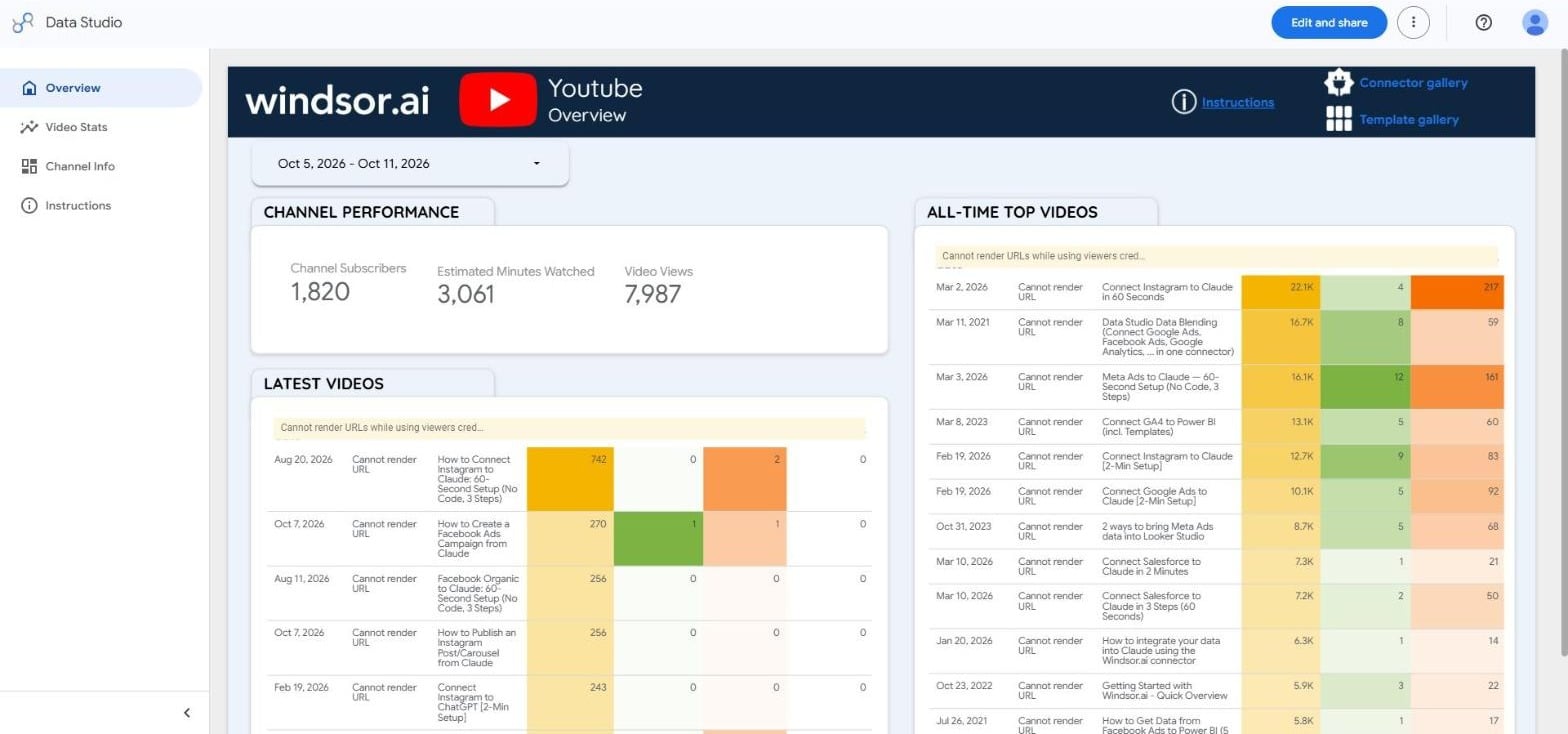
What we tested: Matei Ioan Nicolae (SEO Director, Windsor.ai) connected the Windsor.ai YouTube channel on 12 October 2026, built a report from our YouTube template with a Linking API URL and compared it with the connector: 1,820 subscribers, 3,061 minutes watched and 7,987 views for 5 to 11 October 2026, and 742 views for the top video, all exact matches.
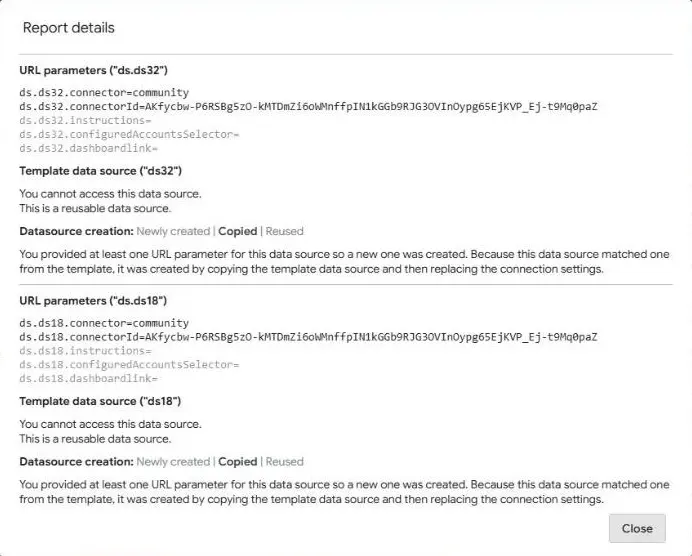
Building the report from a URL: our template has two data sources, aliases ds32 and ds18. Data Studio’s report details dialog (add &c.explain=true to the URL) showed both replaced with the Windsor.ai YouTube connector; with only one set, half the charts stayed blank.


How to connect YouTube to Data Studio in Windsor.ai
You need:
- A YouTube channel you own or manage. If it belongs to a Brand Account, pick the Brand Account when Google asks which account to use.
- A Google account for Data Studio
- A Windsor.ai account (free forever plan, no credit card)
Register and log in to Windsor.ai
Create a new Windsor.ai account or log in if you already have one.
Connect your YouTube channel
Choose YouTube and sign in with Google. If the channel belongs to a Brand Account, pick the Brand Account (shown with the channel name), not your personal account: a Google account without a channel connects but has no data.

Open the connector in Data Studio
In Data Studio, choose Create > Data source, search for “Windsor” and pick YouTube (By Windsor.ai) under Partner Connectors. The Data Studio button in Windsor.ai’s onboarding opens the all-sources Windsor.ai connector, which has YouTube along with 330+ other sources.

Authorize, connect and create the report
Authorize twice: once for Data Studio, then sign in to Windsor.ai. Select your YouTube account, click Connect, then Create report. With Use report template for new reports ticked (the default), Data Studio starts the report from the connector’s own template.
FAQs
How do I use it with the Data Studio Linking API?
Set ds.ALIAS.connector=community and ds.ALIAS.connectorId= the ID above for every data source in your template, using the aliases under Resource > Manage added data sources. Our YouTube template has two, ds32 and ds18; setting only one left half the charts blank in our test. A working URL: https://datastudio.google.com/reporting/create?c.reportId=841fdf4d-eff0-4efc-b948-211fc3dc7823&ds.ds32.connector=community&ds.ds32.connectorId=AKfycbw-P6RSBg5zO-kMTDmZi6oWMnffpIN1kGGb9RJG3OVInOypg65EjKVP_Ej-t9Mq0paZ&ds.ds18.connector=community&ds.ds18.connectorId=AKfycbw-P6RSBg5zO-kMTDmZi6oWMnffpIN1kGGb9RJG3OVInOypg65EjKVP_Ej-t9Mq0paZ. Add &c.explain=true to see how Data Studio read the URL. The dialog also lists the connector’s own parameters: instructions, configuredAccountsSelector and dashboardlink.
Why don't thumbnails show in a Linking API report?
Data sources created through the Linking API use viewer’s credentials, and Data Studio doesn’t render image URLs with viewer’s credentials (“Cannot render URLs while using viewers credentials”). The numbers load. In the copy we made through Create > Data source, which uses the creator’s credentials, thumbnails showed.
Does Google's own YouTube Analytics connector work with the Linking API?
Google’s Linking API documentation (updated 30 April 2026) lists BigQuery, Cloud Spanner, community connectors, Google Analytics, Google Cloud Storage, Google Sheets, Looker and Search Console. YouTube Analytics is not on the list, so use a community connector such as Windsor.ai’s.
Is Looker Studio the same as Data Studio?
Yes. Google renamed Looker Studio back to Data Studio on 11 April 2026, and lookerstudio.google.com redirects to datastudio.google.com.
How fresh is the data?
YouTube Analytics reports about three days behind: on 12 October 2026 the latest day was 9 October. Data Studio also caches the data source for 12 hours by default.
How much does it cost?
Windsor.ai has a free forever plan, no credit card, with 30 days of history. Paid plans start at $19/month. See pricing.
Can I report on YouTube Ads here?
No. This connector reads organic channel analytics. YouTube ad campaigns are reported through Google Ads; connect Google Ads to Windsor.ai and add it as a second data source.
Where are the field list and templates?
The YouTube field reference lists every field, the YouTube Data Studio template is ready to copy, and the Data Studio documentation covers the connector in general.
Tired of manual YouTube exports? Connect YouTube to Data Studio with Windsor.ai


