 Destinations
 Data sources
 AI insights
 About us
 Careers
 Security
 Customer reviews
 Contact us
 Affiliate program
 Solution partners
 Template gallery
 Looker Studio templates
 Power BI templates
 Excel templates
 Google Sheets templates
 Tableau templates
 Facebook Ads templates
 Google Ads templates
 Data fields & Metrics
 AI prompt library & Guides
 Product documentation
 API documentation
 Case studies
 Blog
 Data models
 Windsor vs Supermetrics
 Windsor vs Funnel.io
 Windsor vs Fivetran
 Windsor vs Rivery
 Windsor vs Portermetrics
 Windsor vs Coupler.io
 Last updated: 26 November 2026





To connect CJ Affiliate to ChatGPT, create a personal access token in CJ, add it to Windsor.ai with your advertiser CID, then install the Windsor.ai plugin in ChatGPT. You don’t write any code.
After that, you can ask ChatGPT which publishers drove the most sales, which commissions are still pending and which were corrected, without exporting a CJ report.
Windsor.ai’s CJ connector works with CJ advertiser accounts only, and the free forever plan covers one of them.
2 steps to connect CJ Affiliate to ChatGPT
Windsor.ai’s guide to integrating data into ChatGPT has screenshots of each ChatGPT screen in the setup.
Prerequisites
- A Windsor.ai account, on the free forever plan (no credit card) or a paid plan from $19 a month, billed annually.
- A CJ advertiser account and your CJ login.
- A ChatGPT account. On ChatGPT Business, Enterprise or Edu, your workspace admin decides which plugins members can install (OpenAI’s admin guide to plugins).
Step 1. Connect CJ Affiliate to Windsor.ai
Windsor.ai connects to CJ with two values: your advertiser CID and a personal access token.
- Sign in to the CJ Developer Portal with your advertiser login, then go to the personal access tokens page.
- Add a token and copy it straight away. CJ shows each token only once.
- Your advertiser CID is shown next to your username, top right in your CJ account.
- On the CJ page in Windsor.ai, put the CID in CJ account ID and the token in Personal access token, then select Add Account.

Your plan’s account limit includes the CJ advertiser accounts you connect. You can test a second advertiser account for free in your first 30 days, and after that it needs a paid plan.
Step 2. Install the Windsor.ai plugin in ChatGPT
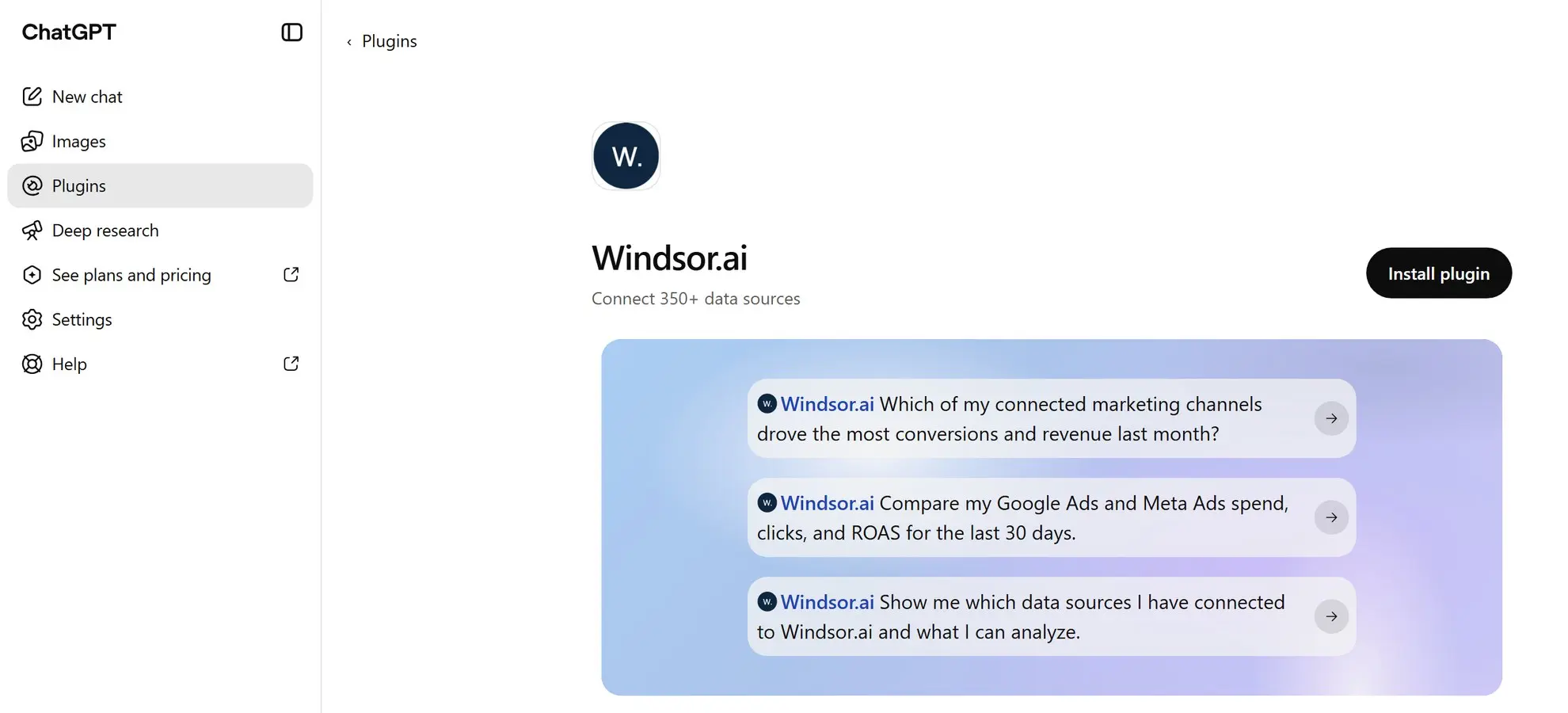
Open Plugins from the ChatGPT sidebar, find Windsor.ai with the search box and select Install plugin. The Windsor.ai plugin page link takes you to the same place.
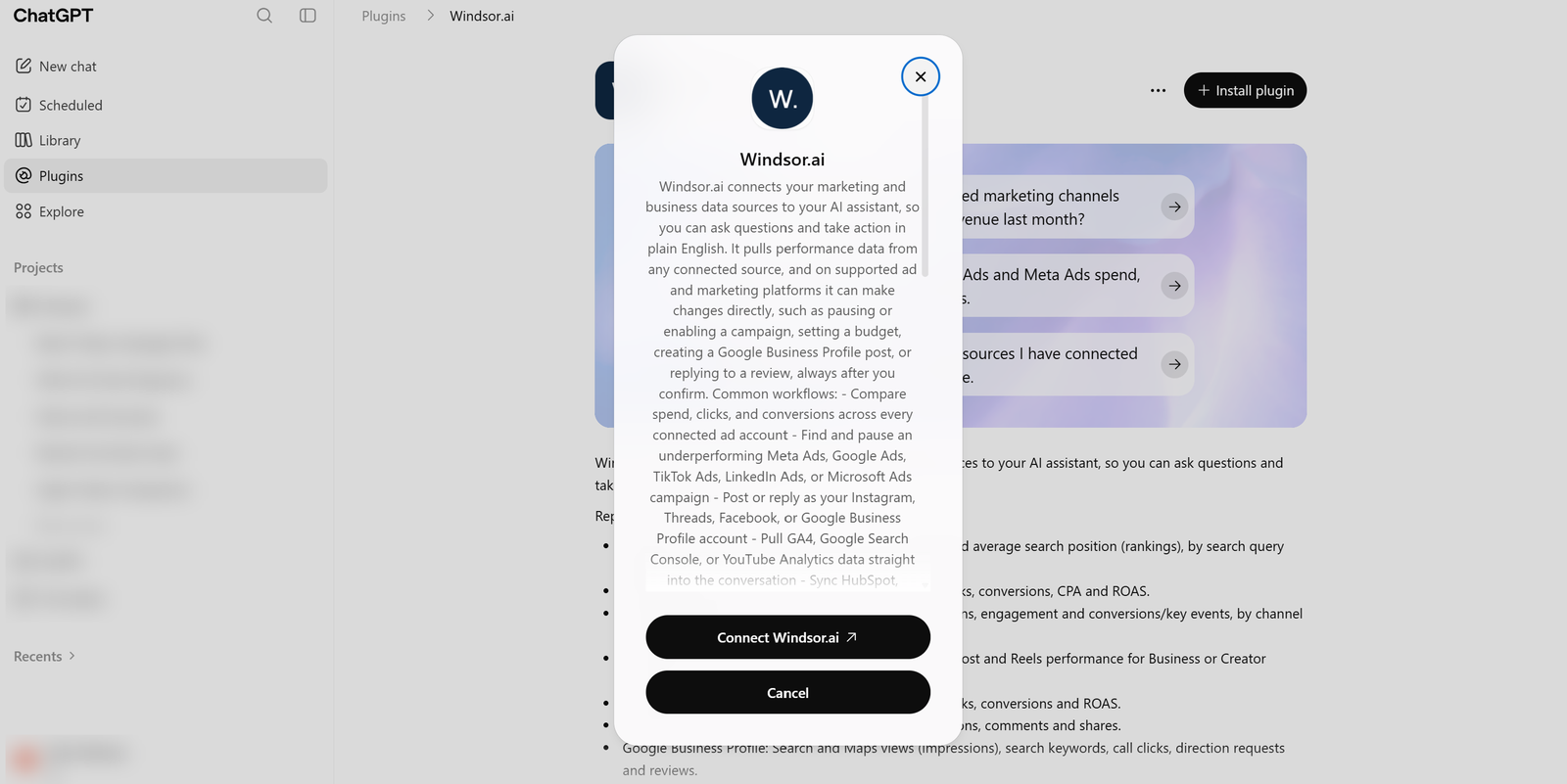
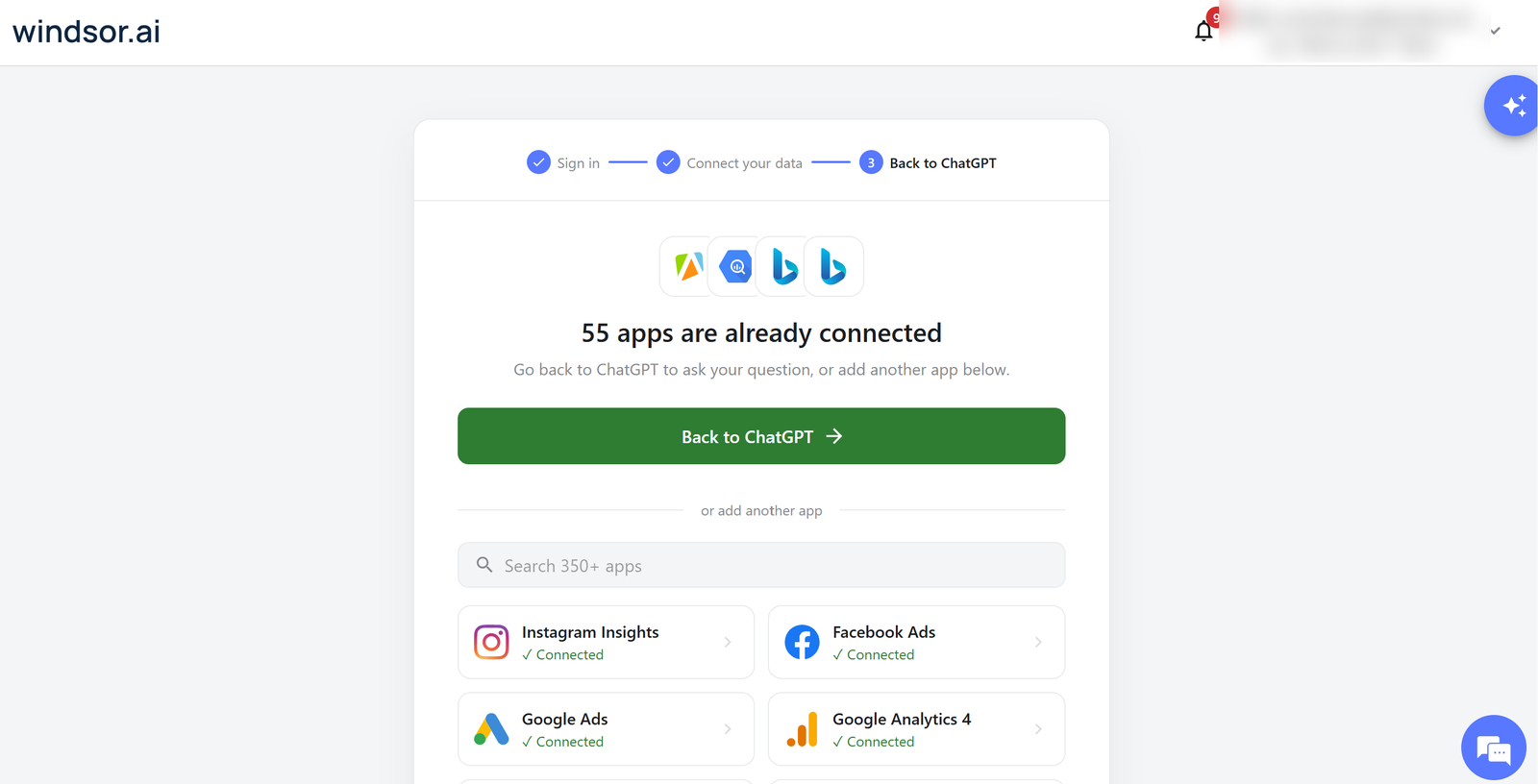
Next, select Connect Windsor.ai. Once you have signed in to Windsor.ai, select Back to ChatGPT to return.
To confirm the setup, open a new chat, choose Windsor.ai in the + menu (or type @Windsor.ai) and ask:
Which data sources are connected to my Windsor.ai account? Is CJ one of them?
If CJ is listed, ChatGPT is ready for your commission questions.
The CJ Affiliate data ChatGPT can read
Through Windsor.ai, ChatGPT reads the commissions in your CJ advertiser account. All 70 fields are in the CJ Affiliate field reference. 17 of them are date and helper fields that Windsor.ai adds.
- Amounts: sale amount, order discount, publisher commission, advertiser commission and CJ fee, each in USD and in at least one local currency. Publisher commission comes in the publisher’s currency, and advertiser commission and the CJ fee in the advertiser’s. Sale amount comes in both, and order discount in both plus the order’s original currency.
- Status: each commission’s action status (new, extended, locked or closed) and validation status (pending, accepted, declined or automated), plus whether the advertiser reviewed it, when it locks and its locking method.
- Corrections: whether a commission is original or corrected, why it was corrected (for example a returned item, a duplicate order, or a product that couldn’t ship or was sold out) and the ID of the original action.
- Partners and orders: the publisher (name, ID and website), the advertiser, the order ID and coupon code, the action type and name, and New To File, which flags customers who are new to you.
- Click and device: click date, referring URL, country, initiating and concluding device and browser, and whether CJ tracked the sale across devices.
Keep these points in mind when you write a question:
- Dates. Periods such as “the last 30 days” pick commissions by event date (in UTC) unless you name the posting date in your question.
- Totals. Windsor.ai sums the individual CJ commissions for whatever you group by, such as publisher, coupon code or date.
- CJ fee. The CJ fee is usually the difference between the advertiser commission and the publisher commission.
- Freshness. Windsor.ai caches identical queries for 6 hours. A question repeated within that time can get the cached result. A commission that CJ corrects or updates later may not show its latest values until the CJ data in Windsor.ai is refreshed or backfilled, or the cache is cleared.
What to ask ChatGPT: prompt ideas
Give each question a period, such as “the last 30 days”. The free forever plan reaches back 30 days, and anything older needs a paid plan.
Publishers and commission
For the last 30 days, rank my CJ publishers by sale amount in USD, with their publisher commission and the CJ fee as a share of advertiser commission.
Commissions pending validation
Which CJ publishers have the most publisher commission still pending validation for the last 30 days? Give the total for each.
Corrections
For the last 30 days, which CJ publishers had the most corrected commissions? Break them down by correction reason, with the original action ID and sale amount.
New customers
Use New To File to show how much CJ sale amount each publisher brought from new customers and from existing customers in the last 30 days.
Coupon codes
For the last 30 days, which CJ coupon codes gave the biggest order discount compared with their sale amount? Show both totals in USD for each code.
Windsor.ai has no write actions for CJ. To accept, decline or correct a commission, use CJ.
Analyze CJ Affiliate next to your other sources
Once CJ and at least one more source are connected to Windsor.ai, you can ask ChatGPT about both in the same chat. Windsor.ai connects 375+ sources.
- Google Ads: see whether the weeks with more Google Ads spend also brought more CJ publisher commission.
- Shopify: see what share of weekly Shopify revenue comes through CJ sale amount.
- Awin: compare sales and commission from your two affiliate networks week by week.
Google Ads and Shopify report in your account’s or store’s time zone, and CJ’s event date is in UTC. When your time zone is far from UTC, weekly or monthly totals keep that gap small.
In your first 30 days you can test a second source for free. To keep two or more sources after that, you need a paid plan: Basic is $19 a month for 3 sources and Standard $99 a month for 7 (annual billing), each with a shared limit of 75 accounts. The pricing page lists every plan.
Other ways to connect CJ Affiliate to ChatGPT
On 26 November 2026 we searched for an official CJ Affiliate plugin in ChatGPT and for a CJ MCP server, and found neither. An MCP server from CJ Dropshipping also exists, but CJ Dropshipping is a different company from CJ Affiliate. Apart from the Windsor.ai plugin, you can bring CJ data into ChatGPT in two ways.
Manual report export
When you have a one-off question, export a commission report from CJ and attach it to a chat. ChatGPT answers from that file alone. For newer commissions, export again.
Your own build on CJ’s APIs
If your team has developers, they can call CJ’s APIs with a personal access token and make the results available to ChatGPT through their own MCP server. Your team then owns the code and keeps the token up to date.
Conclusion
With your CJ advertiser account in Windsor.ai and the Windsor.ai plugin installed in ChatGPT, the publisher and corrections prompts above are a good first test.
For more, see the CJ Affiliate to ChatGPT integration page or the guide on how to connect Awin to ChatGPT.
🚀 Connect CJ Affiliate to ChatGPT. Free forever plan, no credit card
FAQs
Do I need coding skills to connect CJ Affiliate to ChatGPT?
No. You create a token in CJ, paste it into a form in Windsor.ai and install a plugin in ChatGPT. You write no code.
Can a CJ publisher connect its account?
No. Windsor.ai’s CJ connector takes an advertiser CID as the CJ account ID and connects advertiser accounts only. Each commission in the advertiser’s data names its publisher and publisher ID.
What CJ Affiliate data can ChatGPT analyze?
ChatGPT can analyze your CJ commissions: sale amount, publisher and advertiser commission, CJ fee, order discount, action and validation status, corrections, publisher and website, coupon code, New To File, and click, device and country details. All 70 fields are described in the CJ Affiliate field reference.
Which date does "last 30 days" use for CJ?
The event date, in UTC, unless your question names the posting date.
Is there an official CJ Affiliate plugin in ChatGPT?
No. Our check on 26 November 2026 found no official CJ Affiliate plugin for ChatGPT.
Can ChatGPT accept or decline CJ commissions?
No. Windsor.ai offers no write actions for CJ. ChatGPT can analyze your commissions. You accept, decline or correct them in CJ.
How much does it cost to connect CJ Affiliate to ChatGPT?
You can connect one CJ advertiser account on the free forever plan, which needs no credit card. That plan’s limits are 1 user, 1 data source, 1 account and 30 days of history. For your first 30 days, the limits rise to 10 sources and 15 accounts. Paid plans start with Basic at $19 a month (3 sources) and Standard at $99 a month (7 sources), billed annually, each allowing up to 75 accounts in total. See the pricing page.


