 Destinations
 Data sources
 AI insights
 About us
 Careers
 Security
 Customer reviews
 Contact us
 Affiliate program
 Solution partners
 Template gallery
 Looker Studio templates
 Power BI templates
 Excel templates
 Google Sheets templates
 Tableau templates
 Facebook Ads templates
 Google Ads templates
 Data fields & Metrics
 AI prompt library & Guides
 Product documentation
 API documentation
 Case studies
 Blog
Blog Data models
 Windsor vs Supermetrics
 Windsor vs Funnel.io
 Windsor vs Fivetran
 Windsor vs Rivery
 Windsor vs Portermetrics
 Windsor vs Coupler.io
 Last updated: 15 October 2026




Shopify shows you revenue, but not your actual margin after discounts and returns.
It shows best-sellers, but not which products are killing your margins or about to run out of stock.
It shows customers, but not who actually comes back and drives your growth.
The data is there. The insights aren’t.
That’s where Windsor MCP for ChatGPT comes in.
Connect Shopify to ChatGPT through Windsor.ai’s native ChatGPT app, and analyze your full store, including orders, customers, products, and margins, with AI.
Go beyond Shopify’s native dashboards. Get insights, uncover patterns, and take action.
🚀 Connect your Shopify data to ChatGPT with Windsor.ai now. Get started for free → onboard.windsor.ai/app/shopify.
Once your store is connected, answering such complex questions takes just seconds:
- Which products drive high revenue but low net margin after discounts and returns?
- Which SKUs are on track to run out of stock in the next 2 weeks?
- How many new vs returning customers did you have last month?
- Can you write a win-back email for customers who haven’t ordered in 60 days but previously bought 2+ times?
- Which products are frequently bought together and should be bundled?
Set it up once, and turn your Shopify data into daily AI-powered decisions.
Getting Shopify data into ChatGPT with Windsor MCP (2 steps, no code)
With Windsor MCP, connecting Shopify to ChatGPT takes just two simple steps; no code and no ongoing maintenance.
Just connect your Shopify store and install the Windsor.ai native app directly inside ChatGPT.
📖 Full documentation: windsor.ai/documentation/windsor-mcp/how-to-integrate-data-into-chatgpt/.
What you need
- A Shopify store, and an app you create for it in the Shopify Dev Dashboard (it gives you the Client ID and Client Secret)
- A Windsor.ai account (free or paid plan)
- A ChatGPT account
Step 1. Connect Shopify to Windsor
Go to onboard.windsor.ai/app/shopify and select Shopify as your data source.
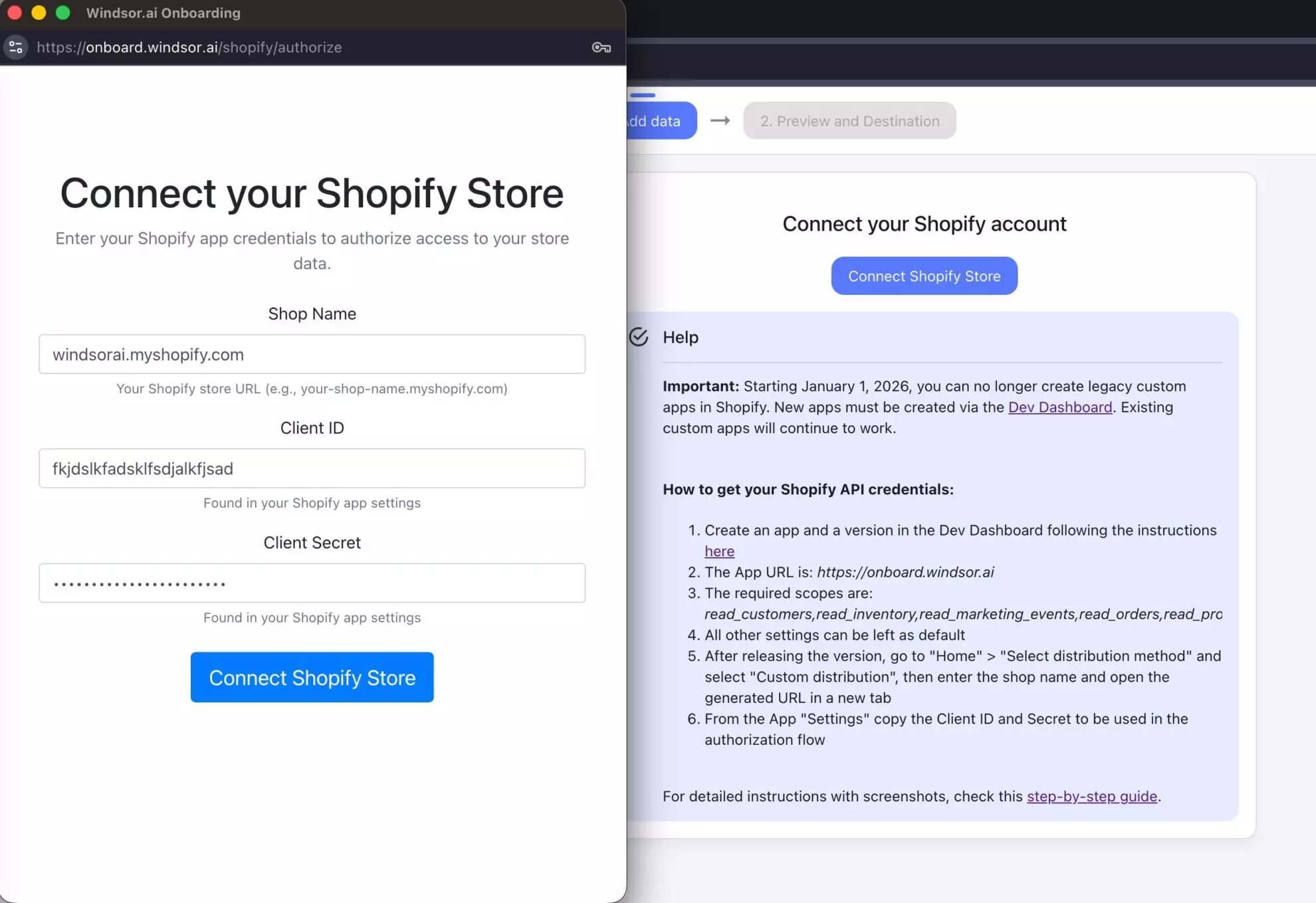
Click Connect Shopify Store and enter your shop name, Client ID and Client Secret. You get the Client ID and Client Secret by creating an app for your store in the Shopify Dev Dashboard.
⚙️ For detailed setup instructions with screenshots, check this step-by-step guide.
Managing multiple stores? Connect each one separately; they’re all queryable in a single ChatGPT conversation.
Step 2. Install Windsor’s native app in ChatGPT
Open Windsor’s native app in ChatGPT and click Connect. Grant access and you’re all set.

To confirm everything is working, open a new chat and run this quick check:
What Shopify stores are connected to my Windsor account?
Show me the total revenue for the last 30 days.
Data confirmed? Go deeper with the advanced prompts shared in the next section.
Every time you ask a question, Windsor pulls fresh data from Shopify, so your numbers are always up to date, with no manual refreshes or exports.
Shopify prompts to unlock deeper insights
These ready-to-use prompts help you answer the most important questions Shopify’s native reports don’t show clearly.
Just copy and paste. ChatGPT will pull the right data automatically.
💡 Good to know: If your Shopify app has the
read_all_ordersscope (see the Shopify Configuration Guide), Windsor pulls your full order history instead of the last 60 days. That means ChatGPT can compare this Black Friday to three years ago, calculate LTV across customer cohorts, and spot long-term trends your Shopify dashboard never shows.
Revenue vs. reality: finding your actual margins
Shopify’s dashboard shows gross revenue. That number feels good.
Net revenue, after discounts, refunds, and returns, sometimes tells a very different story, especially for stores running frequent promotions or selling categories with high return rates.
ChatGPT helps you break this down instantly, calculating true margins and showing which products actually drive profit.
Calculate net revenue vs. gross revenue by month
Show total gross revenue vs. net revenue (after discounts and refunds) for each of the last 6 months.

How wide is the gap? Is it growing or shrinking?
Find which products look profitable but in fact aren’t
For my top 20 products by revenue, show total discounts applied and total refunds received.

Which products have the biggest gap between gross and net revenue?
Measure the true cost of your discount strategy
How much total discount has been given in the last 90 days across all orders?

What % of gross revenue does that represent?

Which discount codes are responsible for the most discount spend?
Customer intelligence: who’s actually worth attracting
Not all customers are equal.
A customer who buys once during a sale and never returns costs your acquisition budget and contributes very little long-term. A customer who orders four times a year at full price is your real business.
ChatGPT can separate the two in one prompt and tell you how to find more of the second type.
Identify your highest-LTV customers and what they bought first
Who are my top 10% of customers by customer total spent?

What was their first purchase: product, category, and order channel?

Is there a pattern that suggests what triggers high-LTV customer acquisition?
New vs. returning revenue split
For the last 90 days, split total revenue between new customers and returning customers.

What % of revenue comes from each group?

How does that compare to the previous 90 days?
Find customers at risk of churning
Which customers have ordered 3 or more times but haven't purchased in the last 60 days?

List them with their total spend and last order date.

These are high-value customers worth a win-back campaign.
Write a win-back email
Based on customers who bought [product category] but haven't ordered in 60+ days, write a short win-back email.

Reference their previous purchase. Include a personalized reason to come back and a clear CTA.
Product performance: hidden gems, dead weight, and stockout risks
Shopify’s product reports show sales rank. But they don’t show which products drive repeat purchases, which are cannibalizing each other, or which SKUs are pacing toward a stockout.
All of this data already exists in your orders. ChatGPT simply connects the dots that Shopify’s dashboard can’t.
Find your hidden gems: low volume, high loyalty
Which products have a relatively low total order count but appear frequently in repeat customer orders?

These might be undermarketed products that build long-term loyalty.
Spot products frequently bought together: bundle opportunities
Which pairs of products appear most often in the same order?

Are any of these combinations not currently offered as a bundle or kit?
Inventory velocity and stockout risk
For my top 15 products by units sold in the last 30 days, calculate the average daily sales rate.

Based on current inventory and that rate, which products will run out of stock within the next 14 days?
Identify dead stock
Which SKUs have had zero orders in the last 60 days but were selling regularly before that?

What changed: price, season, or a competitor's product launch?
Discount codes and sales channels: do they bring quality customers?
Discount-driven customers often have a very different LTV profile from full-price buyers.
Understanding whether your promotional activity is growing the business or just inflating short-term order volume is one of the most useful analyses a Shopify store can run, and one that ChatGPT performs easily by joining order data with customer data.
Do discount code buyers come back?
Compare repeat purchase rates between customers whose first order used a discount code vs. customers who paid full price.

Do promo-acquired customers buy again at the same rate?

What's the 90-day LTV difference between the two groups?
Which sales channel produces the best customers?
Break down new customer acquisition by order sales channel for the last 6 months.

For each channel, what is the average customer total spent and customer orders count?

Which channel delivers the best long-term customer quality?
Use ChatGPT as your store copywriter and strategist
This is where Shopify in ChatGPT goes beyond analysis.
Once ChatGPT understands your product catalogue, customer segments, and order patterns, you can ask it to do the work that flows from those insights: writing emails, drafting product descriptions, building promotional plans, and suggesting bundles.
Write product descriptions based on what customers actually buy
Identify my best-selling products. Analyze what makes them perform.

Then write 3 product description variations for low-performing products based on those patterns.
Build a promotional calendar from your sales data
Looking at my order data by month for the last 2 years, which months have the biggest revenue dips?

Suggest a promotional strategy for those slow periods based on my top-selling products and average order value.
Create a post-purchase upsell sequence
Write a 2-email post-purchase sequence for customers who just bought [product name], recommending the most logical next purchase.
Analyze Shopify data alongside your full business stack
Your Shopify store data shows what sold. But the bigger questions, like why it sold, which campaigns drove it, and which channels bring high-value customers, require data beyond Shopify.
🔗 Windsor.ai lets you connect 350+ data sources, so you can combine Shopify with Meta Ads, CRM, email platforms, and more for a complete cross-channel view.
Here are the most valuable combinations for Shopify store owners:
- Shopify + Google Ads: Google Ads reports conversions via pixel. Shopify records actual paid orders. Connect both and ask ChatGPT: Which Google campaigns produce customers who buy again within 90 days? Where is Google Ads conversion value overstated because of return rates on specific products?
- Shopify + Meta Ads: Meta’s reported ROAS and Shopify’s actual revenue rarely match exactly. Connect both and ask ChatGPT to calculate true ROAS, actual Shopify net revenue from orders attributed to Meta, divided by Meta spend, for each campaign. Which Meta campaigns look efficient in Ads Manager but drive high-return products?
- Shopify + TikTok Ads: For DTC brands scaling on TikTok, the critical question is customer quality, not just CPA. Connect both and ask ChatGPT: Do customers acquired through TikTok Ads have the same repeat purchase rate as customers from other channels? Which TikTok campaigns, by creative or audience, drive the highest 90-day LTV?
- Shopify + Klaviyo or Mailchimp: Email is typically your highest-LTV channel. Connect your Shopify order data alongside email platform data and ask ChatGPT: Which email flows are most correlated with repeat purchases? Do customers who receive post-purchase sequences have a higher customer_orders_count than those who don’t?
- Shopify + GA4: GA4 captures site behaviour; Shopify captures purchases. Connect both and ask ChatGPT: Which traffic sources convert to orders but produce customers who never return? Are there sessions with high engagement and multiple product page views that don’t convert, a checkout friction signal?
What data Windsor.ai pulls from Shopify, and what actually matters
Windsor connects to your Shopify store and gives ChatGPT access to detailed order, customer, and product data, covering 350+ metrics and dimensions. View the full list here.
Here are the fields that drive the most useful analysis.
Order data: the revenue layer
| Field | What ChatGPT can answer with it |
| order_total_price | Gross order value before any adjustments, your top-line number |
| order_current_total_price | Current order value accounting for refunds and edits, closer to actual revenue |
| order_net_sales | Revenue after returns and refunds, the number that actually matters for profitability |
| order_total_discounts | Total discount applied per order, essential for understanding true margin impact |
| order_current_total_tax | Tax collected, useful for net revenue calculations by market |
| order_financial_status | Paid, refunded, partially refunded, pending, the fulfilment state of each order |
| order_cancel_reason | Why an order was cancelled, patterns here reveal fulfilment or product problems |
| order_sales_channel | Where the order originated: Online Store, POS, Shop app, social, etc. |
| order_tags | Custom tags applied to orders, useful if you tag by campaign, source, or customer tier |
| order_created_at | Order date and time, the time dimension for all trend and cohort analysis |
Customer data: the retention layer
| Field | What ChatGPT can answer with it |
| customer_total_spent | Total revenue from this customer across all orders, your LTV baseline |
| customer_orders_count | Number of orders placed, distinguishes one-time buyers from repeat customers |
| customer_is_returning | Boolean flag: has this customer ordered before? The single cleanest new vs. returning split |
| customer_aov | Average order value for this customer, identifies high-value buyers vs. deal-hunters |
| customer_tags | Custom tags on the customer profile, often used for VIP segments, wholesale, or acquisition source |
| customer_created_at | When the customer was first acquired, for cohort analysis and LTV calculations |
| customer_last_order_id | Their most recent order, calculate days-since-last-purchase for churn detection |
| customer_state | Account status, enabled, disabled, invited |
Line item data: the product layer
| Field | What ChatGPT can answer with it |
| order_line_items | Individual products within each order, the basis for product-level analysis |
| line_item_quantity | Units sold per product per order, for volume and inventory trend analysis |
| line_item_unfulfilled_quantity | Units not yet shipped, tracks fulfilment backlog and potential stockouts |
| sku | Stock-keeping unit identifier, connects order data to inventory management |
Conclusion
Your store knows more than the Shopify dashboard shows. Now you can access it.
The questions that actually grow a Shopify store:
- Which products are worth scaling?
- Which customers are worth keeping?
- Which channels bring buyers who come back?
These can now be answered instantly with Shopify data in ChatGPT via Windsor MCP.
Connect your data once, and turn insights into action, from margin analysis and LTV to emails, bundles, and campaign ideas generated in seconds.
This is the new analytical loop: data → AI insights → action, all in one place.
🚀 Connect your Shopify data to ChatGPT and start making smarter decisions today. Start Free Now.
FAQs
What is the fastest way to connect Shopify to ChatGPT?
Use a native app like Windsor.ai. You create an app for your store in the Shopify Dev Dashboard, enter its Client ID and Client Secret in Windsor.ai, and add Windsor.ai’s native app in ChatGPT. There is no code to write, your full store data (orders, customers, products, margins) is structured for ChatGPT, and you can start asking questions as soon as the store is connected.
What Shopify data does Windsor pull into ChatGPT?
Windsor connects to Shopify’s Admin API and gives ChatGPT access to order-level data (order value, net sales, discounts, refund status, cancellation reasons, sales channel, tags, timestamps), customer-level data (total spent, order count, returning customer flag, average order value, customer tags, acquisition date), and line-item data (products per order, quantities, SKUs, unfulfilled quantities). If your Shopify app has the read_all_orders scope, Windsor pulls your full order history, so ChatGPT can run cohort analysis, LTV calculations, and year-over-year comparisons; without it, Shopify returns the last 60 days of orders.
Can ChatGPT see individual customer emails and personal data?
Windsor pulls customer email addresses as identifiers (so ChatGPT can match customers across orders) but does not display or analyze personal data beyond what’s needed for aggregated analysis. All data is used within your ChatGPT session only and is not retained by Windsor or used for AI training.
Does Windsor pull Shopify product inventory levels?
Windsor pulls line-item sales data, including quantities sold and unfulfilled quantities per SKU, which enables inventory velocity analysis, calculating how fast each SKU is selling and projecting stockout dates. For real-time on-hand inventory counts, Shopify’s inventory API is a separate scope. The line-item data Windsor provides is sufficient for most demand forecasting and restocking prioritisation use cases.
Can I connect multiple Shopify stores?
Yes. Connect each Shopify store to Windsor separately with the Client ID and Client Secret of that store’s own Dev Dashboard app (one app can cover several stores only if they belong to the same Shopify Plus organization). All connected stores are available in the same ChatGPT conversation, making it straightforward to compare performance across stores, roll up revenue across a brand portfolio, or benchmark one store against another.
How far back does Windsor pull Shopify order history?
It depends on one Shopify scope. Without read_all_orders, Shopify returns orders from the last 60 days only. With it, Windsor pulls your full Shopify order history, so ChatGPT can compare this year’s Black Friday against three years ago, build 12-month LTV cohorts, or find seasonal patterns. You request the scope in Shopify Partners after choosing custom distribution for your app; the Shopify Configuration Guide shows the steps.
Can ChatGPT write emails and copy based on my Shopify data?
Yes, and this is one of the most practical use cases. Once ChatGPT has access to your customer segments, purchase patterns, and product data through Windsor, you can ask it to draft win-back emails for churning customers, write product descriptions based on buying behaviour, create post-purchase upsell sequences based on frequently-bought-together pairs, or build a promotional calendar based on your historical slow periods. The analysis and the writing happen in the same conversation.
Can I blend Shopify data with my ad platforms in ChatGPT?
Yes, blending Shopify with your ad platforms is one of Windsor’s most powerful use cases. Connect Shopify alongside Google Ads, Meta Ads, TikTok Ads, or any of Windsor’s 350+ supported sources and ask ChatGPT questions that require both: true ROAS after returns, LTV by acquisition channel, which campaigns produce repeat buyers vs. one-time purchasers, and whether paid media CAC is justified by downstream customer value. All of it in a single ChatGPT conversation.


