Destinations
 Data sources
 AI insights
 About us
 Careers
 Security
 Customer reviews
 Contact us
 Affiliate program
 Solution partners
 Template gallery
 Looker Studio templates
 Power BI templates
 Excel templates
 Google Sheets templates
 Tableau templates
 Facebook Ads templates
 Google Ads templates
 Data fields & Metrics
 AI prompt library & Guides
 Product documentation
 API documentation
 Case studies
 Blog
Blog Data models
 Windsor vs Supermetrics
 Windsor vs Funnel.io
 Windsor vs Fivetran
 Windsor vs Rivery
 Windsor vs Portermetrics
 Windsor vs Coupler.io
Connect Snapchat Ads to Claude
Automatically sync your Snapchat Ads data to Claude using the Windsor.ai connector.
Send Snapchat Ads metrics to Claude and generate AI-powered insights to improve creatives, optimize targeting, and maximize ad spend efficiency.
Forget CSVs. Stop copy/paste. Connect data in minutes. No code required.
 Sign up with Google
 Free forever plan
No credit card needed
Free forever plan
No credit card needed










Optimize ad performance with Snapchat Ads to Claude integration
Windsor.ai quickly streams Snapchat Ads campaign data into Claude for advanced AI analysis, delivering these key advantages:

Get instant AI insights
Claude interprets your Snapchat Ads metrics and highlights what’s driving results, from top-performing creatives to inefficient spend. You get structured summaries and clear optimization recommendations in seconds without writing SQL or building dashboards.

Query data in natural language
Ask Claude questions in plain language, like “Which audience segments generate the highest ROAS?” or “What changed after we increased the budget last week?” and turn complex analysis into a simple AI conversation.

Unify data across channels
Combine Snapchat Ads with 350+ sources, including YouTube, TikTok, Instagram, CRM, and revenue data to see its contribution across the full marketing mix, measure ROI, and adjust your strategy across the entire funnel.

Identify high-performing creative assets
Claude analyzes your Snapchat Story and Collection ads to determine which creative styles, formats, and hooks drive the highest engagement. Shift budget toward creatives that generate the highest Swipe-Up Rates and conversions.

improve video completion rates
Claude analyzes the performance of your Snapchat video ads to determine which hooks and video lengths drive the highest completion rates. It also highlights where viewers drop off, helping you refine creative edits to improve engagement and reduce Cost-Per-View.
Using Windsor.ai to connect data from Snapchat Ads to Claude
Connecting Snapchat Ads to Claude requires CSV exports, technical setup, or costly third-party tools. Windsor.ai’s connector simplifies this process by automatically pulling, organizing, and streaming your Snapchat Ads data into Claude.
Get started in minutes and unlock instant AI-powered insights into your advertising performance.















How to connect Snapchat Ads to Claude with Windsor.ai
Explore our video tutorial and a step-by-step guide to integrate your data from any source into Claude with the Windsor.ai connector.
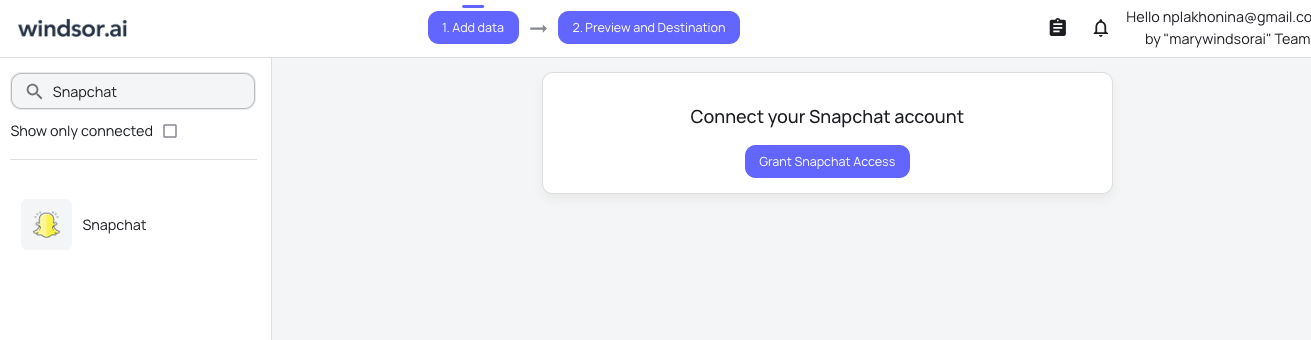
Select your data source
Choose Snapchat as your data source and grant access to Windsor.ai.
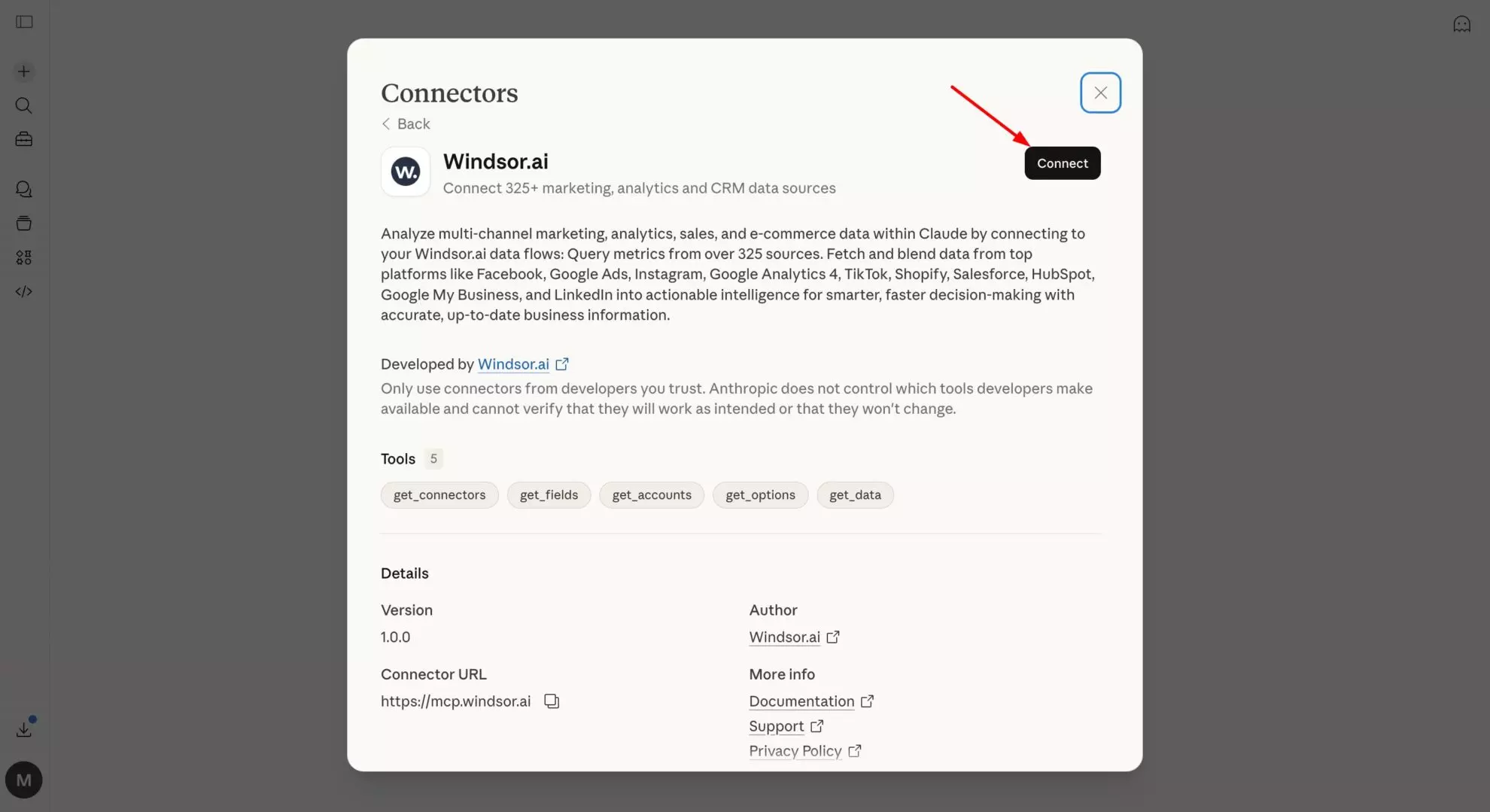
Install the Windsor.ai connector in Claude
In Claude, open Customize, then Connectors, search for Windsor and click Add. Sign in to your Windsor.ai account when prompted, and the connector appears in your Connectors list. You can also open the Windsor.ai listing in the Claude directory and click Connect.
Query your data in Claude
Start a new chat and ask Claude questions about your connected data: summarize KPIs, create client reporting dashboards, or run advanced analyses.

FAQs
What can I do with Snapchat Ads data in Claude?
Once your Snapchat Ads data is in Claude, you can:
- Analyze creative and ad performance. Instantly generate KPI summaries to identify which creatives drive the most Swipe-Ups, engagement, and conversions.
- Compare campaigns and audiences. Ask Claude to create comparison tables so you can quickly understand how different targeting, demographics, or placements impact your results.
- Optimize budget. Pinpoint underperforming ads and reallocate spend to top-performing campaigns with Claude.
- Generate action plans. Get recommendations for improving creative and bidding strategies without writing SQL or building dashboards.
- Perform cross-channel analysis. Integrate Snapchat Ads with 350+ sources (like Shopify, Google Analytics 4, or TikTok) to get a full-funnel view of your marketing and business performance in one AI-powered conversation.
Find more details about Windsor MCP for Claude use cases in this guide: https://windsor.ai/how-to-use-windsor-mcp-examples-use-cases/.
What prompts can I use when analyzing Snapchat Ads data in Claude?
Go beyond daily reports and use advanced prompts to uncover deeper insights and optimize campaigns. For example:
-
Break down all ads in the last 30 days by ad_name and ad_squad_name. Show total impressions, clicks, swipe-ups, spend, CTR, and transaction revenue. Highlight top-performing creatives and underperformers.
-
Identify ads where the CTR has dropped by more than 20% over the last 7 days. Suggest 3 creative refreshes based on our best-performing historical ads.
-
Review all ad groups and their performance. Suggest how to reallocate budgets from underperforming groups to those driving the best results, maximizing ROI.
-
Look at all key conversion events, from adding to cart to purchases and sign-ups. Show where people drop off and which campaigns or ad groups generate the most conversions.
How much does it cost to integrate Snapchat into Claude using Windsor.ai?
Windsor.ai’s pricing for Claude data integration varies depending on the number of connected accounts and data sources. We offer absolutely transparent pricing plans for diversified business needs and budgets.
How long does it take to connect Snapchat to Claude?
With Windsor.ai’s intuitive connector, the integration process takes just a few minutes. No technical expertise is required; connecting Snapchat to Claude is simple, straightforward, and completely code-free.
Do you have helpful links to get started with integrating Snapchat and Claude using Windsor.ai?
Yes, we have helpful resources to help you get started. You can explore our official documentation and tutorials for seamless Snapchat to Claude integration with Windsor.ai:
Can I compare Snapchat Ads with my other marketing channels in Claude?
Absolutely. Windsor.ai supports 350+ data sources. You can stream Snapchat, Instagram, and TikTok data into a single Claude session to get a holistic view of your social media ROI.
Does this work with the Snapchat Pixel?
Yes. As long as your conversions are being tracked by the Snapchat Pixel, those events (Purchases, Add to Cart, etc.) will be available for analysis in Claude.
Can I use Claude to generate client-ready reports?
Definitely. You can ask Claude to “Summarize this week’s Snapchat performance into 5 bullet points for a client email,” and it will generate professional, data-backed summaries instantly.
Can Claude identify ad fatigue on Snapchat?
Yes. Claude can spot Snapchat ad fatigue by tracking declining engagement and performance trends over time. It can then recommend which creatives to refresh, rotate, or pause to maintain campaign effectiveness.
Tired of manual Snapchat Ads data exports? Try Windsor.ai today to automate your reporting