Destinations
 Data sources
 AI insights
 About us
 Careers
 Security
 Customer reviews
 Contact us
 Affiliate program
 Solution partners
 Template gallery
 Looker Studio templates
 Power BI templates
 Excel templates
 Google Sheets templates
 Tableau templates
 Facebook Ads templates
 Google Ads templates
 Data fields & Metrics
 AI prompt library & Guides
 Product documentation
 API documentation
 Case studies
 Blog
Blog Data models
 Windsor vs Supermetrics
 Windsor vs Funnel.io
 Windsor vs Fivetran
 Windsor vs Rivery
 Windsor vs Portermetrics
 Windsor vs Coupler.io






Tracking CPA (Cost Per Action) is essential for understanding how efficiently your Google Ads spend drives meaningful actions such as purchases, form submissions, or signups.
To calculate CPA in an analytics environment like BigQuery, you need two components:
- Your advertising spend from Google Ads
- Your conversion events from GA4
At first glance, this sounds simple. You connect Google Ads to GA4, enable auto-tagging, and GA4 automatically receives your campaign and cost data.
But what if auto-tagging was never enabled?
Or if it was turned off by mistake?
Or if you’re inheriting an account where tracking hygiene wasn’t a priority?
Losing this connection usually means losing native campaign attribution in GA4, making it harder to analyze spend against outcomes.
In these cases, combining Google Ads cost data with GA4 event data using UTM campaign parameters provides a practical way to reconstruct a GA4-based CPA view for analysis and reporting.
Using this ready-made data model by Windsor.ai, you can calculate GA4-attributed CPA and ROAS for Google Ads, analyze campaign performance over time, and centralize paid media and analytics data in BigQuery, even when auto-tagging was not enabled.
A pre-built Google Ads CPA tracking data model
Here’s the idea of this model: you start by exporting Google Ads cost data that includes campaign names. Next, you join it with GA4’s campaign_name field, which comes from your UTM parameters. With this approach, you can match spend to conversions even without Google Ads campaign metadata flowing into GA4.
This model lets you:
- Calculate CPA and ROAS at the campaign level
- Analyze performance over time
- Build a scalable marketing warehouse in BigQuery
And the best part here, Windsor.ai handles end-to-end Google Ads to BigQuery integration, automating data extraction, cleaning, loading, and updating.
How this data model works
Even if you forgot to turn on auto-tagging:
- GA4 still captures your UTM parameters (including utm_campaign).
- Google Ads exports still contain campaign_id and campaign_name.
By matching GA4’s campaign name to Google Ads’ campaign name, you reconstruct a GA4-level linkage between spend and conversion events for analysis.
This solution uses the following standard dimensional modeling approach:
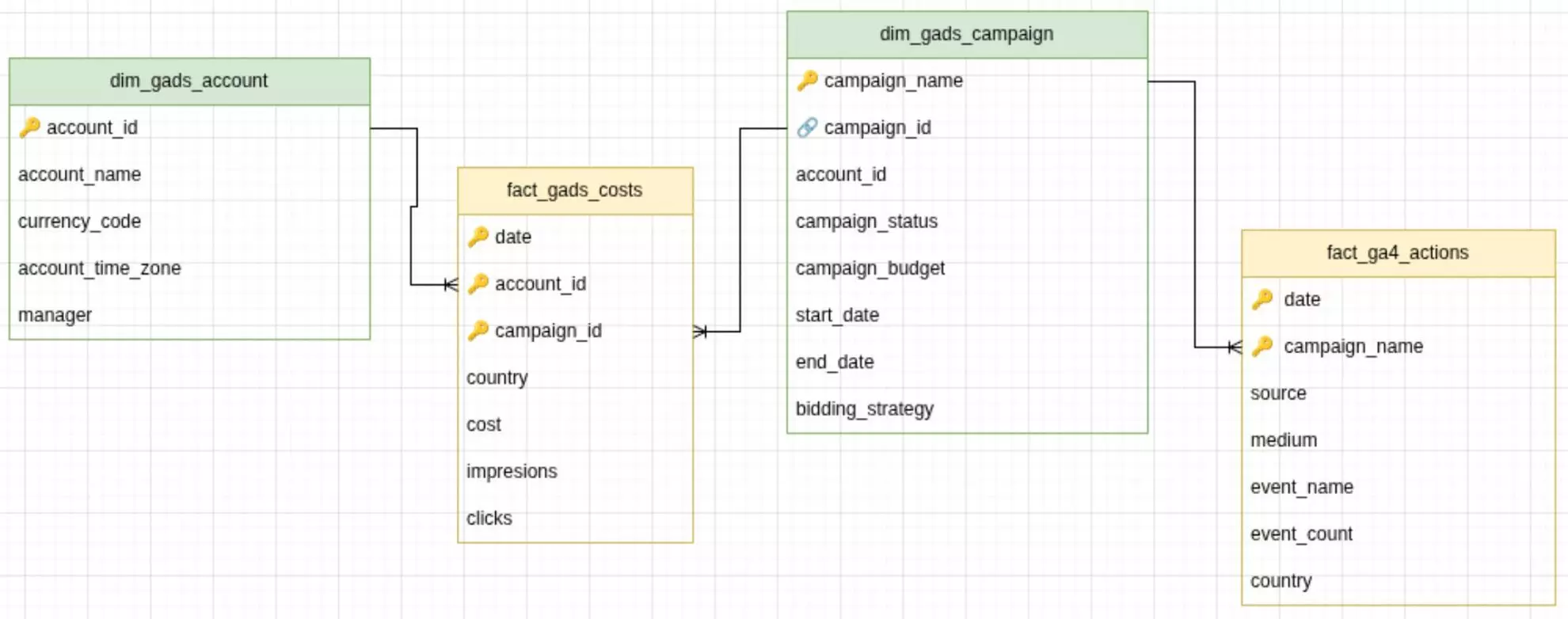
Fact tables:
- fact_gads_costs – impressions, clicks, cost
- fact_ga4_actions – conversions/events from GA4
Dimension tables:
- dim_gads_campaign – connects GA4 campaign_name with GAds campaign_name
- dim_gads_account – Google Ads account attributes
❗ Important: This model calculates CPA using GA4-recorded conversion events attributed to Google Ads based on UTM campaign parameters. Results reflect GA4’s attribution logic (last-click, event-based) and may differ from CPA reported directly in Google Ads, which uses its own attribution model and conversion settings.
How to deploy this model using Windsor.ai
To make your setup easier, we’ve prepared ready-to-use configurations for the tables defined in the above schema. These configurations can be copied right into Windsor.ai to create scheduled export tasks for BigQuery.
Quick setup steps:
- Connect your Google Ads and GA4 account(s) to Windsor.ai and click ‘Next.’
- Scroll down to Destinations → BigQuery.
- Click “Create destination task” (create separate tasks for each config).
- Paste the Connector URL from the config below.
- Set Schedule type as proposed in the config (or adjust to your needs).
- Set Columns to match from the config below.
- Save the task and see it’s running and streaming data to your BigQuery project.
📚 For detailed setup steps (including connecting your BigQuery project), visit documentation: How to Integrate Data into BigQuery with Windsor.ai.
Once set up, Windsor will automatically populate your BigQuery tables with data from Google Ads and GA4, so you can start analyzing your CPA right away. You can start for free on the Forever Free plan to test it out at no cost and see how it works for your campaigns.
Pre-built configurations for Windsor to BigQuery export tasks
Create BigQuery destination tasks in Windsor.ai with the following configurations (just copy-paste the connector URL and select/adjust the proposed settings).
❗ Important: Make sure to insert your actual API key into these connector URLs. For a quick API key insertion, first, paste a copied connector URL into the data preview field; Windsor will automatically add your API key. Preview your data and copy-paste this complete URL into the BigQuery destination task (repeat for each config).

1) Destination task: fact_gads_costs
Connector URL:
https://connectors.windsor.ai/google_ads?date_preset=last_7d&fields=account_id,campaign_id,campaign_name,clicks,cost,country,date,impressions

Task settings:
| Task name | Google Ads CPA -> BigQuery (fact_gads_costs) |
| Schedule type | Daily |
| Columns to match | date |
2) Destination task: fact_ga4_actions
Connector URL:
https://connectors.windsor.ai/googleanalytics4?date_preset=last_7d&fields=campaign_name,country,date,event_count,event_name,medium,source
Task settings:
| Task name | Google Ads CPA -> BigQuery (fact_ga4_actions) |
| Schedule type | Daily |
| Columns to match | date, campaign_name |
| Filters (optional) |
If needed, apply the following filters in dataset settings. Make sure to adjust them for custom UTM setups:
( medium = cpc OR medium = social OR medium = paid_social ) AND ( source = google) |
3) Destination task: dim_gads_campaign
Connector URL:
https://connectors.windsor.ai/google_ads?date_preset=last_7d&fields=account_id,bidding_strategy,campaign_budget,campaign_id,campaign_name,campaign_status,end_date,start_date
Task settings:
| Task name | Google Ads CPA -> BigQuery (dim_gads_campaign) |
| Schedule type | Daily |
| Columns to match | campaign_id |
4) Destination task: dim_gads_account
Connector URL:
https://connectors.windsor.ai/google_ads?date_preset=last_7d&fields=account_id,account_name,account_time_zone,currency_code,manager
Task settings:
| Task name | Google Ads CPA -> BigQuery (dim_gads_account) |
| Schedule type | Daily |
| Columns to match | account_id |
Sample query
Below is a sample SQL query you can use to calculate Google Ads CPA in BigQuery on top of the deployed data model (❗Don’t forget to replace the placeholder table names with your actual BigQuery table names).
WITH ga4_form_submissions AS (
SELECT
date,
campaign_name,
SUM(event_count) AS form_submissions
FROM `project.dataset_id.fact_ga4_actions`
WHERE
LOWER(source) = 'google'
AND LOWER(medium) IN ('cpc', 'paid_search', 'search')
AND event_name = 'form_submit'
GROUP BY date, campaign_name
),

gads_metrics AS (
SELECT
date,
campaign_id,
SUM(impressions) AS impressions,
SUM(cost) AS cost,
SUM(clicks) AS clicks
FROM `project.dataset_id.fact_gads_costs`
GROUP BY date, campaign_id
),

dedup_campaigns AS (
SELECT
campaign_id,
campaign_name
FROM `project.dataset_id.dim_gads_campaign`
QUALIFY ROW_NUMBER() OVER (
PARTITION BY campaign_id
ORDER BY updated_at DESC
) = 1
)

SELECT
ga4.date,
ga4.campaign_name,
ga4.form_submissions,
cmp.campaign_id,

COALESCE(gads.cost, 0) AS cost,
COALESCE(gads.clicks, 0) AS clicks,
COALESCE(gads.impressions, 0) AS impressions,

SAFE_DIVIDE(
COALESCE(gads.cost, 0),
NULLIF(ga4.form_submissions, 0)
) AS cpa

FROM ga4_form_submissions ga4
LEFT JOIN dedup_campaigns cmp
ON LOWER(TRIM(ga4.campaign_name)) = LOWER(TRIM(cmp.campaign_name))
LEFT JOIN gads_metrics gads
ON cmp.campaign_id = gads.campaign_id
AND gads.date = ga4.date

ORDER BY ga4.campaign_name, ga4.date;
This query:
- Aggregates form submissions from GA4
- Blends them with Google Ads cost and click data
- Joins both datasets through the shared campaign name and campaign ID fields
The result reflects GA4’s last-click attribution logic and should be treated as an analytics-based CPA, not a replacement for Google Ads–reported CPA.
What you get:
By exporting your Google Ads costs and GA4 event metrics into BigQuery using Windsor.ai’s automated connectors, you get a scalable, reliable foundation for analyzing CPA, ROAS, and the performance of every campaign, even when native tracking wasn’t set up perfectly.
This data model does more than automate reporting. It gives you:
- A reusable Google Ads CPA data model in BigQuery
- Fact tables for spend, impressions, clicks, conversions
- Dimensions that rebuild the missing link between GA4 & Google Ads
- A clean, analytics-ready dataset
- Ready-to-use CPA calculation query
It’s a perfect foundation for further integration with Looker Studio, Power BI, Tableau, or other BI tools.
🚀 Integrate your Google Ads data into BigQuery with Windsor.ai and build your unified CPA dataset right now:: https://onboard.windsor.ai.