Destinations
 Data sources
 AI insights
 About us
 Careers
 Security
 Customer reviews
 Contact us
 Affiliate program
 Solution partners
 Template gallery
 Looker Studio templates
 Power BI templates
 Excel templates
 Google Sheets templates
 Tableau templates
 Facebook Ads templates
 Google Ads templates
 Data fields & Metrics
 AI prompt library & Guides
 Product documentation
 API documentation
 Case studies
 Blog
Blog Data models
 Windsor vs Supermetrics
 Windsor vs Funnel.io
 Windsor vs Fivetran
 Windsor vs Rivery
 Windsor vs Portermetrics
 Windsor vs Coupler.io





Facebook Ads generate large volumes of data across different levels: accounts, campaigns, ad sets, and ads. While Meta Ads Manager is useful for day-to-day monitoring, it quickly becomes limiting when you need historical analysis, cross-channel reporting, or BI-ready datasets.
This kit shows you how to model complex Facebook Ads performance data in BigQuery using a dimensional (star) schema, and how to keep it auto-refreshing with Windsor.ai, without custom scripts or manual maintenance.
A pre-built Facebook Ads performance reporting data model
By deploying this kit, you’ll get structured, analytics-ready tables in BigQuery with a scheduled refresh.
With this model in place, you can track and analyze the following things:
- Spend, impressions, clicks, and conversions over time
- Campaign, ad set, and ad-level performance
- CPA, CTR, ROAS, and custom KPIs
- Historical trends beyond Meta Ads Manager limits
- Facebook Ads performance alongside other marketing channels
And the best part here, Windsor.ai automates the data extraction, cleaning, and loading, delivering structured datasets to your BigQuery project in minutes.
How this data model works
This kit uses a star schema, with one central fact table surrounded by descriptive dimensions.

Fact table:
- fact_ads_performance – Daily performance metrics at ad-level granularity
Dimension tables:
- dim_account – Facebook Ads account attributes
- dim_campaign – Campaign metadata and budgets
- dim_adset – Targeting and budget configuration
- dim_ad – Creative-level details
This structure keeps metrics centralized while allowing flexible slicing by campaign, ad set, ad, time, or account.
📙 For a deeper explanation of this schema and design decisions, see the full guide on building a Facebook Ads data model in BigQuery.
How to deploy this model using Windsor.ai
To make your setup easier, we’ve prepared ready-to-use configurations for the tables defined in the above schema. These configurations can be copied right into Windsor.ai to create scheduled export tasks for BigQuery.
Quick setup steps:
- Connect your Facebook Ads account(s) to Windsor.ai and click ‘Next.’
- Scroll down to Destinations → BigQuery.
- Click “Create destination task” (create separate tasks for each config).
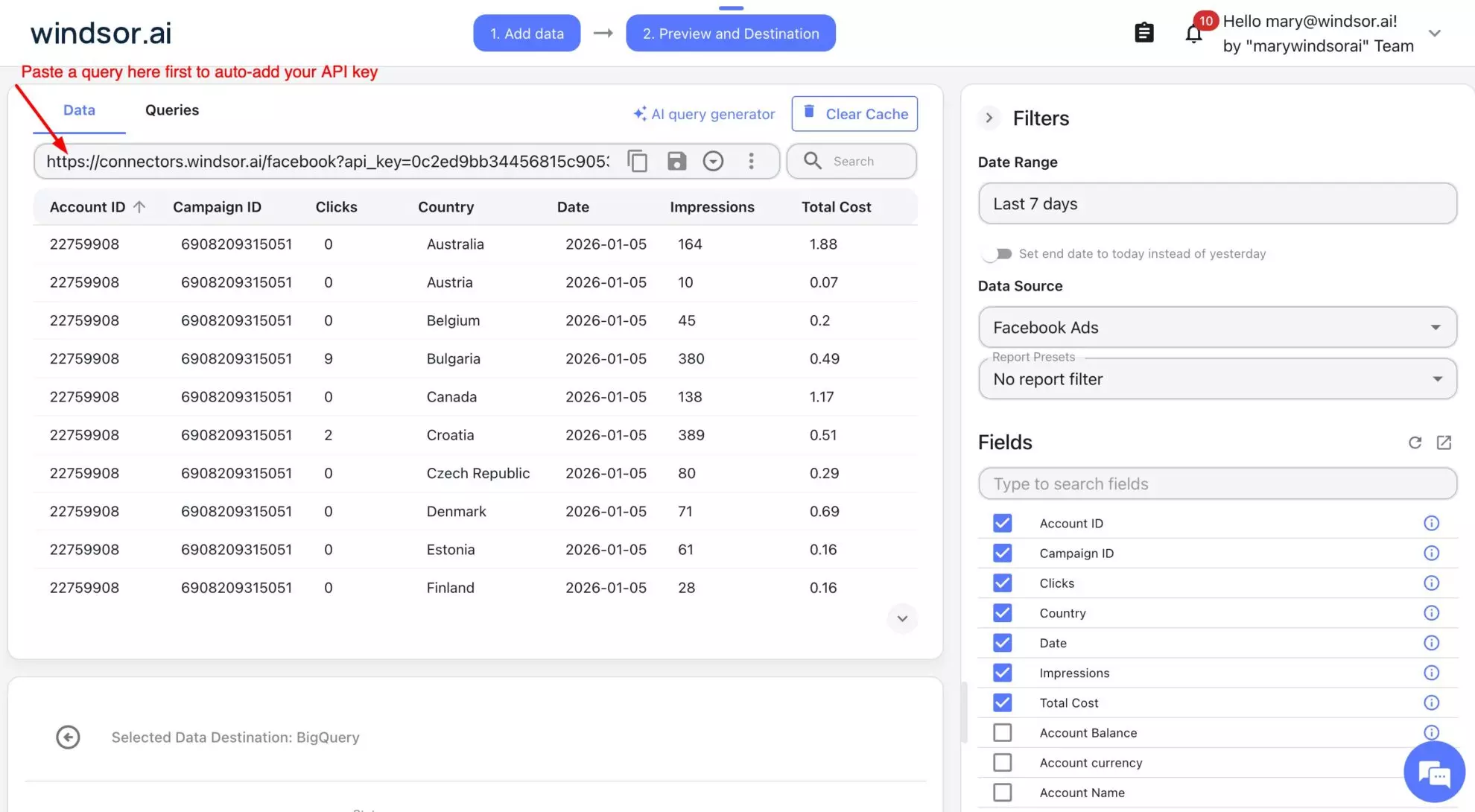
- Paste the Connector URL from the config below.
- Set Schedule type as proposed in the config (or adjust to your needs).
- Set Columns to match from the config below.
- Save the task and see it’s running and streaming data to your BigQuery project.
📚 For detailed setup steps (including connecting your BigQuery project), visit documentation: How to Integrate Data into BigQuery with Windsor.ai.
Once set up, Windsor will automatically populate your BigQuery tables with data from Meta Ads, so you can start analyzing your performance right away. You can start for free on the Forever Free plan to test it out at no cost and see how it works for your campaigns.
Pre-built configurations for Windsor to BigQuery export tasks
Create BigQuery destination tasks in Windsor.ai with the following configurations (just copy-paste the connector URL and select/adjust the proposed settings).
❗ Important: Make sure to insert your actual API key into these connector URLs. For a quick API key insertion, first, paste a copied connector URL into the data preview field; Windsor will automatically add your API key. Preview your data and copy-paste this complete URL into the BigQuery destination task (repeat for each config).
1) Destination task: fact_ads_performance
Connector URL:
https://connectors.windsor.ai/facebook?api_key=&date_preset=last_7d&fields=account_id,ad_id,adset_id,campaign_id,clicks,date,impressions

Task settings:
| Schedule type | daily |
| Columns to match | date, account_id, campaign_id, adset_id, ad_id |
| Partitioning granularity | daily (default) |
| Partition table by | date |
2) Destination task: dim_account
Connector URL:
https://connectors.windsor.ai/facebook?api_key=date_preset=last_7d&fields=account_id,account_name,account_currency,account_status,amount_spent,spend_cap
Task settings:
| Schedule type | daily |
| Columns to match | account_id |
3) Destination task: dim_campaign
Connector URL:
https://connectors.windsor.ai/facebook?api_key=date_preset=last_7d&fields=campaign_id,campaign,campaign_bid_strategy,campaign_configured_status,campaign_daily_budget,campaign_start_time
Task settings:
| Schedule type | daily |
| Columns to match | campaign_id |
4) Destination task: dim_adset
Connector URL:
https://connectors.windsor.ai/facebook?api_key=date_preset=last_7d&fields=adset_id,adset_name,adset_status,adset_daily_budget,adset_budget_remaining,adset_bid_strategy
Task settings:
| Schedule type | daily |
| Columns to match | adset_id |
5) Destination task: dim_ad
Connector URL:
https://connectors.windsor.ai/facebook?api_key=***&date_preset=last_7d&fields=ad_id,ad_name,ad_created_time,ad_object_type,effective_status,link_url,website_destination_url
Task settings:
| Schedule type | daily |
| Columns to match | ad_id |
What you get
By deploying this kit, you’ll have:
- A production-ready Facebook Ads data model in BigQuery
- Fact tables optimized for performance metrics
- Reusable dimension tables for campaigns, ad sets, ads, and accounts
- Auto-refreshing pipelines that keep your data up to date
- A query-ready dataset for Looker Studio, Tableau, Power BI, or SQL analysis
By centralizing Meta Ads data in one place, you can analyze various performance metrics confidently, connect to any BI tool, and make better budget decisions without relying on fragmented platform reports.
🚀 Get started with Windsor.ai for free and build a scalable Facebook Ads data warehouse in BigQuery in minutes with no code: https://onboard.windsor.ai/app/facebook.