 Destinations
 Data sources
 AI insights
 About us
 Careers
 Security
 Customer reviews
 Contact us
 Affiliate program
 Solution partners
 Template gallery
 Looker Studio templates
 Power BI templates
 Excel templates
 Google Sheets templates
 Tableau templates
 Facebook Ads templates
 Google Ads templates
 Data fields & Metrics
 AI prompt library & Guides
 Product documentation
 API documentation
 Case studies
 Blog
Blog Data models
 Windsor vs Supermetrics
 Windsor vs Funnel.io
 Windsor vs Fivetran
 Windsor vs Rivery
 Windsor vs Portermetrics
 Windsor vs Coupler.io
Connect Google Search Console to Python
Load Search Console data into a pandas DataFrame with one API request: clicks, impressions, CTR and average position by date, query, page, country and device, past the 1,000 rows the Performance report shows.
The example below is the code we ran on windsor.ai’s own property, with its real output.
 Sign up with Google
 Free forever plan
No credit card needed
Free forever plan
No credit card needed










What to do with Search Console data in Python
A few uses that need more than the Performance report’s 1,000 rows:

Split branded and non-branded search
Label queries with df["query"].str.contains("yourbrand", case=False), then compare clicks and CTR for both groups.

Find pages that compete for one query
Group by query and count unique pages with df.groupby("query")["page"].nunique(). Several pages with impressions for one query can split its clicks.

Track changes over time
Run the request on a schedule, append each result to a file or table, and compare weeks for the queries and pages that matter to you.
Limits to plan for
Rows per day. A request for date and query returned exactly 5,000 rows per day in our test. Adding a third field lifted that: date, query and device returned 13,000 to 15,300 rows per day, with the same clicks as a request for query alone. Add device or page when you need the long tail.
Missing queries. Google does not report rare queries, so any table with the query field has fewer clicks than the site total in the Performance report.
History and freshness. Search Console keeps 16 months of data, and the newest days arrive with a delay. On 4 October 2026 the latest day available was 29 September. To keep more than 16 months, store each pull, for example in Parquet files or BigQuery.














How to connect Google Search Console to Python
You need:
- Access to a Search Console property
- A Windsor.ai account (free forever plan, no credit card)
- Python 3 with requests and pandas
Connect Search Console to Windsor.ai
Sign in at onboard.windsor.ai, choose Google Search Console and select your property. Domain properties appear as sc-domain:example.com and include every subdomain.

Copy your API key
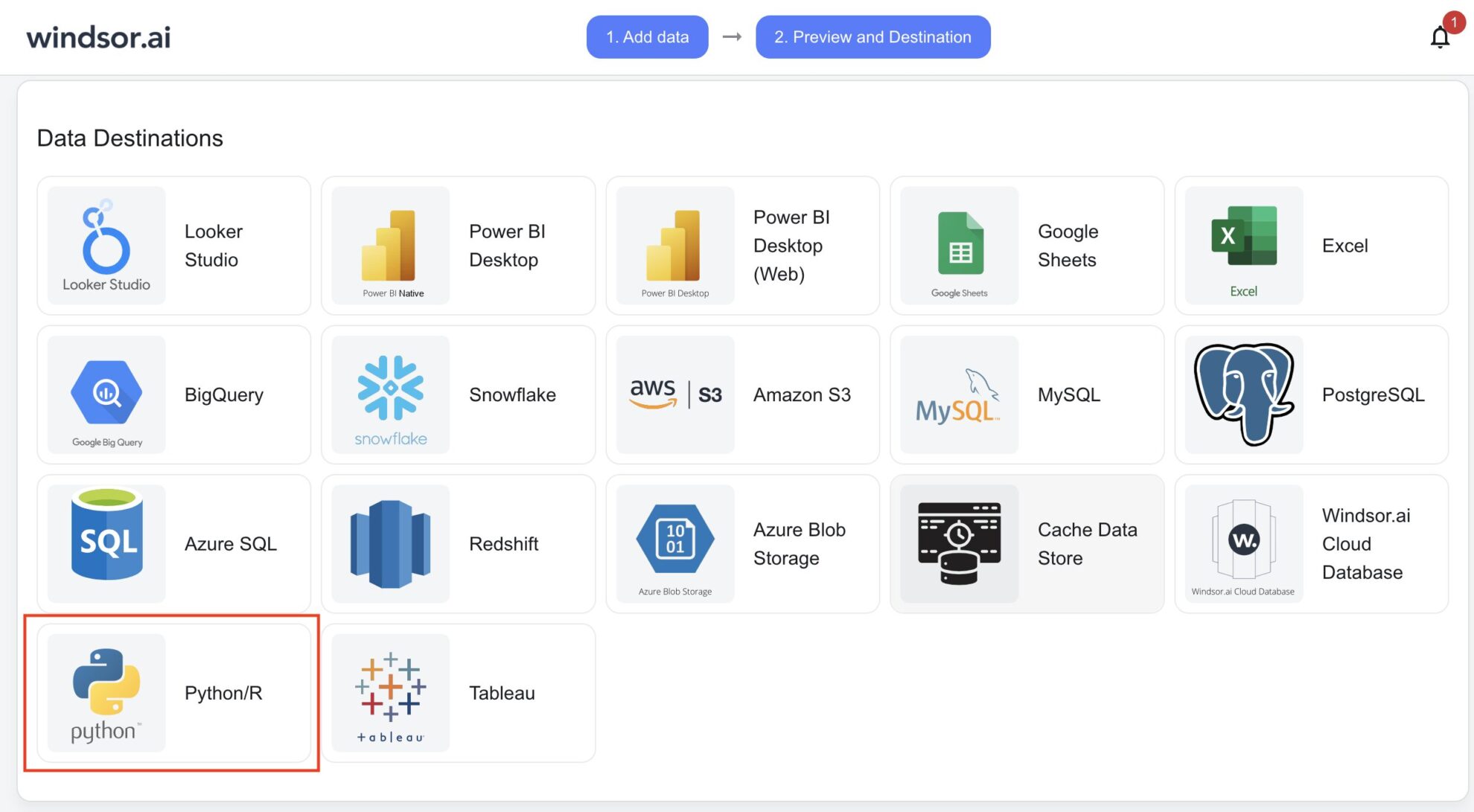
On the Preview and Destination page, choose Python under Data Destinations and copy the URL from the instructions. The value after api_key= is your key. Store it in an environment variable, for example WINDSOR_API_KEY, and keep it out of your code and version control.
Request the data from Python
Send a GET request to https://connectors.windsor.ai/searchconsole with your key, the dates and the fields you want. The response is JSON with the rows under data, which pandas turns into a DataFrame. The example in the next section is the code we ran.
Example: a week of Search Console data in pandas
This is the code we ran on 4 October 2026 against windsor.ai’s own Search Console property:
import os
import requests
import pandas as pd

params = {
    "api_key": os.environ["WINDSOR_API_KEY"],
    "date_from": "2026-09-23",
    "date_to": "2026-09-29",
    "fields": "date,query,page,clicks,impressions,ctr,position",
}
r = requests.get("https://connectors.windsor.ai/searchconsole", params=params, timeout=300)
r.raise_for_status()

df = pd.DataFrame(r.json()["data"])
df["date"] = pd.to_datetime(df["date"])

print(len(df), "rows")
print(df.groupby("date")[["clicks", "impressions"]].sum())
And this is what it printed:
113085 rows
            clicks  impressions
date
2026-09-23  2544.0     148718.0
2026-09-24  2311.0     132304.0
2026-09-25  1832.0     134700.0
2026-09-26  1092.0     118988.0
2026-09-27  1323.0     123271.0
2026-09-28  2341.0     143811.0
2026-09-29  2370.0     156894.0
The request took 11.6 seconds. The metrics arrive as floats and the date as text, which is why the code converts it. To get CSV instead of JSON, add "_renderer": "csv" to the parameters and read the response with pd.read_csv; that returned the same 113,085 rows in 10 seconds.
Fields we used
| Field | What it contains |
|---|---|
| date | The day of the search |
| query | The search query, for queries Google reports |
| page | The full URL that appeared in the results |
| clicks, impressions, ctr | Clicks, impressions and click-through rate (a ratio) |
| position | Average position |
Country, device, page path, search type and sitemap fields are also available; the Search Console field reference lists them all, and the API documentation lists the other parameters, such as date_preset.
Larger requests
The same fields for 2 to 29 September returned 547,336 rows in 74 seconds, with all 28 days present. Set a timeout that leaves room for requests of that size.
FAQs
Is the Search Console to Python connection free?
Yes, on the free forever plan, which covers one data source with no credit card. Paid plans start at $19 a month for more sources; see pricing.
Is there an official Python library?
Yes. pywindsorai (version 1.0.6) wraps the same API: Client(api_key).connectors(connector="searchconsole", ...) returned the same 113,085 rows in our test. It requires requests 2.25.x and downgraded our newer requests when installed, so install it in a virtual environment.
Can I get CSV instead of JSON?
Yes. Add _renderer=csv to the request and read it with pd.read_csv. In our test the CSV response held the same rows as the JSON one, and read_csv parsed the date column directly.
Why does a date and query request stop at 5,000 rows per day?
That is the number of rows per day we got for date and query in our test, on every one of 28 days. Adding a third field lifted it: for windsor.ai, date, query and device returned 13,000 to 15,300 rows per day, and date, query and page 14,700 to 17,700.
Why are my totals lower than in Search Console?
Google does not report rare queries, so a table that includes the query field has fewer clicks than the site total. A table by date and country, without the query field, comes closer to the Performance report.
Do I need the Search Console API or a Google Cloud project?
No. You connect Search Console to Windsor.ai once by signing in with the Google account that has access to the property, and the request goes to Windsor.ai with your API key. To call the Search Console API directly, see our guide to the Google Search Console API.
Where is the documentation?
Load your Search Console data into Python. Try Windsor.ai free


