 Destinations
 Data sources
 AI insights
 About us
 Careers
 Security
 Customer reviews
 Contact us
 Affiliate program
 Solution partners
 Template gallery
 Looker Studio templates
 Power BI templates
 Excel templates
 Google Sheets templates
 Tableau templates
 Facebook Ads templates
 Google Ads templates
 Data fields & Metrics
 AI prompt library & Guides
 Product documentation
 API documentation
 Case studies
 Blog
Blog Data models
 Windsor vs Supermetrics
 Windsor vs Funnel.io
 Windsor vs Fivetran
 Windsor vs Rivery
 Windsor vs Portermetrics
 Windsor vs Coupler.io
Connect Instagram to ChatGPT
Install the Windsor.ai plugin in ChatGPT and ask about your Instagram posts, Reels, Stories and followers in plain language. ChatGPT can also publish posts, Reels and Stories and handle comments, and it waits for your confirmation before each one.
For Instagram Business and Creator accounts. Free forever plan for one data source, no credit card.
 Sign up with Google
 Free forever plan









What ChatGPT can do with your Instagram data
Through the plugin, ChatGPT reads your account, post, Reel, Story and follower data and requests only the fields a question needs.

See who follows you
Followers by age group, gender, country and city come back in one answer. Instagram reports them as they stand today, without a month-by-month history of your audience.

Rank posts by the number you care about
Sort your posts from the last 30 days by views, reach, saves or shares, or by a ratio such as saves per account reached, which ChatGPT works out from Instagram’s numbers.

Check Stories while they are up
For each Story, Instagram reports views, taps forward and back, swipes and exits for 24 hours. Ask before the Story expires, or export Story data to Google Sheets or a warehouse every day.

Find the posts that brought followers
Instagram reports follows per post for images and carousels, and new followers per day for the last 30 days. It does not report follows for Reels; for those, compare new followers on the days each Reel went up.
Example: who follows our Instagram account
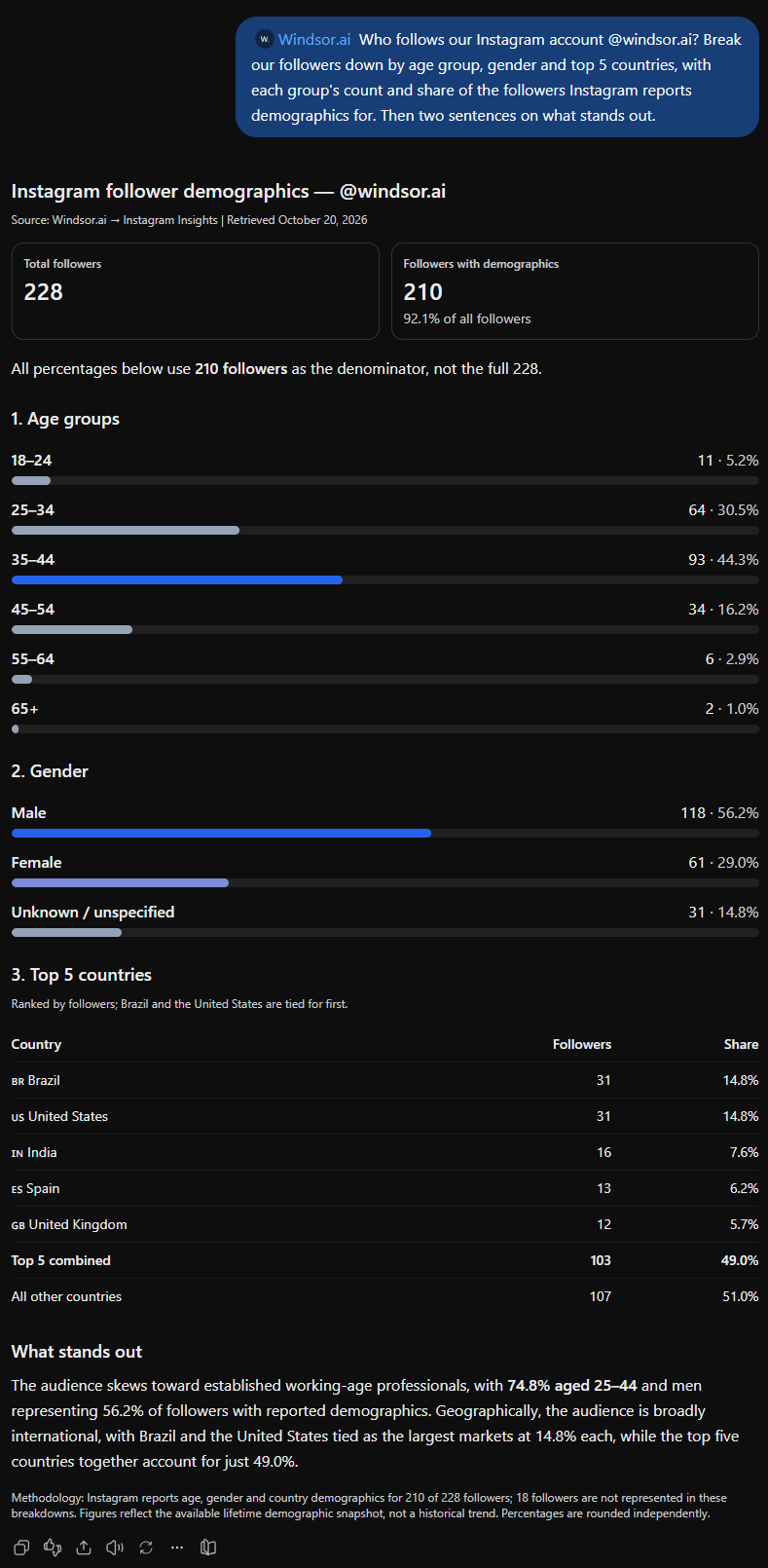
For the question “Who follows our Instagram account? Break our followers down by age group, gender and top 5 countries”, ChatGPT pulled the follower breakdowns from Instagram through the Windsor.ai plugin. On 20 October 2026, Instagram reported demographics for 210 of the 228 followers of @windsor.ai:
- Age: 35 to 44 is the largest group, with 93 of the 210 (44%), followed by 25 to 34 with 64 (30%).
- Gender: 118 men, 61 women and 31 unspecified.
- Countries: Brazil and the United States tie at 31 followers each, followed by India (16), Spain (13) and the United Kingdom (12). Together these five hold 103 of the 210.
Our followers come from 39 countries in total. Instagram gives these breakdowns as a current snapshot; saving a copy each month is the way to see the audience change over time.
Available actions
Create Carousel Post Publish a multi-image carousel post to a connected Instagram Business or Creator account. Provide 2 to 10 publicly accessible image URLs (JPEG, at most 8 MB each, aspect ratio between 4:5 and 1.91:1) and an optional caption; images are shown in the given order. Video carousel items are not supported. For other formats use create_image_post, create_video_post or create_story.
Publish a multi-image carousel post to a connected Instagram Business or Creator account. Provide 2 to 10 publicly accessible image URLs (JPEG, at most 8 MB each, aspect ratio between 4:5 and 1.91:1) and an optional caption; images are shown in the given order. Video carousel items are not supported. For other formats use create_image_post, create_video_post or create_story.
Create Comment Post a comment on a media object (post, reel) of a connected Instagram Business or Creator account. media_id is an Instagram media object id, as returned by the media_id read field. The comment is public and is attributed to the account. Comments on live videos are not supported, and the media must have comments enabled.
Post a comment on a media object (post, reel) of a connected Instagram Business or Creator account. media_id is an Instagram media object id, as returned by the media_id read field. The comment is public and is attributed to the account. Comments on live videos are not supported, and the media must have comments enabled.
Create Image Post Publish a single image post (feed photo) to a connected Instagram Business or Creator account. Provide a publicly accessible image URL and an optional caption. The image must be a JPEG, at most 8 MB, with an aspect ratio between 4:5 and 1.91:1. For other formats use create_video_post, create_story or create_carousel_post.
Publish a single image post (feed photo) to a connected Instagram Business or Creator account. Provide a publicly accessible image URL and an optional caption. The image must be a JPEG, at most 8 MB, with an aspect ratio between 4:5 and 1.91:1. For other formats use create_video_post, create_story or create_carousel_post.
Create Story Publish a story to a connected Instagram Business or Creator account. Provide exactly one of image_url (JPEG, at most 8 MB) or video_url (MP4 or MOV, at most 100 MB, 3 to 60 seconds long), publicly accessible; a 9:16 aspect ratio is recommended. Stories do not support captions and disappear after 24 hours. For feed posts use create_image_post, create_video_post or create_carousel_post.
Publish a story to a connected Instagram Business or Creator account. Provide exactly one of image_url (JPEG, at most 8 MB) or video_url (MP4 or MOV, at most 100 MB, 3 to 60 seconds long), publicly accessible; a 9:16 aspect ratio is recommended. Stories do not support captions and disappear after 24 hours. For feed posts use create_image_post, create_video_post or create_carousel_post.
Create Video Post Publish a single video post to a connected Instagram Business or Creator account. Instagram publishes all single-video feed posts as Reels. Provide a publicly accessible video URL and an optional caption. The video must be an MP4 or MOV, at most 1 GB, between 3 seconds and 15 minutes long; a 9:16 aspect ratio is recommended. The cover image defaults to the first frame and can be overridden with either cover_url (a publicly accessible JPEG URL) or thumb_offset (frame position in milliseconds), but not both. share_to_feed controls whether the Reel also appears in the main feed (Instagram defaults to showing it there). For other formats use create_image_post, create_story or create_carousel_post.
Publish a single video post to a connected Instagram Business or Creator account. Instagram publishes all single-video feed posts as Reels. Provide a publicly accessible video URL and an optional caption. The video must be an MP4 or MOV, at most 1 GB, between 3 seconds and 15 minutes long; a 9:16 aspect ratio is recommended. The cover image defaults to the first frame and can be overridden with either cover_url (a publicly accessible JPEG URL) or thumb_offset (frame position in milliseconds), but not both. share_to_feed controls whether the Reel also appears in the main feed (Instagram defaults to showing it there). For other formats use create_image_post, create_story or create_carousel_post.
Delete Comment Delete a comment on a media object of a connected Instagram Business or Creator account. comment_id is an Instagram comment id, as returned by the comment_id read field. Works on any comment on the account's own media, including other users' comments. This is permanent; to only restrict visibility use hide_comment instead.
Delete a comment on a media object of a connected Instagram Business or Creator account. comment_id is an Instagram comment id, as returned by the comment_id read field. Works on any comment on the account's own media, including other users' comments. This is permanent; to only restrict visibility use hide_comment instead.
Hide Comment Hide a comment on a media object of a connected Instagram Business or Creator account, leaving it visible only to its author and the account. comment_id is an Instagram comment id, as returned by the comment_id read field. Works on any comment on the account's own media, including other users' comments. Reversible with unhide_comment.
Hide a comment on a media object of a connected Instagram Business or Creator account, leaving it visible only to its author and the account. comment_id is an Instagram comment id, as returned by the comment_id read field. Works on any comment on the account's own media, including other users' comments. Reversible with unhide_comment.
Reply to Comment Reply to a comment on a media object of a connected Instagram Business or Creator account. comment_id is an Instagram comment id, as returned by the comment_id read field. The reply is public and attributed to the account. To comment on the media itself rather than reply to a comment, use create_comment.
Reply to a comment on a media object of a connected Instagram Business or Creator account. comment_id is an Instagram comment id, as returned by the comment_id read field. The reply is public and attributed to the account. To comment on the media itself rather than reply to a comment, use create_comment.
Unhide Comment Unhide a previously hidden comment on a media object of a connected Instagram Business or Creator account, making it publicly visible again. comment_id is an Instagram comment id, as returned by the comment_id read field. Reversible with hide_comment.
Unhide a previously hidden comment on a media object of a connected Instagram Business or Creator account, making it publicly visible again. comment_id is an Instagram comment id, as returned by the comment_id read field. Reversible with hide_comment.














How to connect Instagram to ChatGPT with Windsor.ai
The step-by-step guide to connecting Instagram to ChatGPT shows each screen. For other sources, see how to add data to ChatGPT with Windsor.ai.
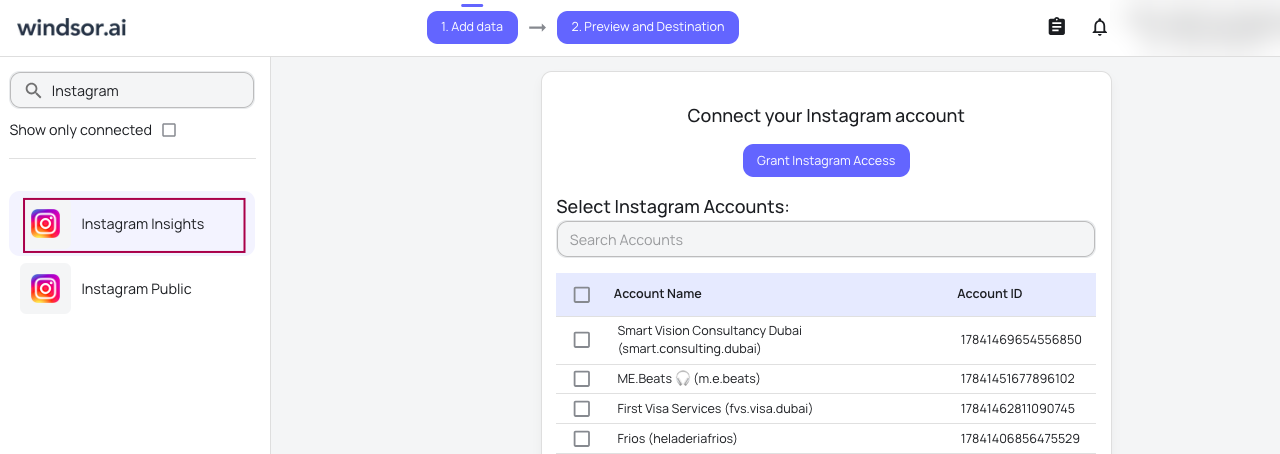
Select your data source
Choose Instagram as your data source and grant access to Windsor.ai.
Install the Windsor.ai connector
Log in to your ChatGPT account and open this Windsor.ai connector page.
Click Connect, then authorize access.

Query your Instagram data in ChatGPT
Open a new chat and start asking questions about your connected Instagram data using natural language.
Make sure that the Windsor.ai connector is enabled (click the + sign → More → Windsor.ai.)

FAQs
Which Windsor.ai plugin should I install?
Install the one called Windsor.ai. It covers Instagram and 350+ other sources, and it can publish posts and manage comments. The Windsor.ai Instagram plugin is limited to organic Instagram analytics: it does not publish or moderate comments.
How do I connect Instagram to ChatGPT?
Click Plugins in the ChatGPT sidebar, search for Windsor.ai and click Install plugin. Sign in to Windsor.ai and authorize your Instagram Business or Creator account. In a new chat, type @Windsor.ai, pick the plugin and ask your question. The step-by-step guide has screenshots of each step.
Can ChatGPT post to Instagram?
Yes, with the Windsor.ai plugin. ChatGPT can publish a single image, a carousel of 2 to 10 images, a video (published by Instagram as a Reel) or a Story, using files at a public URL. It asks you to confirm before anything is published. See the write actions list.
Can ChatGPT reply to and moderate comments on my Instagram posts?
Yes. On your own posts, ChatGPT can add a comment, reply to one, hide or unhide one, and delete one, including comments other people wrote. A hidden comment can be shown again; a deleted one is gone for good.
Can ChatGPT watch my Instagram Reels?
No. The plugin does not pass the video itself. ChatGPT works from each Reel’s caption, comments and numbers: views, reach, saves, shares, average watch time and the share of views skipped in the first 3 seconds.
Can I analyze Instagram ads in ChatGPT?
Yes, through the Facebook Ads connector, because Instagram ads are bought in Meta Ads Manager. Spend, clicks and results come from your Meta ad account, and the Ad Platform field tells Instagram ads apart from Facebook ads. The Instagram connector itself covers organic content and followers.
Can I connect several Instagram accounts for different brands?
Yes. Authorize each Instagram account in Windsor.ai, and ChatGPT can compare them in one conversation. How many accounts you can connect depends on your plan; see pricing.
Can ChatGPT show how my followers grew over the past year?
Not from Instagram alone. Instagram gives today’s follower total, and new followers per day for the last 30 days on accounts with 100 or more followers. For a longer record, export the numbers to Google Sheets or a warehouse each day, as in the Instagram follower tracking dashboard.
Can ChatGPT analyze a competitor's Instagram account?
Yes, through the Instagram Public connector, which reads public profiles without a login: posts with their like and comment counts, and the follower count. Only the account owner can see reach, saves and other private numbers. See Instagram Public to ChatGPT.
Is connecting Instagram to ChatGPT free?
Yes. The free forever plan includes one data source and the last 30 days of data, and no credit card is needed. Adding a second source, such as GA4, Shopify or your Meta ads, needs a paid plan, from $19 a month for 3 sources, billed annually. See pricing.
Is my Instagram data used to train ChatGPT?
It depends on your ChatGPT plan. OpenAI does not train on data from ChatGPT business workspaces (Business, Enterprise and Edu) by default. On Free, Plus and Pro, you can turn off “Improve the model for everyone” under Data controls. Instagram data that ChatGPT reads through the plugin becomes part of the conversation.
Can I use my Instagram data in Claude or Gemini Enterprise?
Yes. Windsor.ai is in Claude’s connector directory; see connect Instagram to Claude. In Gemini Enterprise, Windsor.ai is added as a data store; see how to connect Instagram to Gemini Enterprise.
Ask ChatGPT about your Instagram account with Windsor.ai


