 Destinations
 Data sources
 AI insights
 About us
 Careers
 Security
 Customer reviews
 Contact us
 Affiliate program
 Solution partners
 Template gallery
 Looker Studio templates
 Power BI templates
 Excel templates
 Google Sheets templates
 Tableau templates
 Facebook Ads templates
 Google Ads templates
 Data fields & Metrics
 AI prompt library & Guides
 Product documentation
 API documentation
 Case studies
 Blog
Blog Data models
 Windsor vs Supermetrics
 Windsor vs Funnel.io
 Windsor vs Fivetran
 Windsor vs Rivery
 Windsor vs Portermetrics
 Windsor vs Coupler.io
 Last updated: 20 October 2026




Connect your Instagram Insights to ChatGPT in under a minute, no code required, and start asking questions in plain language: which posts are working, why, and what to post next. Windsor MCP streams your live Instagram data straight into ChatGPT, covering your own account, public competitor data, and Meta Ads performance, so you get answers instead of raw numbers.
Windsor connects through Instagram’s official Graph API, not scraping or link-opening, so ChatGPT works with live, structured data rather than public page content.
🚀 Connect Instagram Insights to ChatGPT with Windsor MCP. Get started for free → onboard.windsor.ai/app/instagram.
Getting started: Connecting Instagram to ChatGPT in two steps
Windsor streams your Instagram data into ChatGPT via a native app in a minute, eliminating the need for custom MCP server setup or coding.
📖 Official documentation: https://windsor.ai/documentation/windsor-mcp/how-to-integrate-data-into-chatgpt/.
What you need before connecting
- An Instagram Business or Creator account linked to a Facebook Page with Admin access
- A Windsor.ai account. Windsor has a forever-free plan, no credit card
required. Paid plans start at $19/month - An active ChatGPT account
- Access to your Meta Ads account, for ad data and write actions.
Step 1. Connect Instagram to Windsor
Go to onboard.windsor.ai/app/instagram and select Instagram as your data source. Authenticate it via your Facebook account (since Instagram Business accounts are managed through Meta’s infrastructure) and grant Windsor access to your Instagram Insights.

Windsor connects to the Instagram Graph API via your Business or Creator account, normalizes your post, story, and audience data under the hood, and makes all of it available for natural language analysis in ChatGPT.
💡 Pro tip: If you manage several Instagram profiles (for different brands, clients, or markets), connect each account to Windsor separately. All of them can be queried in the same ChatGPT conversation, making cross-account comparison straightforward.
Step 2. Activate the Windsor.ai app in ChatGPT
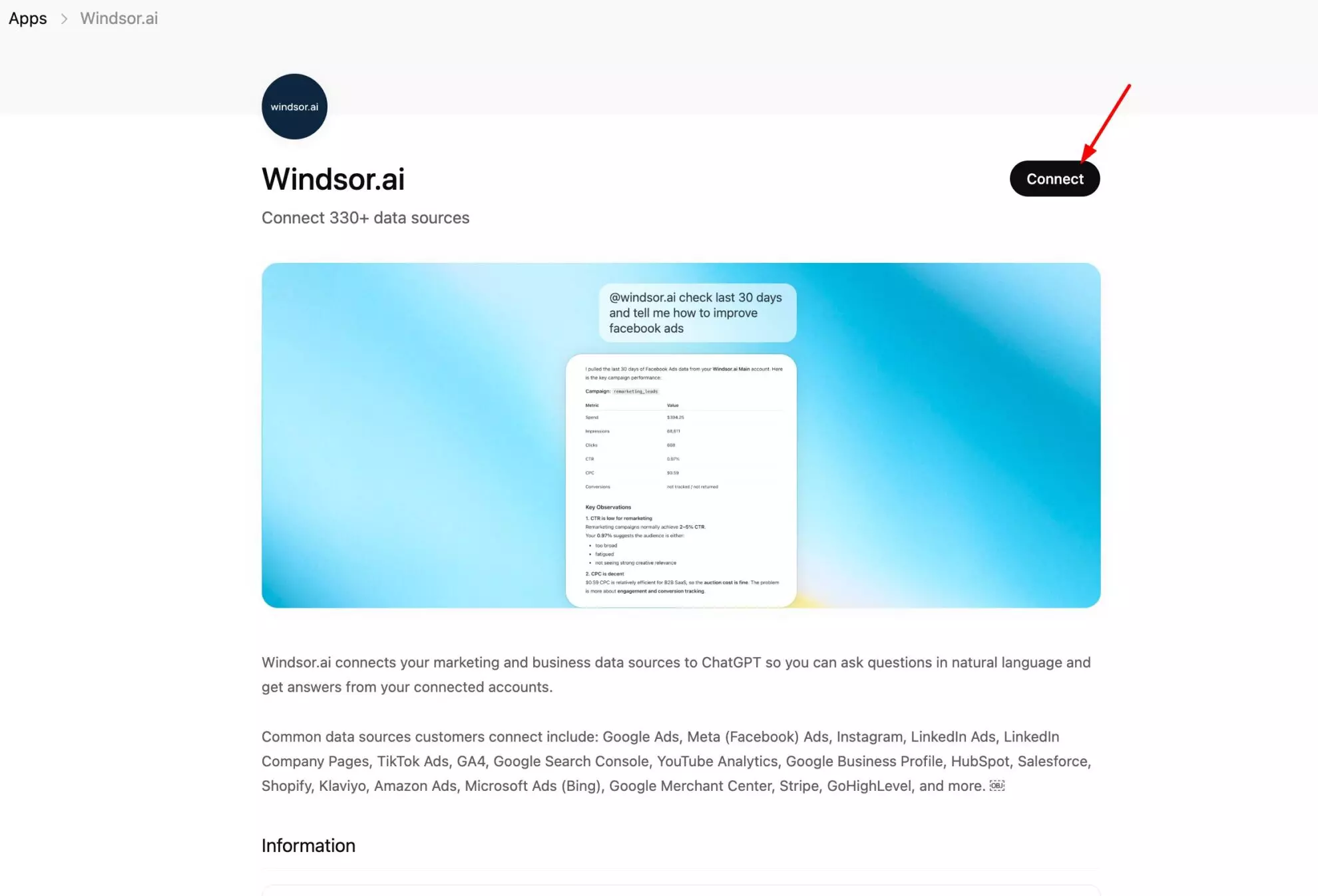
Open Windsor.ai app page in ChatGPT and click Connect. Approve the Windsor access, and the setup is completed.
You can quickly verify that the connection is successful with this prompt:
List the data sources connected to my Windsor account.
Do you see Instagram there?
Once ChatGPT confirms the connection, you’re ready to proceed with deep analysis. No exports, no scheduled refreshes; every question you ask pulls fresh data from the Instagram API at that moment.
The three Instagram data sources in Windsor (and when to use each)
This is the part most people get wrong. Windsor has three separate Instagram sources. They do different jobs. Pick the wrong one and you will wonder why your data looks empty.
Here is the short version.
| Source | What it covers | Do you need account access? | Best for |
|---|---|---|---|
| Instagram Organic (Instagram Insights) | Your own unpaid posts, Reels, Stories, followers, and audience | Yes. Admin access to your Business or Creator account. | Understanding your own content and audience |
| Instagram Public (Instagram Public Data) | Any public Instagram profile: followers, posts, likes, comments, posting frequency | No. Just the handle. | Competitor benchmarking and influencer vetting |
| Meta Ads (includes Instagram Ads) | Your paid campaigns on Instagram and Facebook: spend, reach, clicks, conversions, ROAS | Yes. Access to the ad account. | Paid performance, and creating or changing campaigns |
Now the longer version.
Instagram Organic: your own account, the private numbers
Windsor calls this Instagram Insights on the connection screen, and Instagram Organic elsewhere. They are the same connector, so do not go looking for two.
It reads your own Business or Creator account through the Instagram Graph API. It gives you the private metrics only you can see in your Professional Dashboard.
That includes story reach, story exits, saves, website taps, follower demographics, and the hours your audience is actually online. Instagram does not show most of this to anyone else.
Use case: a skincare brand posts three formats every week. In ChatGPT, they ask which format travels furthest beyond their existing followers. The answer: Carousels get more likes, but Reels reach four times more non-followers. They shift the mix. Reach grows without posting more.
Connect it at onboard.windsor.ai/app/instagram.
Instagram Public: any account, no login needed
This connector reads public profiles. You do not need admin rights. You just need the handle.
It surfaces what anyone can see: follower count, post count, likes, comments, posting frequency, and the content itself. Track a competitor, an aspirational brand, or an influencer you are about to pay.
Use case: an agency is about to spend $8,000 on a creator with 500k followers. They pull the creator’s public data into ChatGPT first. Engagement rate is 0.3%. Follower count is flat over 30 days. Comments are mostly emoji. They walk away and keep the budget.
Connect it at onboard.windsor.ai/app/instagram_public.
Meta Ads: your Instagram Ads, plus the ability to act
Instagram Ads do not live in the Instagram connectors. They live in Meta Ads, because Meta runs Instagram and Facebook advertising on the same system.
So if you want spend, impressions, clicks, cost per result, or ROAS for your Instagram campaigns, this is the connector you need. You can filter to Instagram placements to separate Instagram from Facebook.
Meta Ads supports write actions for your paid campaigns: create, pause, and enable campaigns, ad sets, and ads, and boost an existing organic post. That is what lets ChatGPT act on your ad spend, not just report on it. Instagram Organic has its own write actions too: publishing posts, Reels, and Stories and managing comments directly on your account, no ad account needed. More on that below.
Connect it at onboard.windsor.ai/app/facebook. The address says Facebook because one Meta Ads connector covers both platforms.
Use case: a DTC brand connects Meta Ads next to Instagram Organic. They ask ChatGPT whether paid reach is adding to organic reach or replacing it. It turns out their Stories ads run in the same window as their best organic Stories, and organic reach drops those weeks. They move the ads to a different day.
💡 The short rule: Organic for your own free content. Public for everyone else’s. Meta Ads for anything you paid for. Connect all three and ChatGPT can answer across them in one conversation.
What Instagram data Windsor.ai streams into ChatGPT
Windsor pulls ~100 Instagram fields from the Graph API and makes them available in ChatGPT. Here are the most analytically valuable ones:
Post and Reel metrics
| Field | Description | Why it matters |
|---|---|---|
| media_impressions | Total views, including repeats | Shows overall exposure |
| media_reach | Unique users who saw the post | Base for engagement rate |
| media_engagement | Likes + comments + saves + shares | Overall performance metric |
| media_like_count | Likes per post | Surface-level engagement |
| media_comments_count | Comments per post | Indicates real audience interest |
| media_saved | Saves | High-intent engagement |
| media_shares | Shares via Stories/DMs | Virality indicator |
| media_type | IMAGE / VIDEO / CAROUSEL | Enables format comparison |
| media_url | Link + caption | Enables content + performance analysis |
| carousel_album_engagement | Engagement for carousels | Compare vs other formats |
Story metrics
| Field | Description | Why it matters |
|---|---|---|
| story_impressions | Total views across all frames (including repeats) | Measures overall exposure |
| story_reach | Unique viewers of the story | Base for engagement analysis |
| story_exits | Users who left mid-story | Indicates drop-off points |
| story_taps_forward | Skips to the next frame | Signals weak content |
| story_taps_back | Returns to the previous frame | Indicates strong interest |
| story_replies | Direct responses to a story | Highest engagement signal |
Account and audience metrics
| Field | Description | Why it matters |
|---|---|---|
| followers_count | Current number of followers | Tracks growth over time and audience expansion |
| follows_count | Accounts you follow | Helps assess follow/follower ratio and positioning |
| media_count | Total posts published | Used to calculate posting frequency and consistency |
| profile_views | Number of profile visits | Indicates intent beyond passive content consumption |
| audience_city | Top follower cities | Useful for geo-targeting and local relevance |
| audience_country | Top follower countries | Helps analyze international audience distribution |
| audience_gender_age | Breakdown by gender and age | Measures audience fit and tracks demographic shifts |
What you can do once it’s connected
Once Instagram is connected, ChatGPT can do four broad things with your data:
- Ask questions about your content and audience: which formats travel furthest beyond your existing followers, where Story viewers drop off, whether your posting times actually match when your audience is online. See ‘ChatGPT prompts for Instagram content strategy‘ for a full library of ready-to-use prompts covering format analysis, timing, audience health, and creative strategy.
- Create and manage live ad campaigns: turn a top-performing organic post into a Meta Ads campaign, boost a post that’s already working, or reallocate budget toward your best ad sets, all from a ChatGPT prompt. See ‘How to manage Instagram ad campaigns from ChatGPT‘ for the full list of supported actions and prompt templates.
- Publish directly to Instagram: the Instagram connector isn’t read-only either. Ask ChatGPT to publish an image post, a carousel, a Reel, or a Story to your connected account, or to reply to, hide, or delete comments, with no exporting and no switching tabs. You review the post before anything goes live. See what Windsor’s write actions can do for the full rundown.
- Benchmark against competitors: pull public data from any Instagram account (no login needed) and compare engagement rate, content format strategy, and follower growth against your own. See ‘How to benchmark your Instagram against competitors using ChatGPT‘ for setup and prompts.
Conclusion
ChatGPT reads your posts, Stories, audience data and follower activity through Windsor.ai whenever you ask. You can compare posts, formats and weeks in the chat without exporting from Instagram Insights.
For a test of ChatGPT and Claude on the same Instagram, Facebook, LinkedIn, TikTok and YouTube accounts, read ChatGPT vs Claude for social media.
For Gemini Enterprise, where Windsor.ai is added as a data store in Google Cloud, read how to connect Instagram to Gemini Enterprise.
🚀 Connect your Instagram Insights to ChatGPT with Windsor MCP. Start free now.
FAQs
Can ChatGPT open Instagram links?
No, ChatGPT can’t browse or open Instagram URLs directly. Windsor solves this differently: instead of trying to read a page, it pulls your account’s data through Instagram’s API and hands ChatGPT structured fields it can actually analyze.
What is the fastest way to connect Instagram to ChatGPT?
The native Windsor.ai app inside ChatGPT. Connect Instagram once at onboard.windsor.ai/app/instagram, activate the Windsor.ai app in ChatGPT, and you’re ready to ask questions in under a minute, no code, no custom MCP server setup, no manual exports.
Does this connector include Instagram Ads data?
Not directly through the Instagram connectors. Instagram ad spend, impressions, clicks, and ROAS live in the separate Meta Ads connector, since Meta runs Instagram and Facebook advertising on the same system. Connect Meta Ads alongside Instagram Insights to get organic and paid performance in the same ChatGPT conversation.
Do I need a Business or Creator account?
Yes, your Instagram account needs to be a Business or Creator account linked to a Facebook Page with admin access. Personal accounts aren’t supported by Instagram’s Graph API.
Can I connect multiple Instagram accounts to analyze them in one ChatGPT conversation?
Yes. Connect each Instagram account to Windsor separately, whether that’s different brands, clients, or markets, and query all of them together in the same conversation for side-by-side comparison.
How often does Windsor refresh Instagram data?
There’s no fixed schedule to wait on. Every question you ask pulls fresh data from the Instagram API at that moment, so you’re always working with current numbers, not a cached export.
Does ChatGPT see everything in my Windsor account?
No. ChatGPT only sees the specific data sources you connect and authorize inside the Windsor.ai app. Nothing else in your Windsor account is exposed.
Can ChatGPT open or watch an Instagram Reel link?
No, the same limitation applies to Reels and videos as to any other Instagram link: ChatGPT can’t open or play them directly. Once Instagram is connected through Windsor, ChatGPT can still analyze Reel performance (views, reach, replays, shares) as structured data; it just isn’t watching the video itself.
Does ChatGPT get me more Instagram followers?
Not automatically. ChatGPT can publish posts, Reels, and Stories to your account when you ask it to and approve them first, but it doesn’t follow accounts or grow your audience on its own. What it’s best at is helping you find which content, timing, and formats are actually driving reach and engagement, so follower growth comes from better decisions, not automation.
Can ChatGPT post to Instagram, not just analyze it?
Yes. The Instagram connector is no longer read-only: once it’s connected, you can ask ChatGPT to publish an image post, a carousel of 2 to 10 images, a Reel, or a Story to your connected Instagram Business or Creator account, and to reply to, hide, or delete comments. You review the post before anything goes live. See Windsor’s write-action rundown for details.
Does this work with AI tools other than ChatGPT?
Yes. Windsor MCP is built on the open MCP standard, so the same connection works in Claude, Perplexity, Copilot, and other MCP-compatible AI assistants. See ‘How to analyze your Instagram data with AI assistants’ for a comparison of what’s available on each.


