How to Connect Facebook Ads to ChatGPT Automatically (Plus Other Methods)

If you manage Facebook Ads, ChatGPT can help you analyze performance, summarize metrics, and generate action plans in seconds, eliminating the need to build complex BI dashboards.
But first, you need to get your data into ChatGPT. While exporting CSVs from Ads Manager works, it quickly becomes messy and hard to scale, especially when you manage multiple ad accounts or need to combine it with data from other channels like Google Ads or HubSpot.
Windsor MCP solves this with a fully automated Facebook Ads ChatGPT connector. It pulls live Meta Ads data directly via API and delivers analysis-ready, clean datasets to your AI chat; no exports, no code, no manual work. In just a minute, you can start querying your ad data using natural language.
In this guide, you’ll learn how to automatically send your Meta Ads data to ChatGPT using Windsor MCP, step by step, and get ready-to-use prompts to unlock advanced insights instantly. We’ll also explore other available methods to connect Facebook Ads to ChatGPT.
Using the Windsor.ai connector to sync Facebook Ads to ChatGPT
Windsor.ai is one of the fastest and easiest no-code ways to connect Facebook Ads to ChatGPT. Its MCP (Model Context Protocol) acts as the data integration layer between your Meta Ads accounts and ChatGPT, pulling campaign data from the Meta API, normalizing it under the hood, and streaming structured data directly into your ChatGPT environment.
With Windsor MCP, there’s no need for engineers, custom scripts, or manual exports. The connector provides you with access to more than 560 metrics and 150 dimensions across campaign, ad set, ad, and creative levels, including spend, ROAS, CPA, CTR, and detailed conversion and audience breakdowns.
Beyond Facebook Ads, Windsor connects over 325 data sources, including GA4, Google Ads, Shopify, CRM systems, e-commerce platforms, and analytics tools, using the same integration model. This allows you to bring all your marketing and business data into a single ChatGPT conversation and ask cross-channel questions without switching tools.
How to connect Facebook Ads to ChatGPT with Windsor.ai
Follow our quick step-by-step guide to integrate your data into ChatGPT in minutes.
Prerequisites:
To use Windsor MCP with ChatGPT, make sure you have the following:
- An active Windsor.ai account (free or paid) with at least one connected Facebook Ads profile
- At least one active ad account in Meta Business Manager with View (or higher) permissions
- A ChatGPT plan that supports external connectors (Plus or Pro)
Step 1. Connect Facebook Ads to Windsor.ai
Connecting your Meta Ads account to Windsor.ai is the first step toward bringing your Facebook Ads data into ChatGPT; the setup takes about a minute.
All configuration happens inside the Windsor dashboard, where you authorize access to your Meta account and prepare your data for analysis.
1. Create your Windsor.ai account. Go to onboard.windsor.ai and enjoy your 30-day free trial.
2. Select Facebook Ads as your data source. From the left-hand panel, choose Facebook Ads and grant access to your Meta account.
3. Connect the accounts you want to pull data from. Select one or multiple ad accounts. Connecting multiple accounts allows you to perform cross-account analysis inside a single ChatGPT conversation.
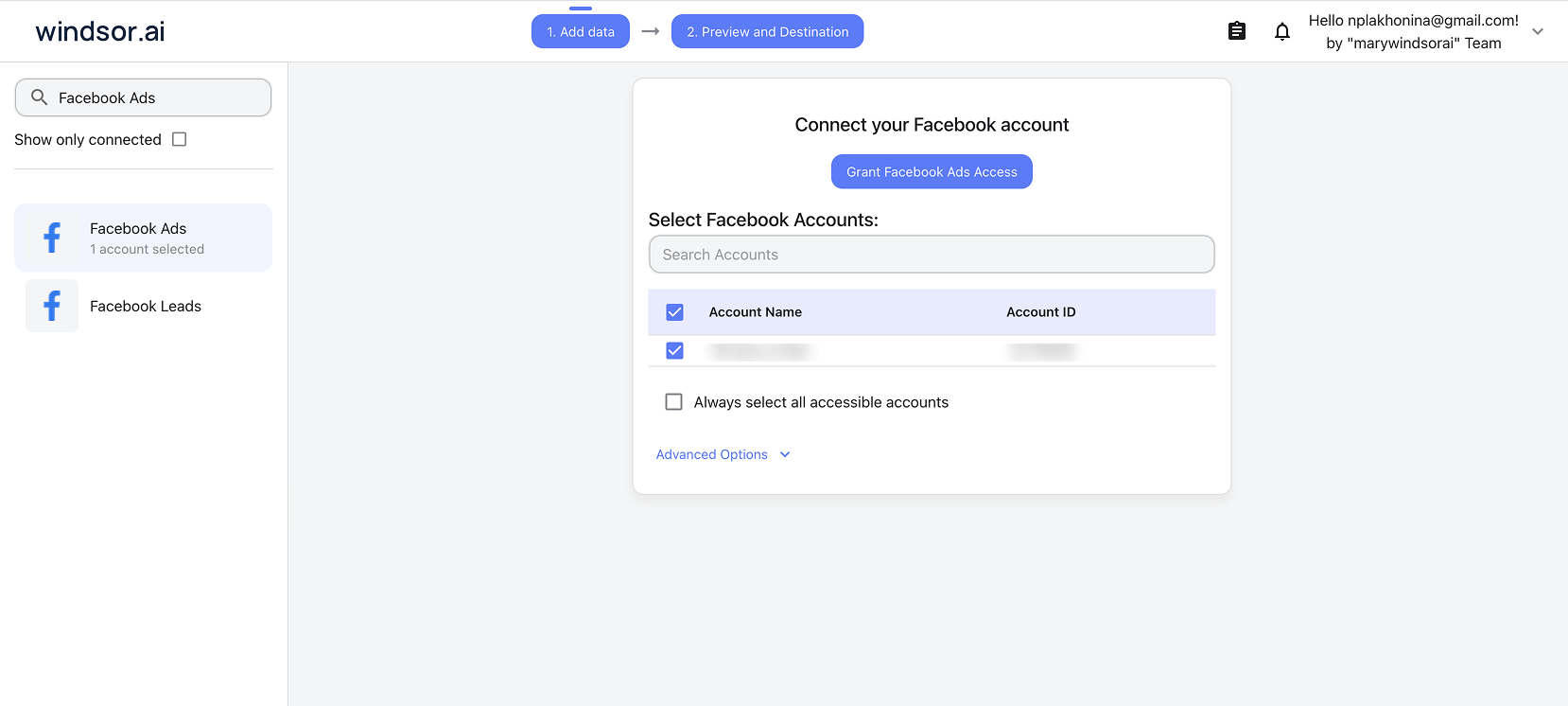
Now you can go to the Preview and Destination page to inspect your extracted data before streaming it to ChatGPT. Windsor automatically normalizes your Meta Ads data in the background, ensuring it’s structured and analysis-ready.
Step 2. Automate Facebook Ads to ChatGPT integration via Windsor MCP
The next step is to link this data to ChatGPT using Windsor MCP to start generating AI-driven insights.
1. Enable Developer Mode. In ChatGPT, navigate to Settings -> Apps -> Advanced Settings -> Developer Mode and turn it on.

2. Create the Windsor.ai app. Click “Create app” and fill in the following details:
- Name: windsor.ai
- MCP Server URL: https://mcp.windsor.ai
- Authentication: OAuth
Tick “I understand and want to continue” and click “Create.”

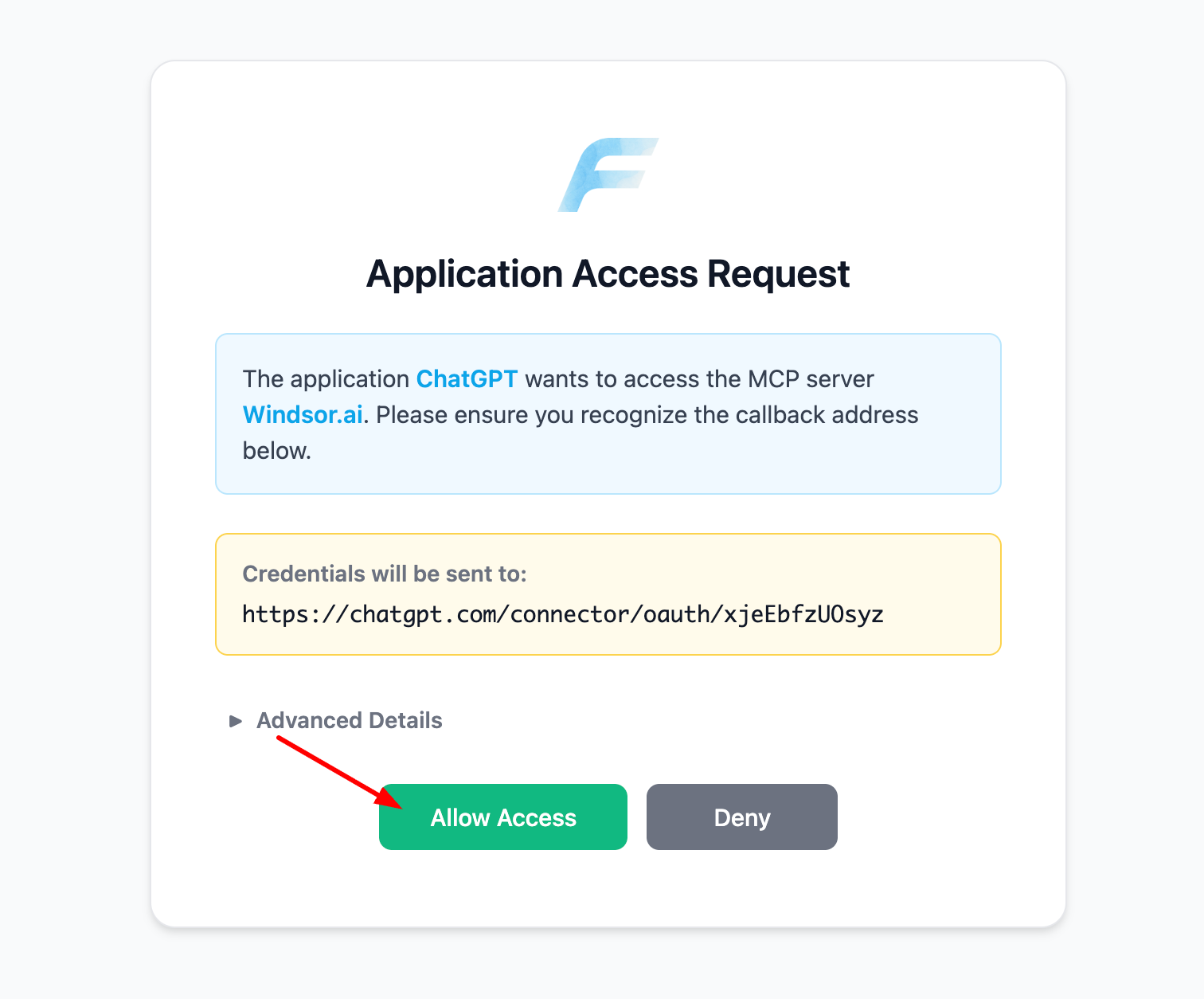
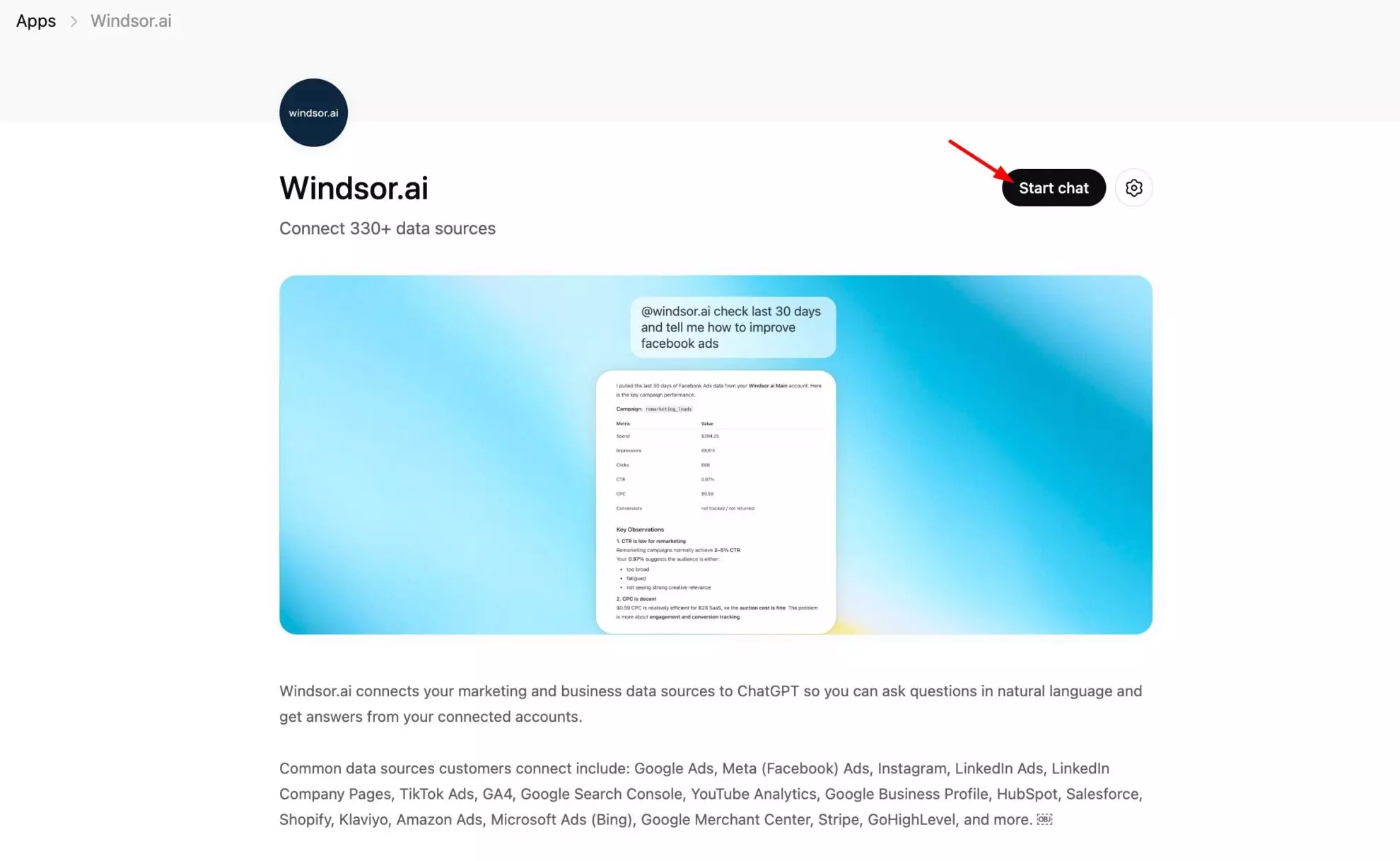
3. Open a new chat in ChatGPT. Click the + icon → More → select windsor.ai.

Windsor MCP is now connected to your ChatGPT account. To confirm everything is working correctly, enter the following prompt:
List the data sources connected to my Windsor account. Do you see Meta Ads there?

This ensures Windsor MCP is successfully pulling your data before you begin deeper analysis.
Once ChatGPT recognizes your Facebook Ads data, you can start querying it in natural language and uncover deeper insights into your performance KPIs.

No ongoing maintenance is required. Simply activate the Windsor MCP connector in any ChatGPT conversation whenever you want to query your connected data.
Bonus: Facebook Ads analytics prompts for ChatGPT
Below is a quick list of ready-to-use prompts to help you start analyzing your Facebook Ads data with AI immediately. Simply copy and paste a prompt into ChatGPT, review the response, and optionally, request the output in your preferred format (table, CSV, Excel file, etc.).
📖 For a broader collection of prompts covering Facebook Ads and other marketing channels, explore our full AI Prompt Library: https://windsor.ai/prompt-library/.
1. Review your monthly campaign performance
Prompt:
Summarize my Facebook Ads performance over the last 30 days. Include total spend, impressions, clicks, CTR, CPA, and ROAS, broken down by campaign. Present the results in a clear table format and highlight the top- and lowest-performing campaigns based on ROAS.2. Spot the best and worst-performing ad sets by ROAS
Prompt:
Analyze my Facebook Ads data for the last 30 days and rank all ad sets by ROAS from highest to lowest. Flag the bottom three and suggest why they may be underperforming.3. Detect creative fatigue
Prompt:
Review my active Facebook Ads and identify any creatives where frequency is rising, and CTR is dropping. List the affected ads and suggest new angles to test.4. Optimize your budget reallocation strategy
Prompt:
Based on my Facebook Ads ROAS data from the last 30 days, recommend how I should reallocate my budget across campaigns to improve overall return on ad spend.5. Understand your audience segments
Prompt:
Break down my Facebook Ads performance for the last 30 days by geo, age, gender, and device. Highlight the segments with the lowest CPA and the highest conversion rate.6. Identify week-over-week CPA and CTR trends
Prompt:
Show me a week-over-week comparison of CPA and CTR across all my Facebook Ads campaigns for the last 2 months. Flag any weeks with significant changes and explain possible reasons.Other ways to connect Facebook Ads to ChatGPT
Windsor.ai is the fastest no-code way to bring live Facebook Ads data into ChatGPT. However, depending on your technical skills and reporting needs, there are other methods you can use.
Manual method: CSV export and upload
The manual export method doesn’t require any third-party tools and is simple to execute. However, every analysis involves the same repetitive process:
Step 1: Log in to Meta Ads Manager and navigate to the Ads Reporting section.
Step 2: Configure your report by selecting the desired date range, campaign level (campaign, ad set, or ad), and relevant metrics such as spend, impressions, CTR, CPA, ROAS, and conversions.
Step 3: Click Export and download the report as a CSV file to your computer.
Step 4: Open a new ChatGPT conversation, click the paperclip icon to attach a file, and upload the downloaded CSV.
Step 5: Enter your analysis prompt, referencing the uploaded file. For example:
Analyze the ROAS and CPA trends across all campaigns in this file and flag any underperforming ad sets.Limitations: Once uploaded, ChatGPT analyzes the data from that static snapshot. Any campaign updates made after the export won’t be reflected until you repeat the entire process from Step 1.
Semi-automated method via Zapier or Make
This approach removes the need for manual CSV exports by automatically pulling data on a schedule. However, it still requires building and maintaining a workflow and updating it whenever Meta or the automation platform changes its API or structure.
Step 1: Create a free or paid account on Zapier or Make. Connect your Facebook Ads account by authorizing access via OAuth.
Step 2: Create a new Zap (Zapier) or Scenario (Make) and set a scheduled trigger—for example, daily at midnight—to pull the previous day’s campaign performance data from Meta Ads.
Step 3: Add an action that writes the retrieved data into a Google Sheet. Map each Facebook Ads field (campaign name, spend, impressions, conversions, etc.) to the appropriate columns in the sheet.
Step 4: Open ChatGPT and either use the Google Drive connector or upload the updated spreadsheet at the beginning of each reporting session.
Step 5: Prompt ChatGPT to analyze the sheet. Keep in mind that the data freshness depends entirely on when your automation last ran successfully.
Limitations: The key drawback is that the connection isn’t truly live. ChatGPT analyzes a stored file rather than querying your Meta Ads account directly. If your Zapier or Make workflow fails, your reporting becomes outdated (often without immediate visibility) until you manually detect and fix the issue.
Why sync Facebook Ads with ChatGPT: benefits and use cases
Once the connection is live, the focus shifts from how to sync Facebook Ads with ChatGPT to what that connection actually enables in day-to-day analysis.
These are the most immediate benefits marketers and agencies see when Meta Ads data is available inside ChatGPT.
- You analyze the latest data: Windsor pulls the latest metrics from your Meta ad accounts every time you open ChatGPT, with no exports, no uploads, and no risk of acting on outdated numbers.
- You can ask questions in plain language and get instant answers: Instead of filtering through Ads Manager or building custom reports, you ask a question like “Which ad sets had the highest CPA last week?” and get a direct response from your live data.
- You can automate Facebook Ads reporting in ChatGPT: AI can easily generate performance summaries, spreadsheet reports, breakdowns, and period comparisons without touching a dashboard, with ChatGPT handling the analysis and presenting the output in the format you need.
- You can perform cross-channel analysis: Windsor MCP connects more than 325 data sources, allowing you to combine Meta Ads performance with Google Ads, GA4, Shopify, and CRM data in a single ChatGPT conversation for effective multi-platform analysis.
- You can analyze data from multiple client accounts at scale: You can sync data from all your Meta Ads accounts to ChatGPT through a single Windsor MCP connection while filtering by account ID in each prompt to keep client reports separate.
📚 For a deeper look at what is possible once your data is connected, the Windsor MCP use cases and examples guide covers how to sync Facebook Ads performance metrics to ChatGPT across more advanced workflows and reporting scenarios.
Why is manual Facebook Ads data integration into ChatGPT problematic?
Manually transferring your Facebook Ads data into ChatGPT creates several challenges and they compound quickly as your reporting needs scale:
- CSV exports become outdated immediately. Every analysis starts the same way: open Ads Manager, configure columns, set a date range, and export a file. The data reflects what already happened—not what’s happening right now.
- Repeated uploads don’t scale. Daily or hourly reporting requires constant exporting and uploading, creating unnecessary manual work. Each step increases the risk of human error, especially for agencies managing multiple client accounts with frequent reporting needs.
- ChatGPT’s context limits can truncate large datasets. Big CSV files don’t always fit cleanly into a single conversation. Portions of the data may be ignored, leading to insights based on incomplete information without you realizing it.
- There’s no live connection. Without a direct integration between Meta Ads and ChatGPT, you can’t automatically stream fresh campaign data. Real-time analysis of active campaigns simply isn’t possible.
- Multiple ad accounts multiply the workload. If you manage five, ten, or more accounts, the manual effort stacks up quickly across every reporting cycle.
This gap between Meta Ads and ChatGPT makes it difficult to analyze campaigns at the speed they actually move. Windsor.ai closes that gap with a fully automated, live integration, so your Meta Ads analysis always keeps up with your ads.
Conclusion
Manually exporting CSVs, uploading files, and copy-pasting numbers into ChatGPT is time-consuming and leads to outdated insights. Windsor.ai removes that friction by creating a direct, automated connection between your Meta Ads accounts and ChatGPT, keeping your data live without ongoing maintenance.
Setup takes just a few minutes: connect Facebook Ads to Windsor, add Windsor MCP to ChatGPT, and start querying real-time campaign data. No exports. No uploads. No stale numbers. No manual reporting cycles.
🚀 If you’re ready to stop wrestling with data and start using it, begin your free 30-day trial at Windsor.ai and get your Facebook Ads data live in ChatGPT right away: https://onboard.windsor.ai/app/facebook.
FAQs
How can I send Facebook Ads data to ChatGPT?
You can send your Facebook Ads data to ChatGPT through Windsor MCP, which connects directly to the Meta Ads API and streams your campaign data into ChatGPT. Once the connection is set up, your data is available in every ChatGPT conversation without uploading any CSV files.
Is there a tool to automate Facebook Ads reporting in ChatGPT?
Yes. Windsor.ai automates Facebook Ads reporting in ChatGPT by pulling live data from your Meta ad accounts, normalizing it, and making it available inside ChatGPT, so you can generate performance reports, summaries, and visual breakdowns using plain-language questions.
Can ChatGPT analyze Facebook campaign performance?
Yes. Once Windsor MCP is connected, ChatGPT can analyze your Facebook Ads spend, ROAS, CPA, CTR, conversions, creative performance, audience breakdowns, and more across any date range you specify.
What is the fastest way to integrate Facebook Ads and ChatGPT?
The fastest way to integrate Facebook Ads and ChatGPT is using Windsor.ai, where you connect your Meta ad accounts in Windsor, add Windsor MCP to ChatGPT, and have a complete no-code Facebook Ads to ChatGPT integration live in a few minutes.
Do I need coding skills to connect Facebook Ads to ChatGPT with Windsor?
No. The entire setup happens through Windsor’s dashboard and ChatGPT’s connector settings. You authorize access, fill in a form, and the connection is running without writing a single line of code.
Does this work for multiple ad accounts or agencies managing multiple clients?
Yes. Windsor supports multiple ad accounts under a single connection. Agencies can filter by account ID in each ChatGPT prompt to keep client data separate while managing everything through one Windsor connection.
What Facebook Ads metrics are available once connected?
Windsor gives you access to 560+ metrics and 150+ dimensions from Facebook Ads, including spend, impressions, reach, frequency, CTR, CPC, CPM, ROAS, CPA, conversions, and breakdowns by campaign, ad set, ad, creative, age, gender, geo, device, placement, and so on.
Is Windsor MCP free? What plan do I need?
Windsor MCP is available on all Windsor’s plans, including a Free trial (that includes up to 10 data sources, 15 accounts, and 30 days of historical data) and paid plans starting at $19 per month for higher usage limits. You’ll also need a ChatGPT Plus or Pro plan to add external connectors like Windsor.
How is the connection via Windsor MCP different from just uploading a CSV to ChatGPT?
Uploading a CSV gives you a static snapshot, while Windsor MCP provides a live connection to the Meta API, so every ChatGPT conversation reflects the latest Facebook Ads data and lets you query across dates, accounts, and channels without touching CSVs.
Can I combine Facebook Ads data with other channels like Google Ads or GA4 inside ChatGPT?
Yes. Windsor connects 325+ data sources, so you can pull Facebook Ads, Google Ads, GA4, Shopify, and CRM data into the same ChatGPT conversation and ask cross-channel questions about blended ROAS, CAC, and conversion performance all at once.
Windsor vs Coupler.io