 Destinations
 Data sources
 AI insights
 About us
 Careers
 Security
 Customer reviews
 Contact us
 Affiliate program
 Solution partners
 Template gallery
 Looker Studio templates
 Power BI templates
 Excel templates
 Google Sheets templates
 Tableau templates
 Facebook Ads templates
 Google Ads templates
 Data fields & Metrics
 AI prompt library & Guides
 Product documentation
 API documentation
 Case studies
 Blog
Blog Data models
 Windsor vs Supermetrics
 Windsor vs Funnel.io
 Windsor vs Fivetran
 Windsor vs Rivery
 Windsor vs Portermetrics
 Windsor vs Coupler.io
 Last updated: 6 October 2026




Connect your Facebook Page Insights to ChatGPT in under a minute, no code required, and ask questions in plain language about what’s actually driving your reach, engagement, and follower growth, instead of reading a static Meta Business Suite snapshot.
🚀 Connect Facebook Page Insights to ChatGPT with Windsor MCP. Try it free → onboard.windsor.ai/app/facebook_organic.
Meta Business Suite tells you what happened, yesterday reach went up, engagement dropped, your top post got 4,200 impressions, but not why. It won’t tell you whether that reach came from your followers or new audiences discovering you through shares, whether your posting frequency is helping or quietly slowing growth, or that an engagement decline is often the first warning sign of a reach drop before it actually hits.
With Windsor MCP, that same post-level data becomes something you can actually question and act on, not just glance at. When you ask it to, the connector can also publish a post to the Page.
With your Facebook Pages data in ChatGPT, the questions your team debates every week become answerable in seconds:
- Which content format, such as video, photo, link, Reel, consistently reaches the most non-followers?
- Are we posting too often? Is there a frequency at which per-post reach starts declining?
- Which posts drove real follower growth, and which caused more people to unfollow than follow?
- Which day and time of week delivers the best engagement rate, not just the most impressions?
- How do our Reels perform on shares and plays compared to our regular video posts?
Connecting Facebook Page Insights to ChatGPT with Windsor MCP (1-minute setup)
Windsor streams your Facebook organic data into ChatGPT via a native app. No CSV exports, no developer setup, and no third-party integrations required.
Before you start
Make sure you have the following prerequisites in place:
- A Facebook Page (with Admin or Editor access)
- A Windsor.ai account (free or paid plan)
- A ChatGPT account
Step 1. Connect your Facebook Page to Windsor
Go to onboard.windsor.ai/app/facebook_organic and select the Facebook Page (Organic) data source. Log in with your Facebook account and authorize Windsor to access your Page Insights. Select the Page or Pages you want to analyze in ChatGPT.
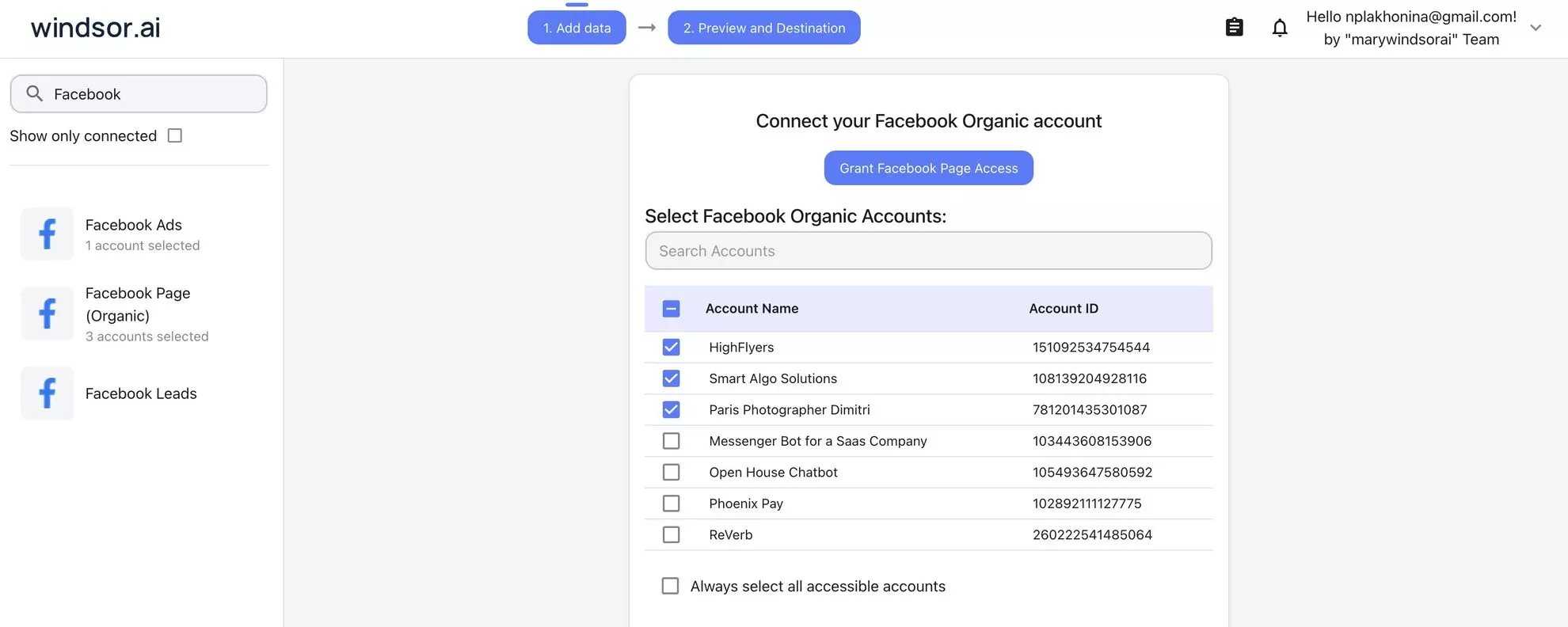
💡 Pro tip: If you manage multiple Facebook Pages (for different clients, brands, or locations), connect each one separately. Then you can query all of them in ChatGPT via the same Windsor.ai app.
Once connected, Windsor extracts your Page data from the Meta Graph API, including post performance, audience metrics, page-level reach and engagement, and Reels data, and automatically normalizes everything, so it’s immediately readable by ChatGPT’s reasoning engine.
Step 2. Install the Windsor.ai app in ChatGPT
Open the Windsor.ai app page in ChatGPT and click Connect. Grant ChatGPT access to your Windsor account.
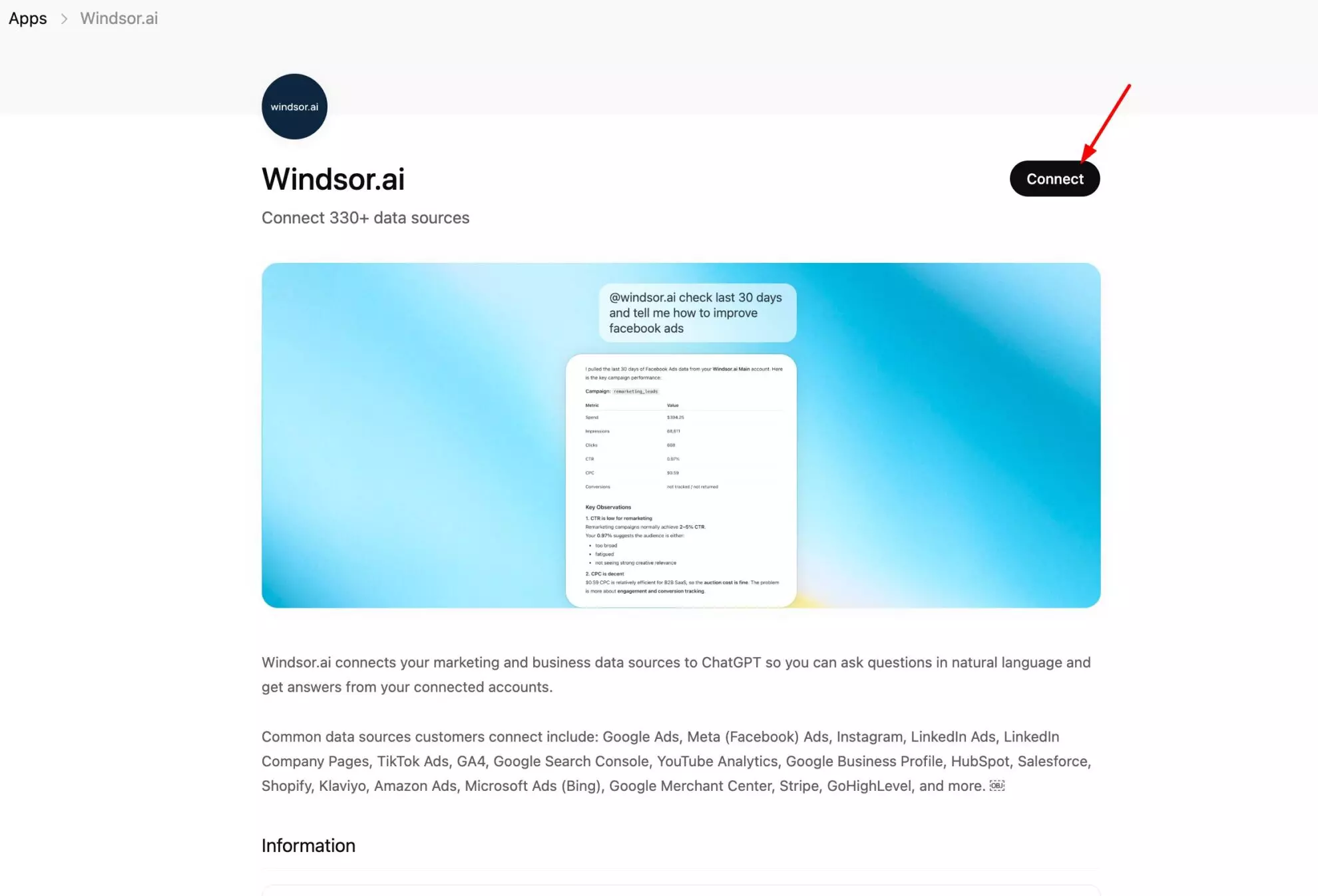
That’s it. You’re all set. Your Meta organic data is now live in ChatGPT.
Run a quick check to confirm everything is working properly:
What Facebook Pages are connected to my Windsor account?
Show me the last 7 days of reach and engagement for my Page.
With setup complete, here are real insights to try.
Ready-to-use prompts for effective Facebook Page analysis in ChatGPT
Not sure what to ask? Just copy these prompts into ChatGPT once your Windsor app is active.
Keep it short and simple; ChatGPT already understands your data structure and will handle the analysis for you.
What format should you post?
Facebook Page managers typically assume video beats everything, but the reality depends on your specific audience and page history, and your own data has the answer if you ask ChatGPT about it.
Compare reach and engagement by post type
Compare my Facebook posts from the last 90 days by post type (photo, video, link, reel, status).

For each type, show:
- Average reach
- Average engagement
- Average shares

Which format drives the most reach and interaction?
Find your Reels sweet spot
Analyze my Reels from the last 60 days.
Which ones had the highest share count?
Is there a pattern in length, topic, or posting time among the most-shared Reels?
Audience health: gains, losses, and the balance between them
Follower count is a lagging metric. A more useful signal is the daily ratio of follows to unfollows, which shows whether your content is growing or eroding the people who chose to follow you.
Track daily follower momentum
Show me daily new followers vs. unfollows for the last 30 days.
Which days had a net loss? What was posted those days?
Identify which posts drive follows, not just likes
Which posts from the last 60 days coincided with the highest new follower days?
Is there a content type or topic that consistently grows the audience versus content that just gets liked without adding followers?
Viral reach analysis
Facebook’s algorithm distributes content in two ways: to your existing followers, and to friends of people who interact with your posts. Viral reach, impressions generated by other people sharing or engaging, tells you when your content reached people beyond your existing followers.
Measure how much reach comes from outside your followers
For the last 30 days, compare total page reach vs. viral reach.
What percentage of our total impressions came from people who saw content because a friend interacted with it?
Which specific posts drove the most viral reach?
When to post: the best times for your audience
Every generic social media guide has a ‘best time to post on Facebook’ chart. But none of them applies to your specific page and audience.
Your own impression and engagement data by posting hour is more reliable than any industry average.
Find the posting window that earns the most engagement
Analyze my last 60 posts by day of week and hour of posting.
Group by: morning (6am–11am), midday (11am–2pm), afternoon (2pm–6pm), evening (6pm–10pm).
Which window delivers the highest average engagement rate?
Posting frequency vs. per-post performance
Group my posts from the last 6 months by week.
In weeks where I posted more than 5 times, how did average reach per post compare to weeks with 3 or fewer posts?
Is there a frequency point where performance starts declining?
Video and Reels: depth of attention, not just view counts
Views are easy to accumulate and easy to misread. A video with 10,000 views but an average watch time of 3 seconds told people nothing; they scrolled past it in the autoplay. Average watch time and completion rate are the metrics that actually reflect whether people kept watching.
Which videos held attention the longest
For all video posts in the last 60 days, show average watch time and complete view rate.
Which videos kept viewers watching longest relative to their total length?
Is there a topic or format pattern among the high-retention videos?
Reels vs. standard video: which drives more distribution
Compare Reels vs. regular video posts from the last 90 days.
For each format: average plays, average shares, average reach.
Which format is getting more organic distribution beyond our existing followers?
Data-driven content strategy
The most useful thing ChatGPT can do with your Facebook data is help you build next month’s content plan based on what actually worked, not just report on last month.
Identify your top content themes
Analyze my last 30 Facebook posts by content topic and format.
Which topics and formats generated the highest reach and engagement?
Summarize the top 3 content patterns that are clearly outperforming the rest.
Generate a content plan based on your best posts
Based on my top-performing posts from the last 60 days, create a 2-week posting plan.
Include recommended format (photo, video, Reel, link), topic, text, and suggested posting day and time based on my engagement patterns.
Weekly performance summary: ready to share
Summarize my Facebook Page performance for the last 7 days.
Include: reach, engagement, top post, follower change, and one actionable recommendation.
Write it as a short paragraph suitable for a weekly team update.
Generate image concepts from your best posts
Analyze my top-performing Facebook posts from the last 60 days based on reach, engagement, and shares.
Based on these patterns, generate 5 image concepts I can use for future posts.
Diving deeper: Analyze Facebook Pages alongside your other data
Organic Facebook data answers what happened on the platform. The full picture of what it means for your business requires connecting it with what happens next: on your website, in your paid campaigns, and across other channels.
🔗 Windsor connects all your business channels in a single unified dataset and makes it available in ChatGPT for effective cross-channel analysis.
Here are several high-impact data blending combinations you can try:
- Facebook Pages + Meta Ads: Your organic and paid Facebook strategies should inform each other, but most teams run them in silos. Connect both and ask ChatGPT: which organic posts are getting strong engagement that you haven’t amplified with paid? Which ad creatives are performing well that you haven’t tested organically first? Where is paid reach compensating for a decline in organic reach, and is that sustainable? Want to act on it directly, not just analyze? See How to manage Facebook Ads campaigns from ChatGPT.
- Facebook Pages + GA4: Facebook organic drives website clicks, but what those visitors do on your site is invisible inside Meta Business Suite. Connect both and ask ChatGPT: which Facebook posts drove the most website sessions, and what was the bounce rate of that traffic? Are link post clicks converting to leads or sales, or are they just clicks?
- Facebook Pages + Instagram: Teams that cross-post between Facebook and Instagram rarely measure the performance delta systematically. Connect both and ask ChatGPT: for the same content posted on both platforms, where does it perform better, and what does that suggest about the audience composition on each? Which formats work on Instagram but fall flat on Facebook? For the same cross-platform comparison from the Instagram side, see ChatGPT prompts for Instagram content strategy.
What your Facebook Pages data looks like inside ChatGPT
Windsor gives ChatGPT access to over 310 Facebook Page data fields.
Below are the ones that drive the most useful analysis, grouped by what they actually tell you about your Page.
Your audience: growth, loyalty, and warning signs
| Field name | What it measures | Why it matters for strategy |
| page_fans | Current total followers | Your audience baseline: track daily to see net growth |
| page_daily_follows_unique | New followers added per day | Which posts or periods attract new followers |
| page_daily_unfollows_unique | Unfollows per day | A spike here means content is repelling the audience |
| page_impressions_unique | Unique accounts that saw any content | True reach, distinct from raw impression counts |
| page_post_engagements | Total engagement actions on the page’s posts | Real engagement, not just passive views |
Post performance: what actually worked
| Field name | What it measures | Why it matters |
| post_impressions | Total times the post was displayed | Volume signal: includes repeat views |
| post_impressions_unique | Unique accounts that saw the post | True reach per post: base for engagement rate |
| post_clicks | Total clicks on anything in the post | Measures intent: someone clicked to learn more |
| post_reactions_like_total | Likes on the post | Basic positive signal |
| post_reactions_love_total | Love reactions specifically | Stronger sentiment signal than a plain like |
| post_activity_by_action_type_share | Times shared to a user’s own timeline or group | The highest organic distribution signal on Facebook |
| post_comments_total | Comment count | Algorithms favour comment-generating content |
Video and Reels: the format that gets amplified
| Field name | What it measures | Why it matters |
| post_video_avg_time_watched | Average time viewers watched a Reel, in milliseconds, replays included | Retention signal: the more they watch, the wider Meta distributes |
| post_video_complete_views_organic | Views that reached 95% or more of the video | Completion rate is the strongest video quality signal |
| blue_reels_play_count | Total Reel plays | Facebook Reels distribution indicator |
| post_video_social_actions_share | Times a Reel was shared | Reels that get shared reach entirely new audiences |
Conclusion
Facebook Page Insights already contains the data you need, but most of that value stays hidden behind static dashboards that show what happened without explaining why or what to do next.
Connecting your Facebook data directly to ChatGPT via Windsor MCP lets you ask questions, uncover patterns, and turn performance data into a content strategy in seconds. You’ll know:
- Which formats drive reach and engagement
- Which posts hurt or grow your audience
- When to post for maximum impact
- What to create next based on what actually worked
🚀 Connect Facebook Page Insights to ChatGPT with Windsor MCP and start getting clear answers, better ideas, and faster results. Start for free now.
FAQs
Does this connector cover Facebook Ads as well?
No. This connector is specifically for Facebook Page Insights: organic performance data from your Page: posts, reach, engagement, audience metrics, and Reels. Facebook advertising data (campaign spend, ad-level reach, conversion tracking) is covered by Windsor’s separate Meta Ads connector. You can connect both to Windsor and use them together in the same ChatGPT conversation if you want to compare organic and paid performance side by side.
What's the difference between this and Zapier's Facebook Pages to ChatGPT integration?
Zapier connects Facebook Pages to ChatGPT for workflow automation, like triggering actions based on events (new post published, engagement threshold reached). Windsor MCP connects your Facebook Insights data for analytics, giving ChatGPT access to your full historical dataset so you can ask questions, identify patterns, and build a content strategy. Zapier automates tasks. Windsor enables analysis.
Do I need admin access to the Facebook Page?
Yes. Windsor connects to the Meta Graph API using Insights permissions, which require Admin or Editor access to the Facebook Page. Standard user roles (Analyst, Advertiser) may have read access to some metrics, but Admin or Editor access is recommended for the full data set Windsor pulls.
Can I connect multiple Facebook Pages and compare them in ChatGPT?
Yes. Connect each Page to Windsor separately, and all of them become available in the same ChatGPT conversation. This is particularly useful for agencies managing multiple client pages, brands with regional pages, or multi-location businesses. You can ask ChatGPT to compare follower growth, engagement rates, or content performance across your entire page portfolio in one prompt.
How far back does Windsor pull Facebook Page data?
Windsor pulls historical data from the Meta Insights API, which provides up to 2 years of historical data for most metrics. This gives you enough history for year-over-year comparisons, seasonal trend analysis, and long-term content performance patterns, far more than the standard view in Meta Business Suite.


