 Destinations
 Data sources
 AI insights
 About us
 Careers
 Security
 Customer reviews
 Contact us
 Affiliate program
 Solution partners
 Template gallery
 Looker Studio templates
 Power BI templates
 Excel templates
 Google Sheets templates
 Tableau templates
 Facebook Ads templates
 Google Ads templates
 Data fields & Metrics
 AI prompt library & Guides
 Product documentation
 API documentation
 Case studies
 Blog
Blog Data models
 Windsor vs Supermetrics
 Windsor vs Funnel.io
 Windsor vs Fivetran
 Windsor vs Rivery
 Windsor vs Portermetrics
 Windsor vs Coupler.io
 Last updated: 1 September 2026




Manus AI is only as powerful as the data it can access.
If your Meta Ads data isn’t connected live, you’re stuck in copy-paste mode.
Windsor MCP for Manus changes the game.
It connects your Facebook Ads account directly to Manus, giving it real-time, queryable access to your campaign data, including Instagram Ads, spend, ROAS, CTR, conversions, creatives, audiences, everything.
No manual exports. No spreadsheets. No delays.
Just add the Windsor MCP connector to Manus once and start asking:
- “Which campaigns are wasting budget this week?”
- “What creatives are burning out?”
- “Where should I shift spend right now?”
…and Manus delivers the insights and action plans in seconds.
🚀 Connect your Facebook Ads (Meta) data to Manus AI with Windsor MCP and turn hours of manual analysis into instant, automated insights. Try it for free → onboard.windsor.ai/app/facebook.
Here’s how to connect your Meta Ads data to Manus using Windsor MCP, step by step.
Getting Meta Ads data in Manus with Windsor MCP: Quick steps
The setup has two steps: first, connect your Meta Ads account(s) to Windsor.ai; then add Windsor as a custom MCP server in Manus. The entire process takes less than 5 minutes and only needs to be done once.
What you need to start
- A Facebook Ads account that you can access through Meta Business Manager
- A Windsor.ai account (free plan or paid plan)
- A Manus account
Step 1. Connect your Meta Ads account to Windsor
Head to onboard.windsor.ai/app/facebook and pick Facebook Ads as your data source. You’ll go through Meta’s standard OAuth flow; log in with the account that owns your ad accounts and approve the access.
Once authorized, select the ad accounts you want to link to Manus. You can connect multiple accounts at once, and they’ll all be queryable in the same Manus session.
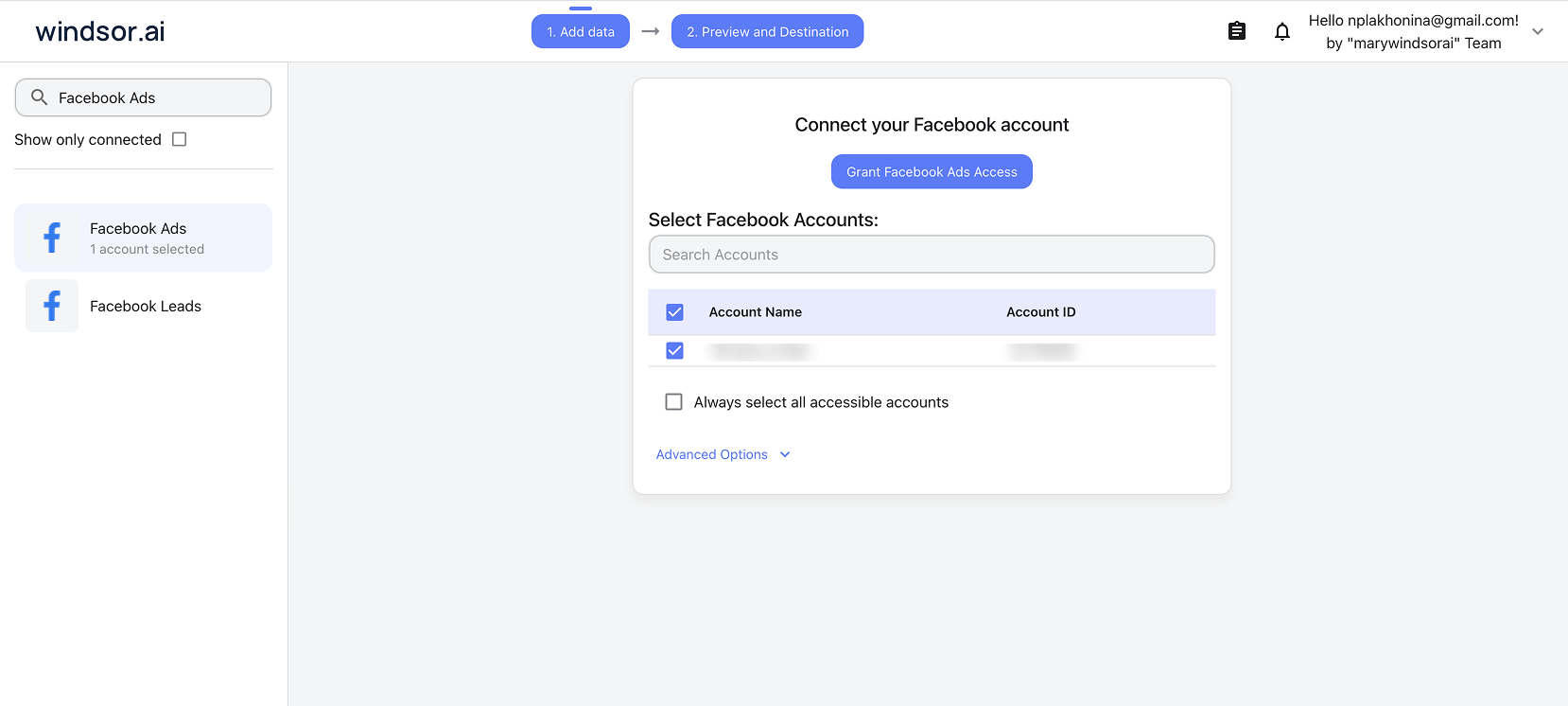
Windsor automatically pulls your campaign data from the Meta Marketing API and prepares it for immediate analysis in Manus, no manual cleanup needed.
Step 2. Add Windsor MCP in Manus
Open your Manus account and go to Settings → Connectors → Add Connectors → Custom MCP → Import by JSON.
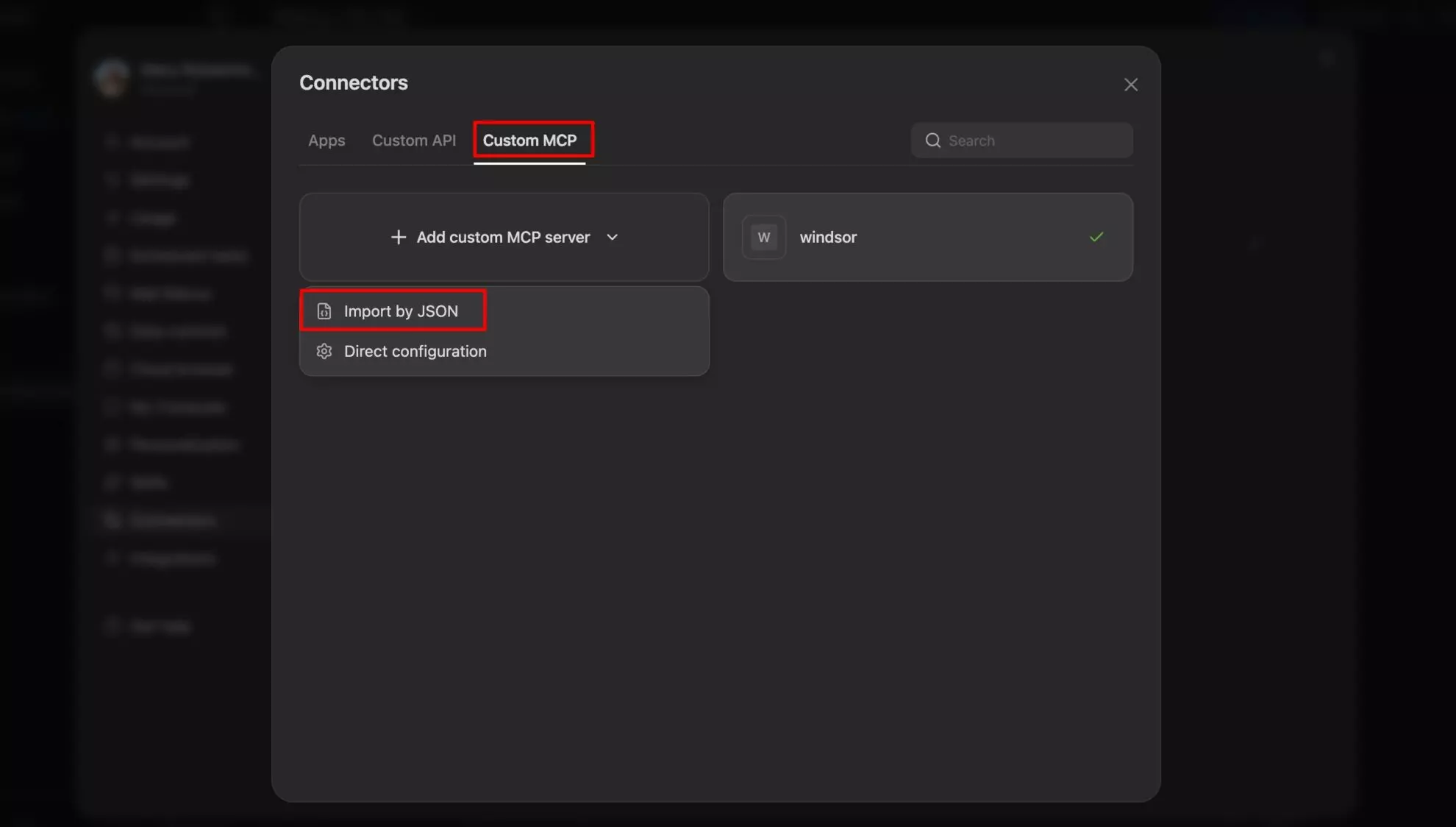
Copy the configuration from your Windsor account at https://onboard.windsor.ai/app/data-preview#MANUS and paste it into Manus.
Click Import. Windsor MCP will be added to your connectors.
Confirm the connection and start your first task
Run the following prompt to confirm your Facebook Ads data is successfully connected to Manus:
What Facebook Ads accounts are connected through Windsor?
Show me total spend and impressions for the last 7 days.
Data confirmed? You’re ready to start handing real tasks to Manus.
📖 Visit the full documentation: windsor.ai/documentation/windsor-mcp/how-to-integrate-data-into-manus-ai/.
Meta Ads analysis with Manus: Best prompts to get actionable insights
Manus is an agent, not a chatbot. The prompts below are written as tasks, things you hand off to Manus and let it complete, rather than questions you ask and then build on yourself.
The autonomous campaign audit
This is Manus doing what it’s built for. Give it a clear brief and let it produce a finished output, not a data dump to interpret yourself.
Full account performance audit
Audit my Facebook Ads account for the last 30 days.

Pull spend, ROAS, CPA, CTR, and frequency for every active campaign.

Flag anything with CPA above [target] or frequency above 3.5.

Summarize the top 3 performers and bottom 3 performers.

Format the output as a table I can paste into a slide.
Creative performance breakdown
For all ads active in the last 14 days, rank by CTR and CPA.

Group them by ad format (image, video, carousel).

Which format is performing best on both metrics?

List the top 5 ads with their ad name, spend, CTR, and CPA.
Anomaly detection across all campaigns
Scan my Facebook Ads data for the last 7 days.

Flag any campaign where spend increased more than 30% day-over-day or where CPA spiked more than 50% vs. the prior 7-day average.

For each flagged item, suggest the most likely cause.
Audience intelligence: who is actually converting
Most Meta Ads managers know their target audience. Fewer know which slice of it is actually delivering results and which is burning budget on views without action.
Manus can cut that analysis across every campaign simultaneously.
Demographic conversion analysis
Break down conversions and CPA by age group and gender across all campaigns in the last 30 days.

Which demographic has the lowest CPA?

Are we allocating budget proportionally to our best-converting segments?
Placement efficiency: where is the money well spent?
Compare spend and CPA across placements for the last 30 days:
Facebook Feed, Instagram Feed, Stories, Reels, Audience Network.

Which placement delivers the best results for us?

Which is spending the most but delivering the least?
Budget decisions: scale what works, cut what doesn’t
Stop guessing where your budget is going.
Manus helps you instantly spot wasted spend and double down on what actually drives results.
Find underperforming spend
Which campaigns or ad sets have spent more than $500 in the last 14 days with a ROAS below [target] or zero conversions?

These are the candidates to pause or restructure.
Identify where to scale
Which ad sets have a CPA below our target and are currently underspending their daily budget?

How much incremental spend could we allocate before they saturate?
Weekly pacing report
Pull Facebook Ads spend for the current month to date.

Calculate the daily run rate and project month-end spend.

Compare against our monthly budget target.

Flag any campaigns pacing more than 15% over or under budget.
Client and stakeholder reporting. Let Manus automate it for you
This is where Manus’s autonomous agent capability goes beyond what any standard AI chat can do.
Rather than asking for data to interpret yourself, ask Manus to build the deliverable directly.
Client-ready campaign report
Create a client performance report for my Facebook Ads account for the last 4 weeks.

Include: total spend, total conversions, average CPA, ROAS, week-on-week trend, and top 3 performing campaigns.

Write an executive summary paragraph in plain language.

Format as a professional document ready to send.
🤖 More prompt ideas across Facebook Ads and 350+ other sources: windsor.ai/prompt-library/.
Facebook Ads + other data in Manus: Build the cross-channel view
Meta Ads data alone answers platform-level questions.
Connecting it with other data sources in Windsor turns Manus into a true cross-channel analyst, one conversation, analysis across all your platforms.
Here are some helpful data blending scenarios you can try:
- Facebook Ads + Shopify: Meta reports ROAS based on pixel attribution. Your store records actual orders. Connect both and ask Manus to reconcile platform-reported revenue against actual Shopify net revenue after returns, by campaign, product, and customer segment. Which Meta campaigns look efficient but drive high return rates?
- Facebook Ads + Google Ads: Ask Manus to compare Facebook and Google campaign efficiency side by side, blended CPA, ROAS, and impression share across both platforms. Which channel is currently more efficient for your objectives? Where should the budget shift this month?
- Facebook Ads + GA4: Meta sends traffic to your website. GA4 shows what those visitors do. Ask Manus to identify Meta campaigns with strong CTR but poor on-site engagement or low conversion rate, a sign of landing page mismatch or audience intent issues.
- Facebook Ads + CRM (Salesforce / HubSpot): For B2B advertisers, the most important analysis connects Meta spend to pipeline quality. Ask Manus to join campaign data with CRM leads and identify which Meta audiences produce MQLs versus which generate form fills that never progress.
All of these combinations are available in a single Manus task once you have linked all the required data sources to Windsor.
Connect all your data and go beyond simple questions; ask Manus to build outputs from the combined data, reports, tables, slide decks, and action plans.
What Facebook Ads data Windsor streams into Manus
Windsor connects to the Meta Marketing API and gives Manus access to 560+ metrics and 150+ dimensions across your Facebook Ads campaigns.
Here are the most analytically important fields.
Spend and efficiency: The financial baseline
| Metric / Field (ID) | What it tells you |
spend |
Total spend: Total amount spent per campaign, ad set, or ad, your primary budget consumption baseline. |
cpm |
CPM: Cost per 1,000 impressions, a proxy for auction competitiveness and audience demand. |
cpc |
CPC: Cost per click, efficiency of converting impressions into traffic. |
cost_per_action_type_results |
Cost per result: The primary efficiency metric for your specific campaign objective (Leads, Purchases, etc.). |
roas |
ROAS: Return on ad spend, total conversion value divided by cost; the top-line ROI signal. |
Reach and delivery: Audience saturation
| Metric / Field (ID) | What it tells you |
impressions |
Impressions: Total ad serves across all placements. |
reach |
Reach: Unique accounts that saw at least one ad, distinct from impressions. |
frequency |
Frequency: Average impressions per unique user, the primary indicator for audience fatigue. |
Engagement and click behavior: Interest signals
| Metric / Field (ID) | What it tells you |
clicks |
All clicks: Includes link clicks, reactions, profile visits, and comments. |
inline_link_clicks |
Link clicks: Clicks specifically on the destination URL, a cleaner traffic signal than total clicks. |
inline_link_click_through_rate |
Link CTR: The percentage of impressions that resulted in a link click. |
outbound_clicks |
Outbound clicks: Clicks leaving the Meta ecosystem entirely. |
video_p25_watched_actions / video_p100_watched_actions
|
Video retention: Video views at 25% and 100% completion, essential retention signals for creative testing. |
Conversions and results: Outcome quality
| Metric / Field (ID) | What it tells you |
actions_total |
Total conversions: Total conversion events attributed to the campaign. |
actions_purchase |
Purchases: Count of purchase events specifically (for e-commerce). |
actions_lead |
Leads: Count of lead form completions or lead events. |
actions_landing_page_view |
Landing page views: Confirmed loads of your landing page, more reliable than clicks for measuring traffic quality. |
cost_per_action_type_landing_page_view |
Cost per LPV: What each confirmed landing page load costs; filters out accidental clicks and bounces. |
Dimensions: Drilling into performance
| Metric / Field (ID) | What it tells you |
campaign_name / campaign_id
|
Campaign level: Compare high-level strategies and objectives. |
adset_name / adset_id
|
Ad set level: Where audience targeting, budget, and placement live. |
ad_name / ad_id
|
Creative level: Compare specific images, videos, and copy combinations. |
age / gender
|
Demographics: Audience breakdown to see which segments convert most efficiently. |
publisher_platform |
Platform: Breakdown by Facebook, Instagram, Messenger, or Audience Network. |
date |
Date: For trend analysis, week-over-week comparisons, and pacing. |
Other ways to connect Facebook Ads to Manus
Windsor MCP is the most complete and stable Facebook Ads to Manus integration option available today.
But here’s an honest overview of other existing methods that allow you to connect Meta Ads to Manus AI.
- Meta’s native Manus connector (beta): Meta’s native Manus connector in Ads Manager is in beta as of early 2026. It’s not available to all advertisers, it has no cross-account or cross-channel analysis capability, and reviewers describe the current state as more of a product introduction than a working analytics tool. Watch this space. It will improve. But it’s not the end-to-end solution today.
- Manual CSV upload: Export your Meta Ads data as a CSV from Ads Manager and attach it to a Manus task. It works for one-off analysis, but the data is stale the moment you download it. No live connection, no automation, no cross-account comparison.
- Other MCP connector tools: Other data integration platforms offer MCP connections for Meta Ads. They vary in data depth, metric coverage, and cross-source capability. Windsor gives access to 560+ metrics and 150+ dimensions, the full Meta Marketing API surface, alongside 350+ other data sources, which is what makes it the strongest option for in-depth Meta Ads analysis in Manus.
Here’s how these options compare right now:
| Feature | Windsor MCP | Meta native connector (beta) | Manual CSV upload |
|---|---|---|---|
| Availability | ✅ Available to all users | ⚠️ Limited beta access | ✅ Available to everyone |
| Data freshness | ✅ Real-time (live connection) | ⚠️ Near real-time (limited) | ❌ Static (outdated after export) |
| Data coverage | ✅ 560+ metrics, 150+ dimensions (full API) | ⚠️ Basic campaign-level data | ⚠️ Depends on export |
| Analysis depth | ✅ Campaign, ad set, ad, creative-level | ⚠️ High-level summaries only | ⚠️ Limited by file structure |
| Cross-account analysis | ✅ Multiple ad accounts in one query | ❌ Not supported | ❌ Manual merging required |
| Cross-channel analysis | ✅ 350+ sources (GA4, Shopify, Google Ads, etc.) | ❌ Meta Ads only | ❌ Manual only |
| Automation | ✅ Fully automated (no exports) | ⚠️ Partial | ❌ None |
| Setup | ✅ 2-step, no-code setup | ✅ One-click | ⚠️ Manual export every time |
| Read-only access | ✅ Yes | ✅ Yes | ✅ Yes |
Conclusion
Manus can only deliver real value if it has access to live, structured data.
Without that, you’re still stuck exporting files, cleaning spreadsheets, and chasing insights manually.
Windsor MCP removes that bottleneck.
It gives Manus direct, real-time access to your full Meta Ads dataset, so the AI can analyze, compare, and act on your data instantly.
No delays. No manual work. No fragmented analysis.
Instead of building reports, you start making decisions: what to cut, what to scale, and where the next opportunity is.
🚀 Connect your Facebook Ads to Manus with Windsor MCP and start extracting valuable insights from your data in seconds. Try it for free.
FAQs
What exactly does Windsor connect to in Meta's API?
Windsor connects to the Meta Marketing API with read-only access. This gives Manus access to data across the full campaign hierarchy: campaign level (objectives, budget, status), ad set level (audience targeting, placement, daily budget, bid strategy), ad level (creative, copy, format), and aggregated reporting (spend, impressions, reach, frequency, clicks, CTR, conversions, CPA, ROAS, video metrics, demographic breakdowns). No write access. Windsor and Manus cannot create, modify, or pause campaigns.
Does Windsor MCP include Instagram Ads data in this Facebook Ads connector?
Yes. Instagram Ads are managed through Meta Ads Manager, so when you connect your Meta Ads account via Windsor MCP, your Instagram campaign data is included automatically. You can analyze performance across Facebook and Instagram ads together in Manus without any additional setup.
Does Windsor MCP include Facebook organic (non-paid) data?
No. Windsor MCP for Meta Ads focuses on paid advertising data from the Meta Marketing API. Organic data (such as page posts, reach, or engagement from unpaid content) is included in another connector, Facebook Page Insights (Facebook Organic).
Can Manus actually build reports and documents from my Meta Ads data?
Yes, and this is Manus’s core advantage over standard AI chat tools. Once Windsor provides live Meta Ads data through MCP, Manus can autonomously complete multi-step tasks: pulling the data, performing the analysis, writing the summary, and formatting the output as a document, table, or presentation. Asking Manus to ‘create a client-ready monthly campaign report’ is a task it will complete end-to-end, not a question it will answer as a text response.
Can I connect multiple Meta ad accounts to Windsor and use them all in Manus?
Yes. Connect multiple ad accounts to Windsor during setup by selecting each account in the Windsor dashboard. All connected accounts are then available to Manus through the MCP connection. You can ask Manus to analyse a single account, compare performance across accounts, or roll up spend and ROAS across your entire portfolio in one task.
How does Windsor MCP work with Manus technically?
Windsor runs an MCP server at mcp.windsor.ai. When you add it as a Custom MCP server in Manus (via Settings → Connectors → Custom MCP → Import by JSON), Manus gains the ability to call Windsor’s MCP tools as part of any task. When you give Manus a task involving your Facebook Ads data, it queries Windsor’s MCP server in real time, which fetches the latest data from the Meta Marketing API. Your Windsor API key authenticates the connection and controls which data sources are accessible.
Is this integration read-only?
Yes. Windsor connects to Meta’s API with read-only permissions. Manus can query, analyse, and build reports from your data, but it cannot create campaigns, change bids, edit audiences, adjust budgets, or take any action inside your Meta Ads account. All changes are made by you inside Meta Ads Manager.
Can Windsor blend Meta Ads data with other sources in Manus?
Yes, this is one of Windsor’s core capabilities. Connect Meta Ads alongside Shopify, Google Ads, GA4, Salesforce, or any of Windsor’s 350+ supported sources, and all of them are available to Manus in the same task. Ask Manus to reconcile Meta’s reported ROAS against actual Shopify orders, compare Meta and Google Ads efficiency side by side, or connect paid ad performance to CRM pipeline data, all in a single Manus session.


