 Destinations
 Data sources
 AI insights
 About us
 Careers
 Security
 Customer reviews
 Contact us
 Affiliate program
 Solution partners
 Template gallery
 Looker Studio templates
 Power BI templates
 Excel templates
 Google Sheets templates
 Tableau templates
 Facebook Ads templates
 Google Ads templates
 Data fields & Metrics
 AI prompt library & Guides
 Product documentation
 API documentation
 Case studies
 Blog
Blog Data models
 Windsor vs Supermetrics
 Windsor vs Funnel.io
 Windsor vs Fivetran
 Windsor vs Rivery
 Windsor vs Portermetrics
 Windsor vs Coupler.io
 Last updated: 7 September 2026




The fastest way to get Meta Ads data out of the API and into a usable report is to skip raw Graph API calls entirely and use a tool like Windsor.ai to normalize and centralize it. No manual JSON parsing required.
Imagine you’re preparing for a high-stakes growth meeting. Your CEO asks for the exact Return on Ad Spend (ROAS) by region, blended with CRM conversion data from the last 7 days. You open Meta Ads Manager and HubSpot, but the data is siloed, making a unified view impossible.
You try the manual route: a CSV export for Looker Studio. But the file is massive, the formatting is broken, and by the time you’ve finished cleaning the data, it’s already outdated. This manual overhead leads to the “API Gap,” where the granular data you need exists within the Meta Marketing API, but remains inaccessible because the raw endpoints don’t natively align with your reporting tools.
The result? Sluggish reporting, manual errors, and stale decision-making.
In this guide, we will map the Meta API landscape. You’ll learn how the Meta Marketing API is structured, how to navigate its technical hierarchy, and how to extract Meta Ads data effectively.
Finally, I’ll show you how to bridge the gap by turning manual extraction into automated pipelines. You’ll learn how to aggregate 700+ metrics from your Meta Ads accounts in seconds using the Windsor.ai no-code connectors. As a bonus, I’ll show you how to blend this data with other business platforms for a cross-channel view of your marketing performance.
Let’s get started.
Overview of the Meta Ads API landscape
The Meta Ads API (officially the Marketing API) is a set of Graph API endpoints that allow developers and marketers to interact programmatically with Meta’s advertising infrastructure. It moves beyond the limitations of the web UI, enabling automated ad creation, real-time management, and deep-level reporting.
The Meta Ads API landscape is primarily divided into three functional pillars: the core Marketing API, the Insights API, and the Ad Library API.
Below is a detailed overview of every component.
The Meta Marketing API (Core)
The Marketing API is the foundation for asset management. It treats every element of an account as a node (e.g., a specific campaign) connected by edges (e.g., the ad sets within that campaign).
- Primary use: Bulk ad creation, management, and programmatic optimization.
- Typical users: Ad-tech developers and internal growth engineering teams.
- Core logic: It follows the object hierarchy: Business Manager -> Ad Account -> Campaign -> Ad Set -> Ad.
By using the Marketing API, you bypass the browser-based UI (user interface). This is essential for building internal dashboards or triggering “automated rules” that exceed the native capabilities of Ads Manager, such as adjusting bids based on external weather data or inventory levels.
The Meta Ads Insights API
For performance marketers, the Insights API is the most critical component. Technically, it is an “edge” of the Marketing API designed specifically for asynchronous reporting. Unlike the core API, which shows you what an ad is, the Insights API shows you how it performed.
It allows you to query performance data across different levels of granularity and breakdown (e.g., by day, region, or platform).
| Metric category | Examples | Why it matters |
| Delivery | Impressions, Reach, Frequency | Monitors brand saturation and audience fatigue |
| Cost | Spend, CPC, CPM | Tracks budget efficiency in real-time |
| Conversion | Purchases, Leads, ROAS | Directly ties ad spend to business revenue |
| Engagement | Video Shares, Post Saves | Measures creative resonance with the audience |
Note: To perform complex attribution modeling or cross-channel analysis, the Insights API acts as your “Source of Truth.” Because it provides raw data, you can recalculate metrics outside of Meta’s narrow attribution windows.
Understanding the date_start and date_stop parameters
The Insights API’s date_start and date_stop fields define the reporting window for any request, formatted as YYYY-MM-DD (e.g. date_start=2026-07-01&date_stop=2026-07-31). Two things worth knowing:
- For rolling windows, use the
date_presetparameter instead (e.g.date_preset=last_30d) rather than hardcoding dates, so the report doesn’t go stale. - Insights data is only retrievable for the trailing 37 months — requests further back will fail.
The Meta Ad Library API
The Ad Library API provides programmatic access to publicly available ad data. While the Marketing API is for your accounts, the Ad Library API is for market research.
❗ Important constraint: Access to this API is restricted. You must undergo Identity Confirmation and, in many regions, the API only provides full transparency for “Ads About Social Issues, Elections or Politics.”
Through the Ad Library API, you can analyze:
- Creative Strategy: Identify if competitors are leaning into video, carousels, or static posts.
- Messaging Patterns: Analyze hooks and CTAs used by industry leaders.
- Market Signals: Detect when competitors launch major seasonal campaigns.
Keep in mind that the Ad Library API does not provide private performance KPIs like Click-Through Rate (CTR) or exact Conversion rates. Spend and Impressions are typically provided as broad ranges rather than precise figures.
Beyond reporting: creating ads and managing rate limits via API
The Marketing API isn’t just for pulling reports — it also supports creating and managing campaigns, and every account operates under a rate limit that determines how much you can automate.
Creating campaigns, ad sets, and ads via API
Campaign creation follows Meta’s account hierarchy: create a campaign first, then an ad set underneath it (which holds targeting and budget), then the ad itself (which pairs a creative with that ad set). Each level is its own API call against the ad account, built in that order — you can’t create an ad set without a parent campaign, or an ad without a parent ad set.
Understanding API rate limits (the “free tier” question)
The Marketing API uses Business Use Case (BUC) rate limits, tracked per ad account, per endpoint category. Read calls cost 1 point, write calls cost 3 points. Development-level access caps out at 60 points per 300-second window — enough for testing, not production-scale automation. Meta reports current usage in the X-Business-Use-Case-Usage response header; start throttling your own requests once you hit 80% of your quota, since 100% returns error code 17 and blocks further calls until the window resets. Higher-throughput access requires applying for Standard Access through App Review.
Tracking creative performance
Ad-level Insights data lets you isolate performance by individual creative, not just by campaign or ad set, essential for creative testing and spotting ad fatigue before it drags down results. Use the action_breakdowns parameter to split conversions by type (purchases vs. leads vs. page views) and action_values to get the revenue figures behind your ROAS.
Note: Meta limits historical retention on unique-count and hourly breakdowns to 13 months, and frequency breakdowns to 6 months. Plan long-term creative-performance tracking around that window, or export the data to a warehouse (via Windsor) before it ages out.
Meta Ads API limits and errors to plan around
Four issues account for most of the failed or confusing requests we see against the Meta Ads API. Knowing them up front saves a debugging session later.
The 37-month history ceiling
Insights requests only reach back 37 months — Meta rejects anything older with a date-range error, and unique-count or hourly breakdowns are capped tighter still, at 13 months, with frequency breakdowns capped at 6. If you need a longer trend line, bring in raw exports before the current 37-month window ages out, or land the data in a warehouse as you go.
Hitting the application (BUC) request limit
Every ad account has a Business Use Case rate limit — reads cost 1 point, writes cost 3, and development-level app access caps out at 60 points per 300 seconds. Meta reports your current usage in the X-Business-Use-Case-Usage header; once you’re consistently near the ceiling, that’s a signal to apply for Standard Access through App Review rather than throttle harder.
The “incompatible fields” error
Meta rejects requests that mix fields from breakdown dimensions it doesn’t allow together in the same call, combining certain action breakdowns with certain demographic breakdowns, for example. The fix is almost always to split the request into two calls, one per breakdown group, rather than trying to force everything into a single response.
Level vs. field confusion
The level parameter (account, campaign, adset, or ad) sets which rows come back, and it isn’t validated against the fields you ask for. Request adset_name at level=campaign and the call doesn’t error, it just returns a blank or duplicated value, which is a common source of reports that look wrong even though the request “succeeded.” If a report looks off, checking that the level matches the fields you asked for is the first thing to verify. Our guide to analyzing Facebook Ads data covers more of these field-selection pitfalls.
The analytics gap: from raw API JSON to business intelligence
Why is the Meta Ads API so challenging? The bottleneck isn’t just “getting the data”. It’s the Data Transformation Gap. Meta’s API outputs data in a platform-centric format that doesn’t “speak the same language” as your CRM or finance tools.
The Meta API output does not reflect the way your business data is arranged. To get real insights, you have to combine the Meta Ads data with organic, CRM, warehouse, finance, and other sources.
The problem with teams is that they possess raw data but cannot transform it into reliable and unified datasets.
Why raw API data isn’t enough
Raw data from the Marketing API is often delivered in nested JSON structures. To make this data useful for a CEO or a data analyst, you have to solve three technical hurdles:
- Metric aggregation vs. snapshots: The API provides “snapshots.” If you pull a report today for yesterday’s spend, and then Meta’s attribution logic updates a conversion three days later, your local data becomes inaccurate. You need a pipeline that handles data refreshes and backfills.
- Schema disparity: Meta identifies customers by a fb_pixel_id or lead_id, while your CRM (like Salesforce or HubSpot) uses email_hash or customer_uuid. Without a common join key, your Meta ROAS and your actual bank-account ROI will never align.
- The timezone/currency trap: Meta API data defaults to the ad account’s timezone and currency. If your warehouse operates on UTC and your Shopify store is in USD, a raw API pull will lead to mismatched daily reports.
Moving beyond the Meta UI: the power of centralization
The Meta Ads Manager UI is a “walled garden.” It can tell you how many people clicked, but it can’t tell you if those people turned into high-lifetime-value (LTV) customers six months later.
To achieve a 360-degree view, you must move from platform-native reporting to outcome-based analysis. This involves:
- ETL (Extract, Load, Transform): Extracting raw data via the API and loading it into a warehouse like BigQuery, Snowflake, or Redshift.
- SQL modeling: Using SQL to join Meta’s campaign_id with your internal UTM parameters to see the full “click-to-cash” journey.
- Attribution blending: Comparing Meta’s “Last Touch” conversion data against your own first-party data to calculate your Marketing Efficiency Ratio (MER).
Once your data is flowing, see our guide on how to analyze Facebook Ads data for the metrics and methods that matter.
💡 Pro tip: Most teams fail because they treat the API like a one-time export. True maturity comes from automated data pipelines that treat Meta Ads as just one “source table” in a much larger business dataset.
How to extract Meta Ads data: manually or automatically
Meta Ads data can be pulled manually using the Graph API. However, you have to work with tokens, pagination, rate limits, and updates. Automated tools such as Windsor.ai eliminate all these bottlenecks and provide analysis-ready Facebook Ads data in seconds.
There are two primary ways to move data from Meta’s servers to your reporting tools: manual extraction via the Graph API or automated ingestion using managed ELT pipelines.
Prerequisites and access requirements for the Meta (Facebook) Ads API
Before extracting data from the Meta Ads API, manually or via an automated connector, you must meet Meta’s access and permission requirements.
Access requirements:
✅ A Meta Business Manager account
✅ At least one active Meta Ads account
✅ A Facebook user role with ad-level access (Admin, Advertiser, or Analyst)
Page-only access is not sufficient. API reporting works at the ad account level.
Required API permissions (granted during OAuth authorization) typically include:
✅ ads_read
✅ ads_management
✅ business_management
These permissions are read-only for reporting and do not allow ad edits.
❗ Important: If permissions change, access is revoked, or tokens expire, data syncs may stop. Manual Graph API setups require ongoing token and permission management, while automated connectors like Windsor.ai handle this automatically.
Method 1: Manual data extraction via Graph API
Every request for Meta Ads data eventually passes through the Graph API. If you choose to build your own connector to extract data from the Meta Ads API, your engineering team will need to manage several layers of infrastructure:
1. App registration & scopes: You must register a Meta Developer App and request specific permissions (e.g., ads_read, ads_management, business_management).
2. The token lifecycle: You can’t simply use a password. You must exchange a short-lived token for a Long-Lived User Access Token (valid for 60 days) or a System User Token to avoid frequent re-authentication.
3. Querying the Insights edge: You will send GET requests to specific endpoints, such as:
graph.facebook.com/v19.0/act_{ad_account_id}/insights
A canonical pull built around the fields most teams start with looks like this in Graph API terms:
GET https://graph.facebook.com/v19.0/act_{ad_account_id}/insights
  ?fields=campaign_name,spend,impressions,clicks,date_start
  &level=campaign
  &time_range={"since":"2026-08-01","until":"2026-08-31"}
  &access_token={access_token}
The same pull through Windsor’s connector collapses to one authenticated request, with field names normalized (campaign_name becomes campaign) and no token refresh, pagination, or async job polling to manage:
https://connectors.windsor.ai/facebook/fields?api_key={api_key}&fields=campaign,date,spend,impressions,clicks&date_from=2026-08-01&date_to=2026-08-31
4. Managing the “three big bottlenecks”:
- Pagination: Meta doesn’t send 10,000 rows at once. You must write recursive logic to follow the next page links until the full dataset is captured.
- Rate limiting (throttling): Meta uses a “Usage Header.” If you query too fast, Meta will block your App ID. Your code must include “sleep” timers or back-off logic.
- Asynchronous jobs: Large data requests aren’t instant. You must trigger a “Report Run,” polling the API until the status changes from Job Running to Job Completed.
⚠️ Technical warning: Be aware of the “maintenance trap.” Meta releases a new API version every quarter (e.g., v18.0 to v19.0). Each version has a two-year lifespan. If your code isn’t updated to the latest version before the breaking change date, your reporting pipelines will fail instantly.
Method 2: Automated Meta Ads API data extraction with Windsor.ai
For teams that prefer to focus on high-level analysis rather than custom-build infrastructure and constant maintenance, automated data connectors like Windsor.ai act as a robust abstraction layer over the Graph API.
Instead of writing scripts to handle nested JSON and API throttling, you gain access to an “analysis-ready” data stream. Here is how the Windsor.ai Meta Ads connector handles the heavy lifting:
- No-code data integration: You don’t need a developer to register an app. Simply connect your Meta Ads account(s) via a secure OAuth 2.0 authentication method, and the platform instantly inherits the necessary permissions.
- Scalable reporting: Windsor supports over 700 Meta Ads data fields, including many that are difficult to calculate manually, like unique reach, frequency, and custom conversion events across specific attribution windows.
- Automated schema mapping: Moving data to BigQuery, Snowflake, or Redshift usually requires writing a schema (defining column types). Windsor.ai automates this, ensuring that “Spend” is a float and “Date” is a timestamp, preventing pipeline crashes.
- Data blending for cross-channel performance tracking: Meta Ads data is most powerful when it’s not alone. Windsor.ai allows you to blend Meta Ads data with 350+ other sources (Google Ads, LinkedIn, TikTok, Shopify, CRM, and more). This creates a single source of truth, allowing you to build cross-platform reporting dashboards or calculate cross-channel ROAS without manual spreadsheets.
- Zero maintenance: The connector handles API versioning, schema drift (when Meta renames a field), and token refreshes automatically.
- Built-in data normalization: The Meta Graph API returns data in “Nested JSON” (data within data). Windsor.ai flattens this into a tabular format, making it instantly compatible with Looker Studio, Power BI, or Excel.
- Rate limit protection & caching: You can bypass Meta’s rate limits by using the connector’s internal caching, allowing you to refresh dashboards multiple times a day without getting blocked.
- AI readiness: Windsor.ai enables you to feed your normalized Meta Ads data directly into AI environments (like ChatGPT, Claude, Copilot, and more). You can use these ready-made Facebook Ads prompts for an instant start.
The fields teams pull most often from the Meta Ads API
Across real Meta Ads pulls made through Windsor.ai, five fields form the baseline almost everyone starts with: spend, campaign, date, impressions, and clicks. From there, ctr, reach, ad_name, campaign_id, and cpc round out the most-requested set, followed closely by adset_name, frequency, and cpm. If you’re deciding what to include in a first pull, that list is a reasonable default before you add anything account-specific.
Summary: choosing the right Meta Ads API strategy
The right Meta Ads reporting configuration depends entirely on your engineering resources and the complexity of your business needs. While a custom Graph API build offers total control, it requires weeks of initial development and a permanent commitment to upkeep. In contrast, Windsor.ai transitions your team from “data plumbing” to “in-depth insights” in minutes.
The selection of the appropriate approach is based on your resources. The following is a comparison to enable you to make a decision.
| Feature | Manual Graph API integration | Windsor.ai managed connector |
| Time-to-value | Weeks of development & testing | Up to 5 minutes |
| Maintenance | High (quarterly versioning & bug fixes) | Zero (handled by Windsor.ai) |
| Data readiness | Manual JSON parsing & flattening | Automatic & analysis-ready |
| Metric depth | Limited to custom-coded fields | 700+ fields available out-of-the-box |
| Data blending | Requires new APIs for every platform | Natively blends 350+ sources |
| Scalability | Manual overhead for every new account | Effortless multi-account scaling |
How to automate Meta Ads data pipelines with Windsor.ai (step-by-step)
It’s easy to set up an automated Meta Ads API pipeline with Windsor.ai using direct Meta Ads API automation. This quick tutorial shows how to extract your data from Meta Ads using Windsor.ai‘s connector in just a few minutes.
Step 1. Connect your Meta Ads account(s)
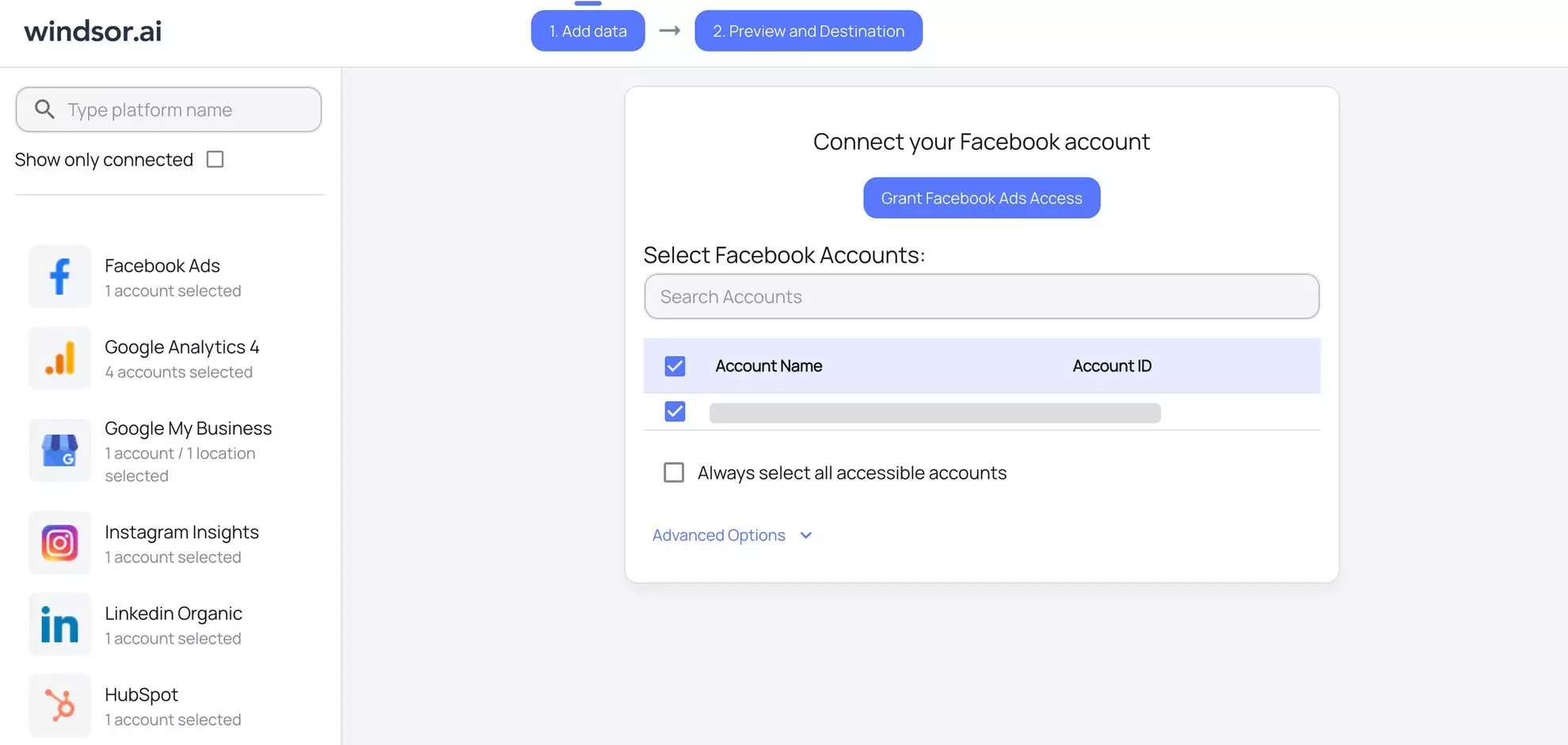
Log in to Windsor.ai and select the Facebook (Meta) Ads data source from the connector list. You will be prompted to grant access via OAuth 2.0.
⚙️ Connector setup documentation: Facebook (Meta) Ads connector installation guide.
You’ll see a list of all available properties under your account. Select only the ones you want to pull data from.
Step 2: Select your reporting fields
Click Next and go to the Preview and Destination screen. Here, you can customize your Facebook Ads dataset by selecting a date range and the metrics and dimensions you actually need. This includes spend, clicks, reach, custom conversion events, and 700+ other data fields.

You can optionally apply filters to further segment your dataset for narrow reporting use cases.
Click Load data in the table to preview your Meta Ads data extracted via Windsor.ai. Compare the numbers to your original Meta reports and feel free to customize further.
💡 Good to know: Windsor.ai handles the field mapping on its own. So when Meta tweaks naming, your data stays consistent.
Step 3: Choose your data destination
Once your data is prepared, choose where you want it delivered.
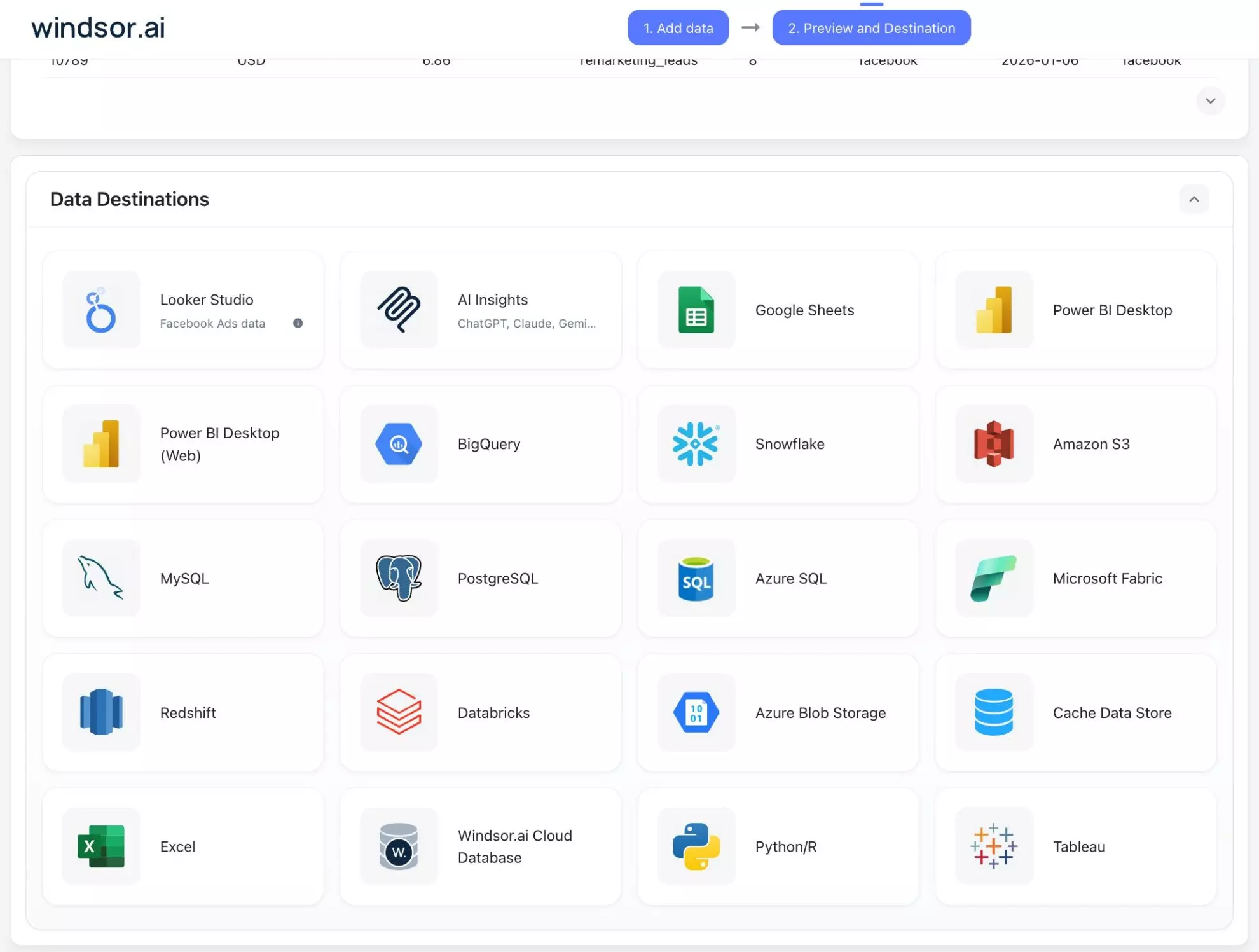
Windsor supports 20+ destinations:
- BI & spreadsheets: Send data to Looker Studio, Power BI, or Google Sheets for visual dashboards.
- Data warehouses: Stream raw, normalized data into BigQuery, Snowflake, or Redshift for long-term storage and SQL analysis.
- AI environments: Export your data to ChatGPT, Claude, or Copilot. This allows you to perform “Conversational Analytics,” asking the AI to find trends or anomalies in your Meta performance.
Depending on your chosen destination, follow the integration instructions and build a fully automated pipeline with a scheduled auto-refresh (daily, hourly, every 15/30 minutes) and backfilling in a matter of minutes.
Get always up-to-date, accurate data delivered right from the Meta Ads API, in any destination with zero code and maintenance.
Helpful resources:
How to Integrate Facebook Ads into BigQuery: Top 3 Methods
How to Import Facebook Ads Data into Google Sheets: Automated Way in 3 Minutes
How to Connect Facebook Ads to Looker Studio: 3 Methods [Automated Setup Included]
Conclusion
The Meta Ads API is an incredibly powerful but notoriously complex engine. While building a manual connector offers total control, it often results in heavy technical debt. Managing token lifecycles, navigating rate limits, and chasing quarterly schema changes can quickly turn a reporting project into a full-time infrastructure job.
Data extraction should be a quick and simple process, not a bottleneck. By using Windsor.ai’s Facebook Ads connector, you bridge the gap between raw, nested JSON and business-ready intelligence.
🚀 Are you ready to stop fighting with spreadsheets and start scaling your growth? Start free with Windsor.ai today and extract your Meta Ads data in minutes: https://onboard.windsor.ai/app/facebook.
FAQs
How can I extract data from the Meta Ads API?
Meta Ads data can be pulled manually using the Graph API. However, you have to work with tokens, pagination, rate limits, and updates. Automated data integration tools such as Windsor.ai, Supermetrics, Funnel, Stitch, Hevo, and others eliminate all these bottlenecks and provide analysis-ready Facebook Ads data in seconds.
Do I need to be a developer to use the Meta Ads API?
If you are using the manual Graph API method, yes. You will need experience with Python or JavaScript, handling JSON, and managing OAuth 2.0 authentication. However, if you use a no-code connector like Windsor.ai, you can extract and automate your data pipelines without writing a single line of code.
How often does the Meta Ads API data refresh?
The data refresh rate depends on your setup. Meta’s system generally updates delivery metrics every 15–20 minutes. With Windsor.ai, you can schedule your data to refresh hourly, daily, or even every 30/15 minutes, ensuring your dashboards in Looker Studio or Power BI or tables in BigQuery or Snowflake are always up to date.
Why doesn't my API data match my Ads Manager reports?
Discrepancies usually happen for two reasons:
- Attribution windows: The API might be pulling a different window (e.g., 1-day click) than what you have set as your default in the UI.
- Data latency: Conversions can take up to 72 hours to be fully processed and reported via the API due to delayed attribution logic.
Can I pull data from multiple Meta Ad Accounts at once?
Yes. While the manual method requires you to loop through multiple act_{ad_account_id} endpoints, Windsor.ai allows you to select multiple accounts during the initial setup. This aggregates all your data into a single dataset, making agency-level or multi-brand reporting much faster.
What are the Meta API rate limits?
Meta uses Business Use Case (BUC) rate limits, tracked per ad account: reads cost 1 point, writes cost 3, and development-level app access caps out at 60 points per 300 seconds. Hit 100% of that and calls are blocked until the window resets. Windsor.ai’s connectors batch and cache requests to stay well within that ceiling automatically.
Can I use Meta Ads API data for AI analysis?
Absolutely. While you can manually export your data to a CSV and upload it to an LLM, the Windsor.ai MCP (Model Context Protocol) server completely automates this workflow.
Instead of dealing with static files, the MCP server acts as a direct “brain-to-data” bridge. It connects your structured Meta Ads API stream directly to AI chats like Claude, ChatGPT, or Cursor. This allows you to perform real-time conversational analytics, asking natural language questions such as:
- “Which ad creative has the lowest cost-per-purchase over the last 30 days?”
- “Identify the top 3 regions where ROAS is scaling and suggest a budget reallocation.”
- “Compare this week’s frequency trends against last month and alert me to potential creative fatigue.”
You can also generate insightful visual summaries and custom dashboards on top of the output data.
Is the Meta Ads API free to use?
Technically, Meta does not charge a fee to access the Marketing API. However, “free” is a misconception when you count in operational costs. Building a custom pipeline requires significant investment in engineering hours for development, server costs for data hosting, and ongoing maintenance. For most teams, the “cost” of the API is actually the salary of the developers required to keep it from breaking.
How often does the Meta Ads API update?
Meta operates on a strict quarterly release cycle, launching a new version (e.g., from v19.0 to v20.0) every three months. Each version has a two-year lifespan before it is deprecated. Managed connectors like Windsor.ai eliminate the risk of “breaking changes” by automatically handling version migration and schema drift, ensuring your reporting remains uninterrupted without manual code updates.
Why does the Meta Ads API return blank values for some fields?
Usually a level mismatch. The level parameter (account, campaign, adset, or ad) decides which rows come back, but Meta doesn’t validate it against the fields you request — asking for an ad-set field at campaign level returns a blank or duplicated value instead of an error. Windsor.ai resolves the correct level automatically for each field you select.
Why does my Meta Ads API request fail with an "incompatible fields" error?
Meta rejects requests that combine fields from breakdown dimensions it doesn’t allow together in a single call, for example certain action breakdowns paired with certain demographic breakdowns. Split the request into separate calls by breakdown group, or let Windsor.ai’s connector handle the grouping for you.


