Destinations
 Data sources
 AI insights
 About us
 Careers
 Security
 Customer reviews
 Contact us
 Affiliate program
 Solution partners
 Template gallery
 Looker Studio templates
 Power BI templates
 Excel templates
 Google Sheets templates
 Tableau templates
 Facebook Ads templates
 Google Ads templates
 Data fields & Metrics
 AI prompt library & Guides
 Product documentation
 API documentation
 Case studies
 Blog
 Data models
 Windsor vs Supermetrics
 Windsor vs Funnel.io
 Windsor vs Fivetran
 Windsor vs Rivery
 Windsor vs Portermetrics
 Windsor vs Coupler.io
Connect MySQL to ChatGPT
Connect your MySQL database tables to ChatGPT with the Windsor.ai plugin.
Ask ChatGPT about a table, such as orders by day or revenue by product category. Compare the answers with Google Ads or Meta Ads in the same chat.
Connect in three steps: fill in a form in Windsor.ai, then install the plugin in ChatGPT.
 Sign up with Google
 Free forever plan








Ask ChatGPT about your MySQL tables
Once a MySQL table is connected in Windsor.ai, you can ask ChatGPT about it through the Windsor.ai plugin.

Ask in plain language
Ask ChatGPT for revenue by product category, orders by country or signups by day from your MySQL tables. ChatGPT works out which columns, dates and filters the question needs, and Windsor.ai returns that data from your table. Anyone on the marketing or sales team can get a figure from the table without asking a developer for a query.

Find what changed and where
If a total in your MySQL table falls, ask ChatGPT which channel, product category or country changed most between the last 14 days and the 14 days before.

Spot unusual days
Ask ChatGPT for a daily total from your MySQL table for the last 30 days and to flag the days well above or below the average. Check those dates in your database or your ad accounts.

Compare MySQL with your ad platforms
Add Google Ads or Meta Ads in Windsor.ai next to your MySQL orders table, then ask ChatGPT to set ad spend by campaign against revenue by utm_campaign. Keeping both sources after the first 30 days needs a paid plan, because the free forever plan covers 1 source.
How ChatGPT reads your MySQL data through Windsor.ai
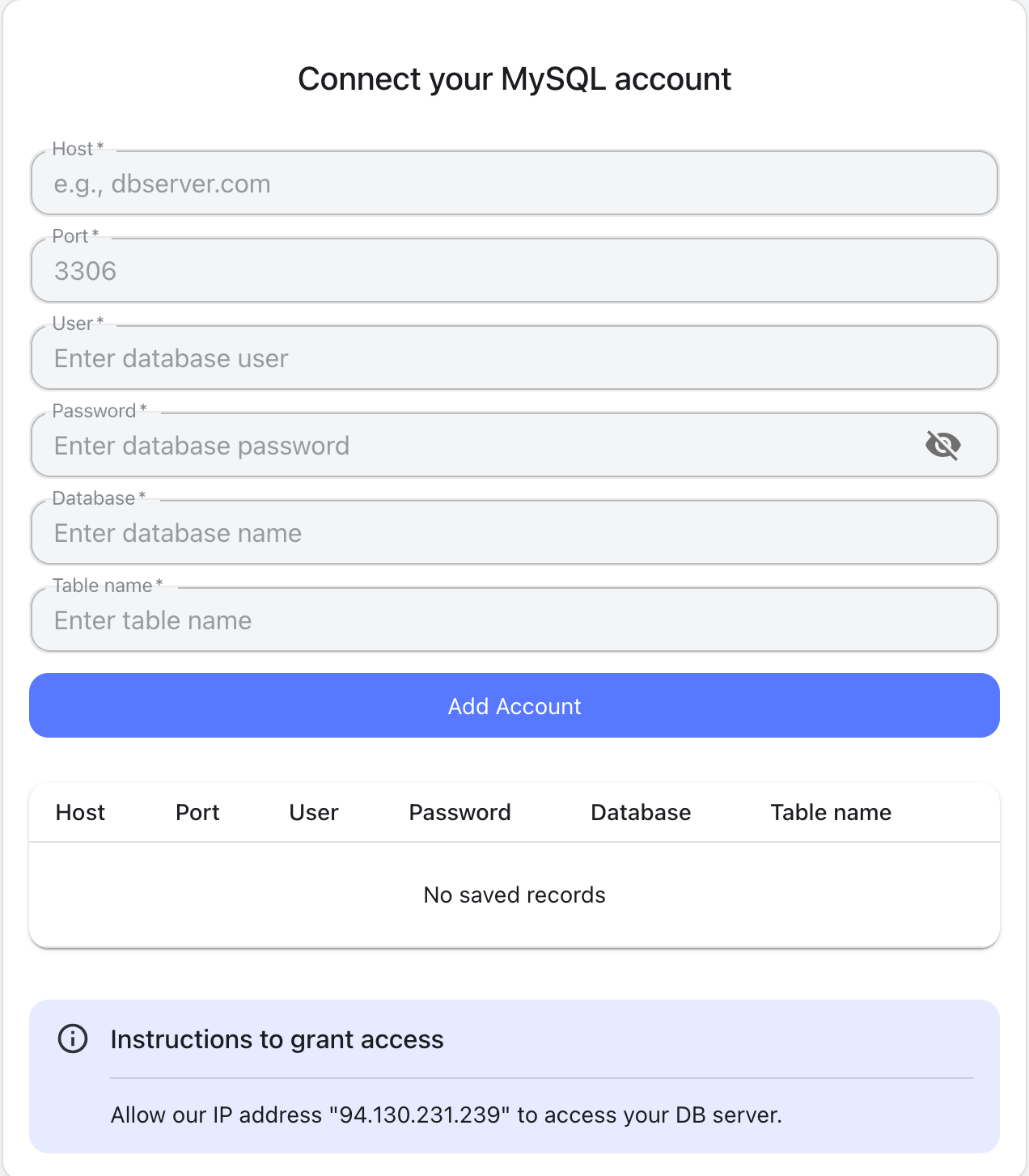
Windsor.ai connects to MySQL with your host, port, user, password, database and table name, one table at a time. After you connect, ChatGPT can ask for the table’s columns by their own names. For another table from the same database, connect it the same way. All tables from one MySQL database count as a single account on your plan. Views work too, as long as the MySQL user you gave Windsor.ai can SELECT from the view and from the tables it reads.
Windsor.ai returns the columns ChatGPT asks for, within the date range and filters it sets. Ask for raw records and you get one row for each table record that matches. Windsor.ai doesn’t add up MySQL columns by default. Numbers are summed only when your question asks for a total, a count or a grouped result, such as revenue by category, and ChatGPT then answers with the aggregated figures.
Name the date column in your question, for example: “From my orders table, show revenue by product category for the last 30 days, using order_date as the date.” On the free forever plan, a question can reach back 30 days at most. If your table has no date column, Windsor.ai reads the rows it holds at the time you ask.






How to connect MySQL to ChatGPT with Windsor.ai
Watch the video tutorial, or follow our step-by-step guide to connecting MySQL to ChatGPT, which also shows how to create a read-only MySQL user.
Install the Windsor.ai plugin
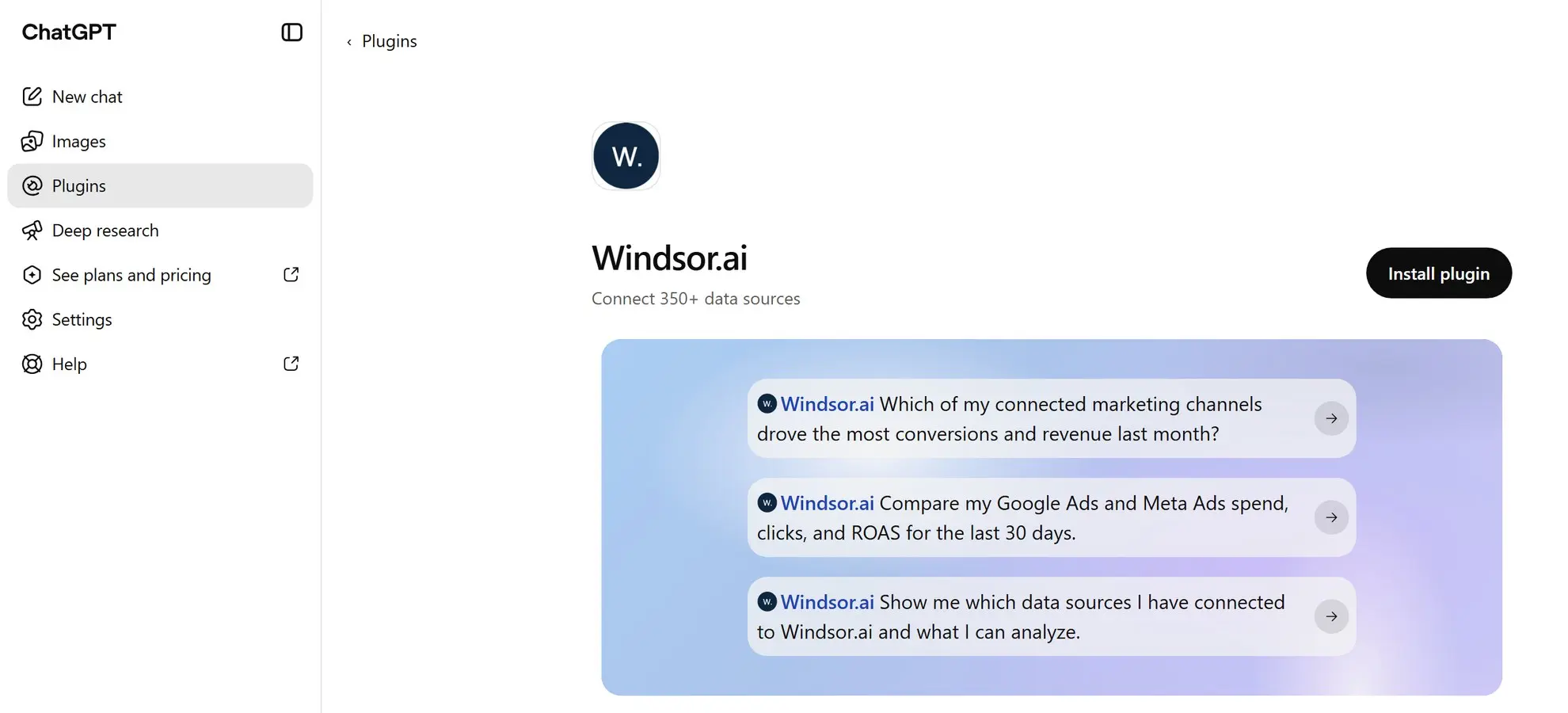
In ChatGPT, select Plugins in the sidebar and search for Windsor.ai, or open the Windsor.ai plugin page.
Select Install plugin, then sign in to Windsor.ai and authorize access.
Query your MySQL data in ChatGPT
Open a new chat, select + and choose Windsor.ai, or type @Windsor.ai. To check the connection, ask: “Is MySQL connected in my Windsor.ai account? List the connected tables and the columns of each.”
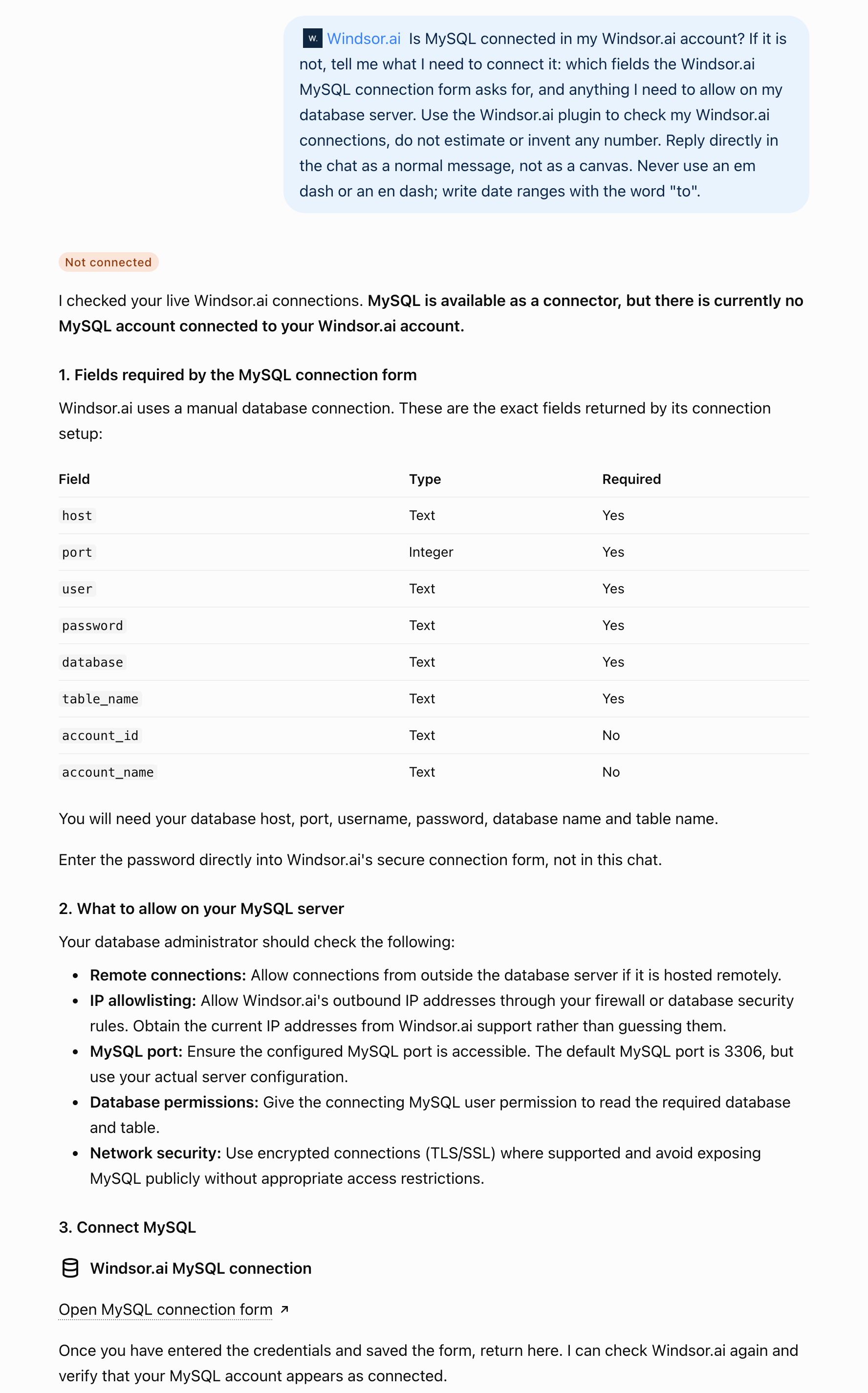
On 19 November 2026, before our test account had a MySQL table, we asked ChatGPT a longer version of this question through the Windsor.ai plugin: whether MySQL was connected and, if not, what a connection needs. It answered “Not connected” and listed the same 6 required fields as the connection form: host, port, user, password, database and table name. It could not give Windsor.ai’s IP address and suggested asking support. The address is on the connection form, under “Instructions to grant access”.
FAQs
Is there an official MySQL plugin for ChatGPT?
No. ChatGPT’s Plugins directory has no MySQL plugin by OpenAI or Oracle (checked 20 November 2026). A search for “MySQL” lists third-party plugins that work with SQL databases, such as QueryBear and AI2SQL. Pick a route by what you need from ChatGPT.
- A database plugin suits you if ChatGPT should run queries on your SQL database itself. Check each plugin’s page for what it can run and whether it can change data.
- The Windsor.ai plugin suits you if you want your MySQL data in the same chat as Google Ads, Meta Ads, GA4 or any of Windsor.ai’s 350+ sources. Access is read-only: the MySQL connector has no write actions.
Can ChatGPT change my MySQL data through Windsor.ai?
No. Windsor.ai can only read MySQL, because the connector has no write actions (write actions documentation). If the database user has only SELECT rights on the table, MySQL itself also refuses any change.
Which MySQL tables and columns can ChatGPT see?
ChatGPT sees only the MySQL tables you connect in Windsor.ai, one table per connection, and asks for their columns by your own column names. Windsor.ai does not join tables inside your database. To use two tables, add both. ChatGPT reads each one separately and can show the results side by side. Tables from the same MySQL database share one account on your plan. A view is readable when the MySQL user you gave Windsor.ai has SELECT access to the view and to the tables behind it.
How do I query a large MySQL table?
For a large MySQL table, keep each request small: name a date column and a short period, or filter on a column such as status or country. Windsor.ai puts no cap on the number of rows, but a request times out after about 3 minutes.
Can I combine MySQL with Google Ads or Meta Ads data?
Yes, free for the first 30 days and on a paid plan after that. Connect Google Ads, Meta Ads or any other source in Windsor.ai next to your MySQL table. Then ask ChatGPT to put both side by side for the same period, for example ad spend by day next to orders by day. After the 30 days, Basic covers 3 sources for $19/month and Standard covers 7 for $99/month, both billed annually.
What prompts can I use to analyze MySQL data in ChatGPT?
Try prompts such as these, with your own table and column names:
From my customers table, count new customers by country for the last 30 days, using created_at as the date.From my order_items table, show units sold by SKU for the last 14 days, using order_date as the date, and list the 10 best sellers.From my orders table, list the 5 days in the last 30 with the lowest order count, using order_date as the date.From my orders table, show revenue by country for this month, using order_date as the date, and rank the top 5 countries.
Each of these reads one MySQL table and stays within 30 days, the most the free forever plan can reach back.
How fresh is the MySQL data in ChatGPT?
Windsor.ai reads your MySQL table when you ask ChatGPT a question and keeps each result for 6 hours. The same question within those 6 hours gets the stored result, so ask again later for newer rows. To get them sooner, select Clear Cache in Data Preview in the Windsor.ai app (once every 2 hours), and your next ChatGPT question reads the table again.
How much does it cost to connect MySQL to ChatGPT with Windsor.ai?
Windsor.ai’s free forever plan needs no credit card. In your first 30 days you can connect up to 10 sources and 15 accounts. From then on it keeps 1 user, 1 data source and 1 account, with data from the last 30 days. MySQL can be that source, and tables from one MySQL database count as that 1 account. For more sources, Basic costs $19/month for 3 and Standard $99/month for 7, both billed annually. Every plan is on the pricing page.
Do you have helpful links to get started with integrating MySQL and ChatGPT using Windsor.ai?
Yes. The MySQL how-to has the full setup, and the other pages cover Claude, other databases and the MySQL fields.
- How to connect MySQL to ChatGPT: setup steps with a read-only user, prompts and troubleshooting
- How to connect a MySQL database to Claude: the same connection in Claude
- Connect PostgreSQL to ChatGPT, BigQuery to ChatGPT and Snowflake to ChatGPT: other databases in ChatGPT
- MySQL Field Reference: how MySQL columns become fields
- ChatGPT Integration Documentation: the Windsor.ai plugin for any source
Tired of manual MySQL data exports? Try Windsor.ai today to automate your reporting