 Destinations
 Data sources
 AI insights
 About us
 Careers
 Security
 Customer reviews
 Contact us
 Affiliate program
 Solution partners
 Template gallery
 Looker Studio templates
 Power BI templates
 Excel templates
 Google Sheets templates
 Tableau templates
 Facebook Ads templates
 Google Ads templates
 Data fields & Metrics
 AI prompt library & Guides
 Product documentation
 API documentation
 Case studies
 Blog
Blog Data models
 Windsor vs Supermetrics
 Windsor vs Funnel.io
 Windsor vs Fivetran
 Windsor vs Rivery
 Windsor vs Portermetrics
 Windsor vs Coupler.io
Connect Shopify to Microsoft Copilot
Automatically sync your Shopify data to Microsoft Copilot using the Windsor.ai connector.
Query your Shopify store data in plain language to spot margin leaks, find best sellers, and make faster decisions that drive revenue growth.
Forget CSVs. Stop copy/paste. Connect in minutes. No code required.
 Sign up with Google
 Free forever plan
No credit card needed
Free forever plan
No credit card needed










Turn raw Shopify data into actionable insights with Copilot Agent
Bring your Shopify data into Microsoft Copilot Agent to skip manual analysis and get instant answers about revenue, products, refunds, and discount performance. Key use cases and benefits include:

Spot your profit drains
Ask Copilot Agent to cross-reference gross sales against refund value and unit cost per product to separate genuine top performers from products that look strong on revenue but erode margin through returns.

Prevent stockouts
Analyze current variant-level inventory against recent order volume to identify which SKUs are approaching stockout. Instead of checking Shopify manually every morning, ask Copilot for a prioritized watchlist based on actual sales velocity.

Connect ad spend to real revenue
Compare your Facebook Ads spend against Shopify order revenue attributed via UTM campaign data, all inside one Copilot conversation. See which campaigns generate orders with above-average order value and which are burning budget on low-value transactions.

Share insights in Microsoft 365
Since Copilot Agent runs inside Microsoft 365, your entire team can access Shopify insights without leaving the tools they already use. Share findings directly in Teams, pull data into Excel for further analysis, or brief stakeholders in a meeting without switching a single tab.
Using Windsor.ai to connect data from Shopify to Copilot
Most ways to get Shopify data into Copilot Agent involve manual exports, API work, or engineering support. Windsor MCP removes this complexity by automatically pulling, cleaning, and streaming your Shopify data directly into your Copilot Agent workspace.
Connect once and start analyzing your e-commerce store performance in plain language.














How to connect Shopify to Copilot Agent with Windsor.ai
Explore our step-by-step guide to integrate your Shopify data into Copilot with the Windsor.ai connector.
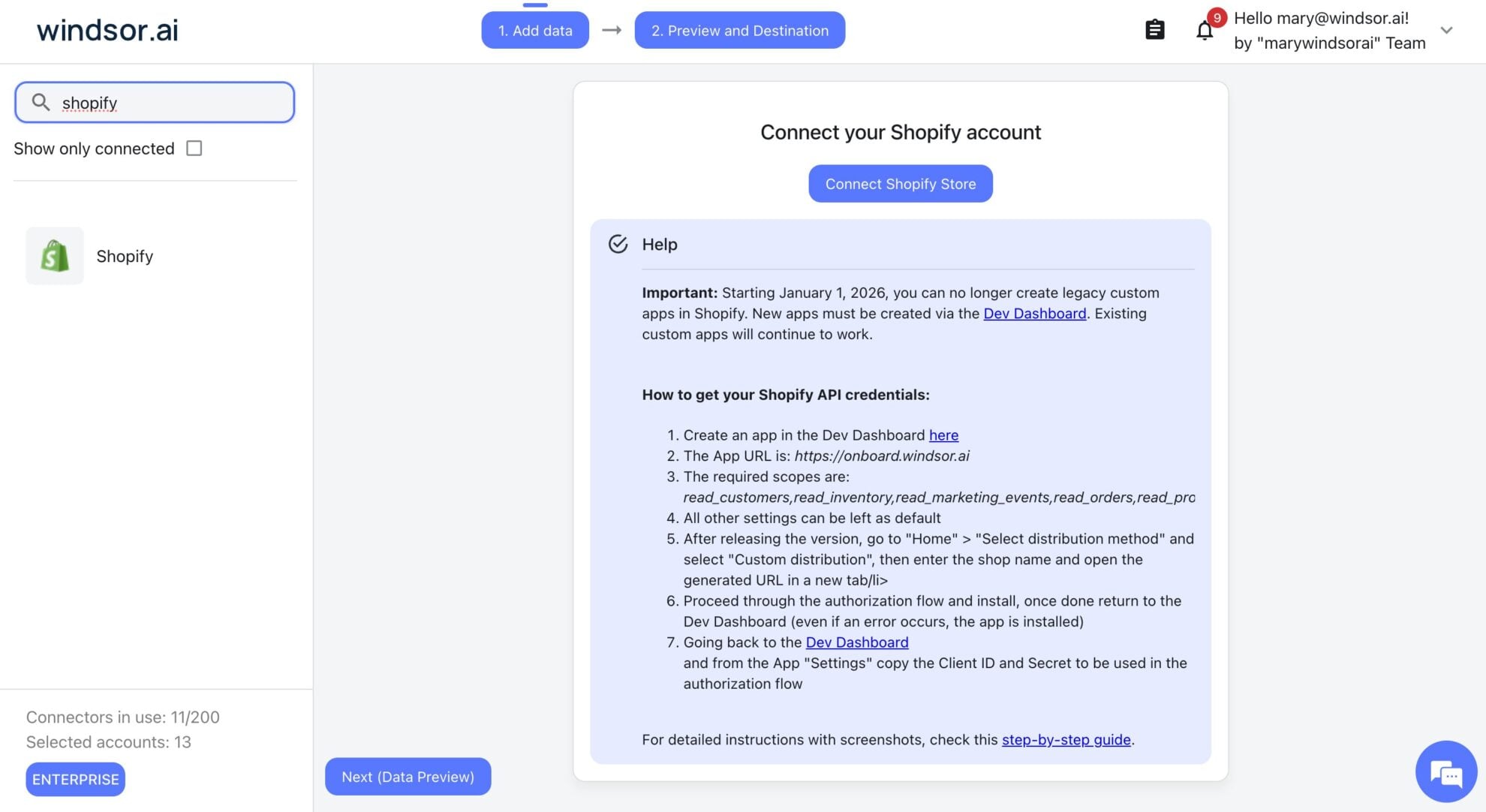
Connect data source in Windsor.ai dashboard
Connect your Shopify to Windsor.ai. Select the necessary account(s) you want to pull data from and click “Next.”
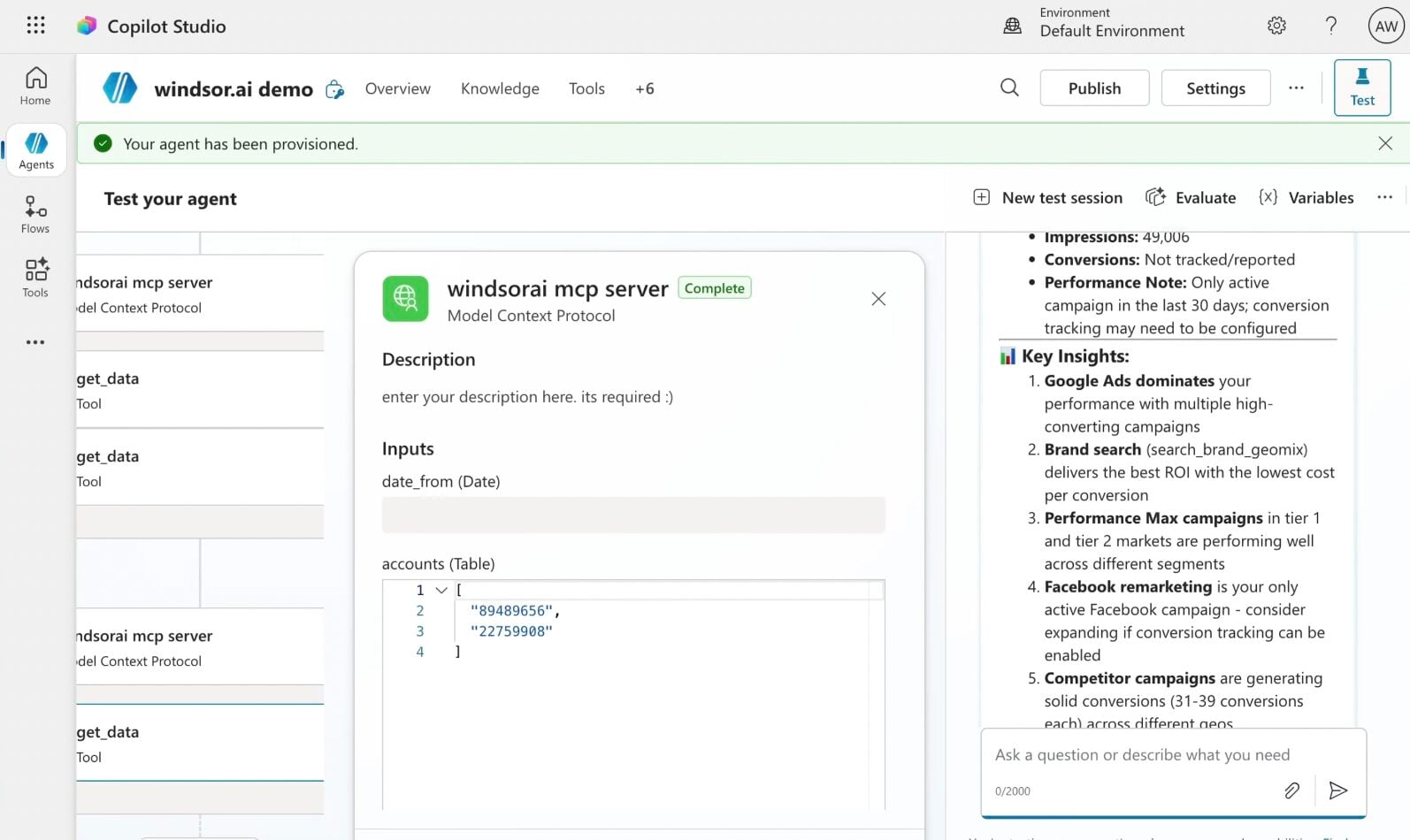
Create a new agent (Windsor MCP) in Copilot
In Microsoft Copilot Studio, create a new agent.
Click + Add tool and select + New tool -> Model Context Protocol.
- Server Name: Windsor MCP
- Server URL: https://mcp.windsor.ai
- Authentication: API Key
- Header name: Authorization

Create a new connection
On the next screen, click the dropdown under ‘Not connected’ and select Create new connection.
⚠️ Important: Enter your Windsor API key with the Bearer prefix.

Confirm credentials and start querying
Start a new chat. Copilot will prompt you to connect to Windsor MCP via the Connections manager. Click Connect -> Submit.
Return to the chat and click Retry in your agent prompt.
You can now ask questions about your integrated Windsor.ai data.
FAQs
Which Shopify data fields are available in Copilot Agent through Windsor.ai?
Windsor.ai gives Copilot Agent access to 300+ metrics and dimensions, including:
- Sales and Revenue: gross sales, net sales, order total price, subtotal, total discounts, refund amounts, and net payment.
- Orders: order count, order status, fulfillment status, payment status, discount codes, sales channel, order tags.
- Products and inventory: product title, variant price, inventory quantity, unit cost (requires ‘View product costs’ permission), product status, vendor.
- Customers: total spend, order count per customer, average order value, customer state, email marketing consent, returning vs. new customer.
- Attribution and traffic: UTM source, UTM campaign, UTM medium, UTM content, last visit referrer URL, last visit landing page.
- Fulfillment and shipping: fulfillment created and delivered dates, shipping address by city and country, shipping price, fulfillment service.
Can I connect multiple Shopify stores to one Copilot Agent?
Yes. Windsor.ai supports multiple Shopify accounts under a single workspace, each identified by its own store name and account ID. Agencies managing several brands or merchants running regional storefronts can pull them all into a Copilot Agent and query stores individually or compare them side by side.
Can I combine Shopify sales data with my ad spend from Google Ads or Meta?
Absolutely. Once Google Ads or Facebook Ads are added alongside Shopify via Windsor.ai, the Copilot Agent matches Shopify order revenue against ad spend using UTM attribution data. It helps you calculate blended ROAS, compare customer acquisition cost against average order value, or flag campaigns where spend is rising while order volume is flat.
Can Copilot Agent identify my best-selling products?
Yes. Ask Copilot to rank products by order count, total revenue, or net sales (after discounts and refunds) over any date range. You can also slice by product type, vendor, or variant, for example:
Show my top 10 products by net sales over the last 30 days. For each, break down which variant (size, color, or option) drove the most orders.
This surfaces not just what sells, but what specifically within a product line is moving.
What prompts can I use when analyzing Shopify data in Copilot Agent?
Here are examples of more specific prompts you can use to dive deep into your Shopify data:
-
Analyze my discount code usage over the last 90 days. For each code, show how many orders used it, total discount value given away, average order value with vs. without a discount code, and net sales generated. Identify which codes are driving incremental revenue and which are just eroding margin.
-
Break down my UTM campaign performance by shipping country. For each country, show total orders, net sales, and average order value. Show me markets where I'm generating strong order volume but below-average order value, and suggest pricing or bundling adjustments.
-
Segment my customers by order frequency: one-time buyers, 2–3 orders, and 4+ orders. For each segment show total customer count, average total spend per customer, and the top 3 products purchased. Which product appears most in the first order of customers who go on to buy 4 or more times?
-
Compare my Shopify revenue against my Facebook Ads spend over the last 30 days using UTM campaign data. For each campaign, show total ad spend, attributed Shopify orders, gross revenue, and blended ROAS. Flag any campaign where spend increased week-over-week but Shopify order volume from that UTM source stayed flat or declined.
How much does it cost to integrate Shopify into Copilot using Windsor.ai?
Windsor.ai is free to start, no credit card required. Paid plans start at $19/month and scale by the number of sources and accounts. See the pricing page.
How long does it take to connect Shopify to Copilot?
With Windsor MCP, the integration process takes a few minutes. No technical expertise or coding is required; connecting data to Copilot is simple, straightforward, and accessible to everyone.
Do you have helpful links to get started with integrating Shopify and Copilot Agent using Windsor.ai?
Yes, we have helpful resources to help you get started. You can explore our official documentation and tutorials for seamless Shopify to Copilot Agent integration with Windsor.ai:
Tired of manual Shopify data exports? Try Windsor.ai today to automate your reporting


