 Destinations
 Data sources
 AI insights
 About us
 Careers
 Security
 Customer reviews
 Contact us
 Affiliate program
 Solution partners
 Template gallery
 Looker Studio templates
 Power BI templates
 Excel templates
 Google Sheets templates
 Tableau templates
 Facebook Ads templates
 Google Ads templates
 Data fields & Metrics
 AI prompt library & Guides
 Product documentation
 API documentation
 Case studies
 Blog
Blog Data models
 Windsor vs Supermetrics
 Windsor vs Funnel.io
 Windsor vs Fivetran
 Windsor vs Rivery
 Windsor vs Portermetrics
 Windsor vs Coupler.io
Connect Shopify to Lovable
Automatically sync your Shopify data to Lovable using the Windsor.ai connector.
Chat with your Shopify data in Lovable to spot fulfillment issues, identify your highest-value customers, and scale your top-performing products.
Forget CSVs. Stop copy/paste. Connect data in minutes. No code required.
 Sign up with Google
 Free forever plan
No credit card needed
Free forever plan
No credit card needed










Grow your e-commerce store with Shopify to Lovable integration
Windsor MCP streams your live Shopify data directly into Lovable, so you get instant answers on revenue, customers, and products, and turn your findings into shareable dashboards. Explore key use cases:

Find high-value customers at risk
Surface your highest-spend customers who are going quiet before they churn. Use the list to trigger retention campaigns at exactly the right moment, before a competitor wins them back.

Pinpoint refund-heavy SKUs
Understand which Shopify products are quietly killing your margin with returns before it hits your P&L, then fix the product, the listing, or the expectation before you reorder.

Measure true ROAS
Blend Shopify net sales with Facebook Ads or Google Ads spend in Lovable. Calculate true ROAS based on actual store revenue, not platform-attributed conversions, and identify which campaigns acquire customers with the highest lifetime value.

Prevent costly stockouts
Lovable helps you see which variants will stock out before your current inventory can cover demand, so your buying team gets the lead time they need to reorder and avoid turning stock gaps into lost revenue.
Using Windsor.ai to connect data from Shopify to Lovable
Most ways to connect Shopify to Lovable require manual exports, data cleanup, or costly tools. Windsor MCP removes this complexity by collecting, organizing, and streaming your e-commerce data into Lovable.
Ask questions in plain language and get real-time insights in seconds.
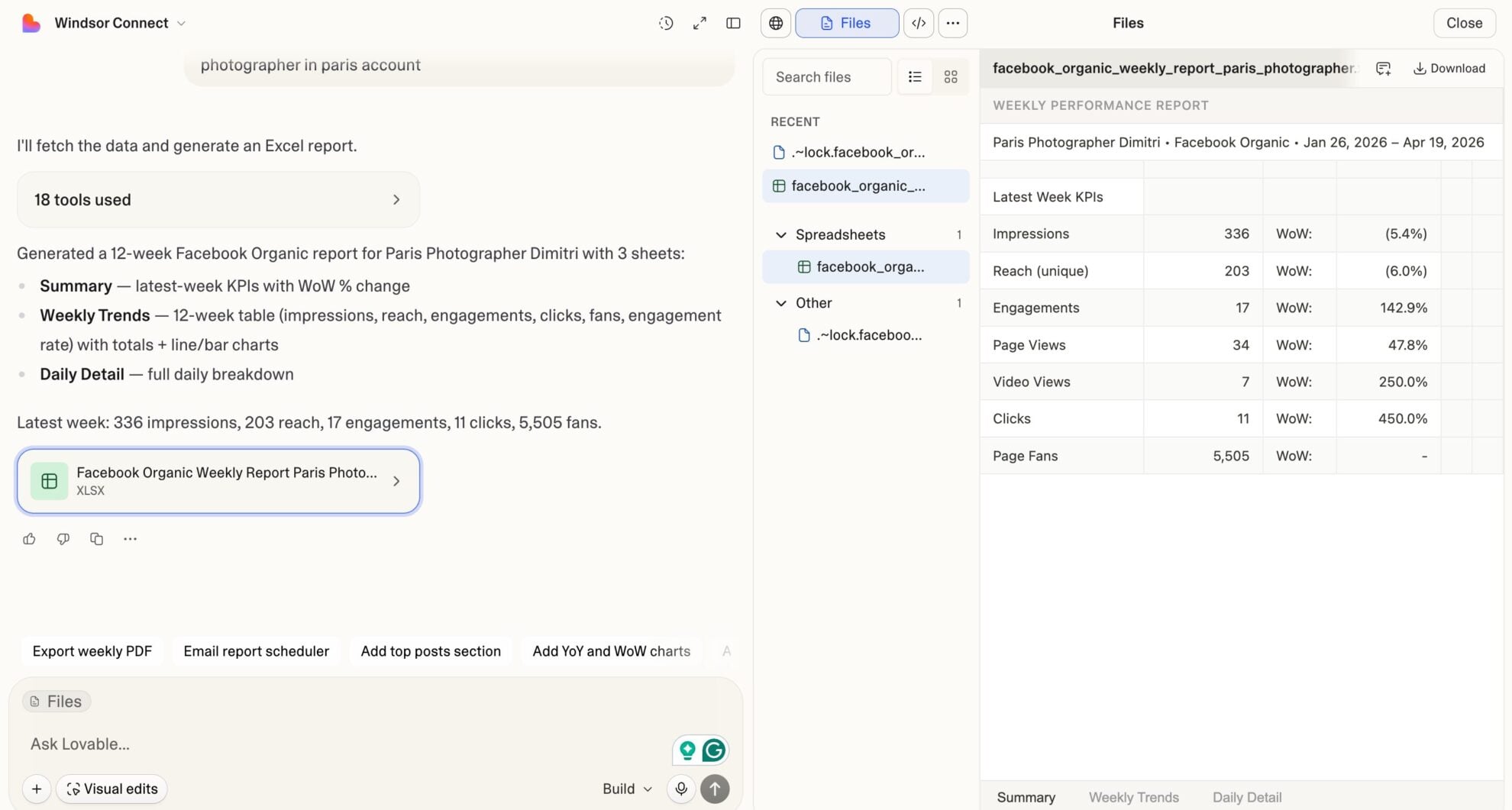














How to connect Shopify to Lovable with Windsor.ai
Explore our video tutorial and a step-by-step guide to integrate your Shopify data into Lovable with the Windsor.ai connector.
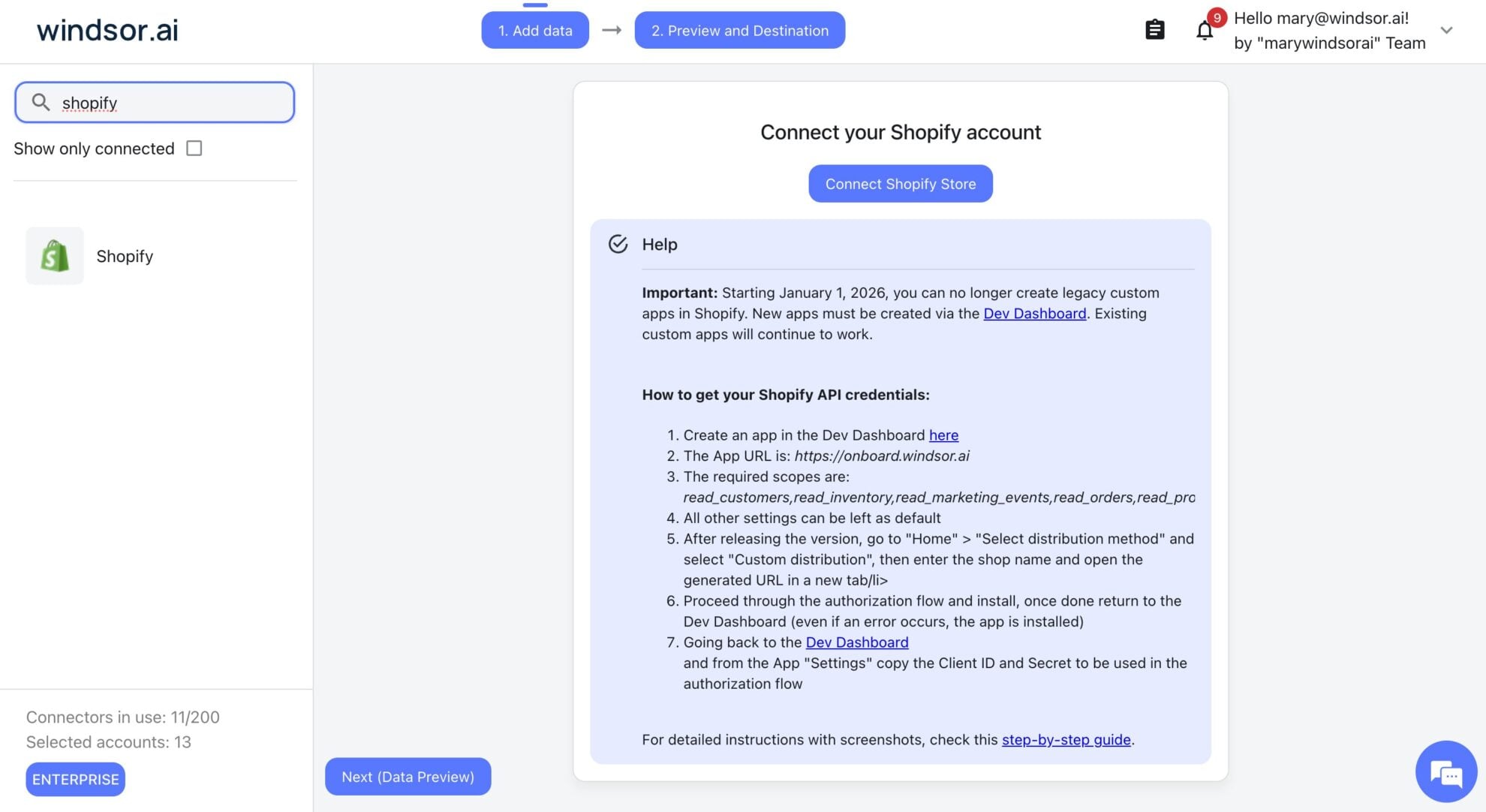
Select your data source
Choose Shopify as your data source and grant access to Windsor.ai.
Select custom connector in Lovable
In Lovable, open Connectors and select Custom MCP.

Add MCP server
Enter the following details:
- Name: Windsor.ai
- URL: https://mcp.windsor.ai/
Click Add & Authorize to save the connector and authorize access to Windsor.ai.

Authorize and start querying your data
Once added, Windsor will appear in your list of connectors. Enable Always allow permissions for faster access.
Open a new chat and start querying your connected data.

FAQs
Does Windsor.ai pull Shopify data in real time?
Yes. Every question you ask in Lovable triggers a fresh pull from the Shopify API via Windsor MCP, ensuring your order totals, inventory levels, customer data, and fulfillment statuses reflect the current state of your store performance.
What Shopify data can I analyze in Lovable via Windsor.ai?
Windsor.ai gives you access to a wide range of Shopify metrics and dimensions, including:
- Revenue and orders: Gross sales, net sales, total price, subtotal price, total discounts, net payment, total tax, order count, cost of goods sold, order financial status, fulfillment status.
- Refunds and returns: Refunds subtotal, refunds quantity, returns amount, returns quantity, line item refunds price, line item refund quantity, refund discrepancy amount.
- Customers: Total spent, orders count, average order value, is returning, email marketing consent state, default address country, customer created date, customer tags.
- Products and variants: Product title, product type, vendor, inventory quantity, inventory value, variant price, compare at price, unit cost, variant SKU, product status.
- Marketing attribution: UTM source, UTM medium, UTM campaign, UTM content, order customer last visit source, referrer URL, discount codes.
- Fulfillment and shipping: Fulfillment status, fulfillment created date, fulfillment delivered date, shipping address country, shipping line title, shipping price, carrier identifier.
Can I track customer lifetime value and retention in Lovable?
Yes. Windsor.ai pulls customer_total_spent, customer_orders_count, customer_aov, customer_is_returning, and customer_created_at for every customer in your store. Ask Lovable to rank customers by lifetime value, identify your most loyal buyers, or find high-spend customers who haven’t ordered recently, so your retention campaigns reach the right people.
Can Lovable help me analyze product inventory and stock levels?
Yes. Lovable helps you identify which variants are running low relative to their recent sales velocity, which products have the highest inventory value sitting unsold, and where you’re at risk of stockouts before your next reorder.
Can I build a live Shopify store dashboard in Lovable?
Yes. Describe what your team tracks daily (revenue by channel, top SKUs, refund rate, new vs. returning customer split, fulfillment delays), and Lovable builds a fully interactive, shareable web app from your live Shopify data.
What prompts can I use to analyze my Shopify data in Lovable?
Beyond basic performance summaries, you can use more advanced, specific prompts to uncover deeper insights. For example:
-
Analyze customer retention for the last 6 months. Segment customers into first-time buyers and returning buyers. For each segment, show total revenue, average order value, and average days between orders for returning customers. Which acquisition month produced the highest share of returning buyers?
-
For the last 90 days, pull all orders with a discount code applied. Show total revenue, average order value, discount amount, and net sales per discount code. Compare average order value for discounted vs. non-discounted orders and calculate the net revenue impact of each promotion.
-
Break down my product inventory by variant. Show current inventory quantity, sellable online quantity, unit cost, and inventory value per variant. Flag all variants with fewer than 10 units remaining and a sales velocity above 5 units per week in the last 30 days.
-
Attribute revenue to marketing channels using UTM data for the last 60 days. For each UTM source and medium combination, show order count, total revenue, average order value, and share of total revenue. Which channel drives the highest AOV, and which drives the most order volume?
-
Pull all customers with a total spent above $500 who haven't placed an order in the last 60 days. Show their last order date, total orders count, average order value, and email marketing consent state. Flag customers who accept marketing: these are your highest-priority re-engagement targets.
Do you have helpful links to get started with integrating Shopify and Lovable using Windsor.ai?
Yes, we have helpful resources to help you get started. You can explore our official documentation and tutorials for seamless Shopify to Lovable integration with Windsor.ai:
Can I combine Shopify data with my ad platforms in Lovable?
Absolutely. Windsor.ai allows you to blend Shopify with 350+ data sources, including Facebook Ads, Google Ads, TikTok, and Klaviyo, in the same Lovable conversation. Ask which ad campaigns drove the highest revenue per order, calculate true ROAS based on Shopify net sales, and identify which channels acquire your highest-value customers.
Tired of manual Shopify data exports? Try Windsor.ai today to automate your reporting


