 Destinations
 Data sources
 AI insights
 About us
 Careers
 Security
 Customer reviews
 Contact us
 Affiliate program
 Solution partners
 Template gallery
 Looker Studio templates
 Power BI templates
 Excel templates
 Google Sheets templates
 Tableau templates
 Facebook Ads templates
 Google Ads templates
 Data fields & Metrics
 AI prompt library & Guides
 Product documentation
 API documentation
 Case studies
 Blog
 Data models
 Windsor vs Supermetrics
 Windsor vs Funnel.io
 Windsor vs Fivetran
 Windsor vs Rivery
 Windsor vs Portermetrics
 Windsor vs Coupler.io
Connect Snapchat Ads to ChatGPT
Ask ChatGPT about your Snapchat Ads spend, swipe ups, video views, installs and purchases by campaign, ad squad and ad, through the Windsor.ai plugin. ChatGPT can also pause or enable campaigns, ad squads and ads, and change campaign and ad squad budgets, after you confirm each change.
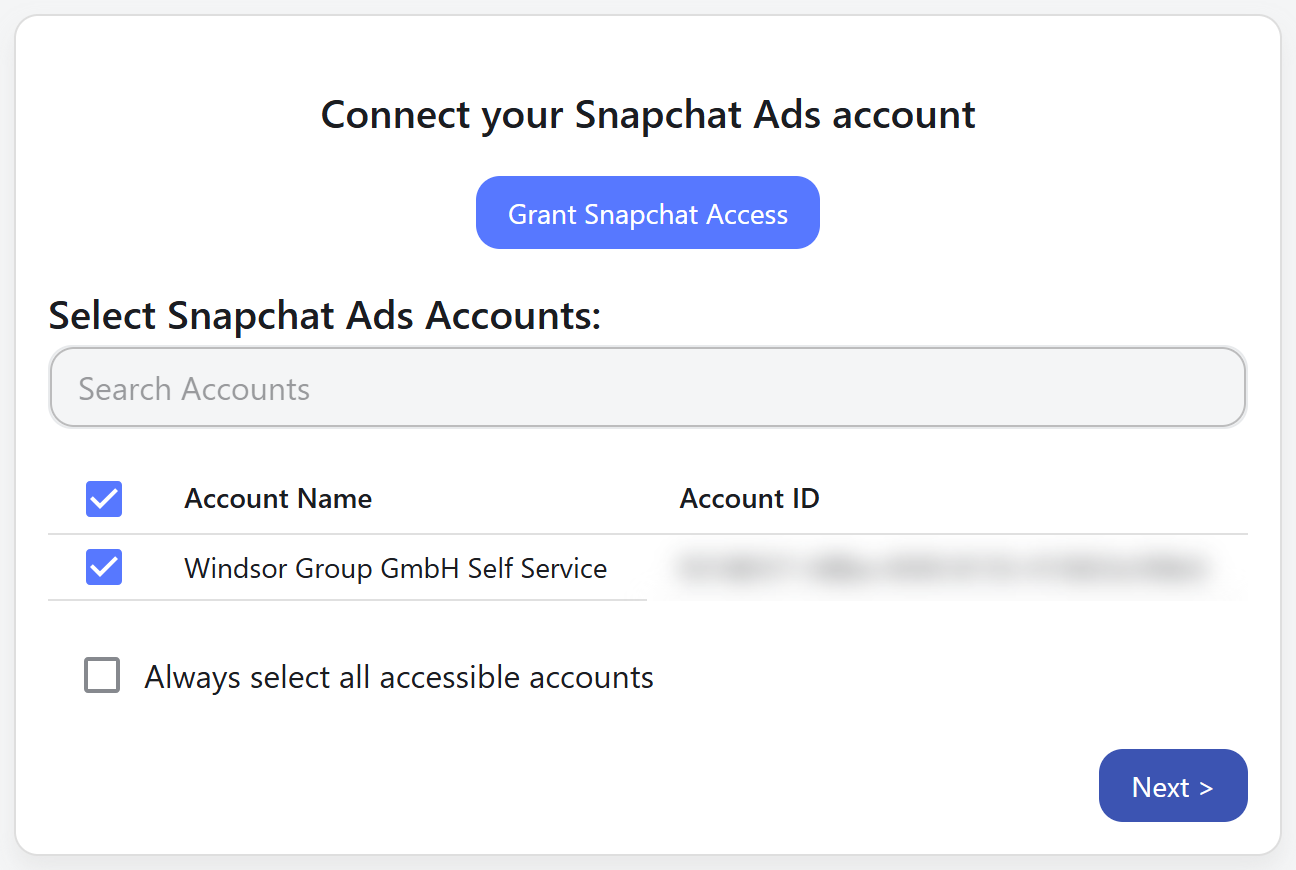
Set it up in three steps: grant Windsor.ai access to your Snapchat ad accounts, install the Windsor.ai plugin in ChatGPT, and ask your first question in a new chat.
 Sign up with Google
 Free forever plan







What you can do with Snapchat Ads data in ChatGPT
With the Windsor.ai plugin, ChatGPT reads your Snapchat Ads campaigns, ad squads and ads and can make a small set of changes in your account.

Pause ads and change budgets from the chat
Ask ChatGPT to pause or enable a Snapchat campaign, ad squad or ad, or to set a new campaign or ad squad budget. ChatGPT sends the change to Snapchat Ads through Windsor.ai’s write actions. New campaigns and ads, targeting, schedules and creative are still edited in Ads Manager.

Compare Snapchat with TikTok Ads and Meta Ads
Connect TikTok Ads or Meta Ads to Windsor.ai as well, and ask ChatGPT for spend, installs and cost per install by channel in one answer. From day 31, a second connected source needs a paid plan.

Spot creative fatigue
Snapchat Ads reports frequency, swipe up rate and video completion for each ad. Ask ChatGPT for these by week to find ads whose swipe up rate falls while frequency rises.

Find ad squads that stopped delivering
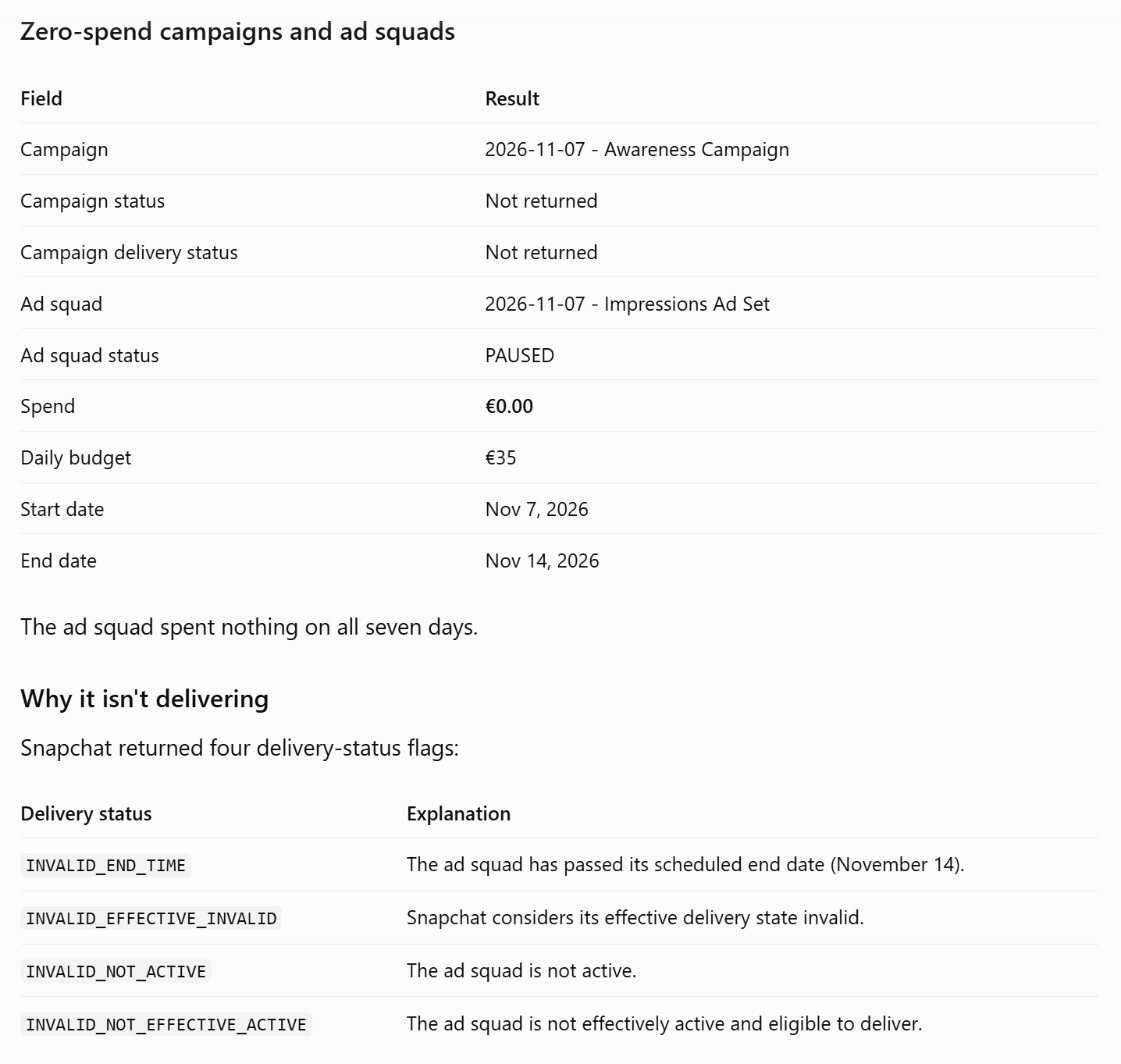
Windsor.ai reads Snapchat’s delivery status for each campaign and ad squad, such as a passed end date or a paused campaign. Ask ChatGPT which ad squads spent nothing last week and why.
What Windsor.ai reads from Snapchat Ads
Windsor.ai connects to Snapchat Ads with your Snapchat login and reads the ad accounts you select. The Snapchat Ads field reference lists every field.
The fields cover spend, impressions, swipe ups, reach, frequency, video views and quartiles, app installs, campaign and ad squad status, delivery status, and ad squad daily and lifetime budgets. Attributed conversions include purchases, purchase value, sign ups, add to cart, page views and five custom events, from the Snap Pixel, your app or the Conversions API. Delivery and conversion metrics can be split by age, gender, country and OS. Region splits cover delivery metrics only.
Through Windsor.ai, ChatGPT can switch Snapchat campaigns, ad squads and ads on or off and set new campaign or ad squad budgets. The list below shows each write action.
Available actions
Pause Ad
Pause an active Snapchat Ads ad. Reversible via enable_ad.
Pause Ad Squad
Pause an active Snapchat Ads ad squad. Reversible via enable_ad_squad.
Pause Campaign
Pause an active Snapchat Ads campaign. Reversible via enable_campaign.
Enable Ad
Enable a paused Snapchat Ads ad. Reversible via pause_ad.
Enable Ad Squad
Enable a paused Snapchat Ads ad squad. Reversible via pause_ad_squad.
Enable Campaign
Enable a paused Snapchat Ads campaign. Reversible via pause_campaign.
Set Campaign Budget
Set the daily budget of a Snapchat Ads campaign. The amount is in the account currency major unit (e.g. 50.00 means fifty, not micros). Snapchat requires at least 20 and at least a quarter of the sum of the campaign's ad squad budgets.
Set Ad Squad Budget
Set the budget of a Snapchat Ads ad squad. The amount is in the account currency major unit (e.g. 50.00 means fifty, not micros). The ad squad keeps its budget type: a daily budget stays daily and a lifetime budget stays lifetime. Snapchat requires a daily budget of at least 5.






How to connect Snapchat Ads to ChatGPT with Windsor.ai
Watch the video or follow the three steps below. Our guide to connecting Snapchat Ads to ChatGPT adds field notes, prompt ideas and the results of our own test. For examples with other sources, see how to use the Windsor.ai MCP server for data analysis.
Install the Windsor.ai plugin
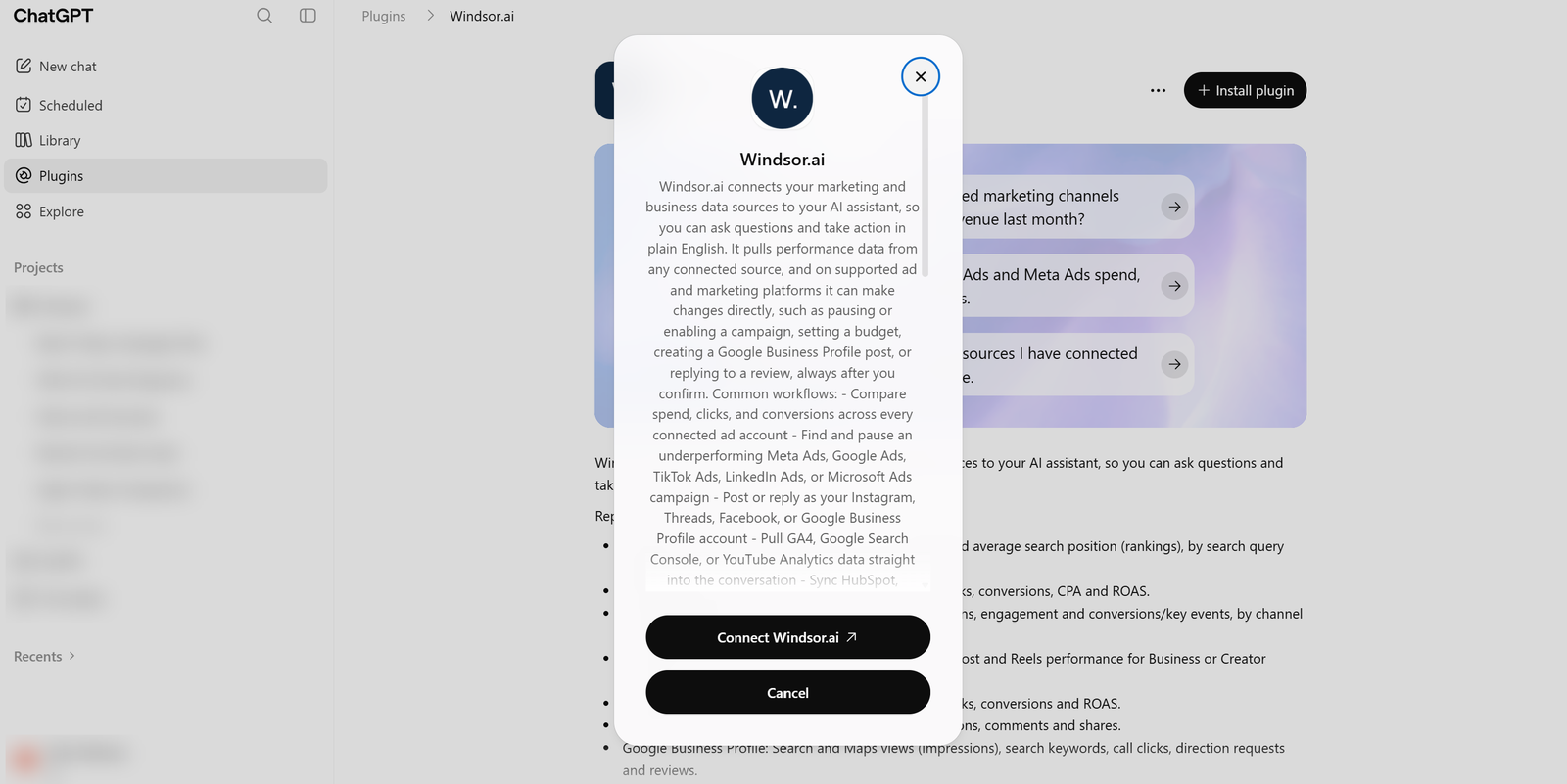
In ChatGPT, select Plugins in the sidebar and search for Windsor.ai, or open the Windsor.ai plugin page.
Select Install plugin, then Connect Windsor.ai. Sign in to Windsor.ai and select Back to ChatGPT.
Ask ChatGPT about your Snapchat Ads data
In ChatGPT, open a new chat, select + and choose Windsor.ai, or type @Windsor.ai. Name a date range in each question: without one, Windsor.ai reads the last 3 days.
On our own account, ChatGPT found a paused ad squad with no spend and explained each delivery status code it returned. Its answer left out our other paused campaign, which has no ad squad. Asking about campaigns on their own returns it.
FAQs
What Snapchat Ads data can I analyze in ChatGPT?
Spend, impressions, swipe ups and swipe up rate, reach and frequency, video views and quartiles, iOS and Android installs, attributed conversions and purchase value (from the Snap Pixel, your app or the Conversions API), campaign and ad squad status, delivery status, and ad squad daily and lifetime budgets. You can ask for them by campaign, ad squad, ad and day. The Snapchat Ads field reference lists every field.
Does Windsor.ai include Snap Pixel conversions?
Yes. Windsor.ai reads Snapchat’s attributed purchases, purchase value, sign ups, add to cart, page views and five custom events, which include Snap Pixel events. Web purchases and their value also have their own fields. ChatGPT can compare them with spend by campaign or ad.
Why do Snapchat conversions in ChatGPT differ from Ads Manager?
Ads Manager dates each conversion by the day the ad was shown, while Windsor.ai dates it by the day the conversion happened, unless you ask otherwise. Add “by impression time” to your question to get Ads Manager’s numbers. Both use Snapchat’s default windows: 28 days after a swipe up and 1 day after a view.
Can ChatGPT split Snapchat Ads results by age, gender or country?
Yes. Spend, impressions, swipe ups and conversions can be split by age, gender, country and OS. To see age and gender combined, name both in the same request. Region splits return delivery metrics such as spend and impressions, without conversions.
Can ChatGPT pause Snapchat ads or change their budgets?
Yes, through 8 write actions. ChatGPT can pause or enable a campaign, ad squad or ad, and set a campaign’s daily budget or an ad squad’s budget. Creating campaigns or ads and editing targeting, schedules or creative stay in Ads Manager. Snapchat sets minimum budgets: a campaign needs at least 20 a day and at least a quarter of its ad squads’ combined budgets, and an ad squad needs at least 5 a day, in your account currency.
Can ChatGPT tell me why a Snapchat ad squad isn't delivering?
Yes. Windsor.ai reads Snapchat’s delivery status codes, and ChatGPT can explain them, for example a paused ad squad or an end date in the past. For campaign status, ask about campaigns on their own: a question that mixes campaign and ad squad fields leaves out campaigns with no ad squad and returns campaign status empty.
Can ChatGPT write new ad copy for my Snapchat campaigns?
Yes, as text in the chat. ChatGPT can compare your ads’ swipe up rate and conversions and draft new copy ideas. It can’t upload or edit creative in Snapchat Ads through Windsor.ai.
Does Snapchat have its own MCP server for ChatGPT?
Yes. Snap launched the read-only Snapchat Ads MCP Server in August 2026. You add it to ChatGPT as a custom MCP server on Plus, Pro, Business, Enterprise or Edu, and an Admin or Business Admin of your Snap organization approves it. Windsor.ai adds pause and budget changes and puts Snapchat Ads next to your other sources.
How up to date is Snapchat Ads data in ChatGPT?
Snap updates its stats about every 15 minutes and finalizes each day 48 hours after it ends. Windsor.ai answers a repeated question from its cache for up to 6 hours. To get newer rows, ask ChatGPT to refresh the data, which re-fetches the most recent days on Standard and higher plans. You can also select Clear Cache under Data Preview in the Windsor.ai app, once every 2 hours.
How much does it cost to connect Snapchat Ads to ChatGPT?
Windsor.ai’s free forever plan costs nothing and needs no credit card. It covers 1 user, 1 data source and 1 account, with data from the last 30 days. Your first 30 days allow up to 10 sources and 15 accounts for testing. Comparing Snapchat Ads with TikTok Ads or Meta Ads after that needs a paid plan: Basic ($19/month, 3 sources) or Standard ($99/month, 7 sources), billed annually. See the pricing page.
Where can I learn more about Snapchat Ads and ChatGPT?
Windsor.ai has more Snapchat Ads and ChatGPT guides, plus the same setup for Claude and for TikTok Ads:
- How to connect Snapchat Ads to ChatGPT: the full guide, with ChatGPT’s answer on our account
- Snapchat Ads field reference: every Snapchat Ads field
- Connect Snapchat Ads to Claude: the same data with Claude as the assistant
- How to connect TikTok Ads to ChatGPT: the same setup for TikTok Ads
- ChatGPT setup documentation: how to install and use the Windsor.ai plugin
Try Windsor.ai free and ask ChatGPT about your Snapchat Ads campaigns.


