 Destinations
 Data sources
 AI insights
 About us
 Careers
 Security
 Customer reviews
 Contact us
 Affiliate program
 Solution partners
 Template gallery
 Looker Studio templates
 Power BI templates
 Excel templates
 Google Sheets templates
 Tableau templates
 Facebook Ads templates
 Google Ads templates
 Data fields & Metrics
 AI prompt library & Guides
 Product documentation
 API documentation
 Case studies
 Blog
 Data models
 Windsor vs Supermetrics
 Windsor vs Funnel.io
 Windsor vs Fivetran
 Windsor vs Rivery
 Windsor vs Portermetrics
 Windsor vs Coupler.io
 Last updated: 23 November 2026





To connect GitHub to Claude, add a GitHub personal access token and your list of repositories to Windsor.ai, then connect Windsor.ai in Claude. Claude can then read your repository activity, such as issues, pull requests, reviews, commits, releases and workflow runs. Ask it in plain English, for example how many pull requests were merged last week.
Claude doesn’t read your code through Windsor.ai. The connector returns activity and links to files, not file contents. The connection is also read-only: GitHub has no write actions in Windsor.ai (checked on 23 November 2026). Claude can’t merge, comment or close issues for you.
Windsor.ai or the GitHub MCP server
GitHub runs its own MCP server. Through it, Claude can read files and code. It can also work with issues and pull requests in your repositories. Use it when you want Claude to read or change code.
Use Windsor.ai when you want GitHub activity in the same Claude chat as your other tools, such as Jira, Trello or your marketing data, through one connector.
Before you start
- A GitHub personal access token. In GitHub, open Settings, then Developer settings, then Personal access tokens, and create a token with read access to the repositories you want Claude to see.
- A Windsor.ai account. Windsor.ai has a free forever plan with 1 data source and the last 30 days of data. Paid plans start at $19/month for 3 sources, billed annually (pricing).
- A Claude account that can add connectors. In a Claude Team or Enterprise workspace, your admin may limit which connectors you can add.
Step 1. Add GitHub to Windsor.ai
- Go to onboard.windsor.ai/app/github and sign in or create a Windsor.ai account.
- In Authentication, enter your token in the format the form’s Help box shows.
- In GitHub Repositories, list the repositories as owner/repo, or use owner/* for all repositories of an organization.
- Click Add Account.

GitHub is a community connector in Windsor.ai. Support can be more limited than for connectors Windsor.ai maintains. Enter the token in the Windsor.ai form only. Never paste it into a Claude chat.
Step 2. Connect Windsor.ai in Claude
- In Claude, open Customize in the sidebar, then Connectors, or open the Windsor.ai listing in the Claude directory.
- Search for Windsor.ai and click Connect.
- Sign in to Windsor.ai with the account you added GitHub to.
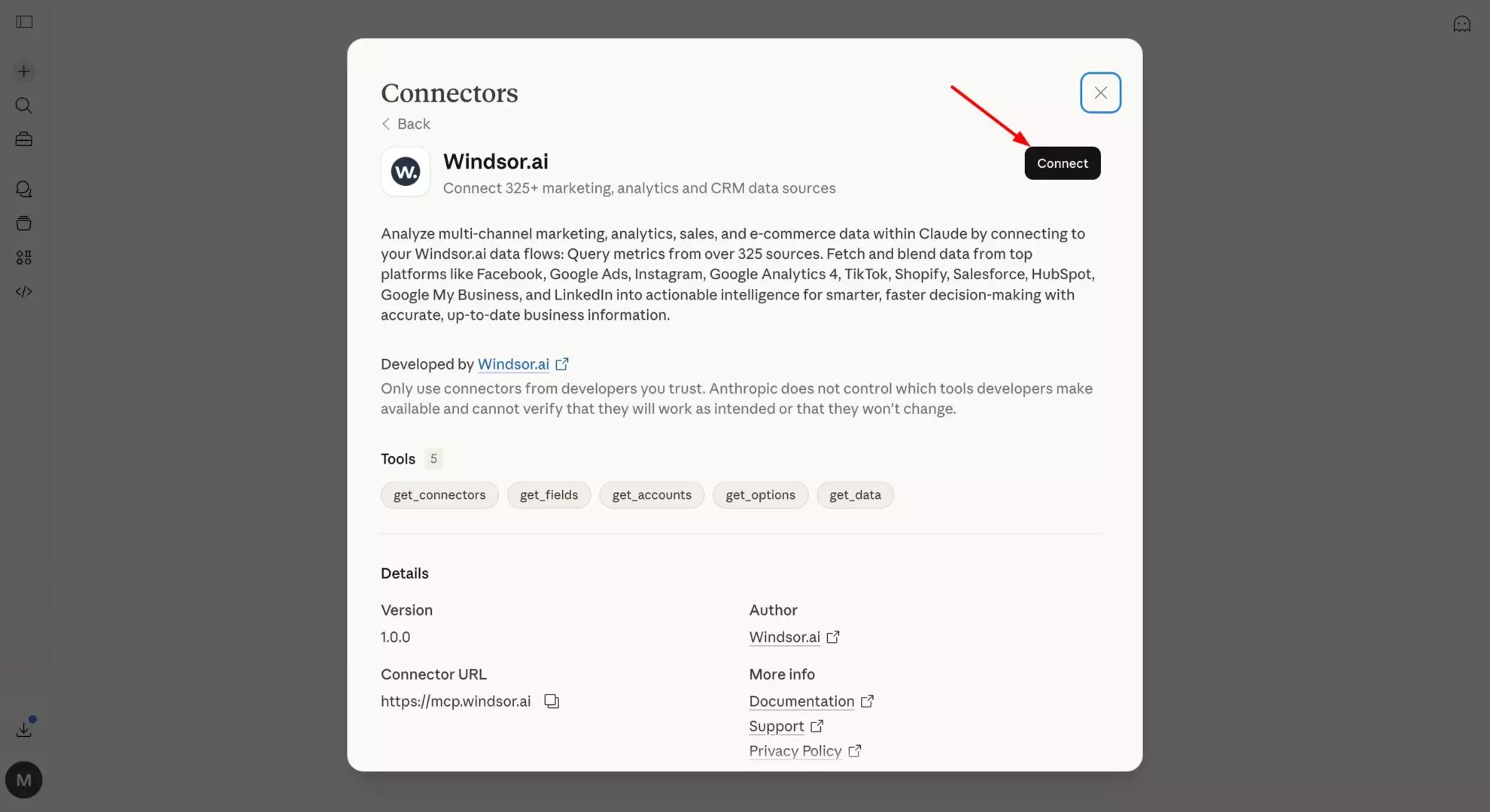
The Windsor.ai Claude setup guide shows each setup screen.
Check the GitHub connection in Claude
Ask Claude whether GitHub is connected before you ask about activity:
Using Windsor.ai, is GitHub connected in my Windsor.ai account? If it is not, which fields does the Windsor.ai GitHub connection form ask for? Also, can the Windsor.ai GitHub connector read the code in my repository files?
On 23 November 2026 we asked this in our own Windsor.ai account, which has no GitHub account added. Claude answered that GitHub was not connected and named the two form fields, credentials and repositories. It also confirmed that the connector returns repository activity and metadata, not file contents. One detail did not match: Claude called both fields optional, while the form marks Authentication and GitHub Repositories as required. Without a GitHub account connected, we could not test a prompt with real activity data.
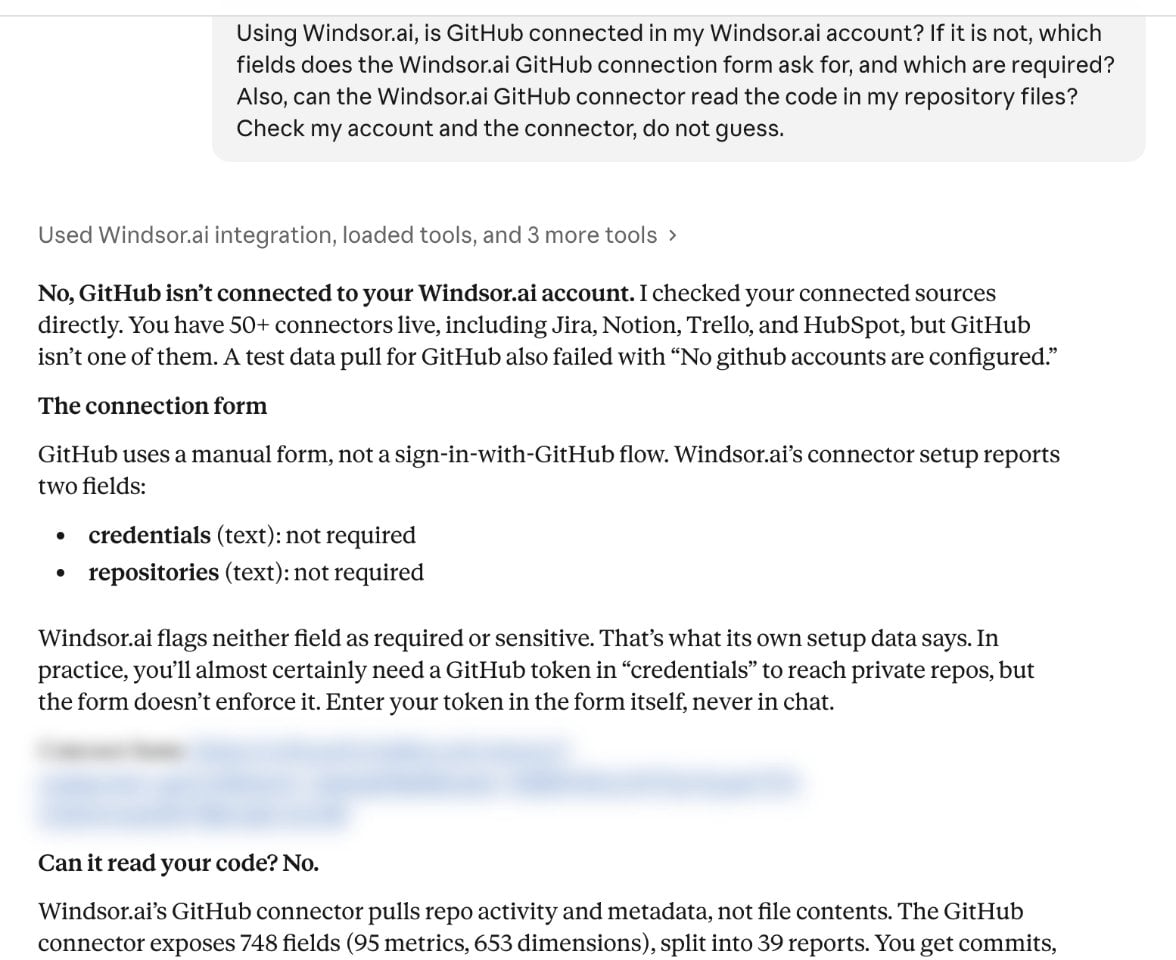
If Claude says GitHub is not connected after you added it, the form was not saved or the token has no access to the repositories you listed. Check the repository names and the token’s access in GitHub.
GitHub data Claude can read through Windsor.ai
Through the Windsor.ai connector, Claude can read 748 GitHub fields (95 metrics, 653 dimensions) in 39 tables. The full list is in the GitHub field reference.
- Issues: title, text, state, labels, milestone, assignees, comments, reactions and dates.
- Pull requests: title, description, state, author, reviews and review comments, plus pull request stats (additions, deletions, changed files).
- Commits and branches: commit author, message and date, branches and their protection.
- Releases and deployments: release name, notes and dates, deployments by environment.
- Workflows: workflow runs and jobs with status and conclusion.
- People: contributors and their weekly activity, collaborators, teams and stars.
GitHub prompts to try in Claude
-
How many pull requests were merged per week in each repository over the last 30 days?
-
List open issues with the label bug, oldest first, with their assignee.
-
Which workflows had the most failed runs in the last 14 days?
-
Which pull requests waited longest for their first review this month?
-
Summarize the releases published this month from their release notes.
The free forever plan reaches back 30 days. A question about a quarter or a year needs a paid plan.
Combine GitHub with other sources in Claude
With GitHub and your other tools in the same Windsor.ai account, Claude can put them side by side. For example, ask for merged pull requests per week next to resolved tickets from Jira. More than one source kept long term needs a paid plan.
Next steps
- The GitHub to Claude connector page lists more use cases and prompt ideas.
- To use the same data in ChatGPT, see how to connect GitHub to ChatGPT.
To start, add your GitHub token and repositories to Windsor.ai on the free forever plan, then connect Windsor.ai in Claude.
FAQs
Can Claude read my code through Windsor.ai?
No. The connector returns repository activity and links to files, not file contents. GitHub’s own MCP server can read code.
Can Claude merge pull requests or close issues through Windsor.ai?
No. The connection is read-only (write actions list, checked on 23 November 2026).
Should I use Windsor.ai or the GitHub MCP server?
Use the GitHub MCP server to read or change code from Claude. Use Windsor.ai to analyze repository activity next to Jira, Trello or your marketing data in the same chat.
How much does it cost?
Windsor.ai has a free forever plan with 1 data source and the last 30 days of data. Paid plans start at $19/month for 3 sources, billed annually (pricing).


