 Destinations
 Data sources
 AI insights
 About us
 Careers
 Security
 Customer reviews
 Contact us
 Affiliate program
 Solution partners
 Template gallery
 Looker Studio templates
 Power BI templates
 Excel templates
 Google Sheets templates
 Tableau templates
 Facebook Ads templates
 Google Ads templates
 Data fields & Metrics
 AI prompt library & Guides
 Product documentation
 API documentation
 Case studies
 Blog
 Data models
 Windsor vs Supermetrics
 Windsor vs Funnel.io
 Windsor vs Fivetran
 Windsor vs Rivery
 Windsor vs Portermetrics
 Windsor vs Coupler.io
 Last updated: 25 November 2026





To connect Google Search Ads 360 (SA360) to ChatGPT, sign in with Google in Windsor.ai, pick the engine accounts you want ChatGPT to read, then install the Windsor.ai plugin in ChatGPT. Setup needs no code.
After that, you can ask ChatGPT about spend, clicks, impression share, quality scores and conversions across the engine accounts in Search Ads 360, such as Google Ads and Microsoft Advertising. You don’t need to export a report first.
The free forever plan covers one engine account. Comparing two or more needs a paid plan after the first 30 days.
2 steps to connect Search Ads 360 to ChatGPT
For screenshots of the ChatGPT side of the setup, see Windsor.ai’s guide to integrating data into ChatGPT.
Prerequisites
- A Windsor.ai account. The free forever plan needs no credit card. Paid plans start at $19 a month, billed annually.
- A Google account that can open your Search Ads 360 accounts, or the account owner’s help (see Step 1).
- A ChatGPT account. If you work in a ChatGPT Enterprise or Edu workspace, new plugins usually start switched off, and a workspace admin enables the Windsor.ai plugin for members (OpenAI’s admin guide to plugins). Admins of Business workspaces can also restrict the plugins and apps members can use.
Step 1. Connect Search Ads 360 to Windsor.ai
- Open the Search Ads 360 page in Windsor.ai and select Sign in with Google.
- Pick that Google account and allow access.
- Back in Windsor.ai, select the engine accounts for ChatGPT. On the free forever plan, select one.

Each engine account under your Search Ads 360 login counts as one account, so a Google Ads account and a Microsoft Advertising account count as two. You can test several in the first 30 days. After that, two or more engine accounts need a paid plan.
Can’t open the Search Ads 360 account yourself? Select Send a link to its owner and the account owner can connect it. If the account doesn’t appear, pause your ad blocker and sign in again.
Step 2. Install the Windsor.ai plugin in ChatGPT
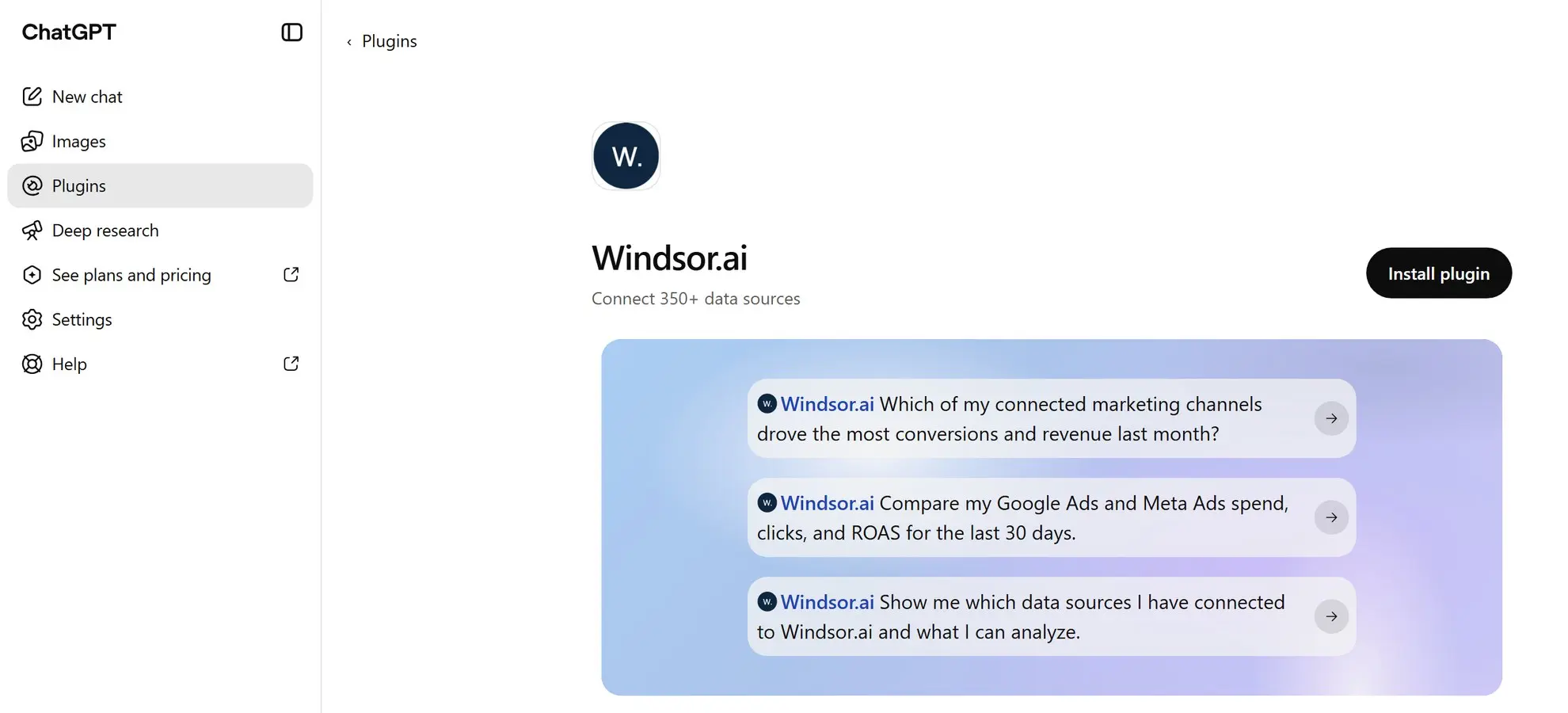
In ChatGPT, select Plugins in the sidebar, search for Windsor.ai and select Install plugin. You can also open the Windsor.ai plugin page.
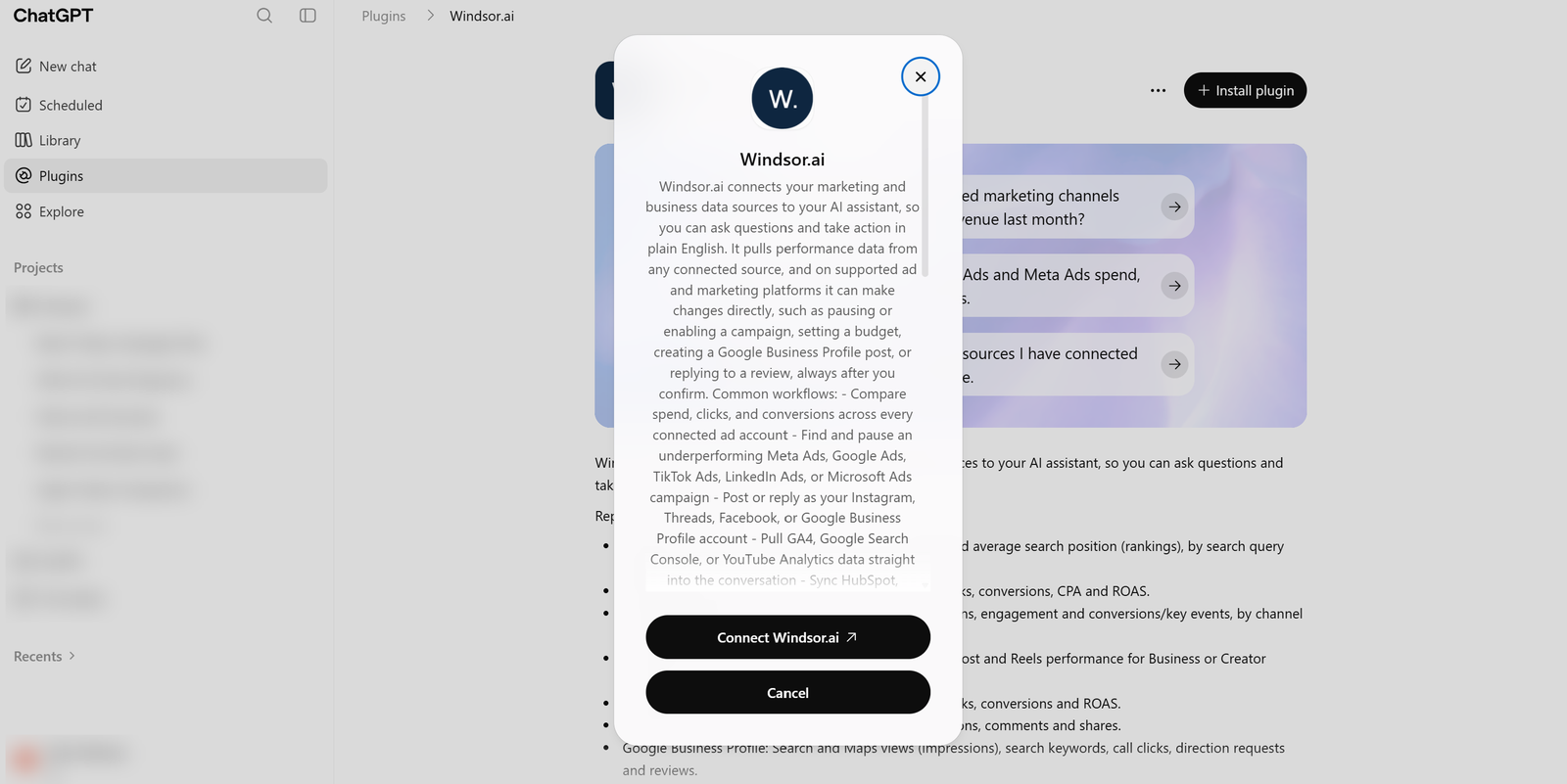
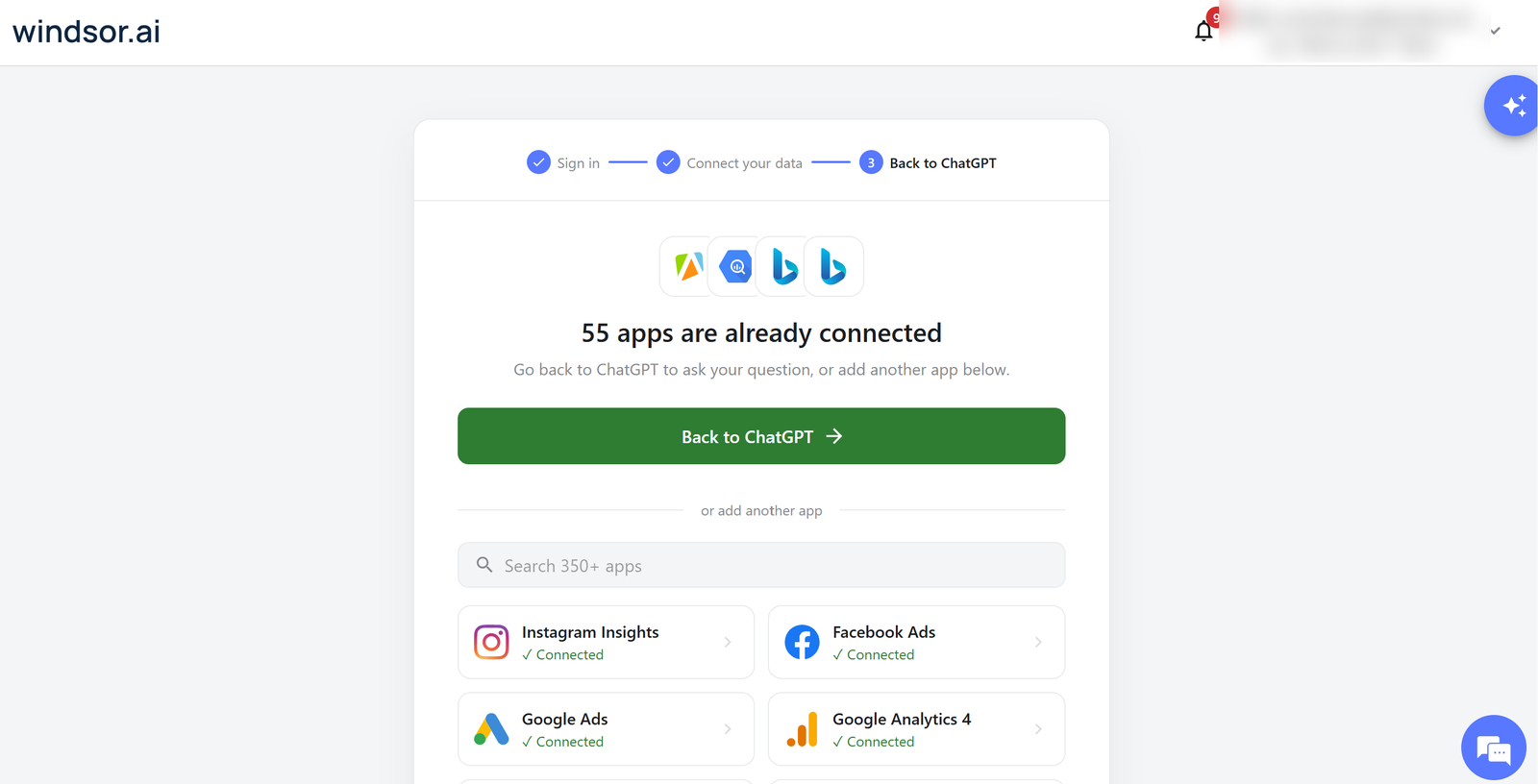
Then select Connect Windsor.ai, sign in to Windsor.ai and select Back to ChatGPT.
In a new chat, pick Windsor.ai from the + menu or type @Windsor.ai, then check the connection:
List the data sources connected to my Windsor.ai account. Do you see Google Search Ads 360 there?
When Search Ads 360 appears in the list, you can ask about your campaigns.
The Search Ads 360 data ChatGPT can read
Windsor.ai reads 280 Search Ads 360 fields (81 metrics, 199 dimensions) at campaign, ad group and keyword level; the field reference lists each one.
- Cost, clicks and traffic: spend, impressions, clicks, CTR, average CPC and CPM, visits, and how often ads showed at the top or absolute top of the page.
- Impression share (Google Ads and Microsoft Advertising accounts): search, top and absolute top impression share, each with the share lost to budget and the share lost to rank.
- Keywords and quality score: keyword text and match type, plus the current and historical quality score of each keyword in Google Ads and Microsoft Advertising accounts.
- Conversions and Campaign Manager revenue: client account conversions and their value, view-through and cross-device conversions, conversion action names, and the actions, transactions and revenue that Campaign Manager tags record. If your conversions carry cart data, cart revenue, units sold and cost of goods sold come through too.
- Bids, targets and budgets: bid strategy, target CPA, target ROAS, min and max bids, daily budget and device bid adjustments.
- Engines and structure: engine account type, such as Google Ads, Microsoft Advertising, LY Ads (formerly Yahoo! JAPAN Ads) and Baidu, plus campaign, ad group, ad text, labels and Shopping product details.
A few things to know before you ask:
- Micros. Target CPA and the bid strategy’s min and max bids come in micros. Divide by 1,000,000 to get the amount in your currency.
- Quality score. You get the overall score only. Expected CTR, ad relevance and landing page experience aren’t in the data.
- Conversions on Microsoft Advertising accounts. Client account conversions come back as zero or blank for a Microsoft Advertising account whose conversion tracking doesn’t report into Search Ads 360.
- Impression share above 90%. For Google Ads accounts, Search Ads 360 caps impression share at 0.9 (90%) and reports anything higher as 0.9001.
- Freshness. ChatGPT gets the numbers from Windsor.ai when you ask, unless the same query ran in the past 6 hours. Then Windsor.ai answers from its cache.
What to ask ChatGPT: prompt ideas
Name a period in each question, such as “the last 30 days”. The free forever plan covers the last 30 days of data. A longer period, such as a quarter or year over year, needs a paid plan.
Budget and impression share
Which of my Search Ads 360 campaigns lost the most search impression share to budget in the last 14 days? Show the share lost to rank next to it.
For my Search Ads 360 campaigns in the last 30 days, which ones lose more top impression share to rank than to budget?
Keywords and quality score
List Search Ads 360 keywords with a current quality score of 5 or lower that had clicks in the last 30 days, with spend and CTR.
Engines side by side
Compare Search Ads 360 spend, clicks, average CPC and client account conversions by engine account type for the last 30 days.
This prompt needs two or more engine accounts connected, which takes a paid plan after the first 30 days. If a Microsoft Advertising account shows zero conversions, check that its conversion tracking reports into Search Ads 360.
Bid strategy targets
For Search Ads 360 campaigns with a target CPA, convert the target from micros and show it next to the actual cost per conversion for the last 30 days.
Cross-device conversions
Show Search Ads 360 cross-device conversions and cross-device conversion value by campaign for the last 30 days.
Cross-device conversions are conversions where someone clicked an ad on one device and converted on another device or browser. In Google Ads accounts, a device breakdown credits each one to the device where the click happened.
The Search Ads 360 connector has no write actions in Windsor.ai, so bid, budget and campaign changes stay in Search Ads 360.
Analyze Search Ads 360 next to your other sources
With two or more sources connected to Windsor.ai, ChatGPT can put Search Ads 360 next to the others in one chat. Windsor.ai connects 350+ sources.
- Ad clicks next to site behavior. Line up Search Ads 360 clicks and conversions with GA4 sessions and key events for the same dates. Campaigns are matched on campaign name where your GA4 sessions carry it (auto-tagging or UTM tags).
- Accounts outside Search Ads 360. If some search accounts run outside Search Ads 360, connect Google Ads or Microsoft Ads directly and compare them in the same chat.
A second source is free to test for the first 30 days. After that, two or more sources need a paid plan: Basic at $19 a month for 3 sources or Standard at $99 a month for 7, billed annually. Both include up to 75 accounts across all your sources, and each engine account counts as one. See the pricing page.
Other ways to connect Search Ads 360 to ChatGPT
As of November 2026, Google has no ChatGPT plugin or MCP server for Search Ads 360. Its MCP server covers Google Ads only. Three other routes exist.
Adzviser Search Ads 360 plugin
The ChatGPT Plugins directory lists one third-party Search Ads 360 plugin, Adzviser Search Ads 360, made by Adzviser LLC.
Manual CSV export
Export a report from Search Ads 360 and attach it to a chat. ChatGPT sees only that file, so each refresh means a new export.
Your own build on the Reporting API
Developers can pull data through the Search Ads 360 Reporting API and expose it to ChatGPT through their own MCP server. They then maintain the code and the API credentials.
Conclusion
Once your Search Ads 360 engine accounts are in Windsor.ai and the Windsor.ai plugin is installed in ChatGPT, start with the impression share or quality score prompts.
You can also see the Search Ads 360 to ChatGPT integration page, connect Search Ads 360 to Claude or read how to connect Google Ads to ChatGPT.
🚀 Connect Search Ads 360 to ChatGPT. Free forever plan, no credit card
FAQs
Do I need coding skills to connect Search Ads 360 to ChatGPT?
No. You sign in with Google in Windsor.ai, pick engine accounts and install a plugin in ChatGPT. You write no code and copy no API keys.
What Search Ads 360 metrics can ChatGPT analyze?
Windsor.ai reads 280 Search Ads 360 fields, 81 of them metrics. They include spend, clicks, CPC, client account conversions, cross-device conversions, Campaign Manager revenue and bid strategy targets, plus impression share lost to budget and rank and quality score for Google Ads and Microsoft Advertising accounts. The field reference lists every field.
Can ChatGPT compare Google Ads and Microsoft Advertising in Search Ads 360?
Yes. Search Ads 360 data includes the engine account type, so ChatGPT can put spend, clicks, CPC and client account conversions side by side for each engine. Conversions show as zero or blank for a Microsoft Advertising account whose conversion tracking doesn’t report into Search Ads 360. Select each engine account in Windsor.ai after you sign in with Google. After the first 30 days, two or more engine accounts need a paid plan.
Can ChatGPT show quality score components?
No, not through Windsor.ai. Windsor.ai reads each keyword’s current and historical quality score, without expected CTR, ad relevance or landing page experience. ChatGPT can still list low-scoring keywords with their spend, clicks and CTR.
Can ChatGPT change my Search Ads 360 campaigns?
No. The Search Ads 360 connector in Windsor.ai is read-only and has no write actions. ChatGPT can read and analyze your campaigns, but you change bids, budgets and campaigns in Search Ads 360.
How fresh is the Search Ads 360 data in ChatGPT?
ChatGPT gets the data from Windsor.ai when you ask. If the same query ran in the last 6 hours, Windsor.ai returns the cached result. An exported CSV file shows the numbers as of the export, so newer data needs a new export.
How much does it cost to connect Search Ads 360 to ChatGPT?
The free forever plan costs nothing and needs no credit card. It covers 1 user, 1 data source, 1 account and the last 30 days of data. For Search Ads 360, one account means one engine account. In the first 30 days you can test up to 10 sources and 15 accounts for free. After that, Basic costs $19 a month for 3 sources and Standard $99 a month for 7, both billed annually and both with up to 75 accounts across all sources. See the pricing page.


