 Destinations
 Data sources
 AI insights
 About us
 Careers
 Security
 Customer reviews
 Contact us
 Affiliate program
 Solution partners
 Template gallery
 Looker Studio templates
 Power BI templates
 Excel templates
 Google Sheets templates
 Tableau templates
 Facebook Ads templates
 Google Ads templates
 Data fields & Metrics
 AI prompt library & Guides
 Product documentation
 API documentation
 Case studies
 Blog
Blog Data models
 Windsor vs Supermetrics
 Windsor vs Funnel.io
 Windsor vs Fivetran
 Windsor vs Rivery
 Windsor vs Portermetrics
 Windsor vs Coupler.io
 Last updated: 20 August 2026




In 2026, marketing is a high-stakes game that is fueled by data.
As customer journeys run across several channels (Google Ads, Meta, LinkedIn, TikTok, and so on), relying on siloed platform analytics leaves you with fragmented insights, inconsistent metrics, and compliance risks. Creating separate dashboards for every channel is time-consuming, error-prone, and slows decision-making.
The solution? Replace disconnected reports with a single, trustworthy view by building a modern marketing data stack that centralizes your data and streamlines ELT workflows.
Let us introduce our favorite marketing data stack for building quick, reliable, and easy-to-maintain ELT pipelines. Windsor.ai as the data integration platform, Google BigQuery as the data warehouse, and Looker Studio as the BI layer for downstream analytics. Together, this combination creates a single source of truth across all your channels and supports most reporting and analytical workflows.
To bring this stack to life, you start by using Windsor.ai to connect data from up to 350+ marketing sources directly to BigQuery. Then feed the cleaned dataset into Looker Studio to build insightful dashboards that give a clear, cross-channel view of your marketing performance. Sounds intriguing?
Keep reading to learn why siloed analytics no longer cut it in 2026, how a modern marketing data stack closes those gaps, and how Windsor.ai, paired with BigQuery and Looker Studio, empowers marketers, agencies, and SMBs to build scalable, secure ELT pipelines that drive growth and long-term ROI.
Why siloed platform analytics fall short in 2026
Every marketing platform, such as Google Ads, Facebook Ads, HubSpot, Shopify, etc., provides built-in analytics. While these tools offer quick insights, they’re designed for their own ecosystems, not your holistic business needs.
Here is why siloed platform analytics are ineffective:
- Disconnected data: Each platform has its metrics and naming conventions, making cross-channel comparisons nearly impossible. For example, Google Ads and Meta Ads report conversions differently, which results in inconsistent insights unless reconciled manually.
- Privacy and compliance risk: Third-party sites usually rely on cookies or external tracking, which are limited by the GDPR, CCPA, and new international regulations. With no data ownership, you’re at risk of non-compliance and data loss.
- Poor customization: In-built platform analytics usually provide static reports, which don’t allow you to create custom attribution models or conduct a more thorough, cross-channel analysis.
- Data retention issues: Access to historical data is typically restricted on most platforms, preventing long-term trend analysis/projection. A platform might also alter its API or policies, and you risk losing important historical data.
- Manual overhead: Data exporting, merging, and normalizing, as well as creating reports across platforms, is tedious and prone to errors. So marketers waste hours on manual data wrangling, which could be better spent on analysis and strategy optimization.
To prevent all these challenges, what you need is a modern marketing data stack built to scale with your business.
The rise of the modern marketing data stack
The modern marketing data stack is a scalable, modular architecture that helps automate the process of centralizing and analyzing data across all your marketing channels.
It typically consists of four interconnected layers:
- Data sources: These are the platforms where raw marketing data lives. Examples include CRM systems, advertising platforms, e-commerce sites, analytics apps, email & social media marketing tools, etc.
- Data collection & ingestion: These are specialized tools and pipelines that extract and centralize data from all sources. The main examples are ELT (Extract, Load, Transform) tools like Windsor.ai that automatically aggregate data from 350+ marketing platforms and send it to the required destination for further processing with no code.
- Data storage and transformation: These are the platforms where aggregated data is stored and structured for analysis. Common examples include cloud data warehouses and data lakes. In our recommended modern marketing data stack, we highlight Google BigQuery, a highly scalable, serverless data warehouse that maintains both raw and transformed data, enabling fast queries across massive datasets. Its query-based pricing and robust processing power make it an ideal solution for marketing analytics.
- BI (business intelligence) & analytics: The final layer of a modern marketing data stack is the BI and analytics layer. Here, data from your warehouse is transformed into interactive, real-time marketing dashboards and reports, turning raw numbers into actionable insights for your team, clients, and stakeholders. In our recommended stack, we highlight Looker Studio as a go-to tool for this layer thanks to its ease of use and tight integrations with Google BigQuery and other sources.
By combining Windsor.ai for ELT data ingestion, Google BigQuery for storage and in-warehouse transformations, and Looker Studio for visualization and insights, you can build a powerful, end-to-end marketing reporting system. The result is a fully automated setup that even non-technical teams can easily implement and use.
The role of data ownership in the modern marketing stack
Owning your data through storing it in a centralized, secure environment like BigQuery rather than depending on third-party platforms that limit access and flexibility, is no longer optional. It matters for three key reasons:
1. Privacy and compliance
Data privacy is non-negotiable in 2026. Regulations like GDPR, CCPA, and emerging global laws now restrict third-party tracking and demand transparent data handling.
Storing data in BigQuery, combined with a secure ELT platform like Windsor.ai, ensures compliance with frameworks such as SOC 2 and GDPR. With encrypted pipelines and role-based access controls, Windsor.ai keeps sensitive customer data protected, simplifying audits and reducing compliance risks.
2. Accurate attribution
Siloed platforms prioritize their own channels, skewing attribution models. For example, Google Ads may overstate its role in conversions compared to email campaigns or organic traffic.
Consolidating data in BigQuery allows you to create custom attribution models that bring together ads, CRMs, web analytics, and other touchpoints for a unified view.
Windsor.ai’s in-built data normalization ensures consistent metrics (e.g., campaign names, UTM tags) across all marketing platforms, enabling more accurate attribution and cross-channel insights that drive smarter budget allocation.
3. Long-term analysis and flexibility
Native platform analytics often limit data retention to months or a year, restricting historical analysis. Saving raw data in BigQuery retains it indefinitely, supporting long-term trend analysis, forecasting, and machine learning models. Windsor.ai ELT also saves historical data and enables incremental loading, keeping your data fresh and optimizing your warehousing costs.
How Windsor.ai powers the modern marketing data stack
Windsor.ai is the ELT backbone of a 2026 marketing data stack, seamlessly connecting your data sources to BigQuery and Looker Studio. Our no-code data integration platform eliminates technical barriers, enabling marketers, agencies, and SMBs to build robust, scalable pipelines and automate marketing reporting in minutes without engineering support.

Key features of Windsor.ai for ELT:
- Supports 350+ data sources: You can easily integrate data from Google Ads, Facebook Ads, Shopify, Salesforce, HubSpot, and many other popular platforms, with no need for manual API management or custom scripts.
- No-code setup: Build ELT pipelines into BigQuery, Looker Studio, and 20+ other destinations with just a few clicks using a simple, drag-and-drop interface, designed for both data engineers and non-technical users.
- Automated schema mapping: Windsor automatically recognizes and adapts to schema changes on the fly, keeping pipelines consistent and stable as source APIs change.
- Real-time and scheduled syncs: Select near-real-time syncs or scheduled updates (15-minute, hourly, daily ) to ensure that your dashboards and reports remain fresh, which is essential for time-sensitive campaigns.
- Data normalization: Windsor standardizes campaign names, currencies, and UTM tags across platforms, ensuring consistent, accurate reporting.
- Optimized for BigQuery: Windsor supports partitioning and clustering to help optimize cost and performance in BigQuery. Also, the incremental loads remove the need for full-table rewrites and minimize query overhead.
- Native connectors for Looker Studio: You can directly stream data into Looker Studio and create auto-refreshing dashboards through native no-code connectors. No manual data exports or CSVs.
- Pre-built Looker Studio templates: At Windsor, we offer a vast library of ready-made marketing dashboard templates for Looker Studio designed for the most popular data sources. Set them up in minutes with no technical setup required and start reporting instantly while saving hours of manual work.
- Security and compliance: Windsor-powered ELT pipelines are SOC 2 and GDPR-compliant, highly encrypted, and reinforced with role-based access to protect your sensitive marketing information.
- Transparent pricing: Our pricing plans start at just $19/month and include full access to all connectors and destinations, unlike competitors who restrict premium connectors and data warehouse support to higher tiers. Get started for free.
- MCP server for AI insights: You can connect to Windsor.ai MCP server for AI-powered analysis, delivering automated insights and visual summaries based on your integrated data within your preferred LLM chat.
In a nutshell, Windsor.ai connects every layer of the modern marketing data stack, making integration faster, reducing technical overheads, and delivering a reliable and scalable reporting system. With less manual effort and more control over data, teams can shift focus from data wrangling to data-driven decision-making.
Windsor.ai ELT + BigQuery + Looker Studio use cases
The modern marketing data stack, powered by Windsor.ai, BigQuery, and Looker Studio, delivers value to various industries and team sizes:
For marketers: unified campaign insights
Marketers manage data from multiple channels such as Google Ads, Meta, LinkedIn, GA4, CRMs, and more. Windsor.ai consolidates this data into BigQuery, normalizing metrics for consistent analysis across platforms. Automated syncs ensure your data lands in clean, structured tables, ready for transformation, reporting, and confident decision-making.
Then, you send data to Looker Studio to build real-time dashboards to track KPIs like ROAS, conversions, click-through rates, etc., optimizing campaigns without manual data wrangling. For example, a performance marketer can combine ad spend and conversion data to identify high-ROI channels in just minutes, saving hours of manual reporting and messy spreadsheets.
For agencies: streamlined client reporting
Agencies juggle dozens of client accounts across platforms, each with unique reporting needs and settings. Windsor.ai’s no-code dashboard automates data pipelines for each client and offers pre-built marketing templates for instant project onboarding.
Instead of manual exports or custom scripts, you can effortlessly move data from 350+ marketing platforms into BigQuery, then into Looker Studio (or other destinations of your choice), creating dynamic, branded reports that update automatically.
This reduces repetitive setup, removes engineering bottlenecks, and delivers fresh dashboards that keep clients updated in real-time. For example, an agency can onboard a new client and create a full cross-channel report with just a few clicks.
For SMBs: enterprise-grade analytics without the overhead
Small businesses often lack in-house data engineers but still need powerful analytics to compete. Windsor.ai’s affordable, no-code ELT solution lets SMBs build enterprise-grade pipelines into BigQuery and visualize insights in Looker Studio without hiring their own tech team.
Automated schema mapping and data normalization ensure clean, reliable datasets, while fixed pricing (from $19/month) keeps costs predictable. For example, with Windsor.ai, an e-commerce SMB can track sales, ad performance, and customer behavior in a single dashboard, gaining insights previously available only for larger enterprises.
How to build your modern marketing data stack with Windsor.ai
When using Windsor.ai as an ELT layer, sending marketing data to Google BigQuery and Looker Studio is fast, simple, and fully accessible to non-technical users, as it removes the need for coding or complex setup.
You can build your first ELT pipeline in just five quick steps:
Step 1: Sign up for Windsor.ai
Get started by creating your windsor.ai account. You can select your first data source right away (and complete the signup process further) or register immediately.
The free plan gives you access to Windsor.ai data sources and destinations, so you can test the integrations with BigQuery and Looker Studio with zero risk.
Step 2: Connect your data source(s)
Windsor.ai syncs data from more than 350+ applications, including YouTube, Google Ads, Meta Ads, Shopify, Salesforce, HubSpot, Google Analytics 4, etc. From the dashboard, simply select the sources and accounts you want to pull data from.
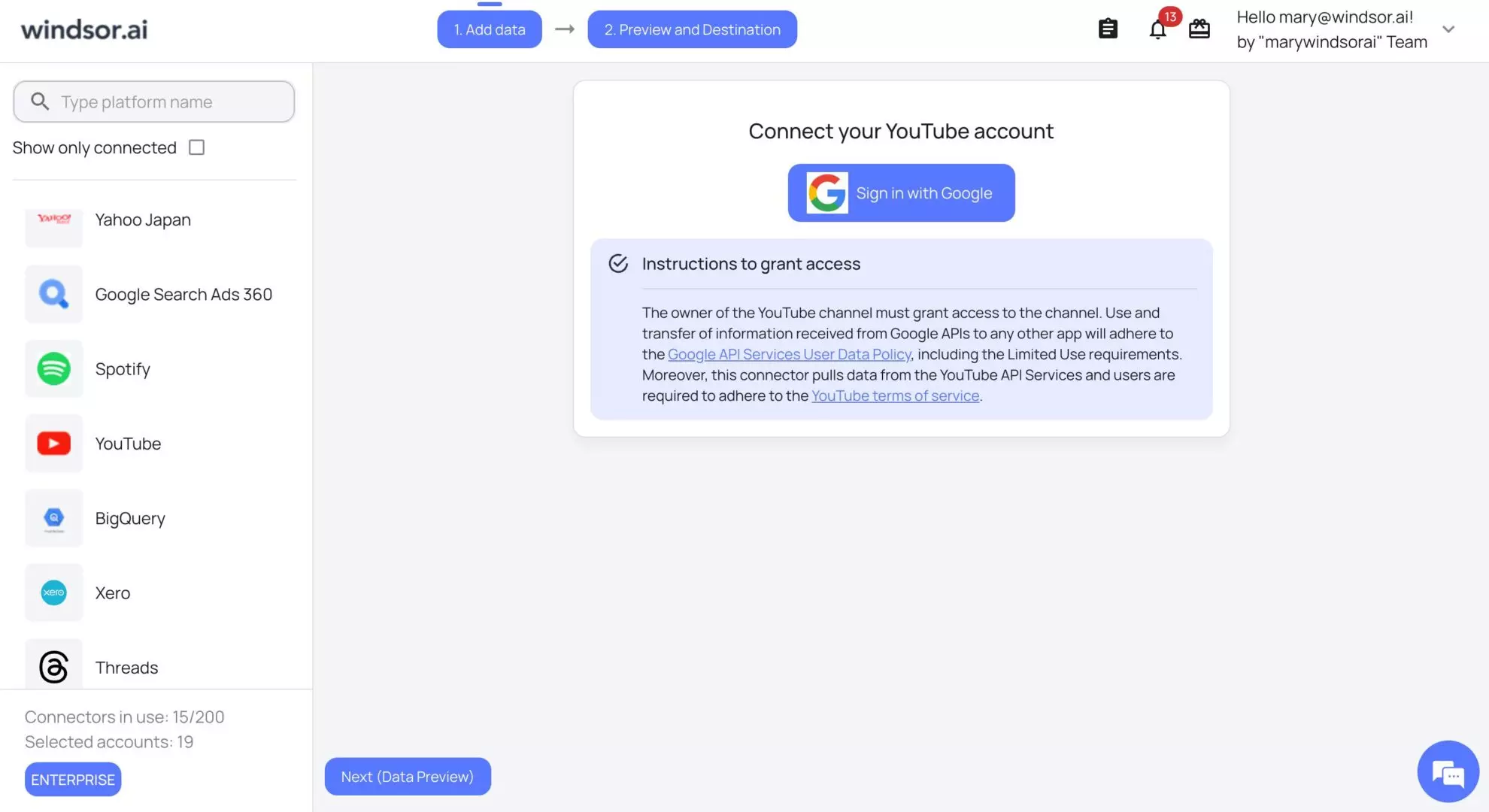
Windsor handles secure authentication and API management automatically, so there’s no need to deal with technical setup.
Step 3: Choose reporting settings, fields, and filters
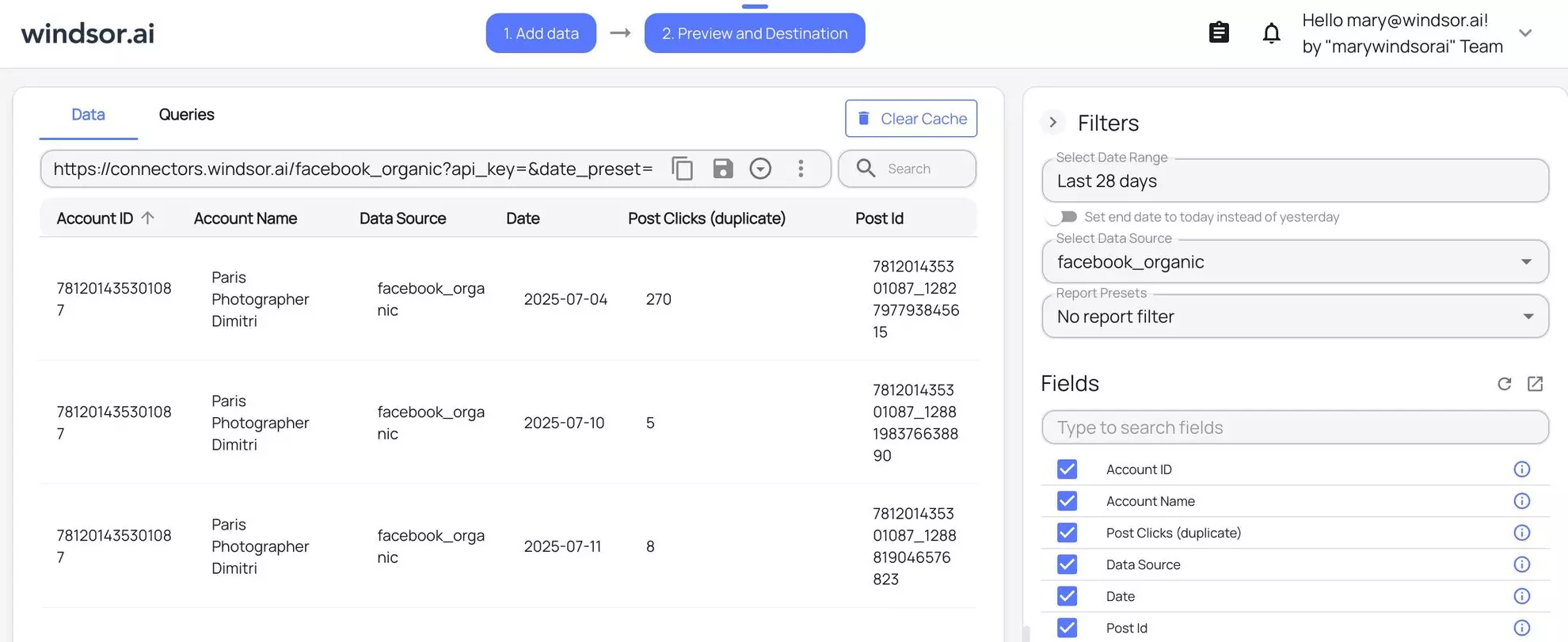
Define the time range and select the metrics and dimensions that you require, be it impressions, clicks, conversions, UTM tags, or else. Windsor.ai’s no-code interface lets you choose from a wide range of API fields to customize your reporting.
Optional filters can further narrow your data, for example, to campaigns within a specific region or time frame. A preview table lets you view your integrated data before loading it into BigQuery or Looker, so you can adjust selections as needed.
Step 4: Select your destination(s)
Next, link your data to BigQuery for storage and/or Looker Studio for visualization. Windsor.ai provides clear, in-dashboard setup instructions to help you connect your BigQuery project or Looker Studio account with minimal effort.
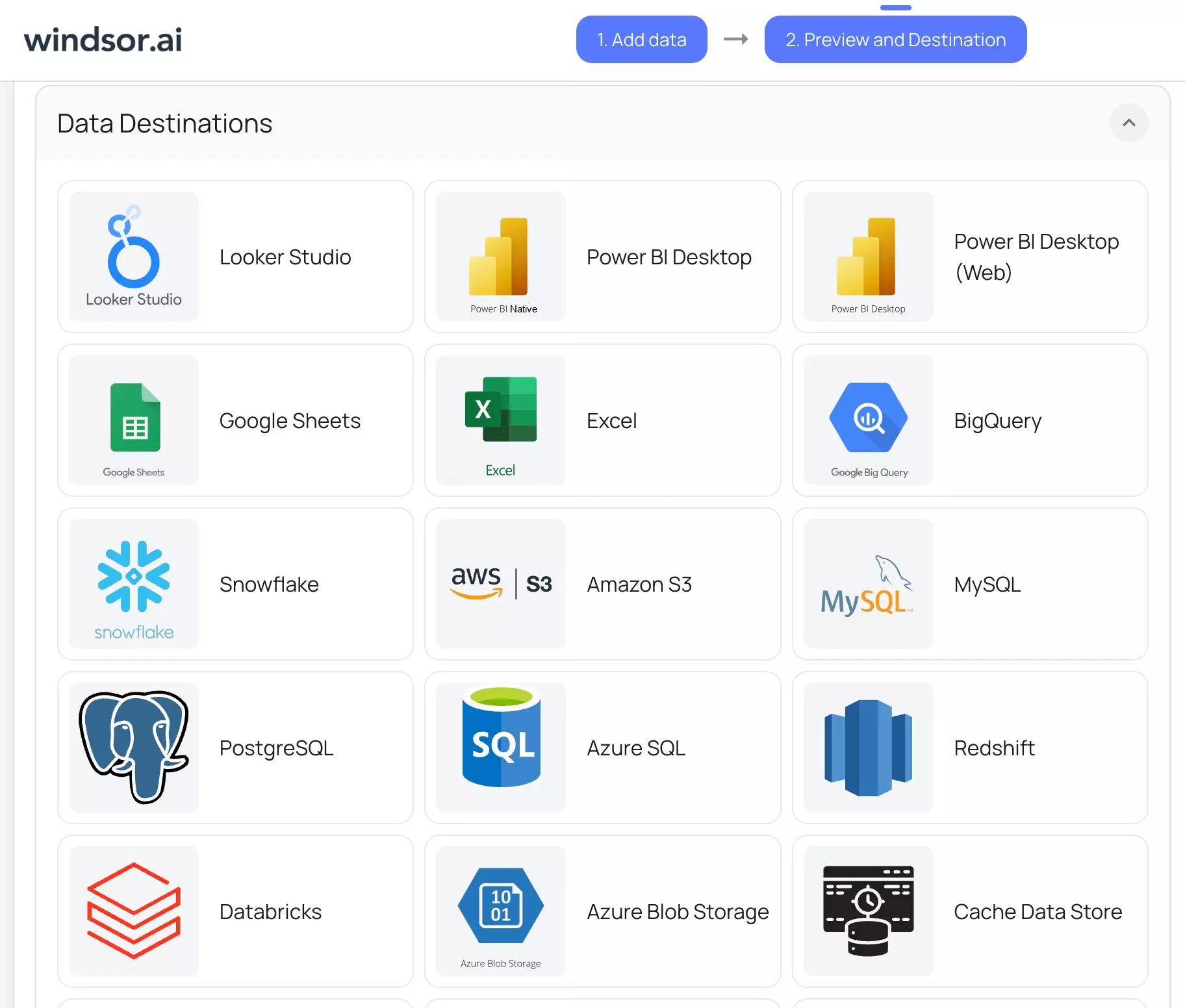
Once connected, your data is automatically structured into clean, analysis-ready tables in BigQuery. For Looker Studio, Windsor.ai pushes the data directly into dashboards, allowing you to start building custom reports right away or leverage a pre-built template.
The platform handles schema mapping automatically for each destination, so your data fits perfectly; no manual configuration required.
Step 5: Sync and monitor
Set up your syncs to run in real time or on a schedule: every 15 minutes, hourly, or daily. Near real-time syncs are ideal for fast-moving campaigns where fresh data matters. For less dynamic sources like sales or CRM data, daily updates are often sufficient. Windsor.ai lets you choose the frequency that best fits your use case.
Then, Windsor.ai’s dashboard displays live logs that show the flow of data, including row counts and any issues such as failed syncs. Automated in-app alerts notify you of problems in real time and via email, allowing you to address them before they impact your reports. This ensures your datasets and dashboards remain accurate and up to date, even during high-volume activity.

Your data is finally sent to BigQuery as clean tables, which are optimized to save query costs and accelerate analysis. Dashboards in Looker Studio refresh automatically, providing insights to your team or clients without any manual updates. The entire setup takes less than five minutes and requires no technical expertise.
Best practices to optimize your marketing data stack
To get the most out of your marketing data stack, including ELT pipelines, Google BigQuery, and Looker Studio, follow these best practices:
1. Define a simple ELT workflow
A clear roadmap to your data pipeline is the foundation of an effective marketing data stack. Without one, you risk messy data and unreliable reports.
Here’s how you can establish a basic, effective workflow:
- List your data sources and update needs: Figure out the origin of your data, such as Google Ads, Meta Ads, Shopify, or your CRM. Choose the frequency of updates that you want to receive.
- Only pull new data: Pull only new or modified stats, such as new ad clicks or new sales, rather than reprocessing all data. This helps to save time and ensures costs remain low in BigQuery by minimizing redundant work. Windsor helps you achieve this through the built-in incremental loading.
- Keep raw data untouched: Store your original data in BigQuery as it is. This gives you the flexibility to create different reports or analyses later without starting from scratch, making it easier to adapt to new business needs.
Windsor.ai covers all these processes with an all-in-one ELT platform. It automatically aggregates and centralizes data from all your sources, sets up scheduled updates, and handles routine cleanup tasks.
2. Optimize BigQuery integrations for cost and speed
BigQuery offers impressive speed and scale, but its pay-per-query model means poorly structured queries can quickly increase costs and slow down performance. To get the most value without overspending or facing delays, it’s important to optimize how your data is queried and stored.
Consider applying these simple tips:
- Sort data by date or category: Segment your data by fields like date, campaign, or customer type to reduce query size. This speeds up reporting and lowers costs by processing only the data you need.
- Select only the reporting fields that matter: You do not need to fetch everything, but only the important metrics that matter to you, such as clicks or conversions. This reduces the processing and cost.
- Track usage to prevent surprises: Use BigQuery’s built-in tools to monitor how much data you’re using and set alerts to catch unexpected cost spikes. This helps you stay within budget.
Windsor.ai automatically applies these optimization techniques, allowing you to select only the required fields and update only what’s necessary.
3. Ensure data quality and consistency
Poor-quality data, such as missing values, duplicates, or inconsistent formats, can break your reports and result in misleading insights. To ensure accuracy, your data must be clean, consistent, and well-structured.
Here’s how you ensure this:
- Check data before loading: Preview your data and identify potential problems, such as missing campaign metrics or errors made by ad platforms, before it reaches BigQuery.
- Organize data in BigQuery: Create temporary “staging” areas in BigQuery to catch errors, like blank fields or duplicate entries. Simple checks can flag these issues, keeping your reports accurate.
- Track your changes: Record changes you make to data, such as combining campaign names or correcting formatting, to make sure that all your reports align.
Windsor.ai automatically standardizes data across platforms, for example, aligning campaign names, and flags early errors to keep your BigQuery & Looker Studio reports consistent and reliable.
Conclusion
In 2026, siloed platform analytics can’t keep up with the demands of modern marketing. A unified data stack built on ELT pipelines, Google BigQuery, and Looker Studio gives you full control over your data, ensures compliance, and delivers timely, actionable insights.
Windsor.ai sits at the core of this stack by connecting all your marketing data with BigQuery and Looker Studio with no technical skills required.
Say goodbye to fragmented reporting and manual data wrangling. With Windsor.ai, you can build a scalable, privacy-first marketing data stack that keeps your team focused on strategy and growth. Get started for free now to experience the power of no-code ELT solutions: https://onboard.windsor.ai/.
FAQs
What is a modern marketing data stack?
A modern data stack consists of a four-layer system: data sources (e.g., Meta, LinkedIn, Salesforce), ELT pipelines (e.g., Windsor.ai, Fivetran, Airbyte) to extract and load data, a cloud data warehouse (e.g., BigQuery, Snowflake, Databricks) for storage and transformation, and a BI tool (e.g., Looker Studio, Power BI, Tableau) for visualization and reporting.
How does Windsor.ai integrate with BigQuery and Looker Studio?
Windsor.ai’s no-code connectors stream data from 350+ sources into BigQuery for storage and transformation, or directly into Looker Studio for real-time, auto-updating dashboards, with automated schema mapping and syncs.
Can Windsor.ai handle real-time marketing data?
Yes, Windsor.ai supports near-real-time syncs and scheduled updates (15-minute, hourly, daily), ensuring access to fresh data for time-sensitive campaigns and dynamic dashboards.
Is Windsor.ai suitable for small businesses?
Absolutely. With pricing starting at $19/month and a no-code interface, Windsor.ai enables SMBs to build enterprise-grade pipelines without technical expertise.
How does Windsor.ai ensure data privacy and compliance?
Windsor.ai is SOC 2 and GDPR-compliant, with encryption and role-based access to secure sensitive marketing data and meet regulatory standards.
What's the fastest way to get started with Windsor.ai?
Sign up for the free forever plan at Windsor.ai, connect your data sources, select BigQuery or Looker Studio as your destination, and start syncing in under 5 minutes.


