 Destinations
 Data sources
 AI insights
 About us
 Careers
 Security
 Customer reviews
 Contact us
 Affiliate program
 Solution partners
 Template gallery
 Looker Studio templates
 Power BI templates
 Excel templates
 Google Sheets templates
 Tableau templates
 Facebook Ads templates
 Google Ads templates
 Data fields & Metrics
 AI prompt library & Guides
 Product documentation
 API documentation
 Case studies
 Blog
Blog Data models
 Windsor vs Supermetrics
 Windsor vs Funnel.io
 Windsor vs Fivetran
 Windsor vs Rivery
 Windsor vs Portermetrics
 Windsor vs Coupler.io
Connect Google Business Profile to ChatGPT
Automatically sync your Google Business Profile data to ChatGPT using the Windsor.ai connector.
Analyze your local search performance, then act on it. Reply to reviews, publish posts, and keep your listing details current without leaving the chat.
Forget CSVs. Stop copy/paste. Connect data in minutes. No code required.
 Sign up with Google
 Free forever plan









Streamline analytics with Google Business Profile to ChatGPT integration
Windsor.ai quickly streams Google Business Profile metrics into ChatGPT for conversational AI analysis. Leverage these key benefits and use cases:

Get instant AI insights
No need to spend time interpreting metrics; ChatGPT analyzes your Google Business Profile data in seconds. Get instant AI insights and make smarter decisions without dashboards or SQL queries.

Query data in natural language
Ask ChatGPT questions in plain language, like “Which locations drove the most calls or clicks?” or “Where can we increase direction requests?” and get clear answers and next steps recommendations to boost local search visibility and drive more customer interactions.

Detect trends in customer reviews
Use ChatGPT to analyze customer reviews and detect whether satisfaction is improving or declining over time. It helps businesses to identify emerging service issues early and address them before they negatively impact ratings.

Evaluate local post engagement
Compare the performance of different post types, such as offers, events, or announcements, to determine which updates generate the most customer actions. Ask ChatGPT to suggest content formats and ideas that drive the strongest engagement.
Using Windsor.ai to connect data from Google Business Profile to ChatGPT
Bringing Google Business Profile data into ChatGPT usually means manual exports, messy CSVs, or costly software. Windsor.ai makes it effortless with a connector that collects, standardizes, and streams your GBP metrics directly into ChatGPT.
Connect in minutes and ask questions in natural language to uncover AI-powered insights.

Available actions
Create Local Post Publish a standard "What's New" post on the connected Google Business Profile location. Provide the post text, an optional publicly accessible photo URL (JPG or PNG, at least 250x250 px and 10 KB) and an optional call-to-action button. Call-to-action types: BOOK, ORDER, SHOP, LEARN_MORE, SIGN_UP (each needs cta_url) or CALL (uses the listing's phone number, no cta_url). The post can be edited afterwards via update_local_post.
Publish a standard "What's New" post on the connected Google Business Profile location. Provide the post text, an optional publicly accessible photo URL (JPG or PNG, at least 250x250 px and 10 KB) and an optional call-to-action button. Call-to-action types: BOOK, ORDER, SHOP, LEARN_MORE, SIGN_UP (each needs cta_url) or CALL (uses the listing's phone number, no cta_url). The post can be edited afterwards via update_local_post.
Update Local Post Update the text, photo or call-to-action of an existing post on the connected Google Business Profile location. post_id is the trailing id from the post's resource name (the post_id field of the Local Posts table); full resource names are also accepted. Only the provided fields are changed. Call-to-action types: BOOK, ORDER, SHOP, LEARN_MORE, SIGN_UP (each needs cta_url) or CALL (uses the listing's phone number, no cta_url).
Update the text, photo or call-to-action of an existing post on the connected Google Business Profile location. post_id is the trailing id from the post's resource name (the post_id field of the Local Posts table); full resource names are also accepted. Only the provided fields are changed. Call-to-action types: BOOK, ORDER, SHOP, LEARN_MORE, SIGN_UP (each needs cta_url) or CALL (uses the listing's phone number, no cta_url).
Reply to Review Publish the owner's reply to a customer review on the connected Google Business Profile location, or replace the existing reply. review_id comes from the review_id field of the Reviews table; full resource names are also accepted. The reply is public; replying again replaces the existing reply.
Publish the owner's reply to a customer review on the connected Google Business Profile location, or replace the existing reply. review_id comes from the review_id field of the Reviews table; full resource names are also accepted. The reply is public; replying again replaces the existing reply.
Upload Photo Add a photo to the connected Google Business Profile location's gallery. Provide a publicly accessible photo URL (JPG or PNG, at least 250x250 px and 10 KB) and the gallery category it belongs to (default ADDITIONAL; COVER and PROFILE replace the current cover or profile photo).
Add a photo to the connected Google Business Profile location's gallery. Provide a publicly accessible photo URL (JPG or PNG, at least 250x250 px and 10 KB) and the gallery category it belongs to (default ADDITIONAL; COVER and PROFILE replace the current cover or profile photo).
Update Location Info Update the business description, website URL and/or primary phone number of the connected Google Business Profile location. Only the provided fields are changed. Edits may be reviewed by Google before they appear on the listing.
Update the business description, website URL and/or primary phone number of the connected Google Business Profile location. Only the provided fields are changed. Edits may be reviewed by Google before they appear on the listing.
Update Service Items Replace the full list of service items (services offered) on the connected Google Business Profile location. Each item is either structured — a Google-predefined service_type_id valid for one of the location's categories — or free-form — a category_id plus a custom display_name; both take an optional description and price. This replaces all existing service items: to keep current ones, read the location_service_items field first and resend them together with the changes. Google removes duplicate items automatically.
Replace the full list of service items (services offered) on the connected Google Business Profile location. Each item is either structured — a Google-predefined service_type_id valid for one of the location's categories — or free-form — a category_id plus a custom display_name; both take an optional description and price. This replaces all existing service items: to keep current ones, read the location_service_items field first and resend them together with the changes. Google removes duplicate items automatically.
Update Categories Set the primary category and the full list of additional categories of the connected Google Business Profile location. Category ids are stable Google ids like 'gcid:plumber' (accepted with or without the 'categories/' prefix); current values appear in the location_primary_category_id and location_additional_categories fields. Replaces all existing categories — omitting additional_category_ids removes every additional category. Category changes may be reviewed by Google and can in some cases trigger re-verification of the listing.
Set the primary category and the full list of additional categories of the connected Google Business Profile location. Category ids are stable Google ids like 'gcid:plumber' (accepted with or without the 'categories/' prefix); current values appear in the location_primary_category_id and location_additional_categories fields. Replaces all existing categories — omitting additional_category_ids removes every additional category. Category changes may be reviewed by Google and can in some cases trigger re-verification of the listing.
Update Service Area Replace the service area (the list of places the business serves) of the connected Google Business Profile location, and whether the business serves customers only at their locations or also at its own address. Replaces all existing places: to keep current ones, read the location_service_area field first and resend them together with the changes. Google caps the service area at 20 places.
Replace the service area (the list of places the business serves) of the connected Google Business Profile location, and whether the business serves customers only at their locations or also at its own address. Replaces all existing places: to keep current ones, read the location_service_area field first and resend them together with the changes. Google caps the service area at 20 places.
Update Attributes Update and/or remove individual attributes (e.g. amenities, payment options, appointment links) of the connected Google Business Profile location. Only the attributes named in the request are touched — unlike the other update actions, the rest of the set is left as is. Currently set attributes can be audited via the location_attributes field; Google rejects attributes that are not available for the location's categories.
Update and/or remove individual attributes (e.g. amenities, payment options, appointment links) of the connected Google Business Profile location. Only the attributes named in the request are touched — unlike the other update actions, the rest of the set is left as is. Currently set attributes can be audited via the location_attributes field; Google rejects attributes that are not available for the location's categories.
Update Address Replace the storefront address of the connected Google Business Profile location. WARNING: changing the address can put the listing back into Google's re-verification flow, which may unpublish it until the business verifies again — the action refuses to run unless acknowledge_reverification_risk is set to true, which requires the end user's explicit approval. The whole address is replaced: provide every part the listing should keep (current values are in the location_address_* fields).
Replace the storefront address of the connected Google Business Profile location. WARNING: changing the address can put the listing back into Google's re-verification flow, which may unpublish it until the business verifies again — the action refuses to run unless acknowledge_reverification_risk is set to true, which requires the end user's explicit approval. The whole address is replaced: provide every part the listing should keep (current values are in the location_address_* fields).
Set Regular Hours Set the weekly opening hours of the connected Google Business Profile location. Provide one period per continuous open span (a day may have several, e.g. before and after a lunch break; days with no period are shown as closed). For 24-hour opening use 00:00 to 24:00. Replaces all existing regular hours.
Set the weekly opening hours of the connected Google Business Profile location. Provide one period per continuous open span (a day may have several, e.g. before and after a lunch break; days with no period are shown as closed). For 24-hour opening use 00:00 to 24:00. Replaces all existing regular hours.
Set Special Hours Set exceptional opening hours of the connected Google Business Profile location for specific dates (holidays, events). Each period is a date that is either fully closed or open for the given time span. Replaces all existing special hours, so include every upcoming exceptional date in one call; regular hours are not affected.
Set exceptional opening hours of the connected Google Business Profile location for specific dates (holidays, events). Each period is a date that is either fully closed or open for the given time span. Replaces all existing special hours, so include every upcoming exceptional date in one call; regular hours are not affected.
Set Open Status Mark the connected Google Business Profile location as OPEN or CLOSED_TEMPORARILY (e.g. for renovations). A temporarily closed location stays on Google with a "Temporarily closed" label. Reversible by calling this action with the other status.
Mark the connected Google Business Profile location as OPEN or CLOSED_TEMPORARILY (e.g. for renovations). A temporarily closed location stays on Google with a "Temporarily closed" label. Reversible by calling this action with the other status.














How to connect Google Business Profile to ChatGPT data with Windsor.ai
Explore our video tutorial and a step-by-step guide to seamlessly integrate your data from any source into ChatGPT with the Windsor.ai connector.
Select your data source
Choose Google Business Profile as your data source and grant access to Windsor.ai.
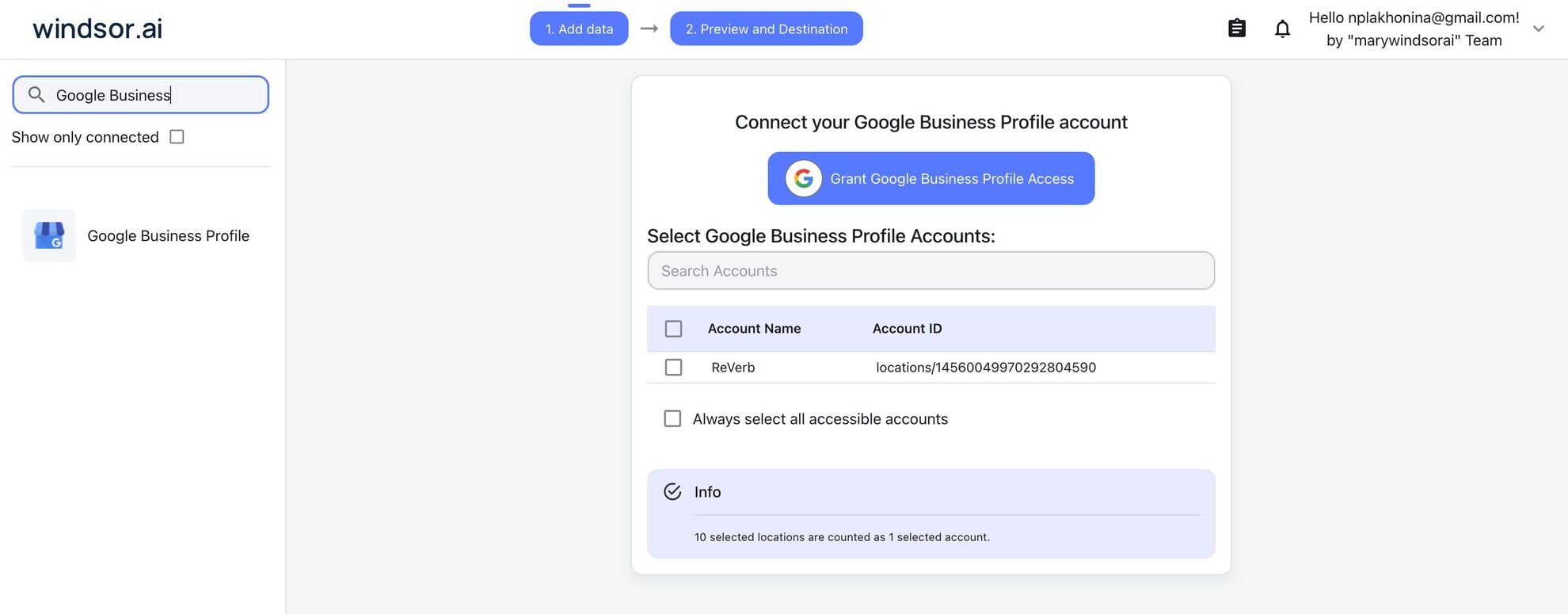
Install the Windsor.ai connector
Log in to your ChatGPT account and open this Windsor.ai connector page.
Click Connect, then authorize access.

Query your Google Business Profile data in ChatGPT
Open a new chat and start asking questions about your connected Google Business Profile data using natural language.
Make sure that the Windsor.ai connector is enabled (click the + sign → More → Windsor.ai.)
FAQs
What can I do with Google Business Profile data in ChatGPT?
Once you connect Google Business Profile to ChatGPT, you can:
- Instant performance analysis. Quickly generate clear summaries of customer actions, search visibility, and engagement without manually reviewing multiple reports.
- Review and sentiment insights. Summarize customer feedback across hundreds of reviews in seconds, identify common themes, and detect issues affecting your reputation.
- Replies and updates, not just reports. Post your owner replies to those reviews, publish a new post, or correct opening hours straight from the conversation.
- Local intent analysis. Let ChatGPT analyze actions such as direction requests, calls, and website clicks to understand what customers are looking for when they find your business.
- Content and engagement tracking. Evaluate how photos, posts, and Q&A activity influence customer interaction and local visibility.
Can ChatGPT change my Google Business Profile, or only read it?
Both, and it works through the same native Windsor.ai app connection you use for reading data. No manual setup, no developer mode, no extra steps. ChatGPT can reply to reviews, publish and edit posts, add photos, and update details such as hours, categories, services and attributes. The Available actions list above is fetched live from the Windsor.ai API, so it always shows what is currently supported, and ChatGPT confirms each change with you before it runs.
Can I analyze data from multiple locations at once?
Yes. Windsor MCP allows you to analyze data from multiple Google Business Profile locations in one ChatGPT session. This helps businesses and agencies compare performance across locations, identify trends, and quickly detect which locations drive the most searches, calls, or customer actions, and which ones need attention.
What prompts can I use when analyzing Google Business Profile data in ChatGPT?
To make the most out of your Google Business Profile data, use more specific and advanced prompts. For example:
-
Examine search_keyword and search_keyword_value across months to identify the keywords that most frequently lead users to discover our business. Detect emerging search trends and recommend which services or offerings we should highlight in our Google Business Profile description and posts.
-
Analyze the relationship between clicks, website clicks, call clicks, and direction requests. Identify which customer actions most frequently follow discovery and explain the most common conversion paths from search visibility to real customer engagement.
-
Compare customer ratings, review volume, profile visibility, and website visits across our locations. Determine whether locations with higher ratings also generate stronger customer engagement and explain how reputation may influence customer behavior.
-
Analyze the relationship between profile visibility and customer actions across all locations over the last 90 days. Identify which locations convert visibility into real customer interactions most efficiently and explain what factors may be contributing to their stronger performance.
Can ChatGPT help improve my local SEO strategy?
Yes. ChatGPT can analyze visibility trends, customer interactions, and search queries to identify optimization opportunities for your local SEO strategy, and then apply the ones that live on your profile, such as refreshing your description, services or categories.
How much does it cost to integrate Google Business Profile into ChatGPT using Windsor.ai?
Windsor.ai is free to start, no credit card required. Paid plans start at $19/month and scale by the number of sources and accounts. See the pricing page.
How long does it take to connect Google Business Profile to ChatGPT?
With Windsor.ai’s intuitive connector, the integration process takes just a few minutes. No technical expertise is required; connecting Google Business Profile to ChatGPT is simple, straightforward, and completely code-free.
Do you have helpful links to get started with integrating Google Business Profile and ChatGPT using Windsor.ai?
Yes, we have helpful resources to help you get started. You can explore our official documentation and tutorials for seamless Google Business Profile to ChatGPT integration with Windsor.ai:
Tired of manual Google Business Profile data exports? Try Windsor.ai today to automate your reporting


