 Destinations
 Data sources
 AI insights
 About us
 Careers
 Security
 Customer reviews
 Contact us
 Affiliate program
 Solution partners
 Template gallery
 Looker Studio templates
 Power BI templates
 Excel templates
 Google Sheets templates
 Tableau templates
 Facebook Ads templates
 Google Ads templates
 Data fields & Metrics
 AI prompt library & Guides
 Product documentation
 API documentation
 Case studies
 Blog
Blog Data models
 Windsor vs Supermetrics
 Windsor vs Funnel.io
 Windsor vs Fivetran
 Windsor vs Rivery
 Windsor vs Portermetrics
 Windsor vs Coupler.io
 Last updated: 1 September 2026




Your Google Business Profile generates valuable data every day, but most of it goes unused.
You could easily answer questions like:
- How many people saw your listing, and how many actually called or asked for directions?
- Are customers finding you through Search or Maps? On mobile or desktop?
- Which search terms bring them in?
- What are people saying in reviews, and how fast are you responding?
- Are you discovered through category searches, or only by people who already know your name?
But the problem is that getting these insights isn’t simple.
You have to log into Google Business Profile, apply filters for each location, export data, and build comparison reports in spreadsheets manually.
As a result, most business owners check this once a month, if at all. Agencies do it in batches. Franchise teams often can’t compare dozens of locations without a dedicated analytics setup.
Here’s the easier way.
You can connect your Google Business Profile directly to ChatGPT using Windsor’s native app and access all your GBP data in a live AI conversation.
No exports. No spreadsheets. Just a one-click setup inside ChatGPT.
Once connected, you can simply ask:
- Which locations get the most calls?
- Where am I losing visibility?
- Which reviews need attention?
…and get AI-powered answers instantly.
🚀 Connect Google Business Profile to ChatGPT with Windsor’s native app. Start free → onboard.windsor.ai/app/google_my_business.
Once your data is live in ChatGPT, insights that used to take days become immediate.
Here’s how to get started with AI-driven analytics of your business performance in under 60 seconds.
Getting your Google Business Profile data into ChatGPT with Windsor MCP: 2 steps
Windsor connects directly to the Google Business Profile API and streams your listing data into ChatGPT through a native app. No manual exports, no third-party scripts, nothing to configure beyond a one-time connection.
📖 Step-by-step documentation: windsor.ai/documentation/windsor-mcp/how-to-integrate-data-into-chatgpt/.
Before you connect
Make sure you have the following things in place:
- A Google Business Profile account (with access to one or more verified business listings)
- A Windsor.ai account (free or any paid plan)
- A ChatGPT account
Step 1. Link your GBP account to Windsor
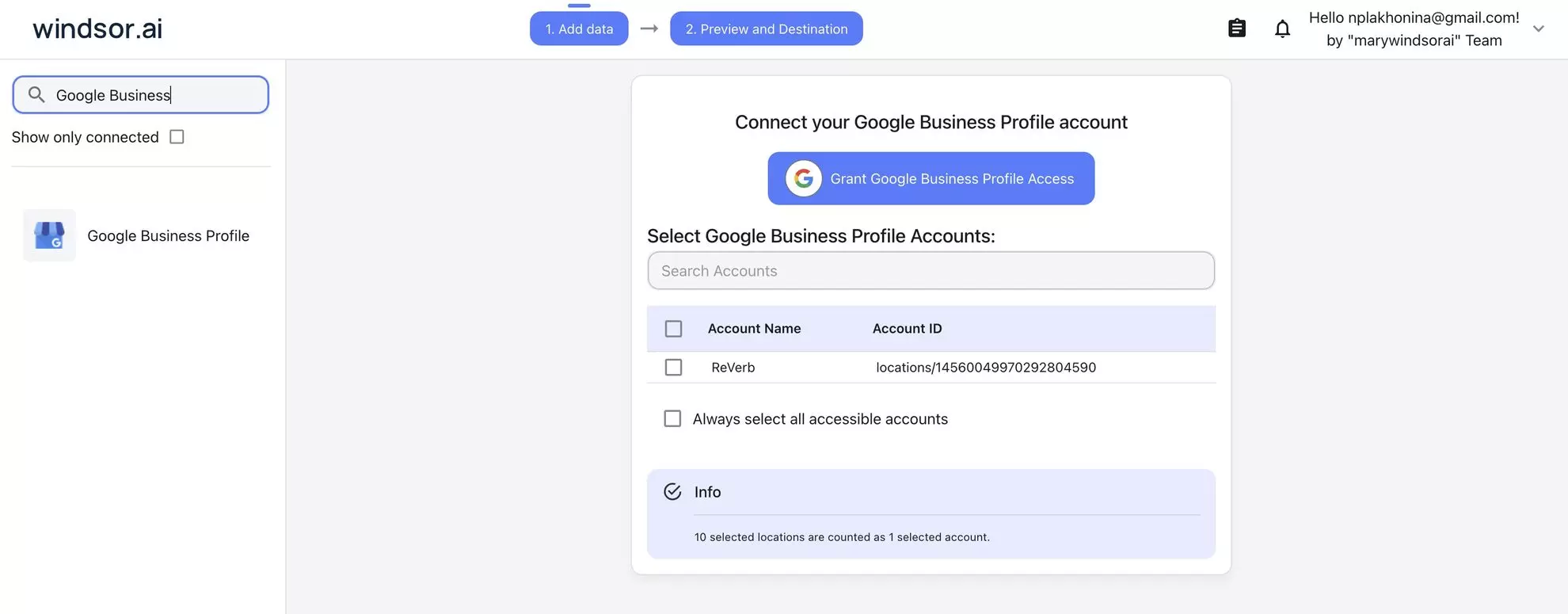
Head to onboard.windsor.ai/app/google_my_business and connect Google Business Profile (Google My Business) as your data source. Sign in with the Google account that manages your business listings and authorize Windsor’s access.
If you manage multiple locations, whether that’s two branches or two hundred, select all the profiles you want to analyze with AI. Windsor automatically normalizes everything into a consistent structure so ChatGPT can compare locations directly without you having to juggle separate exports.
Step 2. Add Windsor’s native app in ChatGPT
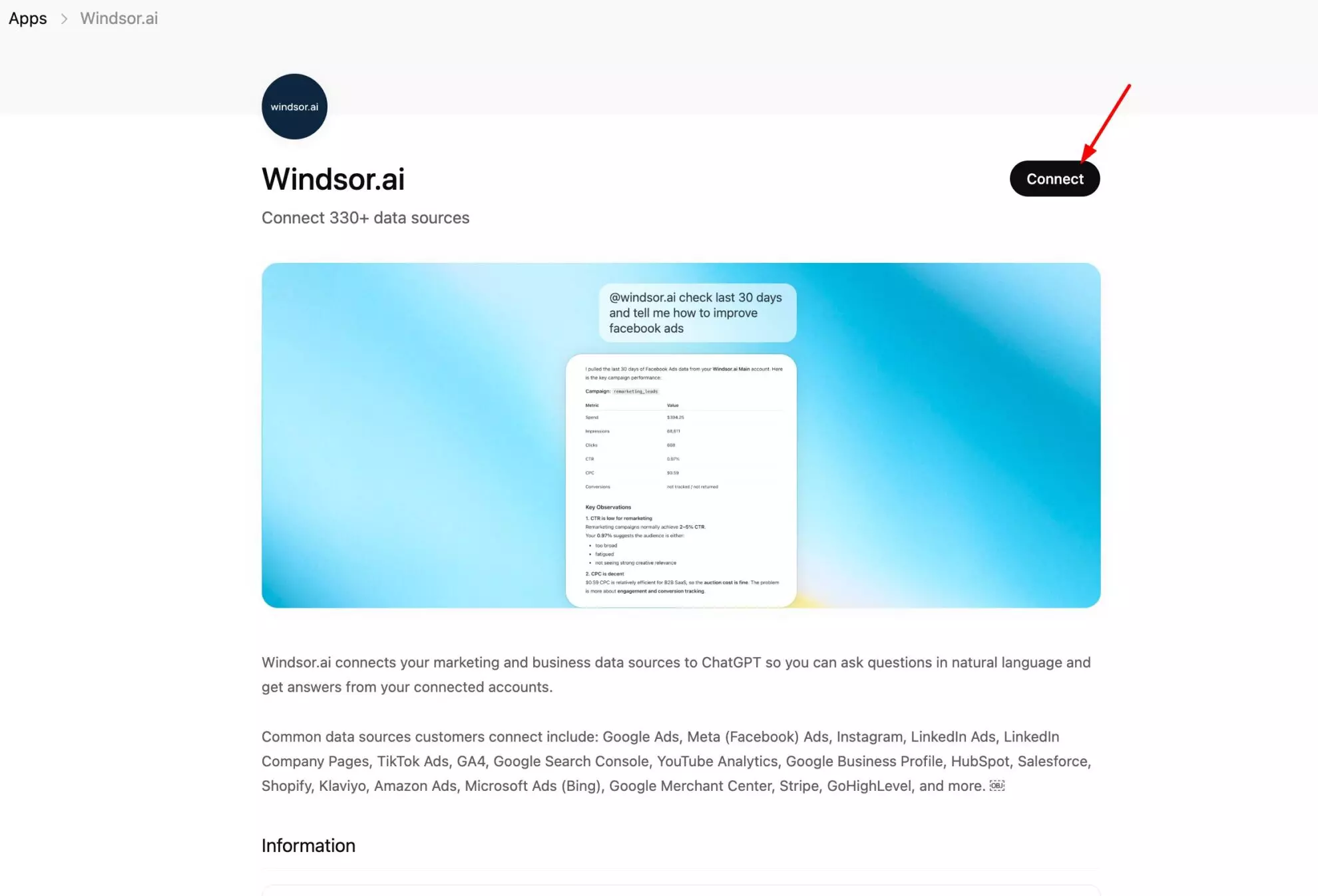
Open Windsor’s native app in ChatGPT and click Connect. Grant the access, and the setup is completed.
Run a quick test to confirm your Google Business Profile data is connected to ChatGPT:
What Google Business Profile locations are connected to my Windsor account?
Show me total impressions and calls for the last 30 days.
Once ChatGPT returns your location data, you can start asking more specific questions.
Windsor pulls fresh data from the GBP API on demand, so every answer reflects the current state of your listings.
Manage your Google Business Profile directly from ChatGPT
Windsor MCP isn’t just for analysis. You can also ask ChatGPT to make real changes to your listings, publish an update, reply to a review, upload a photo, edit your business info, adjust your hours, or mark a location open or closed, all from the same conversation.
Currently available write actions:
- Create or update a Local Post: publish a new “What’s New” update, offer, or event, or edit an existing one.
- Reply to a review: respond to a customer review directly from ChatGPT.
- Upload a photo: add a new image to the listing.
- Update location info: change details like name, address, phone number, or website.
- Set regular hours: update your standard weekly opening hours.
- Set special hours: add holiday or exception hours for specific dates.
- Set open status: mark a location open, temporarily closed, or permanently closed.
For example, you could ask: “Reply to my most recent 2-star review with a professional response” or “Set special hours for December 25th to closed across all my locations.”
Inside the data: What Windsor pulls from Google Business Profile
Windsor gives ChatGPT access to the rich Google Business Profile Insights dataset, supporting 100+ metrics and dimensions.
Here are the most essential fields available for analysis, grouped by what they measure about your local presence.
Visibility: how many people are seeing your listings
| Field name | What it tracks | Why it matters |
| impressions | Total profile views | Overall reach (how many times your listing appeared in Search or Maps results) |
| impressions (desktop_search) | Views from desktop Google Search | Understand which platform your audience uses to find you |
| impressions (mobile_search) | Views from mobile Google Search | Most local searches happen on mobile (this is often your dominant channel) |
| impressions (desktop_maps) | Views from desktop Google Maps | Navigation-intent audience on desktop |
| impressions (mobile_maps) | Views from mobile Google Maps | Your most conversion-ready audience (people actively looking to go somewhere) |
Actions: what people do after finding your listing
| Field name | What it tracks | Why it matters |
| call_clicks | Phone calls initiated from the listing | Your strongest local conversion signal (someone decided to call) |
| website_clicks | Clicks through to your website | Shows when people want more information before acting |
| direction_requests | Get Directions taps | Indicates intent to physically visit (a foot traffic predictor) |
| business_bookings | Bookings made via the profile | Direct conversion actions for bookings-enabled businesses |
| food_menu_clicks | Menu views | Restaurant-specific intent signal (people checking the menu before deciding) |
Search terms: how customers are actually finding you
| Field name | What it tracks | Why it matters |
| search_keyword | The query a customer typed | The exact language your potential customers use (gold for local SEO decisions) |
| search_keyword_value | Unique users per keyword | Weighted by search frequency (shows which terms drive the most discovery) |
💡 Good to know: Search terms from GBP are distinct from Google Search Console keywords. GSC shows website rankings; GBP search terms show what customers typed before clicking on your business listing in Maps or Search, often more local and intent-rich than organic search queries.
Reviews: your reputation in raw form
| Field name | What it tracks | Why it matters |
| review_star_rating | Star rating per review (1–5) | The primary signal new customers use to judge trustworthiness |
| review_count | Total reviews on the profile | Review volume affects local ranking (more recent reviews matter more) |
| review_comment | Full review text | Windsor pulls the actual comment text, enabling ChatGPT to analyze sentiment, topics, and recurring issues across all locations |
Posts and profile activity
| Field name | What it tracks | Why it matters |
| post_summary | Summary of Google Posts published | Track which post types and topics get traction (posts affect profile engagement and can influence local rankings) |
Location dimensions
| Field name | What it tracks | Why it matters |
| account_name/ location_name | Business name and location identifier | The primary dimension for multi-location analysis (every metric can be split and compared by location) |
| date | Daily data points | Enables trend analysis, week-over-week comparisons, and seasonal patterns across any metric |
What to actually ask ChatGPT about your Google Business Profile: Prompt ideas
To help you get started, we’ve prepared a set of short, practical prompts for the most common analytics use cases.
They work for both single-location businesses and multi-location operators; just adjust the scope to fit your setup.
Identify the gap between being seen and getting called
Impressions and calls are the two most telling numbers on any GBP listing.
Impressions tell you whether Google is showing your profile. Calls tell you whether anyone is acting on it.
A listing with strong impressions and low calls has a conversion problem. The profile is appearing, but not compelling enough for people to reach out.
This gap is invisible at a glance but immediately obvious when you ask ChatGPT to calculate it.
Find which listings are visible but not converting
Which of my locations have the highest impressions but the lowest call clicks in the last 30 days?

Rank them by the ratio of calls to impressions — which location is converting impressions into calls the least effectively?
Track calls and direction requests over time
Show me total call clicks and direction requests per week for the last 12 weeks.

Is either metric trending up or down? Were there any weeks with a notable drop?
Compare all locations by their conversion actions
For each connected location, show total calls, direction requests, and website clicks for the last 30 days.

Which location drives the most customer actions overall?

Which has the worst ratio of impressions to actions?
Discovery search vs. direct search: are new customers finding you?
Every GBP impression falls into one of two buckets.
Direct searches happen when someone types your exact business name. They already knew you existed. Discovery searches happen when someone types a category or keyword, and your profile appears. That’s a genuinely new potential customer.
A business where nearly all impressions are Direct is essentially invisible to people who don’t already know it. Growing the Discovery share is the whole game of local SEO; with ChatGPT, you can easily track, understand, and improve it.
Understand how customers are reaching your profile
What search terms are customers using to find my business on Google?

Break them down by volume. Which terms are branded (my business name) and which are category terms like 'near me' or service keywords?
Which category keywords are driving the most discovery?
List my top 10 search keywords by user volume for the last 60 days.

Which ones suggest customers didn't already know my business name — they were searching for a category or service?

Are there high-intent keywords where I could improve visibility?
Spot keyword opportunities you’re missing
Based on my existing search keywords, what related local search terms am I probably not showing up for?

What do my top-performing keywords have in common — location terms, service types, or specific phrases?
Reviews: perform reputation analysis across your locations
Reviews are the most human part of a Google Business Profile, and the hardest to manage at scale.
A single-location business can read every review personally. A franchise with 50 locations generates dozens of reviews a week: patterns emerge, recurring complaints surface, and specific locations develop reputation problems that aren’t visible without reading everything systematically.
ChatGPT can do that reputation analysis at scale for you.
Get a reputation snapshot across all locations
What is the average star rating for each of my locations?

Which locations have the lowest average rating, and how many reviews do they have in total?
Find recurring themes in recent negative reviews
Look at reviews with 1 or 2 stars from the last 30 days.

What topics or issues come up most often?

Is there a pattern — service, wait time, cleanliness, staff?
Identify locations with a sudden reputation shift
Which locations received the most negative and positive reviews in the last 14 days compared to the previous 14 days?

Has the average star rating changed noticeably for any location?
Find what your happy customers are praising
What positive themes appear most often in 4 and 5 star reviews?

Which specific words or phrases do satisfied customers use most?

Are there differences between what customers praise at different locations?
Where your audience is: Search vs. Maps vs. mobile vs. desktop
Not all impressions are equal.
Someone viewing your listing on Google Maps on their phone has a very different intent from someone on desktop Search. The Maps user is typically in navigation mode, closer to a visit decision.
ChatGPT helps you understand which surfaces drive your visibility and tells you where to focus optimization efforts.
See which platform drives your impressions
Break down my impressions by platform for the last 30 days:
desktop search, mobile search, desktop maps, mobile maps.

Which platform drives the most views?

Which drives the most calls and direction requests?
Mobile vs. desktop call conversion
Compare call_clicks from mobile vs. desktop for the last 60 days.

On which device do more people call from the listing?

Has the mobile share been growing or declining?
Multi-location intelligence: the analysis GBP’s interface can’t do
Google Business Profile’s native interface shows one location at a time.
For businesses with multiple branches, clients, or franchise units, comparison across locations requires either a third-party tool or a lot of spreadsheet work.
ChatGPT can run cross-location analysis in a single prompt once all your profiles are connected to Windsor.
Rank all locations by performance
Rank all my connected locations by total customer actions (calls + direction requests + website clicks) for the last 30 days.

Which locations are performing above average and which are lagging?
Find your underperforming locations and understand why
Which locations have the lowest call clicks despite having above-average impressions?

What could explain the gap — low review rating, missing information, or weak conversion of profile visitors?
Weekly cross-location summary for reporting
Give me a summary of last week's performance across all locations.

Include impressions, calls, and direction requests for each.

Flag any location where calls dropped more than 20% vs. the week before.
Google Posts: are you publishing content that actually gets seen?
Google Posts are one of the most underutilised features of Google Business Profile.
A well-timed post about a promotion, an event, or a seasonal service can appear directly in your listing and influence both clicks and calls. Most businesses either never post or post sporadically without tracking results.
With ChatGPT, you can instantly see what’s working, what isn’t, and how to improve your content strategy.
Review your recent posting activity
What Google Posts have been published on my profile in the last 60 days?

Summarise the topics and any performance data available.

How frequently am I posting, and are there gaps?
Connect the posting activity to the visibility changes
Were there any weeks where I published a Google Post and impressions or calls increased noticeably compared to the week before?

Is there a pattern between posting activity and profile engagement?
Bonus: Connecting GBP data with the rest of your business platforms
Google Business Profile tells you how your local listing performs. The full story of what that means for the business requires connecting it with what happens on your website, in your paid campaigns, and across other channels.
🔗 Windsor.ai lets you combine Google Business Profile data with 350+ other platforms and use it in ChatGPT for cross-channel analysis.
Here are some practical data blending ideas you can try to take your GBP analysis to the next level:
- GBP + GA4: Website clicks from GBP land somewhere on your site. GA4 records what those visitors do next. Connect both and ask ChatGPT: Do GBP website clicks convert to enquiries or purchases? Which landing pages receive GBP traffic but have high bounce rates, a sign of a disconnect between the listing and the page?
- GBP + Google Ads: Local Search Ads can appear alongside organic GBP listings for the same searches. Connect both and ask ChatGPT: Are you paying for clicks on queries where your organic GBP listing already ranks well? Which ad campaigns target search terms that also appear in your GBP keyword data?
- GBP + Google Search Console: GSC shows your website’s organic rankings. GBP shows your listing’s local presence. Connect both to understand the full local search picture: are there high-volume local search terms appearing in your GBP keywords that your website doesn’t rank for, an SEO opportunity backed by evidence that customers are already searching those terms?
- GBP across all locations (agencies): Agencies managing GBP for multiple clients connect each client’s profile to Windsor and compare performance across the entire portfolio in one ChatGPT conversation. Ask ChatGPT to flag which client locations need urgent attention based on declining calls or new negative reviews without opening each account separately.
Conclusion
Most local businesses don’t lack data; they lack clarity.
The answers are already there:
- which locations attract new customers
- which searches drive real actions
- where you’re gaining visibility, and where you’re losing it
The problem is how long it takes to get those answers.
With Windsor MCP for ChatGPT, you skip the manual work entirely.
Your Google Business Profile data becomes instantly accessible inside ChatGPT, ready to explore, compare, and act on.
Just ask, and get answers you can actually use to improve performance.
🚀 Connect your Google Business Profile to ChatGPT and turn your data into real visibility gains. Start free now.
FAQs
How is this approach different from just checking Google Business Profile directly?
GBP’s built-in interface shows data for one location at a time and limits how far back you can look without exporting. Windsor pulls your full dataset (all locations, full history, all available metrics) and makes it conversationally queryable in ChatGPT. The key difference is cross-location analysis and pattern recognition: instead of clicking through each location individually, you ask a single question and get answers across your entire portfolio instantly.
Can ChatGPT read and analyze my actual customer reviews?
Yes. Windsor pulls the full review text (review_comment) alongside the star rating and timestamp for every review. This means ChatGPT can analyze the actual language customers use, identifying recurring complaints, highlighting what positive reviews praise, spotting specific issues at specific locations, and summarising sentiment across your entire review history in a single prompt.
What are 'search keywords' in Google Business Profile data?
Search keywords are the actual search terms customers typed into Google before your business listing appeared. They’re distinct from Google Search Console keywords, which relate to your website’s organic rankings. GBP search terms are specific to your listing on Google Maps and Search; they often include location modifiers (‘coffee shop near me’, ‘plumber in [city]’) and service terms that reveal how new customers are trying to find businesses like yours. Windsor makes these queryable in ChatGPT so you can understand the exact language your potential customers use.
Is there a limit on how many locations I can connect?
No hard limit. Windsor supports connecting multiple GBP locations from the same account, and agencies or franchise operators can connect locations from different client accounts by adding each separately, as allowed per your Windsor.ai plan. All connected locations are available in the same ChatGPT conversation for cross-location analysis.
Can I see how individual Google Posts performed?
Windsor pulls post summary data from the GBP API, including what was published and when. Post-level performance metrics (views, clicks per post) availability depends on what Google’s API exposes for your account type. You can at minimum analyse posting frequency, recency, and compare periods of active posting against periods without posts to understand the relationship between content activity and profile engagement.
Can I combine GBP data with other sources in the same ChatGPT conversation?
Yes, this is one of Windsor’s core capabilities. Connect Google Business Profile alongside GA4, Google Ads, Google Search Console, or any of Windsor’s 350+ supported sources, and all of them are available in the same ChatGPT conversation. Ask questions that cross the boundary between your local listing performance and your website analytics, paid campaigns, or organic search visibility in a single prompt.
Can ChatGPT make changes to my Google Business Profile, or only analyze it?
Both. Beyond analysis, Windsor supports real write actions on your Google Business Profile: creating or updating Local Posts, replying to reviews, uploading photos, updating location info, setting regular or special hours, and setting open status. The native Windsor.ai ChatGPT app now handles these write actions directly, no manual setup, developer mode, or custom connector required.


