 Destinations
 Data sources
 AI insights
 About us
 Careers
 Security
 Customer reviews
 Contact us
 Affiliate program
 Solution partners
 Template gallery
 Looker Studio templates
 Power BI templates
 Excel templates
 Google Sheets templates
 Tableau templates
 Facebook Ads templates
 Google Ads templates
 Data fields & Metrics
 AI prompt library & Guides
 Product documentation
 API documentation
 Case studies
 Blog
Blog Data models
 Windsor vs Supermetrics
 Windsor vs Funnel.io
 Windsor vs Fivetran
 Windsor vs Rivery
 Windsor vs Portermetrics
 Windsor vs Coupler.io
 Last updated: 17 September 2026




Connect LinkedIn Ads to Claude by authorizing your account at onboard.windsor.ai/app/linkedin, then adding the Windsor.ai connector in Claude. That’s it. Open a new chat and ask about your campaigns.
LinkedIn publishes no MCP server for Campaign Manager, so every route to Claude is a third-party one. The LinkedIn Ads to Claude connector page compares them: Windsor.ai, a self-hosted open-source server, other hosted connectors and a CSV export, with what each needs and what Claude can do on each.
Here’s the problem it solves: Campaign Manager shows what each campaign cost and what it returned, but not which audience or creative produced the leads that turned into pipeline.
LinkedIn Campaign Manager provides valuable metrics like clicks, impressions, and conversions. However, these static dashboards don’t explain why a specific campaign generated qualified leads or which audience segments drove pipeline growth.
By connecting LinkedIn Ads data to Claude, you can move beyond surface-level reporting and start asking deeper questions, such as:
- Which ad creatives produce the most cost-efficient leads?
- Which audience segments generate the greatest pipeline value?
- What campaign patterns lead to a lower CPL (cost per lead)?
However, getting LinkedIn data into Claude is notoriously difficult, as manual CSV exports are often aggregated and messy. The great news is that you can completely automate your LinkedIn Ads integration and generate such sophisticated visual performance reports in under one minute.

Using the Windsor MCP connector, your LinkedIn Ads data flows directly into Claude, providing real-time insights into your advertising results and B2B funnel without the analyst bottlenecks.
🚀 Try your first LinkedIn Ads → Claude integration at Windsor.ai: https://onboard.windsor.ai/app/linkedin.
Steps to send LinkedIn Ads data to Claude using Windsor MCP
This integration uses Model Context Protocol (MCP) to allow Claude to query live marketing data from Windsor.ai. It requires no coding and typically takes a minute.
📖 Follow our quick step-by-step guide to automatically connect your LinkedIn Ads data to Claude.
Prerequisites
Before starting, make sure you have:
- A Windsor.ai account (free or paid plan)
- A LinkedIn Ads account with Campaign Manager access
- A Claude.ai account
Step 1: Connect LinkedIn Ads to Windsor
First, allow Windsor to access your LinkedIn advertising data:
- Log in to onboard.windsor.ai.
- Choose LinkedIn Ads as your data source.
- Authenticate with your LinkedIn account.
- Select the ad accounts you want to analyze.

Once authorized, Windsor connects directly to the LinkedIn Marketing API and automatically normalizes and structures the campaign data. The result is a clean dataset prepared for AI analysis.
Step 2: Add the Windsor connector in Claude
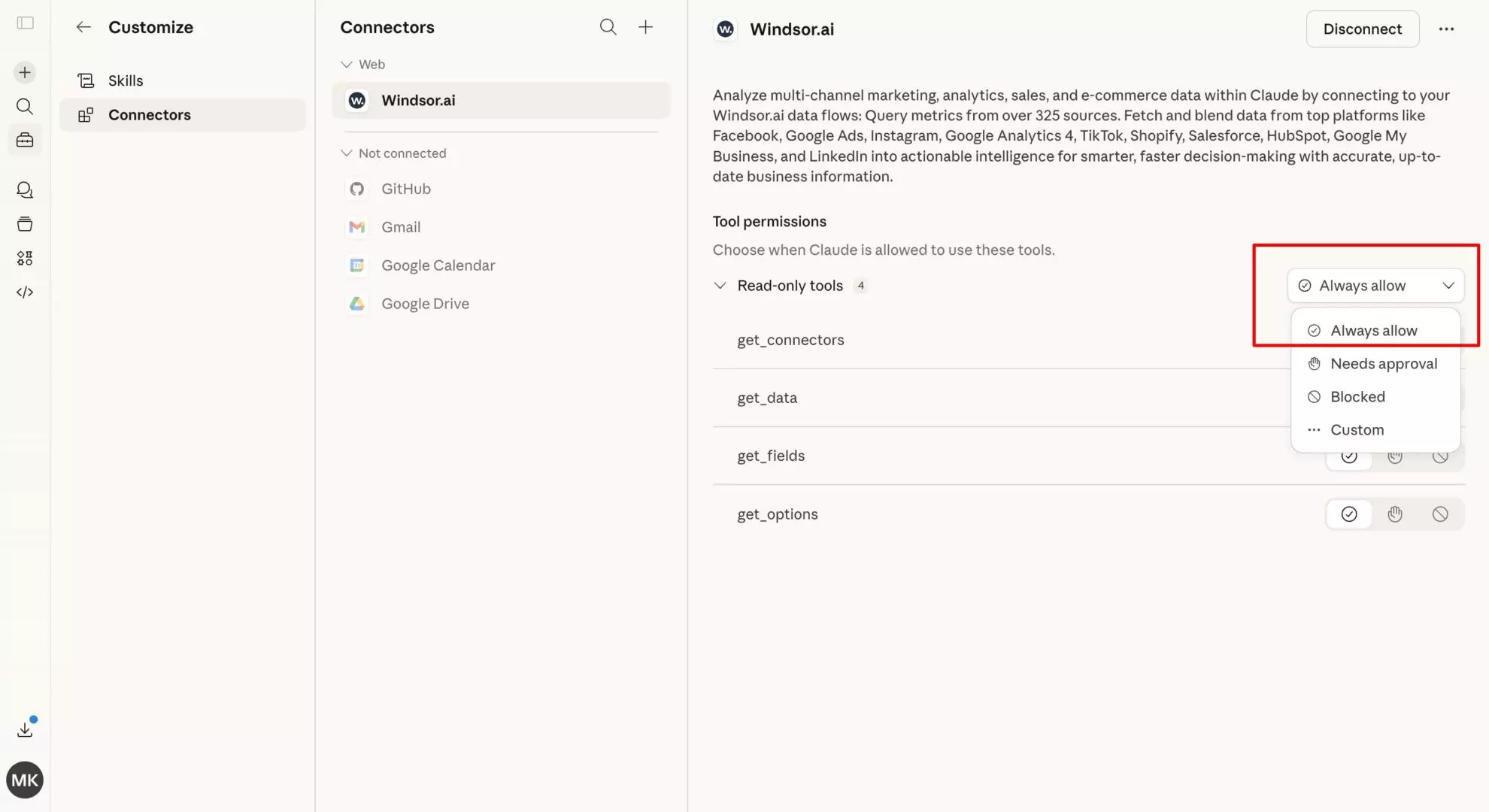
Next, connect Claude to the data you just synced. In Claude, open Customize, then Connectors, search for Windsor and click Add. Sign in to your Windsor.ai account when prompted. You can also open the Windsor.ai listing in the Claude directory and click Connect.

Once activated, Claude can directly access your LinkedIn Ads performance data.
💡 Quick tip: Enable “Always allow” permissions so Claude can retrieve campaign insights without requiring repeated authorization.
Step 3: Start asking Claude questions about your LinkedIn Ads
After connecting the data source, you can analyze your ad performance using simple natural-language queries.
For example:
- “Which LinkedIn Ads campaigns generated the lowest cost per lead last month?”
- “Compare performance between sponsored content and message ads.”
- “Which industries produced the highest conversion rate from my campaigns?”
Claude processes the campaign data instantly and generates strategic insights.
💡 Pro tip: You can also ask it to create summary reports, campaign recommendations, or performance breakdowns for stakeholders or clients.

Bonus: LinkedIn Ads prompt ideas for Claude
The quality of insights depends heavily on how you formulate prompts.
We’ve prepared some ready-to-use prompt ideas for you, so you can jumpstart with your LinkedIn Ads analytics in Claude:
1. Campaign efficiency analysis
Prompt:
Analyze my LinkedIn Ads campaigns from the last 30 days and create a visual report based on the performance data. Identify which campaigns generated the lowest cost per lead and explain which targeting settings contributed to their performance.
2. Audience segment performance
Prompt:
Compare conversion rates across different audience segments such as industry, company size, and job title. Which segments generated the most qualified leads?
3. Ad creative performance
Prompt:
Evaluate the performance of my ad creatives. Which headlines or messaging angles resulted in the highest click-through rate?
4. Budget allocation strategy
Prompt:
Based on campaign ROI, recommend how I should redistribute my LinkedIn Ads budget across campaigns for the next month.
🤖 For more advanced prompt ideas, browse the full Windsor AI Prompt Library.
Advanced use cases: How marketers can use Claude with LinkedIn Ads data
Once your data pipeline is active, Claude functions as an AI marketing analyst who can deeply interpret your LinkedIn Ads results.
Here’s what you can do with your LinkedIn Ads data in Claude:
B2B pipeline reporting
Claude can correlate ad engagement with downstream metrics such as:
- CRM opportunities
- Demo requests
- Sales-qualified leads
Instead of evaluating campaigns purely by CPL, you can identify which campaigns generate revenue opportunities.
Lead quality analysis
Not all leads are equal. Claude can analyze which campaign parameters correlate with higher-value leads, such as:
- job seniority
- company size
- industry segments
This allows you to refine targeting strategies for better pipeline efficiency.
Multi-channel marketing analysis
With Windsor connecting hundreds of data sources, you can combine LinkedIn Ads data with platforms such as:
- Google Analytics 4
- Facebook Ads
- HubSpot
- Shopify, and many more
Example prompt:
Compare LinkedIn Ads lead generation campaigns with GA4 website traffic. Could any specific campaigns trigger spikes in new sessions?
✨ For a complete understaning of what is possible with the Linkedin Ads to Claude integration, read the Windsor MCP use cases guide.
Act on LinkedIn Ads insights directly from Claude
Windsor MCP now supports write actions for LinkedIn Ads. Once Claude identifies a problem, you’re no longer stuck copying the fix into LinkedIn Campaign Manager; you can pause underperforming campaign groups, campaigns or creatives, re-enable a stronger performer, or set a campaign’s daily or total budget, all in the same conversation, with Claude confirming each change first. Creating campaigns or changing targeting stays in Campaign Manager.
For example:
Pause any LinkedIn Ads campaign that's spent more than $500 with zero conversions this week.Increase the daily budget on my top-performing campaign by 20% and reduce the budget on the lowest performer by the same amount.LinkedIn Ads metrics you can stream to Claude via Windsor
Windsor streams 230+ LinkedIn Ads fields into Claude, allowing deeper campaign analysis than standard dashboards.
Campaign performance metrics
Key advertising metrics include:
- impressions
- clicks
- spend
- click-through rate (CTR)
- cost per click (CPC)
These provide a baseline view of campaign engagement.
Lead generation metrics
For campaigns using LinkedIn Lead Gen Forms:
- lead submissions
- conversion rate
- cost per lead
- form completion rate
Claude can analyze which campaigns produce the most efficient lead generation.
Audience and targeting data
Audience insights include:
- job titles
- industries
- company size segments
- geographic performance
This helps marketers identify which audiences better engage with the ads.
Conversion and ROI metrics
If conversion tracking is enabled, Claude can also evaluate:
- post-click conversions
- revenue events
- return on ad spend (ROAS)
These insights help you evaluate the true impact of your advertising efforts and reallocate your ad budget for maximum ROI.
How to send LinkedIn Ads data to Claude manually
The manual LinkedIn Ads data integration into Claude typically looks like this:
- Export campaign data from LinkedIn Campaign Manager.
- Download CSV files.
- Upload them to Claude.
- Ask Claude for a summary.
Why manual LinkedIn Ads exports don’t work well with AI
Many marketers attempt to analyze LinkedIn Ads data by exporting reports from Campaign Manager. While possible and suitable for one-time small reports, this method has major limitations:
- Static snapshots: LinkedIn Ads performance changes daily, so the previous CSV exports quickly become outdated.
- Missing campaign context: Exports often lack important contextual fields like targeting parameters or creative details. Without this context, AI analysis becomes limited.
- Fragmented reporting: Different campaign types require different exports. Combining them into a single dataset is time-consuming and often creates a mess.
How Windsor MCP overcomes the challenges of the manual workflow
Here’s what the Windsor MCP connector brings to the table:
- Structured data for AI models: Raw LinkedIn Ads data is messy and inconsistent. Windsor automatically normalizes these datasets so Claude can interpret them accurately on the fly.
- Context-rich data delivery: In addition to numbers, Windsor includes contextual data such as campaign names, ad creatives, and targeting settings, which enables Claude to understand how messaging affects performance.
- Optimized token usage: Windsor filters irrelevant fields before sending data to Claude, ensuring conversations remain efficient and fast.
- Live data synchronization: Unlike manual exports, Windsor continuously syncs with the LinkedIn API. Each time Claude answers a query, it retrieves the most recent campaign data from your account(s).
Comparing LinkedIn Ads to Claude integration methods
| Feature | Windsor MCP | CSV upload | Automation tools (Zapier/Make) |
|---|---|---|---|
| Data freshness | Real-time API sync | Static snapshot | Delayed |
| Setup time | <1 minute | 10+ minutes | Complex |
| Claude compatibility | Native connector | File upload | Limited |
| Contextual data | Full campaign metadata | Often missing | Hard to map |
| Scalability | Data from multiple ad accounts | One dataset at a time | Multi-account setup is difficult and expensive |
Conclusion
Analyzing LinkedIn Ads data with AI becomes significantly more powerful when the data connection is automated.
By connecting LinkedIn Ads to Claude through Windsor MCP, marketers gain a live pipeline that enables real-time campaign analysis and strategic decision-making.
Instead of manually reviewing dashboards, you can simply ask Claude questions and receive immediate insights about your B2B advertising performance, along with an action plan to optimize your results.
And with write actions now supported, you don’t just get a plan to optimize results, you can execute it on the spot, pausing campaigns and adjusting budgets without leaving the chat.
🚀 Start free at Windsor.ai and connect your LinkedIn Ads data to Claude in just 60 seconds: https://onboard.windsor.ai/app/linkedin.
Available actions
Enable Campaign Group Enable a paused LinkedIn Ads campaign group. Reversible via pause_campaign_group.
Enable a paused LinkedIn Ads campaign group. Reversible via pause_campaign_group.
Pause Campaign Group Pause an active LinkedIn Ads campaign group. Reversible via enable_campaign_group.
Pause an active LinkedIn Ads campaign group. Reversible via enable_campaign_group.
Enable Campaign Enable a paused LinkedIn Ads campaign. Reversible via pause_campaign.
Enable a paused LinkedIn Ads campaign. Reversible via pause_campaign.
Pause Campaign Pause an active LinkedIn Ads campaign. Reversible via enable_campaign.
Pause an active LinkedIn Ads campaign. Reversible via enable_campaign.
Enable Creative Enable a paused LinkedIn Ads creative. Reversible via pause_creative.
Enable a paused LinkedIn Ads creative. Reversible via pause_creative.
Pause Creative Pause an active LinkedIn Ads creative. Reversible via enable_creative.
Pause an active LinkedIn Ads creative. Reversible via enable_creative.
Set Campaign Group Budget Set the total budget of a LinkedIn Ads campaign group. The amount is in the account currency major unit (e.g. 100.00 means one hundred); the currency is resolved automatically from the account. The campaign group must have a schedule end date for a total budget to apply.
Set the total budget of a LinkedIn Ads campaign group. The amount is in the account currency major unit (e.g. 100.00 means one hundred); the currency is resolved automatically from the account. The campaign group must have a schedule end date for a total budget to apply.
Set Campaign Budget Set the daily or total budget of a LinkedIn Ads campaign. The amount is in the account currency major unit (e.g. 100.00 means one hundred); the currency is resolved automatically from the account. A total budget requires the campaign to have a schedule end date.
Set the daily or total budget of a LinkedIn Ads campaign. The amount is in the account currency major unit (e.g. 100.00 means one hundred); the currency is resolved automatically from the account. A total budget requires the campaign to have a schedule end date.
Rename Campaign Change the name of a LinkedIn Ads campaign. Only the name changes; budget, schedule, targeting and status are left untouched, and reporting stays attached because it keys on the campaign id.
Change the name of a LinkedIn Ads campaign. Only the name changes; budget, schedule, targeting and status are left untouched, and reporting stays attached because it keys on the campaign id.
Set Campaign Schedule Change the run schedule of a LinkedIn Ads campaign. Provide start_date and/or end_date as YYYY-MM-DD; at least one is required. The unspecified bound keeps its current value. The end date is exclusive: the campaign stops at the start of that day. The start date cannot be changed once the campaign has started.
Change the run schedule of a LinkedIn Ads campaign. Provide start_date and/or end_date as YYYY-MM-DD; at least one is required. The unspecified bound keeps its current value. The end date is exclusive: the campaign stops at the start of that day. The start date cannot be changed once the campaign has started.
Create Creative Create a new ad (creative) in a LinkedIn Ads campaign from an existing post. post_urn must reference a published post or InMail content (urn:li:ugcPost:..., urn:li:share:... or urn:li:adInMailContent:...); the connector does not build post content from scratch. Created as DRAFT by default so it does not serve until enabled with enable_creative.
Create a new ad (creative) in a LinkedIn Ads campaign from an existing post. post_urn must reference a published post or InMail content (urn:li:ugcPost:..., urn:li:share:... or urn:li:adInMailContent:...); the connector does not build post content from scratch. Created as DRAFT by default so it does not serve until enabled with enable_creative.
Set Campaign Targeting Replace the target audience (targetingCriteria) of a LinkedIn Ads campaign. include and exclude map a facet name to a list of full entity URNs, for example {"locations": ["urn:li:geo:103644278"], "interfaceLocales": ["urn:li:locale:en_US"], "industries": ["urn:li:industry:9"]}. Included facets are AND-ed together and the values within a facet are OR-ed. interfaceLocales is required. locations and profileLocations cannot be used together. The resulting audience must have at least 300 members. This replaces the campaign's entire audience.
Replace the target audience (targetingCriteria) of a LinkedIn Ads campaign. include and exclude map a facet name to a list of full entity URNs, for example {"locations": ["urn:li:geo:103644278"], "interfaceLocales": ["urn:li:locale:en_US"], "industries": ["urn:li:industry:9"]}. Included facets are AND-ed together and the values within a facet are OR-ed. interfaceLocales is required. locations and profileLocations cannot be used together. The resulting audience must have at least 300 members. This replaces the campaign's entire audience.
FAQs
Can Claude help me optimize my LinkedIn Cost Per Lead (CPL)?
Yes. Because Windsor streams granular targeting data, you can ask Claude to identify which job titles, industries, or company sizes are driving the highest CPL. Claude can then suggest budget reallocations or targeting exclusions to improve your efficiency.
Is it possible to analyze LinkedIn Lead Gen Forms with Claude?
Absolutely. Windsor pulls specific Lead Gen Form metrics, including form opens and submission rates. You can ask Claude to compare the quality and cost of leads coming from native LinkedIn forms versus your website landing pages.
Does this integration support account-based marketing (ABM)?
Yes. Since Windsor provides company-level engagement data, you can ask Claude to identify which of your “Target Accounts” are engaging most with your ads and which ones haven’t seen an ad in the last 30 days.
Can I use Claude to audit LinkedIn ad creative fatigue?
Yes. By streaming click-through rate (CTR) and frequency metrics over time, Claude can detect when a creative’s performance starts to “decay.” It can then recommend which ads to pause, take that action right from the chat, and suggest new copy angles based on your historical winners.
What LinkedIn Ads metrics can I stream to Claude?
You can access over 230 fields, including:
- Performance: Impressions, clicks, and total spend.
- Professional demographics: Seniority, function, and industry.
- Video/document: Completion rates and document downloads.
- Conversions: Post-click conversions and total revenue value.
Do I need coding skills to set up the LinkedIn Ads to Claude integration?
No. The standard setup is entirely no-code. You simply authenticate your LinkedIn account via Windsor.ai and toggle the connector inside Claude. For advanced users, a developer-friendly MCP setup is also available via the command line.
How does Windsor MCP handle messy LinkedIn API data for Claude?
Raw data from LinkedIn’s API is often nested and inconsistent. Windsor “normalizes” this data by cleaning and flattening it into a structured format so that Claude can interpret it without “hallucinating” or miscalculating your ROI.
Can I compare LinkedIn Ads performance with other channels (e.g., Google Ads) in the same Claude chat?
Yes. This is a major advantage of using Windsor. You can connect both LinkedIn and Google Ads to Windsor, then ask Claude: “Which platform gave us a lower Cost Per Qualified Lead for our ‘SaaS’ campaign this month?”
Is my LinkedIn advertising data secure when using Windsor and Claude?
Yes. Windsor.ai uses official LinkedIn Marketing APIs and enterprise-grade encryption. When using the MCP connector, your data is only accessed by Claude during your active session to answer your specific prompts. Your data is not used to train public AI models.
Can Claude manage my LinkedIn Ads campaigns?
Yes. Once connected, Claude becomes an execution layer, not just an analytics tool. Here’s what you can do:
- Pause or enable campaign groups, campaigns, and creatives
- Set the total budget on a campaign group
- Set the daily or total budget on a campaign
It acts strictly on your instructions and confirms what it’s about to do before making any change.


