 Destinations
 Data sources
 AI insights
 About us
 Careers
 Security
 Customer reviews
 Contact us
 Affiliate program
 Solution partners
 Template gallery
 Looker Studio templates
 Power BI templates
 Excel templates
 Google Sheets templates
 Tableau templates
 Facebook Ads templates
 Google Ads templates
 Data fields & Metrics
 AI prompt library & Guides
 Product documentation
 API documentation
 Case studies
 Blog
Blog Data models
 Windsor vs Supermetrics
 Windsor vs Funnel.io
 Windsor vs Fivetran
 Windsor vs Rivery
 Windsor vs Portermetrics
 Windsor vs Coupler.io
Connect Notion to ChatGPT
Automatically sync your Notion data to ChatGPT using the Windsor.ai connector.
Analyze your workspace data in ChatGPT to surface pending tasks and stale pages, track team activity, and find knowledge gaps in seconds.
Forget CSVs. Stop copy/paste. Connect data in minutes. No code required.
 Sign up with Google
 Free forever plan
No credit card needed
Free forever plan
No credit card needed









Turn your knowledge base into actionable insights with Notion to ChatGPT integration
Skip the dashboards and manual analysis; ask ChatGPT questions about your Notion workspace and get instant AI answers. Explore key use cases:

Surface unchecked tasks
ChatGPT scans all to-do blocks across your entire workspace and lists every unchecked item in one place. Start each day knowing exactly what needs action without missing deadlines.

Track contributor activity
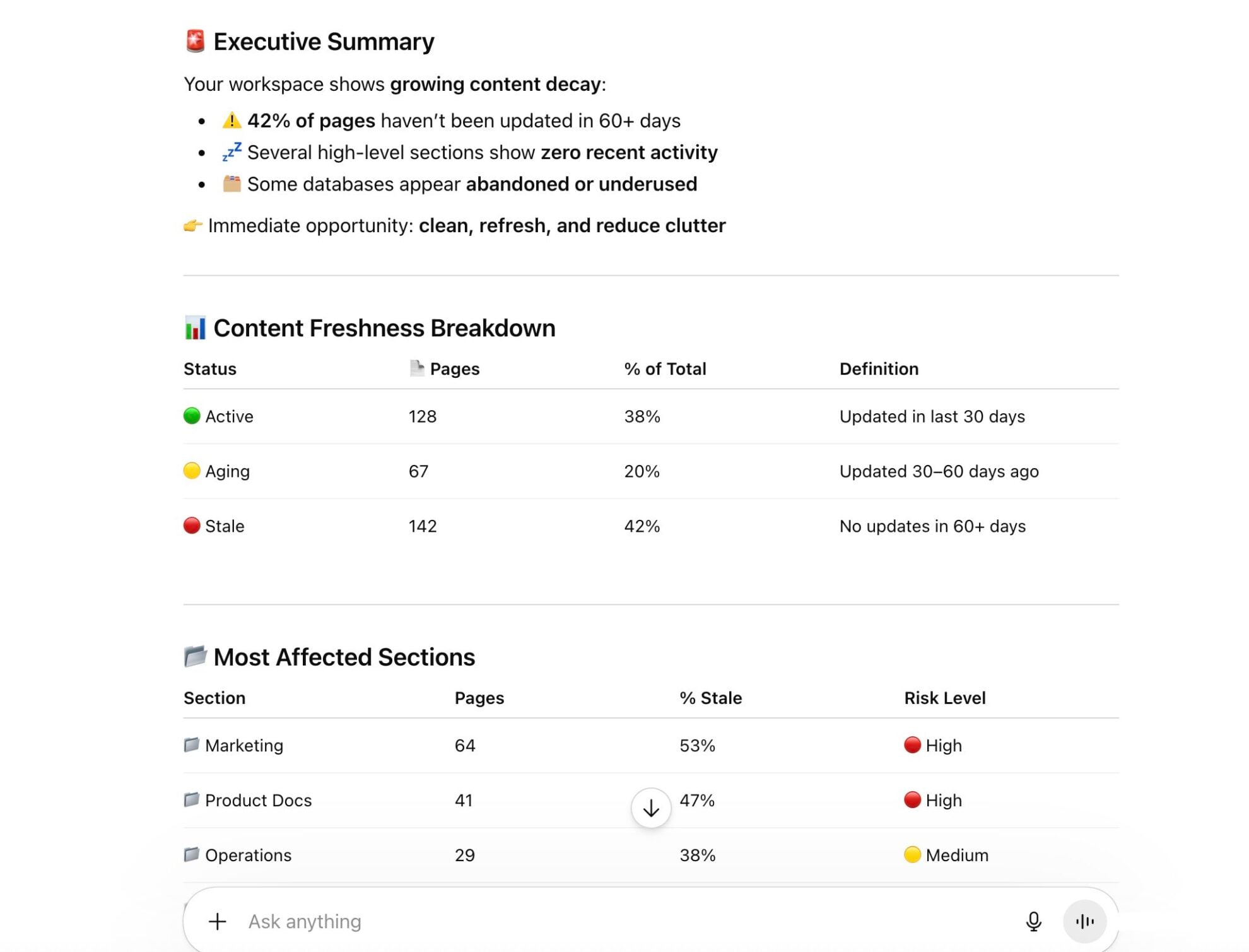
Analyzes contribution patterns across your entire workspace to see who is actively creating new content, who is primarily editing existing pages, and which team members have become inactive over time.

Detect stale pages
Ask ChatGPT to identify pages that haven’t been edited in weeks and flag them for review. Keep your knowledge base trustworthy and stop teams from working off outdated information.
Using Windsor.ai to connect data from Notion to ChatGPT
Syncing Notion data to ChatGPT typically requires manual exports, data cleanup, or costly tools. Windsor MCP removes this complexity by automatically pulling, organizing, and streaming your Notion workspace data directly into ChatGPT.
Connect your account in one minute and start analyzing your pages, tasks, databases, and team activity with simple prompts.














How to connect Notion to ChatGPT data with Windsor.ai
Explore our video tutorial and a step-by-step guide to seamlessly integrate your data from any source into ChatGPT with the Windsor.ai connector.
Select your data source
Choose Notion as your data source and grant access to Windsor.ai.

Install the Windsor.ai connector
Log in to your ChatGPT account and open this Windsor.ai connector page.
Click Connect, then authorize access.

Query your Notion data in ChatGPT
Open a new chat and start asking questions about your connected Notion data using natural language.
Make sure that the Windsor.ai connector is enabled (click the + sign → More → Windsor.ai.)
FAQs
What Notion metrics can I analyze in ChatGPT via Windsor.ai?
Windsor.ai gives ChatGPT access to 92 fields across five groups, such as:
- Pages: Page ID, URL, creation time, last edited time, last edited by, parent, properties, cover, icon, archived status.
- Blocks: Block type (paragraph, heading, to-do, toggle, code, table, video, image, etc.), creation time, last edited time, and parent.
- Databases. Database ID, title, description, properties, creation and last edited timestamps, inline status, public URL.
- Comments. Comment text (rich_text), discussion ID, creation time, last edited time, and parent page.
- Users. User name, avatar URL, user type (person or bot), and user ID.
Can I analyze comments and discussions in Notion through ChatGPT?
Yes. Windsor.ai pulls comments_rich_text, comments_discussion_id, comments_created_by, and comments_created_time, so ChatGPT can surface open discussions, summarize recent comment threads, or show you which pages have the most active conversations.
Can ChatGPT find all my unchecked to-do items in Notion?
Yes. Windsor.ai streams blocks_to_do data into ChatGPT, which can filter for unchecked items across your entire workspace and organize them by page, database, or last edited date, giving you an instant task backlog with no manual digging.
What prompts can I use to analyze Notion data in ChatGPT?
Use advanced prompts in ChatGPT to uncover deeper insights from your Notion data. For example:
-
Audit my entire Notion workspace and identify structural weaknesses: pages with no content, databases with no entries, sections that exist in the navigation but appear empty, and any areas where the hierarchy seems broken or confusing. Give me a prioritized list of what to fix first.
-
Analyze the contribution patterns of my team in Notion over the last 30 days. Identify who creates vs edits content, highlight inactive users, and flag pages with no recent activity or unclear ownership signals.
-
Look at how content is structured across my Notion workspace. Which areas rely heavily on unformatted text versus richer formats like tables, toggles, callouts, or embedded media? Identify the pages that are hardest to navigate due to poor formatting and suggest how they could be restructured for clarity.
-
Analyze how your Notion workspace has grown over time. Identify which months saw the most pages and databases created, track whether activity is trending up or down, and highlight periods of unusually low activity with supporting patterns and signals.
Can ChatGPT show me which Notion pages haven't been updated recently?
Using pages_last_edited_time and pages_last_edited_by, ChatGPT can identify pages that haven’t been touched in weeks or months, flag stale documentation, and suggest which pages need a review or an owner.
Do you have helpful links to get started with integrating Notion and ChatGPT using Windsor.ai?
Yes, we have helpful resources to help you get started. You can explore our official documentation and tutorials for seamless Notion to ChatGPT integration with Windsor.ai:
How much does it cost to integrate Notion into ChatGPT using Windsor.ai?
Windsor.ai is free to start, no credit card required. Paid plans start at $19/month and scale by the number of sources and accounts. See the pricing page.
Tired of manual Notion data exports? Try Windsor.ai today to automate your reporting


