 Destinations
 Data sources
 AI insights
 About us
 Careers
 Security
 Customer reviews
 Contact us
 Affiliate program
 Solution partners
 Template gallery
 Looker Studio templates
 Power BI templates
 Excel templates
 Google Sheets templates
 Tableau templates
 Facebook Ads templates
 Google Ads templates
 Data fields & Metrics
 AI prompt library & Guides
 Product documentation
 API documentation
 Case studies
 Blog
Blog Data models
 Windsor vs Supermetrics
 Windsor vs Funnel.io
 Windsor vs Fivetran
 Windsor vs Rivery
 Windsor vs Portermetrics
 Windsor vs Coupler.io
 Last updated: 31 August 2026




The fastest way to connect Notion to ChatGPT is to install Windsor.ai’s native ChatGPT app: connect your Notion workspace to Windsor once, then add the Windsor.ai app inside ChatGPT so it can read your pages, databases, and blocks directly in the chat, no code required.
The alternative is opening every database and page by hand, or exporting a single table as a CSV, just to check what’s stale, what’s unowned, or what changed this week. That works for a quick look at one database, but Notion workspaces sprawl across dozens of pages and sub-pages, and a manual check is out of date the moment you close the tab. Connecting Notion to Windsor keeps the whole workspace live and queryable in ChatGPT instead.
2 steps to connect Notion to ChatGPT
Takes under a minute, no code or manual CSV work required.
See the full walkthrough in the Windsor.ai documentation.
Prerequisites
- A Windsor.ai account (free forever plan, no credit card, or paid from $19/month)
- A Notion workspace with at least one page or database, and permission to share it with an integration
- A ChatGPT account that can install apps or connectors
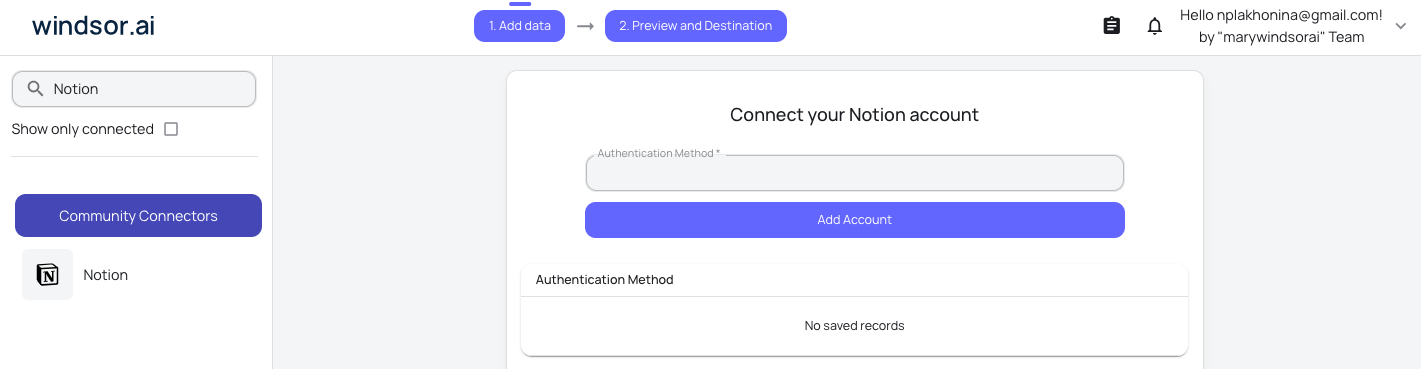
Step 1. Connect Notion to Windsor.ai
Start on the Windsor.ai side:
- Create a free Windsor.ai account, or log in if you already have one
- Go to onboard.windsor.ai/app/notion and select Notion
- Authorize Windsor and choose the pages or databases to share, Notion’s own share dialog controls what the integration can see
- Repeat the process to connect additional Notion workspaces if you manage more than one
Step 2. Connect the Windsor.ai app in ChatGPT
Now install the native app inside ChatGPT:
- Open ChatGPT and go to Settings > Connectors (or Apps)
- Search for “Windsor.ai” and install it
- Allow Windsor.ai access when prompted
- Confirm the app appears in your connected apps list



Confirm the connection is live by asking ChatGPT:
List the data sources connected to my Windsor account. Do you see Notion there?If Notion shows up, you’re ready to query your workspace in plain English.
The metrics that matter for Notion
| Metric | What it tells you |
|---|---|
| Database Title | The name of each database in your workspace, so you can tell which tracker, roadmap, or wiki a row belongs to. |
| Database Properties | The full property schema of a database (status, owner, priority, due date, and more), showing what a given tracker actually measures. |
| Database Last Edited Time | When a database’s structure or content last changed, a way to spot trackers nobody has touched in a while. |
| Database URL | The direct Notion link back to a database, so you can jump from a summary straight into the workspace. |
| Database Inline Status | Whether a database lives inline inside a page or as its own standalone item, useful for understanding how your workspace is organized. |
| Page Properties | The actual property values on a specific page or database row, such as status, tags, or assignee, the real content behind the summary. |
| Page Parent | Which database or page a given page sits under, so you can group pages by the tracker or wiki they belong to. |
| Page Created Time | When a page was first created, useful for seeing how fast a backlog or knowledge base is growing. |
| Page Last Edited Time | When a page was last touched, the clearest signal of what’s actively being worked on versus what has gone stale. |
| Page Archived Status | Whether a page has been archived, so you can separate live work from items that have already been cleaned up. |
| Block Last Edited Time | When a specific block inside a page, such as a paragraph, a to-do, or a table, was last changed, a finer-grained freshness read than the page level alone. |
| Comment Created Time | When a comment was left on a page, a read on how much active discussion is happening across your workspace. |
What to ask ChatGPT: prompt ideas
Database and page overview
List every database in my Notion workspace and tell me what properties each one tracks.
Show me all the pages under my project tracker database, grouped by their parent page or database.
Content freshness and activity
Which pages in my Notion workspace haven’t been edited in the last 30 days?
Show me the databases that have changed most recently, so I know which trackers are actually in active use.
Status and property tracking
Summarize the property values across my Notion task database, including status, and flag anything that’s archived.
The Notion connection through Windsor is read-only. ChatGPT can read and summarize your pages, databases, and comments, but it can’t create, edit, or archive anything back in Notion itself.
Other ways to connect Notion to ChatGPT
Manual CSV export
You can export a single Notion database as a CSV and upload it to ChatGPT for a one-off analysis. It works for one table at a time, but it’s a static snapshot: every time you want an updated view, or want to look across more than one database, you have to re-export and re-upload the file by hand.
Zapier or Make
Zapier or Make can move Notion pages or database rows into a spreadsheet or another tool on a schedule. That’s a reasonable automated workflow, but it still needs to be built and maintained separately, and it doesn’t give ChatGPT a live, queryable connection to your whole workspace the way the native Windsor.ai app does.
Neither approach gives you the same live view as connecting Notion to Windsor directly.
Conclusion
Connecting Notion to ChatGPT through Windsor.ai takes two steps: link your Notion workspace to Windsor, then install the Windsor.ai app in ChatGPT. From there you can ask plain-language questions about your pages, databases, and team activity, and spot stale pages or unowned work, without exporting a single CSV.
🚀 Ready to connect Notion to ChatGPT? Connect your Notion workspace to Windsor.ai and start querying your workspace in minutes.
FAQs
What's the fastest way to connect Notion to ChatGPT?
The native Windsor.ai app is the fastest way. It takes under a minute, connects Notion natively, and doesn’t require exporting or uploading any files.
Do I need any coding or technical setup?
No. Connecting Notion to ChatGPT through Windsor.ai is a no-code process: authorize the Notion connection, then install the app in ChatGPT.
Can ChatGPT actually analyze my Notion workspace?
Yes. Once connected, you can ask ChatGPT plain-language questions about your Notion pages, databases, properties, and comments, and it will pull the live data through Windsor.
Can I connect multiple Notion workspaces, for example for an agency or several teams?
Yes. You can connect more than one Notion workspace to Windsor.ai, which is useful if you manage several teams’ workspaces or client accounts and want to see them all from the same ChatGPT conversation.
Which Notion fields are available in Windsor?
Windsor returns 92 fields from Notion across five groups: pages (properties, parent, created and last edited time, archived status), databases (title, properties, created and last edited time, public URL), blocks (type, content, created and last edited time), comments (text, discussion ID, created time), and users (name, type, avatar). Notion is a docs and database workspace rather than an ads or analytics platform, so these are structural fields, not marketing metrics.
How much does it cost to connect Notion to Windsor.ai?
Windsor.ai has a free forever plan with no credit card required, which covers connecting Notion to ChatGPT. Paid plans start from $19/month for higher usage needs.
Is this better than exporting Notion data as a CSV?
A CSV export only covers a single database at a time and goes out of date the moment you close the file. Connecting Notion to Windsor keeps your whole workspace live, so ChatGPT is always working from current pages and databases instead of a manually re-exported table.
Can I combine Notion with data from my other tools?
Yes. Windsor connects to 350+ data sources, so you can blend Notion alongside platforms like Google Sheets, HubSpot, or your analytics tools in the same ChatGPT conversation for cross-channel, blended reporting instead of checking each tool on its own.
Is the connection secure, and can ChatGPT change anything in my Notion workspace?
The Notion connection through Windsor is read-only. ChatGPT can read and summarize your pages, databases, and comments, but it cannot create, edit, or archive anything back in Notion.


