 Destinations
 Data sources
 AI insights
 About us
 Careers
 Security
 Customer reviews
 Contact us
 Affiliate program
 Solution partners
 Template gallery
 Looker Studio templates
 Power BI templates
 Excel templates
 Google Sheets templates
 Tableau templates
 Facebook Ads templates
 Google Ads templates
 Data fields & Metrics
 AI prompt library & Guides
 Product documentation
 API documentation
 Case studies
 Blog
Blog Data models
 Windsor vs Supermetrics
 Windsor vs Funnel.io
 Windsor vs Fivetran
 Windsor vs Rivery
 Windsor vs Portermetrics
 Windsor vs Coupler.io
 Last updated: 8 October 2026




Paid media is usually reported from Google Ads and Meta Ads, organic search from Search Console, site traffic from GA4 and revenue from a CRM, and each of those tools reports on its own. Putting them in one dashboard usually means exporting from each one and renaming columns until they line up.
This guide shows how to track paid and organic campaigns together in one dashboard with Windsor.ai, in Data Studio or Google Sheets, and which free templates to start from.
Why you need a unified paid and organic marketing dashboard
Most marketing teams rely on multiple platforms:
- Google Ads and/or Meta Ads for tracking paid media performance
- Google Analytics 4 or Search Console for tracking the website analytics
- CRM and sales tools for tracking conversions and revenue
When each system is reported on its own, no report shows how paid and organic traffic add up.
A paid and organic dashboard puts paid clicks, organic visits, conversions and revenue from every channel on one page, with the same date range and the same metric names.
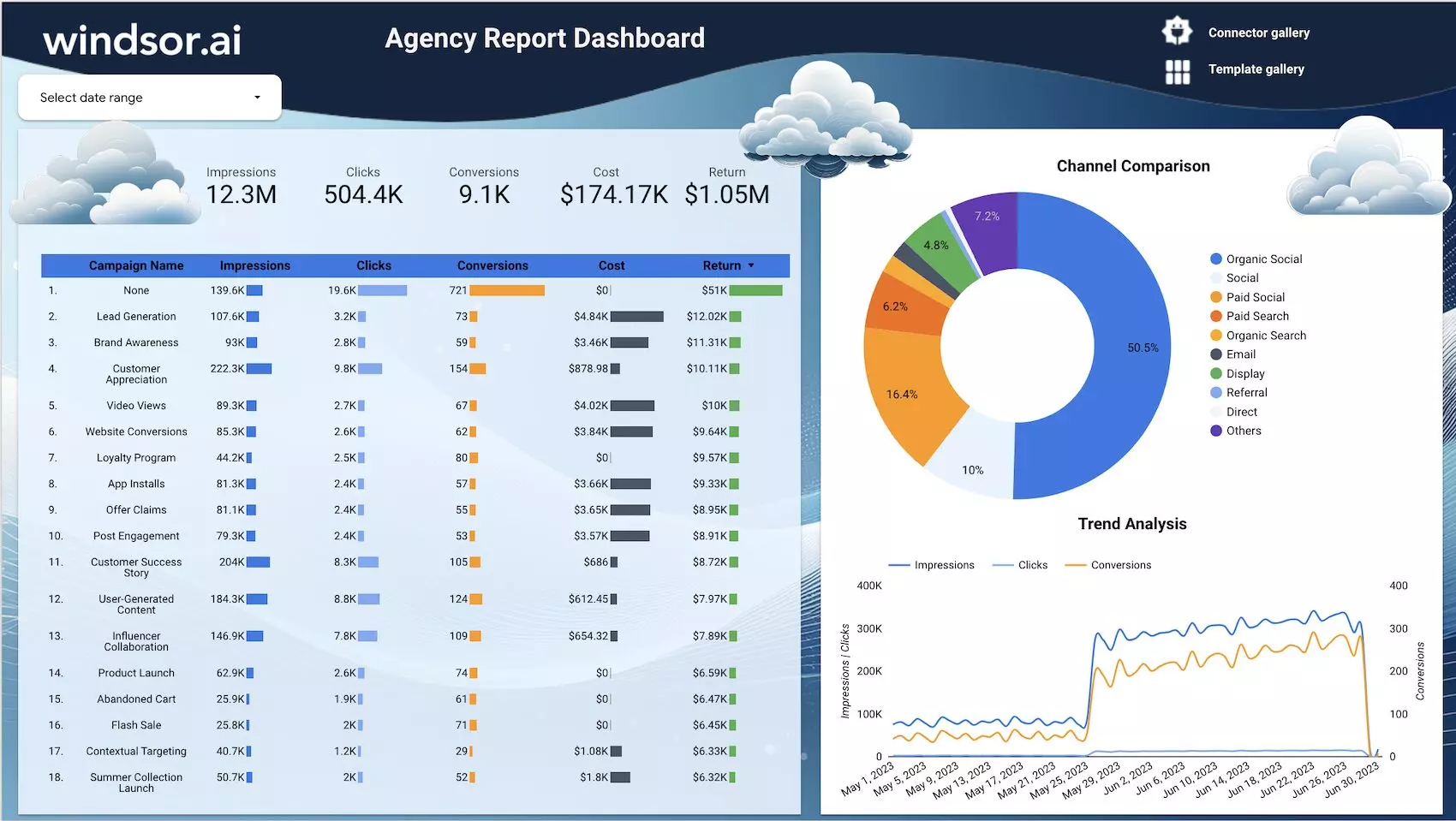
Benefits of combining paid & organic data:
- See how paid and organic channels contribute to the same conversions
- Spot paid ads that take clicks organic search would have brought anyway
- Set budgets on total return across channels, including organic
- Simplify reporting and reduce manual spreadsheet work
The challenge: data fragmentation across platforms
Without automation of data ingestion, creating a cross-channel marketing dashboard means you have to:
- Export CSVs from each ad and analytics platform
- Clean and map field names manually
- Manage different date ranges, metrics, time zones, and currencies
- Rebuild and update reports every time you need fresh insights
Each of these steps takes time, and each manual rename is a chance for two columns to stop matching.

How Windsor.ai automates paid and organic data blending
Using Windsor.ai, you can automatically connect and blend paid and organic marketing data from over 350+ sources, including Google Ads, Facebook Ads, Bing, TikTok, Google Analytics 4, Google Search Console, HubSpot, and more.
Windsor.ai covers these three key data ingestion processes:
- Connects and pulls data from all your required sources, paid and organic.
- Maps shared metrics to one name across sources, for example spend, clicks and impressions on every ad platform.
- Blends the data and sends it to your destination, such as Data Studio, Google Sheets, BigQuery or an AI assistant.
For metrics that share a name, such as spend, clicks and impressions, you do not need SQL, exports or manual joins: the blended data adds them up, and a data source column keeps each platform apart. Metrics that are named differently on each platform, such as conversions, need a calculated field in your dashboard or a custom field in Windsor.ai.
These are the Windsor.ai features this setup uses:
| Feature | Benefit |
| Blended data model | Unified schema for paid and organic data |
| Automatic data mapping | Gives shared metrics such as spend, clicks and impressions one name across sources |
| Support for multiple destinations | Data Studio, Google Sheets, BigQuery, Power BI, Tableau, Databricks, Snowflake and more |
| No-code setup | Connect and visualize your cross-channel data without scripts or SQL |
| Automatic refresh | Keep dashboards up-to-date with scheduled syncs |
| MCP for AI-driven analysis | Send your blended data to LLMs (ChatGPT, Claude, Gemini, or others) and query it using natural language |
🔗 Connect your paid and organic marketing channels in Windsor.ai: https://onboard.windsor.ai/. Every connector is on every plan, including the free forever plan with no credit card. Keeping several sources connected needs a paid plan, from $19/month for 3 sources.
What data to include in a paid & organic marketing dashboard
For your first automated marketing dashboard for paid and organic data, consider combining the following key metrics and dimensions:
| Category | Suggested metrics | Platforms |
| Paid marketing | Spend, Clicks, Impressions, Conversions, CPC, ROAS | Google Ads, Meta Ads, LinkedIn Ads, Bing Ads |
| Organic marketing | Sessions, Impressions, Clicks, CTR, Avg. position | Google Analytics 4, Google Search Console |
| Cross-channel metrics | Conversion Rate, Cost per acquisition (CPA), Total conversions | Windsor.ai blended fields |
The paid metrics share names across platforms, so they add up without manual work. Organic metrics such as sessions and average position come from their own sources and appear next to them in the same report.
Data Studio and Google Sheets are the two quickest places to build this dashboard.
How to track paid and organic marketing performance in Data Studio
Windsor.ai’s native connector brings blended paid and organic data into Data Studio in a few minutes.
Integration steps:
- Sign up for Windsor.ai and create your free account.
- From the data source list, connect your platforms like Google Ads, Facebook Ads, Google Analytics, Search Console, and complete authentication for each.
- In each connected data source, select the specific account(s) you want to retrieve data from.
- After selecting the account(s), click Next to go to the data preview page.
- In settings, in the data sources dropdown, select All, and choose the reporting fields you want to track across all channels (e.g., source, medium, spend, clicks, impressions, sessions, conversions, etc.).
- Windsor will automatically fetch and display your data in the preview table. Check the data, then scroll down to the Data Destinations section.
- Choose Data Studio as your destination.
- Authorize the connector in Data Studio, and the blended data appears as a new Data Studio data source.
- Build your own report or use a pre-built Windsor template.
Visit the full documentation: How to integrate data into Data Studio with Windsor.ai.
📚 Start from a ready-made report in the Windsor.ai Data Studio dashboard templates.

Most of these templates include:
- Paid vs. organic traffic breakdowns
- Conversion performance charts
- Channel and campaign ROI comparisons
Blended connector or one connector per platform?
Windsor.ai gives Data Studio two kinds of connector: one blended connector that carries every connected source, and one connector per platform. Most dashboards use both.
- Overview page: use the blended connector. Spend, clicks and impressions share one name across platforms, so one scorecard or chart adds them up, and the Data Source dimension splits them again.
- One page per platform: use that platform’s own connector. It has every field the platform offers, including fields that exist only there, such as post IDs for organic social or keyword text for Google Ads.
- Conversions with different names: each platform names its conversions differently, so they do not add up on their own. Create a calculated field in Data Studio, or a custom field on the blended data in Windsor.ai, that sums the conversion fields you count.
- An account missing from a blended chart: a blended chart shows only accounts that have data for the chosen metric in the chosen dates. Widen the date range, or chart spend instead of impressions, to check.
- Several currencies: each account reports in its own currency, so add the Currency dimension to the overview table before you trust a total.
How to track paid and organic marketing performance in Google Sheets
If you report in spreadsheets, the Windsor.ai Sheets add-on combines paid and organic data in Google Sheets.
Integration steps:
- Open your Google Sheets file, then go to Extensions -> Add-ons and search for Windsor.ai. Install the Windsor.ai extension.
- Log in to the Windsor.ai extension using your API key.
- Click Add new query in the right-hand panel.
- Fill in the query details:
- Query name: Give your query a descriptive name (e.g., Cross-channel analysis 2025).
- Target sheet: Select or name the sheet tab where data will load.
- Data source: Choose Blended Data.
- Accounts: Select the specific accounts to pull data from.
- Date range: Set your reporting period (like last 14 days, 30 days, etc.).
- Fields: Choose all the fields you want to report on (like date, source, medium, spend, sessions, conversions, etc.).
- Filters: Apply optional filters if needed.
- Schedule: Select a data refresh period (like 15-min, hourly, daily).
- Click Load Data to pull information into your sheet.
Then build charts or pivot tables on the loaded data, or connect the sheet to Data Studio.
Visit the full documentation: How to integrate data into Google Sheets with Windsor.ai.
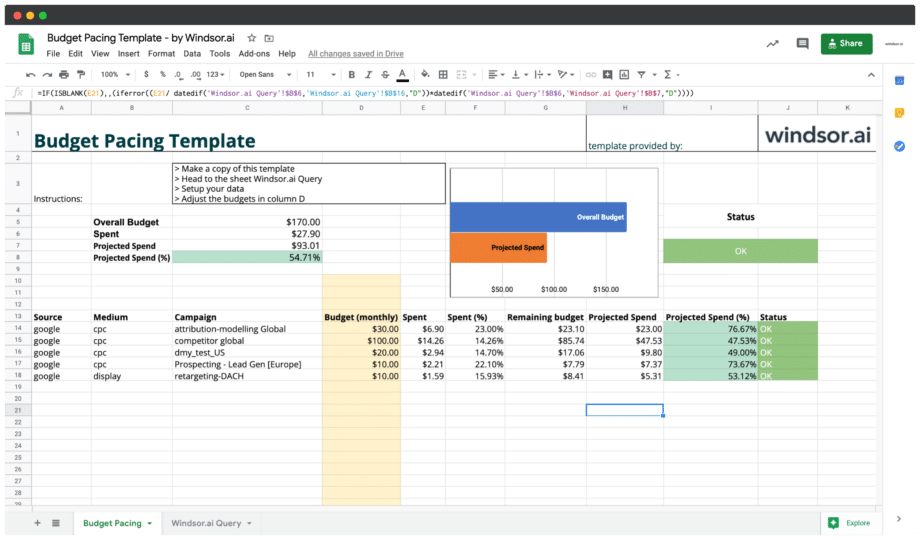
📋 For multi-channel tracking in a spreadsheet, start from the Google Sheets Windsor.ai Dashboard Templates.
Conclusion
Connect your ad platforms, GA4 and Search Console to Windsor.ai, use the blended connector for the overview page and the platform connectors for detail pages, and start from a template in Data Studio or Google Sheets. The same connected sources also work in BigQuery, Power BI and AI assistants such as Claude and ChatGPT.
For ad-platform-only reporting, see how to use Windsor.ai for paid media and the cross-channel dashboard templates.
🚀 Build your cross-platform marketing dashboard and compare channels and campaigns side by side: https://onboard.windsor.ai/.
FAQs
Do I need to rename spend and cost for each platform?
No. Spend, clicks and impressions arrive under the same names from every ad platform, so they add up in one chart. Conversions are named differently per platform and need a calculated or custom field.
Can I combine Google Ads and Meta Ads in one table in Google Sheets?
Yes. Choose Blended Data as the data source in the Windsor.ai add-on, select the accounts from both platforms and add the Data Source field so each row shows its platform.
How do I keep each client's data separate in one dashboard?
Filter by account. When you add the Windsor.ai connector you select the accounts for that report, and an Account Name filter on the page lets one template serve several clients.


