 Destinations
 Data sources
 AI insights
 About us
 Careers
 Security
 Customer reviews
 Contact us
 Affiliate program
 Solution partners
 Template gallery
 Looker Studio templates
 Power BI templates
 Excel templates
 Google Sheets templates
 Tableau templates
 Facebook Ads templates
 Google Ads templates
 Data fields & Metrics
 AI prompt library & Guides
 Product documentation
 API documentation
 Case studies
 Blog
Blog Data models
 Windsor vs Supermetrics
 Windsor vs Funnel.io
 Windsor vs Fivetran
 Windsor vs Rivery
 Windsor vs Portermetrics
 Windsor vs Coupler.io
 Last updated: 5 November 2026




To connect Microsoft Ads to Claude, authorize your Microsoft Advertising account in Windsor.ai at onboard.windsor.ai/app/bing, then add the Windsor.ai connector from Claude’s directory. Open a new chat and ask about your campaigns.
Microsoft also runs its own Microsoft Advertising MCP server, an open pilot since June 2026. It is free and read-only, and Claude can use it after you register an app in Microsoft Entra ID. The comparison below covers Microsoft’s server, Pipeboard’s server and Windsor.ai, with the setup each one needs.
Most paid search teams review Microsoft Ads less often than Google Ads, even when it earns its budget. With both connected through Windsor.ai, one prompt compares them on the same dates and fields, without a CSV from each ads manager.
2 steps to connect Microsoft Ads to Claude
The setup takes a few minutes and needs no code.
📖 Full walkthrough: windsor.ai/documentation/windsor-mcp/how-to-integrate-data-into-claude/.
Prerequisites
Before you begin, make sure you have:
- a Windsor.ai account. The free forever plan (no credit card) covers 1 source and the last 30 days. Microsoft Ads next to Google Ads, or a longer period, needs a paid plan from $19 a month for 3 sources (pricing).
- a Microsoft account with access to the Microsoft Advertising accounts you want to analyze
- a Claude account on any plan, including Free
Step 1. Connect Microsoft Ads to Windsor
Go to onboard.windsor.ai/app/bing and select Microsoft Ads (Bing) as your data source. Sign in with the Microsoft account that has access to your Advertising account and approve the connection.
Select the accounts you want Claude to read. If you manage several brands or clients, connect each account; Claude can query them one at a time or together in the same chat.

Step 2. Add the Windsor.ai connector in Claude
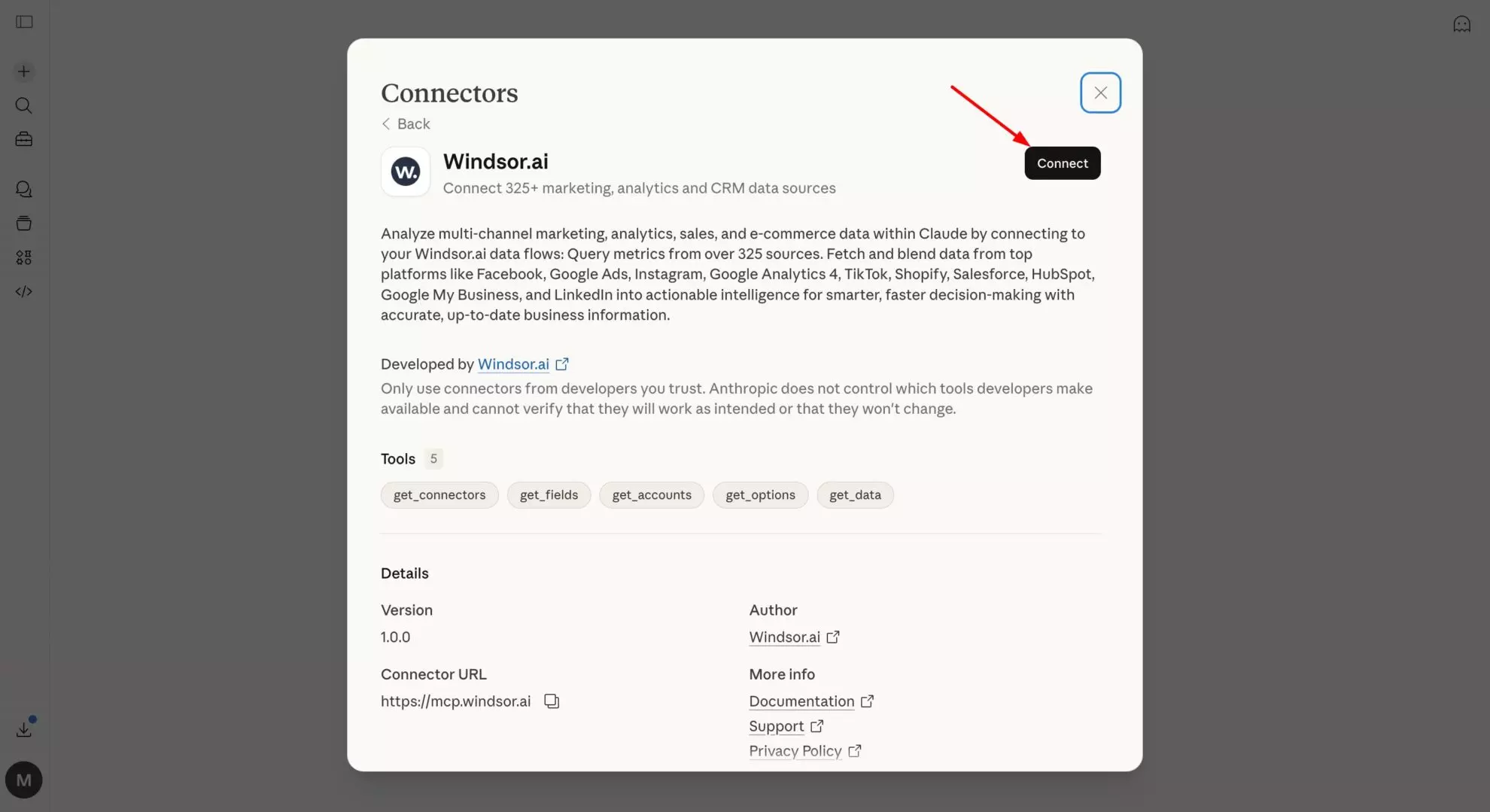
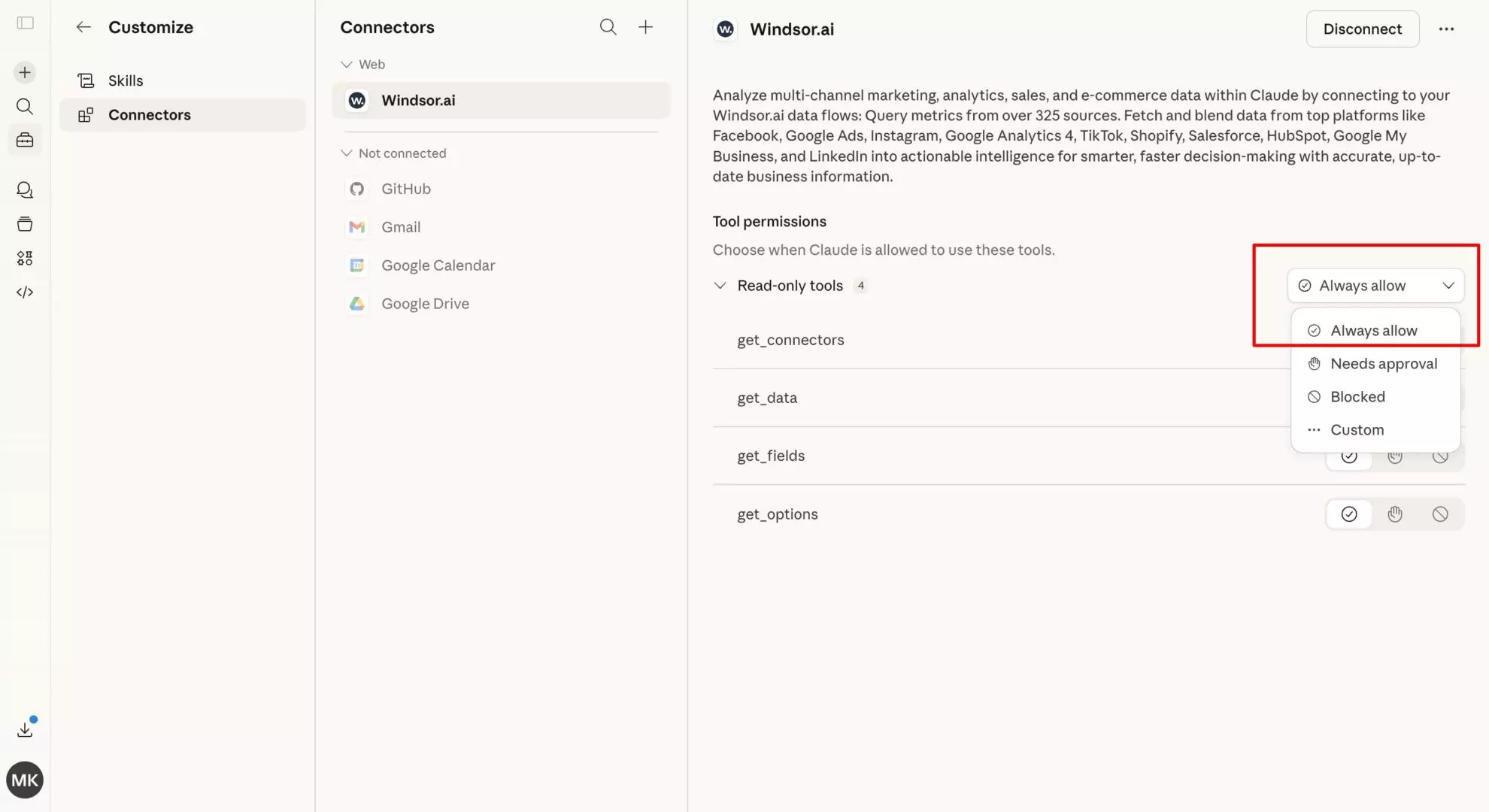
In Claude, open Customize, then Connectors, search for Windsor, and click Add. Sign in to your Windsor.ai account when prompted. You can also open the Windsor.ai listing in the Claude directory and click Connect.
List my connected Microsoft Ads accounts and show total spend and clicks for the last 30 days.
If the totals match the Microsoft Advertising interface for the same dates, the connection works.
Is there an official Microsoft Ads MCP server for Claude?
Yes. Microsoft announced the Microsoft Advertising MCP server in June 2026 as an open pilot. Its tools reference, updated on 20 October 2026, lists nine read tools: accounts, campaigns, ad groups, ads, keywords, Performance Max asset groups, assets, audience associations and the last 180 days of change history. None of them change anything in the account.
To use it in Claude, you register an app in Microsoft Entra ID with the Azure CLI, add Claude’s callback address to the app, and add the server address as a custom connector with your app’s client ID. The steps are in Microsoft’s MCP setup guide. On Claude’s Free plan this uses the one custom connector Free allows; on Team and Enterprise, an Owner adds it.
Two other routes are common:
- Pipeboard hosts a Microsoft Ads server that reads and writes. Its tool list includes changing keyword bids, adding keywords and negative keywords, creating responsive search ads and campaigns, bid adjustments by device, age and gender, and deleting ads. You create a Pipeboard account and add the server in Claude as a custom connector. We have not tested it; check Pipeboard’s page for its plans.
- Windsor.ai is listed in Claude’s directory, so you add it with one click and need no app registration. Microsoft Ads sits next to Google Ads, GA4 and 350+ other sources in the same chat. Through Windsor.ai, Claude can pause or enable campaigns and ad groups and set a campaign’s daily budget. It cannot change keyword bids, keywords, ads or negative keywords; the write actions documentation lists what each connector can change.
Which one to choose
- Read-only reporting on Microsoft Ads alone, at no cost: Microsoft’s server, which Microsoft hosts, if you or your IT team can register an app in Entra ID. For an account manager who wants answers without a setup project, that registration is the hard part.
- Keyword, bid and ad edits from the chat: Pipeboard, the only one of the three with those tools.
- Microsoft Ads next to Google Ads, GA4 or a CRM, without an app registration: Windsor.ai, which also pauses, enables and sets daily budgets.
What Claude found in our own Microsoft Ads account
Dmytro Pieikov, PPC specialist at Windsor.ai, ran our Microsoft Ads account from 2023 to 2025 on Looker Studio, Power BI and competitor keywords. Google Ads sent little traffic on those keywords, so we added Microsoft Ads to get more. The results were never stable, and the account did not collect enough conversions to optimize the campaigns well. After the rise of AI assistants we no longer needed them. One restart gave a similar result. The account holds 207 campaigns, all paused now; 18 of them ran in the last two years.
Those 18 campaigns spent $3,307 for 1,395 clicks and 50 conversions, all of them from one custom goal, Signup (New). We asked Claude through the Windsor.ai connector:
For each Microsoft Ads campaign in the last 2 years, show campaign type, spend, clicks, conversions_qualified, cost per click and cost per conversion. Sort by spend.
A two-year period needs a paid plan; the free forever plan reaches back 30 days.
The answer showed four things we used:
- Search took almost all of the budget. Search campaigns spent $3,297 of the $3,307. The three Performance Max campaigns spent $9 for 12 clicks and 1 conversion, too little to judge them.
-
The largest campaign raised the average cost.
search_topsegments_tier1spent $1,646 for 623 clicks and 19 conversions: $2.64 per click and $87 per conversion, against $2.37 and $66 for the account. -
Two Power BI campaigns had very different costs per conversion.
dp_search_powerbi_maingeomixspent $251 for 9 conversions ($28 each),search_powerbi_maingeomix$436 for 2 ($218 each). - Competitor campaigns cost less per conversion than the account. Three campaigns spent $816 for 15 conversions, $54 each.
Check the search terms before you trust the traffic
Dmytro’s main problem with Microsoft Ads was traffic quality. Search terms with about 10 Google searches a month collected thousands of impressions on Microsoft Ads, and he has seen the same on other accounts. Microsoft Ads volume is small to begin with: in his experience about 3% to 5% of Google Ads on the same keywords, and less outside the US, which makes narrow B2B campaigns hard to optimize.
Our own search term data shows how little of the traffic you can check. We asked Claude for impressions, clicks, spend and conversions by search_query for the same two years:
- The search term rows add up to 12,077 impressions, 23% of the account’s 52,465. Microsoft Ads did not report the query for the rest.
- Competitor names took the most impressions: “fivetran” 2,162 impressions, 22 clicks and 1 conversion; “supermetrics” 1,993 impressions, 104 clicks and 8 conversions.
- 34 of 2,007 search terms produced a conversion.
For the last 90 days, list search_query with impressions, clicks, CTR and conversions_qualified, sorted by impressions. Flag terms with more than 500 impressions and a CTR under 1%, and tell me what share of the account's impressions the search term rows cover.
One field detail: Microsoft marks the conversions column as deprecated since 2022 and says it will return zero. In our account it still returned the same 50 as conversions_qualified. Ask Claude for conversions_qualified so a report does not break when Microsoft switches the old column off.
Changing campaigns from Claude
Windsor.ai has five Microsoft Ads write actions, checked with the connector’s action list on 5 November 2026:
- pause a campaign
- enable a campaign
- pause an ad group (Claude also needs the parent campaign)
- enable an ad group
- set a campaign’s daily budget, in the account currency
Claude shows the change it is about to make and runs it only after you approve it in the chat. If the campaign uses a shared budget, Windsor.ai refuses the change and lists every campaign that shares it, until you confirm the change should apply to all of them. Enabling a paused campaign starts delivery at its current budget, so check the budget before you enable one.
We tested the round trip on 5 November 2026. Claude enabled the paused search_topsegments_tier1 campaign through Windsor.ai, and a status check returned Active. Claude then paused it, and the status returned Paused. The campaign recorded no spend or impressions in between.
The metrics that matter for Microsoft Ads
Claude can read the full set of Microsoft Advertising fields through Windsor.ai. These are the ones used in most analysis:
| Field | What it tells you |
| spend | Media spend for the period, in the account currency. |
| clicks, impressions, ctr | Volume and click-through rate, an early signal of ad and keyword relevance. |
| cpc | Average cost per click. |
| conversions_qualified | Conversions Microsoft Advertising credits to the account. Use it instead of the deprecated conversions column. |
| cost_per_conversion | Cost per conversion (CPA) at campaign, ad group or keyword level. |
| ad_quality_score | A 1 to 10 score of keyword, ad and landing page relevance. Low scores usually mean higher CPCs. |
| absolute_top_impression_share_percent | The share of eligible first-position impressions you won. The _lost_to_budget_percent and _lost_to_rank_percent fields say why you missed the rest. |
| campaign_type | Search, Performance Max, Shopping and the other types, to compare them in one table. |
| account_name | Which account a row belongs to, needed once you connect more than one. |
What to ask Claude about your Microsoft Ads data
Quality score audit
Low quality scores raise CPCs. This prompt shows where a fix saves the most.
Show me all keywords with an ad_quality_score of 5 or below, with their campaign, spend and average CPC for the last 30 days. Rank by spend. Which of these would benefit most from a landing page or ad relevance fix?
Top position: budget or rank?
Pull absolute_top_impression_share_percent, absolute_top_impression_share_lost_to_budget_percent and absolute_top_impression_share_lost_to_rank_percent by campaign for the last 30 days. Which campaigns lose top-position impressions to budget, and which to rank?
Campaign-level cost efficiency
For each active campaign, show spend, conversions_qualified and cost_per_conversion for the last 30 days. Which campaigns are furthest above a cost per conversion of [your target], and which have room to scale?
Google Ads and Microsoft Ads side by side
Connect both platforms to Windsor.ai and ask:
Compare spend, clicks, CPC and cost per conversion between my Microsoft Ads and Google Ads accounts for the last 30 days. Which keywords run on both, and where is each one cheaper per conversion?
The comparison only holds when both platforms count the same conversion event. Check the conversion goals and attribution settings first; Microsoft Ads can import Google Ads campaigns, so the keywords often match, but the conversion setup may not.
Analyze Microsoft Ads next to your other sources
Windsor.ai connects Microsoft Ads to 350+ other marketing and business data sources, so you can query them together in the same Claude chat.
- Google Ads (windsor.ai/how-to-connect-google-ads-to-claude): compare both search platforms on the same keywords.
- GA4 (windsor.ai/how-to-connect-ga4-data-to-claude): see what visitors from Microsoft Ads do on your site.
- LinkedIn Ads (windsor.ai/how-to-sync-linkedin-ads-to-claude): compare B2B search spend with B2B social spend.
Conclusion
Windsor.ai puts Microsoft Advertising data in Claude next to Google Ads and your other sources, and lets Claude pause, enable and set daily budgets after you approve each change. If you need Microsoft Ads reporting alone and can register an Entra ID app, Microsoft’s own server is free; for keyword and bid edits, Pipeboard has the tools.
Start with the test prompt from step 2, then the campaign-level prompt from our account on your own data.
🚀 Connect Microsoft Ads to Claude with Windsor.ai. Start with the free forever plan.
Available actions
Enable Campaign Activate a paused Bing Ads campaign. Provide either campaign_id or campaign_name. Reversible via pause_campaign.
Activate a paused Bing Ads campaign. Provide either campaign_id or campaign_name. Reversible via pause_campaign.
Pause Campaign Pause an active Bing Ads campaign. Provide either campaign_id or campaign_name. Reversible via enable_campaign.
Pause an active Bing Ads campaign. Provide either campaign_id or campaign_name. Reversible via enable_campaign.
Set Campaign Budget Set the daily budget of a Bing Ads campaign. Provide either campaign_id or campaign_name. The amount is in the account currency major unit (e.g. 50.00 means 50.00 USD on a USD account). Bing Ads only supports daily budgets at the campaign level. If the campaign uses a shared budget, the change is rejected unless apply_to_shared_budget is set to true, because it would affect every campaign sharing that budget.
Set the daily budget of a Bing Ads campaign. Provide either campaign_id or campaign_name. The amount is in the account currency major unit (e.g. 50.00 means 50.00 USD on a USD account). Bing Ads only supports daily budgets at the campaign level. If the campaign uses a shared budget, the change is rejected unless apply_to_shared_budget is set to true, because it would affect every campaign sharing that budget.
Enable Ad Group Activate a paused Bing Ads ad group. Provide either ad_group_id or ad_group_name, plus the parent campaign as campaign_id or campaign_name. Reversible via pause_ad_group.
Activate a paused Bing Ads ad group. Provide either ad_group_id or ad_group_name, plus the parent campaign as campaign_id or campaign_name. Reversible via pause_ad_group.
Pause Ad Group Pause an active Bing Ads ad group. Provide either ad_group_id or ad_group_name, plus the parent campaign as campaign_id or campaign_name. Reversible via enable_ad_group.
Pause an active Bing Ads ad group. Provide either ad_group_id or ad_group_name, plus the parent campaign as campaign_id or campaign_name. Reversible via enable_ad_group.
FAQs
Is connecting Microsoft Ads to Claude free?
Yes, to start. Windsor.ai’s free forever plan (no credit card) covers 1 source and 1 account with the last 30 days of data, and the connector works on every Claude plan, including Free. Microsoft Ads next to Google Ads, or a longer period, needs a paid plan from $19 a month for 3 sources; see pricing.
Do I need to write any code or use the Microsoft Advertising API directly?
No. You authorize your Microsoft Advertising account once in Windsor.ai and add the Windsor.ai connector in Claude. Windsor.ai handles the API connection and field names, and you ask in plain language. Microsoft’s own MCP server needs an Entra ID app registration with the Azure CLI; the Windsor.ai route does not.
Can I compare Microsoft Ads and Google Ads in the same chat?
Yes. Connect both to Windsor.ai and ask Claude to compare spend, CPC and cost per conversion for the same dates, or to list keywords that run on both. Two sources need a paid plan.
Can Claude make changes to my Microsoft Ads account, or only read data?
Both, within five actions. Through Windsor.ai, Claude can pause or enable campaigns and ad groups and set a campaign’s daily budget. It cannot change keyword bids, keywords, ads or negative keywords. Claude shows each change and runs it only after you approve it; the write actions documentation has the current list.
Can Claude change keyword bids in Microsoft Ads?
Not through Windsor.ai, and not through Microsoft’s own MCP server, which is read-only. Pipeboard’s Microsoft Ads server lists tools for keyword bids and bid adjustments. Through Windsor.ai, Claude can find the keywords whose bids to change, and you change them in Microsoft Advertising.
Why does Claude show zero conversions for my Microsoft Ads campaigns?
Check which field it asked for. Microsoft deprecated the conversions column in 2022 and says it will return zero; ask for conversions_qualified. If that is also zero, check that a UET tag and a conversion goal are set up in Microsoft Advertising.
Can I connect multiple Microsoft Ads accounts for agency or multi-brand reporting?
Yes. Select every account when you connect Microsoft Ads to Windsor.ai, then ask Claude to compare them, for example by cost per conversion or by change in spend from last month. Each account counts toward your plan’s account limit.


