 Destinations
 Data sources
 AI insights
 About us
 Careers
 Security
 Customer reviews
 Contact us
 Affiliate program
 Solution partners
 Template gallery
 Looker Studio templates
 Power BI templates
 Excel templates
 Google Sheets templates
 Tableau templates
 Facebook Ads templates
 Google Ads templates
 Data fields & Metrics
 AI prompt library & Guides
 Product documentation
 API documentation
 Case studies
 Blog
Blog Data models
 Windsor vs Supermetrics
 Windsor vs Funnel.io
 Windsor vs Fivetran
 Windsor vs Rivery
 Windsor vs Portermetrics
 Windsor vs Coupler.io
 Last updated: 16 September 2026




Adverity and Power My Analytics are data integration platforms with significantly different capabilities. Adverity has 600+ data source connectors, while Power My Analytics has 80+. Adverity has 30+ data destinations, while Power My Analytics has 7. Adverity is created for medium- and large-sized organizations, while Power My Analytics is appropriate for SMEs. However, there can be situations in which Power My Analytics is suitable for large organizations. Our review helps you understand the two data integration platforms.
Adverity Overview

Adverity is a powerful data connection platform suitable for big organizations. It features 600+ data sources, 30+ destinations, AI-powered integrations, and data mapping features. Adverity does not publish fixed prices. It quotes each customer individually based on the number of data sources, your selected destinations like Looker Studio and Google Sheets, and your ad spending budget as an indicator of data volume. Examples of database destinations on Adverity include BigQuery, Snowflake, MySQL, Amazon S3, Azure SQL, and Azure Blob. You need to request a quote to see the price. Considering all the features, it is Adverity’s data handling capabilities that make it suitable for data-intensive large organizations.
Power My Analytics Overview

Power My Analytics has been promoted as an affordable data integration service, so it targets price-sensitive users. Paid plans start from $41.63/month (Business plan, billed annually). The platform’s features include 80+ data sources and seven destinations, five of which are databases: BigQuery, MySQL, Azure SQL, PostgreSQL, and Snowflake, plus Amazon S3 and FTP. Power My Analytics also includes a Data Builder tool for creating custom metrics and dimensions with formulas. The features above make the platform appropriate for small organizations. In some circumstances, the Grow, Pro, and Custom data plans can meet the needs of large-sized organizations. We single out the Custom plan as suitable for large organizations because of unlimited data sources, unlimited accounts, all database destinations included at no extra cost, and a dedicated account representative.
Who Are Adverity and Power My Analytics For?
Adverity is for marketers in medium- and large-sized organizations. The company targets businesses with ample ad spending, which translates to big data analytics requirements. The prices for data integrations are significantly higher on Adverity compared to other platforms, making the platform appropriate for large organizations.
Power My Analytics targets SMEs that are data-driven but have budget constraints for data integration services. Power My Analytics has created a platform that combines low prices with a large connector library and infrastructure hosted on Google Cloud to serve SMEs. However, the platform’s Custom data plan is also suitable for large organizations because it handles big data and permits control over the data by exporting it to clients’ database destinations. In fact, large organizations that store data on BigQuery, MySQL, Azure SQL, PostgreSQL, Snowflake, or Amazon S3 are better off with Power My Analytics compared to Adverity.
Adverity vs Power My Analytics: Pricing
Adverity does not publish the prices of its data services. Instead, Adverity wants to send you a custom price quotation based on the number of data source connectors, your selected destination, and your ad spending budget as an indicator of your data volume requirements. Adverity’s own documentation confirms a core connectors versus all connectors split exists, but it does not publish which connectors fall in which tier or what either tier costs. You need to request a quote to find out your price.
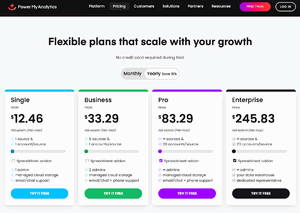
Power My Analytics has a starting price of $41.63/month, billed annually. This is for the Business plan, which includes 5 data sources and 5 total accounts. The next plan is Grow, priced at $83.29/month for unlimited data sources and 7 accounts per source, and it adds Sheets and Excel as destinations. The Pro plan starts from $166.63/month for unlimited data sources and 20 accounts per source. The last plan is Custom, priced by quote. The Custom plan offers unlimited data sources, unlimited accounts, and includes database exports (BigQuery, MySQL, Azure SQL, PostgreSQL, Amazon S3, Snowflake, and FTP) at no extra cost. On Business, Grow, and Pro, database exports are billed separately: Power My Analytics’ own pricing page lists them as a paid add-on, while its support documentation states that as of 2026 these exports are limited to the Custom plan for new subscribers, so confirm current eligibility with Power My Analytics directly. The price of Custom is still typically lower than the base price on Adverity.

Adverity vs Power My Analytics: Data Destinations
Adverity and Power My Analytics differ significantly in the number of data destinations. Adverity has 30+ destinations, spanning databases, cloud storage, BI tools, and ad audience platforms. This huge number of destinations makes it the data integration platform that will export data anywhere. Despite the many destinations, you should carefully check to be sure that your data destination is available on the platform.

Power My Analytics has 7 data destinations: five databases (BigQuery, MySQL, Azure SQL, PostgreSQL, and Snowflake), plus Amazon S3 and FTP. These are included at no extra cost on the Custom plan. On Business, Grow, and Pro, Power My Analytics’ pricing page lists database exports as a paid add-on, though its own support documentation states that as of 2026 these exports are limited to the Custom plan for new subscribers, so confirm current eligibility with Power My Analytics directly.

| Database Destinations | Adverity | Power My Analytics |
| BigQuery | Yes | Yes |
| Snowflake | Yes | Yes |
| Azure SQL/Blob | Yes | Yes (Azure SQL only, no Blob Storage) |
| Amazon S3 | Yes | Yes |
| MySQL | Yes | Yes |
| PostgreSQL | No | Yes |
| FTP Server | Yes | Yes |
| Price | Custom quote (not published) | Add-on on Business, Grow and Pro; included on Custom (exact add-on price not published) |
Having studied Power My Analytics, we believe that customers who need database exports get the best value from the Custom plan, where BigQuery, MySQL, Azure SQL, PostgreSQL, Snowflake, Amazon S3, and FTP are all included. Even as a paid add-on on the lower plans, database exports on Power My Analytics typically cost less than the database destinations on Adverity.
Adverity vs Power My Analytics: Data Source Connectors
The platforms differ in the number of data source connectors. Adverity has 600+, while Power My Analytics has 80+. You should, therefore, begin by finding out whether the connectors on the two platforms support your data sources.

Adverity has core and premium connectors, per its own documentation, but it no longer publishes specific prices or a fixed limit on the number of connectors per plan anywhere on its site. Your data plan and its cost are set through a custom quote based on your connectors, destinations, and ad spend volume.

Power My Analytics has 80+ connectors that are accessible at all pricing levels, including the free plan. Unlimited access to the connectors means there are no premium connectors. Considering the unlimited access, Power My Analytics may be more favorable to entities that require access to many connectors at the same time without worrying about going beyond the data integration budget. However, before making the decision, ensure that all the connectors for your data needs are available on the platform. If not, you may request the platform to build one.
Adverity vs Power My Analytics: Ratings
Adverity is rated 4.4 stars on G2, while Power My Analytics has a rating of about 4.5. That means users rate Power My Analytics slightly higher than Adverity on G2. Factors considered in the ratings include the ease of use and support that the platforms offer their clients. Our analysis also adds the suitability of the Custom plan in Power My Analytics for meeting the needs of large organizations as a factor contributing to better ratings.
Adverity vs Power My Analytics: Support
Adverity support begins with an implementation manager to help your organization set up the connectors for your data needs. After that, an account manager will be assigned to provide support. Adverity is proactive in ensuring clients get the best value out of the system. If you have an issue with your data plan, you can email or chat directly with the support team 24/7. Adverity ensures that every support ticket is responded to within 45 minutes.
Power My Analytics differentiates support based on your data plan. Email and chat support are available to all users. Business and Pro users have phone support in addition to email and chat. Enterprise users get a dedicated representative in addition to the standard support. Having dedicated support means that the support system for Enterprise plan users on Power My Analytics is generally similar to the support system on Adverity.
Adverity vs Power My Analytics: Security and Reliability
Adverity is compliant with SOC Type 2 security requirements. It also offers single sign-on features. Adverity also has other advanced security features, including GDPR compliance and the ability to restrict data geographically. Power My Analytics has been SOC 2 Type II and ISO 27001 certified since 2023, with annual independent audits. Power My Analytics supports multi-factor authentication (OTP and TOTP) and sign-in with Google, though it does not publish documentation for enterprise SAML single sign-on.
Adverity vs Power My Analytics: Ease of Use
Both platforms are relatively easy to use, considering they use codeless connectors, and therefore, you do not need to write or maintain any code. However, setting up some of the connectors from Adverity can be complex. The complexities also emanate from the fact that Adverity is built to handle big data. In response to those complexities, Adverity expects you to have at least some essential database management capacity. Adverity then offers an implementation manager who works with you to implement the systems. You also get an ongoing account manager for support.
In the case of Power My Analytics, the system is easy to use, and you can implement it as a self-service. Having managed Cloud storage cuts many complexities in setting up the system. Lastly, on the Enterprise plan, you get dedicated support to help you with any challenges when implementing the tools. Overall, the majority of the connectors and destinations can be set up with ease by following interactive steps.
Summary
Adverity is a powerful system for data integrations. The 600+ data source connectors and 30+ destinations enable the system to export data anywhere. Adverity’s data mapping feature and AI integrations make data mapping simple and intelligent. For organizations with large, complex data requirements, the customized pricing can still generate value from the system. SMEs may find the pricing above budget.
Power My Analytics is suitable for SMEs because it offers unlimited access to its 80+ data source connectors. Its infrastructure, hosted on Google Cloud, is appropriate for small organizations that lack adequate data handling capacity internally. Organizations that store data in BigQuery, MySQL, Azure SQL, PostgreSQL, Snowflake, Amazon S3, or FTP can also generate value for money on the Custom plan. In fact, large organizations that need these database destinations may also find Power My Analytics more affordable than Adverity, since Power My Analytics’ database exports are included at no extra cost on the Custom plan. For that reason, we feel that large organizations should also consider Power My Analytics.
Lastly, your final selection of the exemplary system comes down to finding the data source applications and destinations of your needs on the two platforms. Create a list of all your data applications then check if all are available on Adverity and Power My Analytics. Also, check whether your destinations are available. If you don’t find a source or destination on your preferred platform, ask whether the company can provide a custom solution. Make a decision based on what you see and other information we have shared herein.
If you need to try the systems before buying, book a demo with Adverity since it does not have a free trial or free-for-life plan. Power My Analytics offers a free forever Sample Data plan with unlimited sample sources, though it does not connect to your own real accounts. Every paid plan also comes with a 14 day free trial and no credit card required. We recommend testing the Custom plan if you need database exports or unlimited accounts, since it is the plan with the most included at a fixed cost among those we analyzed here. The demos and trials will help you make the right decision about the data connectors.
If your choice is not limited to Adverity or Power My Analytics, consider the equally compatible Windsor.ai platform. Test Windsor.ai for free on the free forever plan. The platform offers transparent value-based pricing.


