 Destinations
 Data sources
 AI insights
 About us
 Careers
 Security
 Customer reviews
 Contact us
 Affiliate program
 Solution partners
 Template gallery
 Looker Studio templates
 Power BI templates
 Excel templates
 Google Sheets templates
 Tableau templates
 Facebook Ads templates
 Google Ads templates
 Data fields & Metrics
 AI prompt library & Guides
 Product documentation
 API documentation
 Case studies
 Blog
Blog Data models
 Windsor vs Supermetrics
 Windsor vs Funnel.io
 Windsor vs Fivetran
 Windsor vs Rivery
 Windsor vs Portermetrics
 Windsor vs Coupler.io
 Last updated: 3 September 2026




Getting your data from Google Sheets to Power BI can be a pain.
While Google Sheets is a good tool for small businesses, it does have its shortcomings. Connecting Google Sheets to Power BI, Tableau, or Looker Studio can help overcome a few of its shortcomings.
As a Google Sheets user, you would know how it falls short of data visualization options. Also, if you’ve ever tried to import and analyze data, it must have been quite an exercise. Power BI now has a native Google Sheets connector, which is the fastest and most secure way to bring your data over. There’s also an older manual method using Google Sheets’ “Publish to the web” feature, which still works and is useful if the native connector isn’t an option for you.
Option 1: Power BI’s native Google Sheets connector (recommended)
Power BI has an official Google Sheets connector built into Power Query, available in Power BI Desktop, Power BI Dataflows, and Fabric Dataflow Gen2. It connects directly to your Google account, so you don’t need to publish your sheet publicly the way the older method below requires.
- In Power BI, go to Get Data and search for Google Sheets.
- Paste the browser URL of the Google Sheet you want to connect (the normal URL you see when the sheet is open, not a published link).
- Sign in with the Google account that has access to the sheet.
- In the Navigator window, select the specific sheet(s) or tabs you want to load.
- Choose Transform Data to clean up the data first, or Load to bring it straight into Power BI.
This keeps your sheet private, since Power BI authenticates with your Google account instead of relying on a publicly shared link.
Option 2: The Publish to the web method
This is the older, manual way to connect Google Sheets to Power BI. It works, but it requires making the sheet’s data public, so it’s better suited to non-sensitive data or when you can’t sign in with a Google account directly.
How to set up Google Sheets for Power BI
You need to ensure the basics are in place to get marketing data into Google Sheets and enable Power BI to interact with it.
1. Files without names cannot be shared, so name your file
2. In sharing options, change the setting to ‘Anyone on the internet with this link can view’


3. Click on ‘Publish to the web’ under the File option. This generates a URL
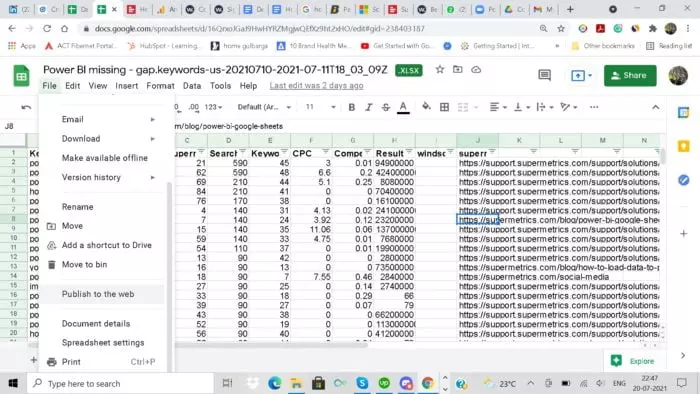
4. Copy the URL (and save it in notepad)

How to set up Power BI for importing data from Google Sheets
1. Open Power BI and click on ‘Home’

2. Under ‘Get Data’, select ‘Web’

3. Paste the Google Sheet URL in the pop-up window

4. Click OK
Now you will be able to see the Google Sheets data in rows and columns in Power BI.
That’s how you connect Power BI to Google Sheets using a published link.
How to move data into Google Sheets or Power BI with Windsor.ai
Both methods above move one spreadsheet at a time, and someone still has to get the data into that spreadsheet first. If it starts in advertising, CRM, or analytics platforms, Windsor.ai loads it into Google Sheets or Power BI directly and refreshes it on the schedule you set.
Create a free Windsor.ai account, connect your sources, then pick Google Sheets or Power BI as the destination. These two walkthroughs cover each setup:
Loading data into Google Sheets
Loading data into Power BI
Conclusion: Connect Google Sheets to Power BI
In this article, you’ve seen two ways to connect Google Sheets to Power BI: the native connector, which is faster and keeps your sheet private, and the older Publish to the web method, which is a useful fallback.
Both work great for smaller amounts of data.
You would not want to manually update data from different sources like SEO, Facebook, Linkedin, or Twitter analytics. It’s cumbersome and also prone to errors. Using Windsor.ai’s connectors can make importing data into Google Sheets a breeze.
💡 Power BI is not the only destination for a Google Sheet. You can also connect the same sheet to an AI assistant and ask questions about the data in plain language: Google Sheets to Claude.

Get started for free
Access all your data from your favorite sources in one place.
Free forever plan, no credit card


