 Destinations
 Data sources
 AI insights
 About us
 Careers
 Security
 Customer reviews
 Contact us
 Affiliate program
 Solution partners
 Template gallery
 Looker Studio templates
 Power BI templates
 Excel templates
 Google Sheets templates
 Tableau templates
 Facebook Ads templates
 Google Ads templates
 Data fields & Metrics
 AI prompt library & Guides
 Product documentation
 API documentation
 Case studies
 Blog
 Data models
 Windsor vs Supermetrics
 Windsor vs Funnel.io
 Windsor vs Fivetran
 Windsor vs Rivery
 Windsor vs Portermetrics
 Windsor vs Coupler.io
 Last updated: 30 October 2026




To connect TikTok to Claude, authorize your TikTok account at onboard.windsor.ai/app/tiktok_organic, then add the Windsor.ai connector in Claude from Customize, Connectors. Start a new chat and ask about your videos, followers and audience.
TikTok has its own verified connector in Claude’s directory, TikTok for Business, but it covers TikTok Ads only. Claude’s directory has no official connector for organic TikTok data (checked 28 October 2026). This page covers organic data.
🚀 Connect your TikTok Organic data to Claude. Free forever plan, no credit card → onboard.windsor.ai/app/tiktok_organic.
Which TikTok connection do you need?
“TikTok in Claude” can mean three different things, and each has its own route.
- Organic analytics (videos, followers, audience, comments): the Windsor.ai connector with TikTok Organic, set up in the two steps below. It is read-only: Claude analyzes the data but does not post or reply on TikTok.
- TikTok Ads: two directory options. TikTok’s own TikTok for Business connector reads ad reports and can create and edit Smart+ campaigns, ad groups and ads. Windsor.ai’s TikTok Ads connection reads ad reports, can pause or enable campaigns, ad groups and ads and change budgets, and puts TikTok Ads next to your other ad platforms in the same chat. Setup is in how to connect TikTok Ads to Claude.
- TikTok Shop sales: see how to connect TikTok Shop to Claude.
Other ways exist for organic data too. Another vendor’s MCP server can be added under Customize, Connectors, Add custom connector; Claude’s Free plan allows one such connector (Anthropic’s help article), while directory connectors like Windsor.ai do not count toward it. You can also upload a TikTok Studio export to a chat, but Claude then works on that file only and cannot refresh it.
Connecting TikTok Organic to Claude with Windsor MCP: 2 steps
Full walkthrough: How to integrate data into Claude.
Before you start
- A TikTok Business or Creator account you manage.
- A Windsor.ai account. The free forever plan (no credit card) covers 1 data source and 1 account with the last 30 days of data. More history, more accounts, or TikTok Organic next to other sources needs a paid plan: Basic is $19/month for 3 sources, Standard is $99/month for 7 (annual billing, see pricing).
- A Claude account on any plan, including Free.
Step 1. Connect TikTok Organic to Windsor
Go to onboard.windsor.ai/app/tiktok_organic, sign in with TikTok and allow access. Select the account or accounts you want Claude to see.
Step 2. Add the Windsor.ai connector in Claude
In Claude, open Customize, then Connectors, search for Windsor and click Add. Sign in to your Windsor.ai account when prompted. You can also open the Windsor.ai listing in Claude’s directory and click Connect. Set read permissions to “Always allow” if you want the data in every chat without a prompt each time. Then check the connection:
Which TikTok accounts are connected to my Windsor account?
Show daily video views and net new followers for the last 7 days.
Windsor.ai caches the result of an identical query for up to 6 hours. For newer numbers within that window, use Clear Cache in Windsor.ai’s Data Preview, which you can do once every 2 hours.
The TikTok Organic data Claude can use
The complete set is in the TikTok Organic field list. The fields fall into four groups.
Account, per day
- video_views and unique_video_views: views of your videos, and people who watched at least one.
- likes, comments, shares and engaged_audience: engagement across your videos, and people who engaged at least once.
- profile_views and bio_link_clicks: visits to your profile and clicks on your link in bio.
- followers_count: net followers gained that day (new minus lost). total_followers_count is today’s total.
Per video
- video_caption, video_create_datetime and video_duration: what was posted, when, and how long it is.
- video_views_count and video_reach: views and unique viewers. TikTok reports reach 24 to 48 hours after the views.
- video_average_time_watched and video_full_watched_rate: watch time and the share of viewers who watched to the end.
- video_new_followers, video_profile_views and video_shares: what each video added to the account.
- video_impression_sources_impression_source: where views came from, such as For You, Follow, Search or a sound.
- video_view_retention_second and video_view_retention_percentage: the share of viewers still watching at each second.
Audience
- Follower age, gender, country and city, and the hours your followers are online (audience_activity_hour). For each video’s viewers: gender, country and city, followers versus non-followers, and new versus returning viewers.
Comments
- comment_text, comment_likes and comment_username: the comments on your videos, which Claude can group by topic or question.
What to ask Claude about your TikTok Organic data: prompt ideas
Growth and reach
Give me an organic TikTok report for the last 30 days: views, people reached, net new followers and bio link clicks, compared with the 30 days before.
The comparison with the previous 30 days needs a paid plan; the free forever plan returns the last 30 days only.
Best videos and why
Rank the videos I posted in the last 30 days by new followers per 1,000 views.
For the top 5, compare length, average watch time and full watch rate with my account average.
For my 3 most viewed videos this month, at which second do I lose half of the viewers?
Audience and timing
At which hours are my followers most active?
Compare that with the hours I posted my best and worst 10 videos of the last 30 days.
Comments
Group the comments on my last 10 videos by topic. Which questions come up more than once?
Claude can read comments and draft replies, but it cannot post them on TikTok through Windsor.ai.
Example: what our own TikTok account shows
We used the Windsor.ai connector in Claude on our own TikTok account, which Nataliia runs: 63 posts from 12 February to 7 August 2026. Each prompt below asks for the data we pulled, followed by what it showed.
Rank my TikTok videos by views and show the new followers each one brought.
The most viewed post, a 211-second demo of Facebook Ads data in Claude from 25 February, had 8,848 views and brought 51 new followers. The next one had 1,608 views, and most posts had between 100 and 700.
Using my Windsor.ai TikTok Organic data (account windsor.ai | data connectors), find my most viewed TikTok video posted between 1 February and 31 August 2026. What share of its viewers was still watching at each second? Show a short table for seconds 1 to 10 and 17, plus the video's views, new followers and average watch time.
70% of viewers were still watching after 1 second, 49% after 2 seconds, 22% after 7 seconds and 11% after 17 seconds. The average view lasted 9.8 seconds.
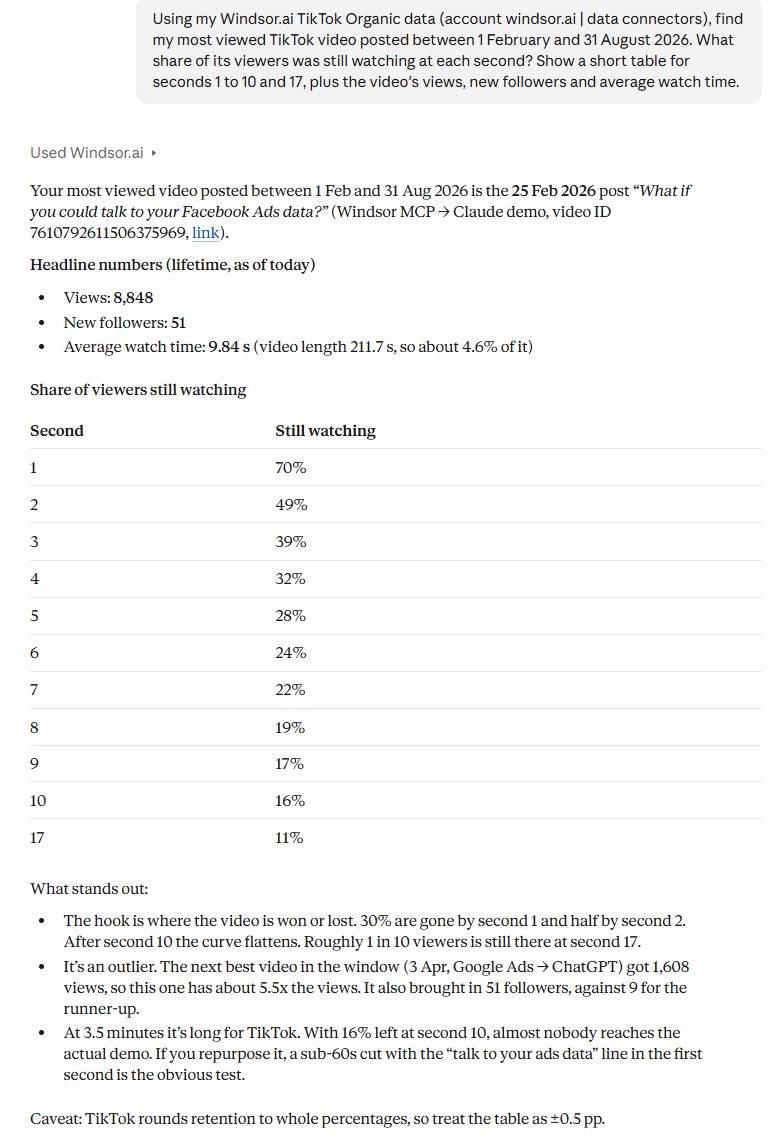
This is Claude’s answer to that prompt in claude.ai on 28 October 2026. Claude also suggested testing a version under 60 seconds with the main line in the first second.
Where did the views on my top videos come from?
The Facebook Ads demo got 67% of its views from the For You feed and 30% from TikTok Search. A Google Ads to ChatGPT setup video got 68% from Search. The TikTok Organic to Claude video got 96% from For You and 1% from Search.
A period this long needs a paid plan; the free forever plan returns the last 30 days.
Can Claude watch your TikTok videos?
No. Claude’s file upload help article lists document and image types only, and the Windsor.ai connector does not send video files. Claude gets the data about each video: views, reach, watch time, the share of viewers left at each second, where views came from, the caption and the comments.
That shows the second where viewers leave, but not what is on screen at that moment. To see that, open the video in TikTok Studio or your editor at the same second. Claude also does not make videos: it can write the hook, script and caption from what worked, and you film and edit the video yourself.
How different teams use it
- Brand social teams: a weekly report of views, reach, new followers and bio link clicks, with the videos that brought the most followers per 1,000 views.
- Agencies: connect each client’s TikTok account in Windsor.ai, compare clients on the same metrics, and check which organic videos are worth running as ads.
- Creators and founders: find the second where viewers leave, the hours followers are online and the questions that repeat in comments, then plan the next video from that.
Limits to know before you start
- The free forever plan returns the last 30 days of data.
- The last two days of reach are incomplete, because TikTok reports reach 24 to 48 hours after the views.
- followers_count is the net change per day. total_followers_count gives today’s total only.
- For video and comment rows, the date range selects videos by the day they were posted, and each video’s numbers are its totals to date.
- TikTok Organic is read-only through Windsor.ai: Claude cannot post, reply or delete anything on TikTok. The connectors that do support changes are listed in the write actions documentation.
Using TikTok data in Claude Code
Claude Code uses the same Windsor.ai connection. Install the Windsor.ai plugin with /plugin install windsor-ai@claude-plugin-directory and sign in to Windsor.ai.
Claude Code works in a folder on your computer, which makes it the better choice when you want the result as a file. For example:
Pull every TikTok video I posted in the last 30 days with views, average watch time, full watch rate and new followers.
Save it to tiktok_videos.csv, sorted by new followers per 1,000 views.
You can then ask Claude Code to chart the file or to write a script that builds it every week.
Bonus: TikTok Organic with your other channels
Windsor.ai brings 350+ data sources into one Claude chat.
- TikTok Organic + TikTok Ads: find organic videos with high watch time and shares, and check whether similar ads get a lower cost per result.
- TikTok Organic + GA4: compare bio link clicks with the sessions and conversions GA4 records from TikTok.
- TikTok Organic + Instagram: compare follower growth and engagement on both accounts for the same weeks.
Blending sources needs a paid plan, because the free forever plan covers one source.
Conclusion
For organic TikTok data, the Windsor.ai connector gives Claude your videos, followers, audience and comments in one chat. For ads, use TikTok’s own connector or Windsor.ai’s TikTok Ads connection, depending on whether you need campaign creation or ads next to your other channels. Start with the test prompt in step 2, then try the retention prompt on your last few videos.
Teams that use Gemini Enterprise can add the same data there: how to connect TikTok Organic to Gemini Enterprise.
🚀 Connect TikTok Organic to Claude. Free forever plan, no credit card → onboard.windsor.ai/app/tiktok_organic.
FAQs
Can Claude watch TikTok videos?
No. Claude’s file uploads cover documents and images, and the Windsor.ai connector sends the data about each video, not the video file. Claude sees views, watch time, retention by second, view sources, the caption and comments, which shows where viewers leave but not what is on screen.
Is it free to connect TikTok Organic to Claude?
Yes. Windsor.ai’s free forever plan (no credit card) covers 1 data source and 1 account with the last 30 days of data, and the connector works on every Claude plan, including Free. Longer history, more accounts or other sources next to TikTok need a paid plan from $19/month; see pricing.
Can I use Claude to create TikTok videos?
No. Claude does not make video files. It can write hooks, scripts and captions based on your best videos, and you film and edit the video yourself.
Can Claude post videos or reply to comments on TikTok?
No, not through Windsor.ai. TikTok Organic is read-only: Claude can analyze videos and read comments, and you post any replies it drafts yourself. The connectors that support changes are listed in the write actions documentation.
Which TikTok Organic metrics can I analyze?
Account metrics per day (views, people reached, likes, comments, shares, profile views, bio link clicks, net new followers), metrics per video (views, reach, average watch time, full watch rate, retention by second, new followers, view sources), follower and viewer demographics, and comment text. See the full field list.
How do I connect my other social media accounts to Claude?
Through the same Windsor.ai connector. Connect each account in Windsor.ai and it appears in Claude next to TikTok. Guides: Instagram, Facebook Pages, LinkedIn Pages and YouTube.
Can I use TikTok data in Claude Code?
Yes. Install the Windsor.ai plugin with /plugin install windsor-ai@claude-plugin-directory and sign in to Windsor.ai. Claude Code then reads the same TikTok data and can save results as files.
Can I combine TikTok Organic with other channels?
Yes, on a paid plan. Connect TikTok Organic with TikTok Ads, GA4, Instagram or any of Windsor.ai’s 350+ sources and ask about them together in one Claude chat. Basic ($19/month, annual billing) covers 3 sources.


