 Destinations
 Data sources
 AI insights
 About us
 Careers
 Security
 Customer reviews
 Contact us
 Affiliate program
 Solution partners
 Template gallery
 Looker Studio templates
 Power BI templates
 Excel templates
 Google Sheets templates
 Tableau templates
 Facebook Ads templates
 Google Ads templates
 Data fields & Metrics
 AI prompt library & Guides
 Product documentation
 API documentation
 Case studies
 Blog
Blog Data models
 Windsor vs Supermetrics
 Windsor vs Funnel.io
 Windsor vs Fivetran
 Windsor vs Rivery
 Windsor vs Portermetrics
 Windsor vs Coupler.io
 Last updated: 15 October 2026




To connect Pipedrive to ChatGPT with Windsor.ai, connect Pipedrive to Windsor.ai with your Pipedrive API token. Then add the Windsor.ai plugin in ChatGPT and ask about your deals, stages and activities in a chat.
Pipedrive also offers two routes of its own: the Pipedrive app for ChatGPT, which OpenAI builds, and Pipedrive’s MCP server. Both need a paid ChatGPT plan. The Windsor.ai plugin also works on ChatGPT’s Free plan, and one question can cover Pipedrive together with Google Ads, Meta Ads or GA4.
Connect Pipedrive to Windsor.ai on the free forever plan, no credit card: onboard.windsor.ai/app/pipedrive.
Before you start
- A Windsor.ai account. The free forever plan covers one data source with no credit card and returns the last 30 days of data. To keep Google Ads, Meta Ads or GA4 next to Pipedrive after the first 30 days, paid plans start at $19 a month (billed annually) for 3 sources, or $99 a month for 7. See Windsor.ai pricing.
- A Pipedrive user with API access. You connect Pipedrive with that user’s API token. ChatGPT sees the deals that this user is allowed to see in Pipedrive.
- A ChatGPT account. We have used the Windsor.ai plugin on ChatGPT’s Free plan. OpenAI says plugin availability depends on your plan, region, workspace and the ChatGPT interface you use, and a workspace admin can turn plugins off.
Step 1: Connect Pipedrive to Windsor.ai
- Open onboard.windsor.ai/app/pipedrive and sign in to Windsor.ai, or create a free account.
- In Pipedrive, open the company you want to analyze. Go to Settings, then Personal preferences, then API, and copy your personal API token. Pipedrive gives you a different token for each company you belong to.
- Paste the token into the Pipedrive form in Windsor.ai and save it. If you do not see the API option in Pipedrive, your permission set does not include it, and a Pipedrive admin can turn it on.
To add a second Pipedrive company, repeat these steps with that company’s token.
Step 2: Add the Windsor.ai plugin in ChatGPT
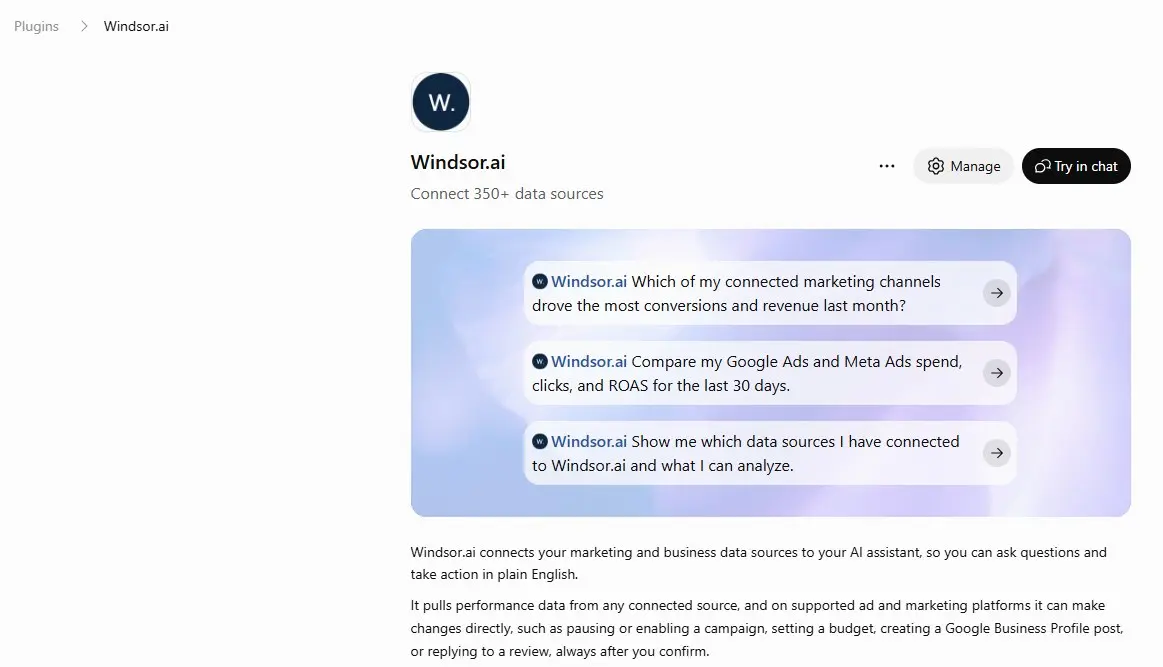
In ChatGPT, click Plugins in the sidebar and search for Windsor.ai, or open the Windsor.ai plugin page directly. Click Install plugin (or Connect, if that is the button you see), sign in to Windsor.ai and approve the access. Once the plugin is connected, its page shows Manage and Try in chat.
ChatGPT used to call plugins “apps” and “connectors”, and older guides use those names. To disconnect Windsor.ai later, open Settings, then Plugins.
This video shows the same setup. It was recorded before the rename, and the screens say “app” where ChatGPT now says “plugin”.
Step 3: Check the connection with a number you know
Start a new chat, click + and choose Windsor.ai, or type @Windsor and pick it from the list. Then ask a question you can check in Pipedrive:
Using Windsor.ai, how many Pipedrive deals did we win in the last 30 days, by won date, and what was their total value? Tell me the date range and currency you used.Compare the answer with a won-deals report for the same dates in Pipedrive Insights. If the numbers differ, check that both sides use the same pipelines and the same currency.
Pipedrive fields you can ask about
| Area | Fields (names as Windsor.ai shows them) |
|---|---|
| Deal value and forecast | Deal Value, Deal Currency, Deal Weighted Value, Deal Probability, Deal Expected Close Date |
| Recurring revenue | Deal ARR, Deal MRR, Deal ACV, each with its currency |
| Status and stage | Deal Status, Stage Name, Stage Pipeline Name, Deal Stage Change Time, Deal Won Time, Deal Lost Time, Deal Lost Reason |
| Follow-up | Deal Activities Count, Deal Done Activities Count, Deal Undone Activities Count, Deal Last Activity Date (Pipedrive), Deal Next Activity Date (Pipedrive), Deal Rotten Time |
| Activities | Activity Type, Activity Subject, Activity Due Date, Activity Done, Activity Owner Name |
| Ownership and source | Deal Owner Name, Deal Channel, Deal Origin, Lead Source Name |
Windsor.ai also returns lead, person, organization, product, project and user fields. The full list with field IDs is in the Pipedrive field reference.
Through Windsor.ai, ChatGPT reads Pipedrive data and cannot create a deal, move a stage or log an activity. Windsor.ai has no write actions for Pipedrive. Pipedrive’s own MCP server can make those changes (see other ways to connect).
Questions to ask ChatGPT about your pipeline
Deals with no next step
List open deals with no activity in the last 14 days and no next activity scheduled. Show owner, stage, value and the date of the last activity, highest value first.
Pipedrive’s rotting setting works per pipeline stage, with its own day limit. This question applies one rule to every pipeline at once.
Weighted forecast
Sum the weighted value of open deals by expected close month for the next three months, split by pipeline and by owner.
Recurring revenue in the pipeline
For open deals, total Deal ARR and Deal MRR by stage. Which deals have a value but no ARR, so I can check whether their products are set up as recurring?
Lost deals and follow-up by rep
For deals lost in the last 90 days, group the lost reasons by owner, and show each owner's done activities in the same period.
The free forever plan returns the last 30 days of Pipedrive data, and this 90-day question needs a paid plan for its full period.
Pipedrive next to your ad and website data
With more sources in the same Windsor.ai account, one question can cover spend and pipeline. A few examples:
- Cost per won deal. Compare monthly Google Ads and Facebook Ads spend with the number and value of deals won whose channel is paid search or paid social.
- Traffic and new deals. Put GA4 sessions by source next to deals added per week, by Deal Channel or Lead Source Name.
A deal joins to a campaign only through the channel, origin or lead source on the deal. If your team leaves those fields empty, ChatGPT can show spend and pipeline side by side by month without tying a deal to a campaign. Blending sources needs a paid Windsor.ai plan after the first 30 days.
Other ways to connect Pipedrive to ChatGPT
- Pipedrive app for ChatGPT. OpenAI builds and maintains it. It needs a ChatGPT Business, Enterprise, Edu or Pro plan, and a workspace admin enables it first. It syncs Pipedrive data into ChatGPT every 30 minutes, including notes, emails and files, and you ask about it through Company knowledge. The sync only reads from Pipedrive (see Pipedrive’s guide to the app).
- Pipedrive MCP server. Pipedrive builds it, and it can create and update deals, contacts and activities as well as read them. In ChatGPT it needs a Pro, Business, Enterprise or Edu plan and developer mode turned on, and you add it as a plugin with the server URL (see Pipedrive’s MCP setup for ChatGPT).
- Zapier or Make. These run ChatGPT as one step in a workflow, for example drafting a follow-up email when a deal changes stage. They act on one record at a time.
- CSV export. You can export deals or activities from Pipedrive and upload the file to ChatGPT. The file shows the pipeline at the moment you exported it.
Use Pipedrive’s app or MCP server if your team works only in Pipedrive and has a paid ChatGPT plan, or if ChatGPT needs to update records. Use the Windsor.ai plugin to ask about Pipedrive on any ChatGPT plan, or together with your ad and analytics data.
Troubleshooting
ChatGPT finds fewer deals than your Pipedrive report
Windsor.ai returns the deals that the Pipedrive user whose token you used is allowed to see. Pipedrive’s visibility groups limit which deals each user can view. Global admins and users with the deals admin permission set see every pipeline. For company-wide numbers, connect Pipedrive with one of those users’ tokens.
Counts for a period do not match
Windsor.ai’s Date field for Pipedrive is the time a record was last updated. Ask ChatGPT to filter on the date you mean, such as Deal Won Time, Deal Lost Time or Deal Add Time, as the Step 3 question does.
ChatGPT answers without Pipedrive data
Check that the Windsor.ai label appears on your message, and add Windsor.ai with + if it does not. In Windsor.ai, check that Pipedrive shows as connected. If Windsor.ai shows “Disabled by admin” in ChatGPT, your workspace admin has turned it off and can turn it back on.
Conclusion
After Steps 1 and 2, ChatGPT can answer questions about your Pipedrive deals, stages and activities, and about any other source you connect in Windsor.ai. Run the Step 3 check first, then the questions about deals with no next step and the weighted forecast.
- If your team uses Claude: how to connect Pipedrive to Claude.
- If your company uses Gemini Enterprise: how to connect Pipedrive to Gemini Enterprise.
- More questions for sales and CRM data: how to use Windsor.ai for CRM.
- Every ChatGPT setup screen: Windsor.ai documentation for ChatGPT.
Start with Pipedrive on the free forever plan, no credit card: connect Pipedrive to Windsor.ai.
FAQs
Does Pipedrive have its own ChatGPT app?
Yes. The Pipedrive app for ChatGPT is built by OpenAI and needs a ChatGPT Business, Enterprise, Edu or Pro plan, enabled by a workspace admin. It syncs Pipedrive data every 30 minutes and only reads from Pipedrive. Pipedrive also has an MCP server that can update records. The Windsor.ai plugin works on ChatGPT’s Free plan too, and can combine Pipedrive with ad and analytics data.
Do I need a Pipedrive API token?
Yes, for the Windsor.ai route. Windsor.ai connects to Pipedrive with a personal API token, which you find in Pipedrive under Settings, Personal preferences, API. Each Pipedrive company you belong to has its own token. Paste it into the Windsor.ai form, never into a ChatGPT chat.
Can ChatGPT update or move deals in Pipedrive through Windsor.ai?
No. Windsor.ai has no write actions for Pipedrive (see the list of write actions). ChatGPT can analyze deals, stages and activities, but it cannot create a deal, change a stage or log an activity. Pipedrive’s own MCP server can make those changes.
Can I connect more than one Pipedrive company?
Yes. Add each company in Windsor.ai with that company’s API token, and ChatGPT can compare them in one chat. The free forever plan covers one account, and more companies need a paid plan.
Is the Windsor.ai plugin free to use with Pipedrive?
Yes, for Pipedrive on its own. The free forever plan covers one data source with no credit card and returns the last 30 days of data. Longer periods, or Pipedrive together with Google Ads, Meta Ads or GA4 after the first 30 days, need a paid plan: from $19 a month (billed annually) for 3 sources, or $99 a month for 7.


