 Destinations
 Data sources
 AI insights
 About us
 Careers
 Security
 Customer reviews
 Contact us
 Affiliate program
 Solution partners
 Template gallery
 Looker Studio templates
 Power BI templates
 Excel templates
 Google Sheets templates
 Tableau templates
 Facebook Ads templates
 Google Ads templates
 Data fields & Metrics
 AI prompt library & Guides
 Product documentation
 API documentation
 Case studies
 Blog
Blog Data models
 Windsor vs Supermetrics
 Windsor vs Funnel.io
 Windsor vs Fivetran
 Windsor vs Rivery
 Windsor vs Portermetrics
 Windsor vs Coupler.io
 Last updated: 1 September 2026




When evaluating ELT (Extract, Load, Transform) tools, the core priorities often come down to reliable data pipelines, fast setup, and extensive scalability. Depending on your business size and goals, whether you’re a non-technical marketing team or an enterprise-level data operation, choosing the right platform can significantly impact your workflow.
In this article, we compare two well-regarded options: Fivetran, a pioneer and widely adopted ELT provider known for its enterprise-grade capabilities, and Windsor.ai, a fast-growing data movement platform built for simplicity, speed, and no-code integrations.
While Fivetran is built with large-scale data governance and compliance in mind, Windsor.ai offers a more accessible, cost-effective solution that enables both marketers and data teams to instantly connect data and extract insights in minutes, without relying on deep technical support.
Which one should you choose? Go through this side-by-side comparison guide that explores Windsor vs Fivetran functionality, pricing, connector availability, ease of use, and many other essential factors to help you define the best fit for your ELT needs.
Windsor.ai vs Fivetran: features comparison
Both Windsor.ai and Fivetran are designed to simplify ELT workflows, but they aim at different priorities.
Windsor emphasizes speed, ease of use, and rapid time-to-insight, making it a strong choice for teams that seek fast setup and quick results. Fivetran is built for scale, governance, and enterprise-grade security, aligning with the needs of large, compliance-driven organizations.
Let’s take a closer look at how their features compare across key areas and whether these tools differ not only in approach but also in the technical value they deliver.
1. Supported data sources and destinations
Windsor.ai overview
Windsor.ai supports a wide spectrum of data sources (350+ connectors), including popular platforms across marketing, sales, ERP, HR, finance, and SaaS ecosystems.
Whether you’re pulling data from Google Ads, HubSpot, Salesforce, QuickBooks, Profitwell, or Stripe, Windsor lets you move hundreds of metrics into diversified destinations like BI tools (Looker Studio, Power BI, Tableau), spreadsheets (Excel, Google Sheets), databases (PostgreSQL, MySQL), and data warehouses (BigQuery, Snowflake, Redshift, Databricks), ideal for both technical teams and business users alike.

Fivetran overview
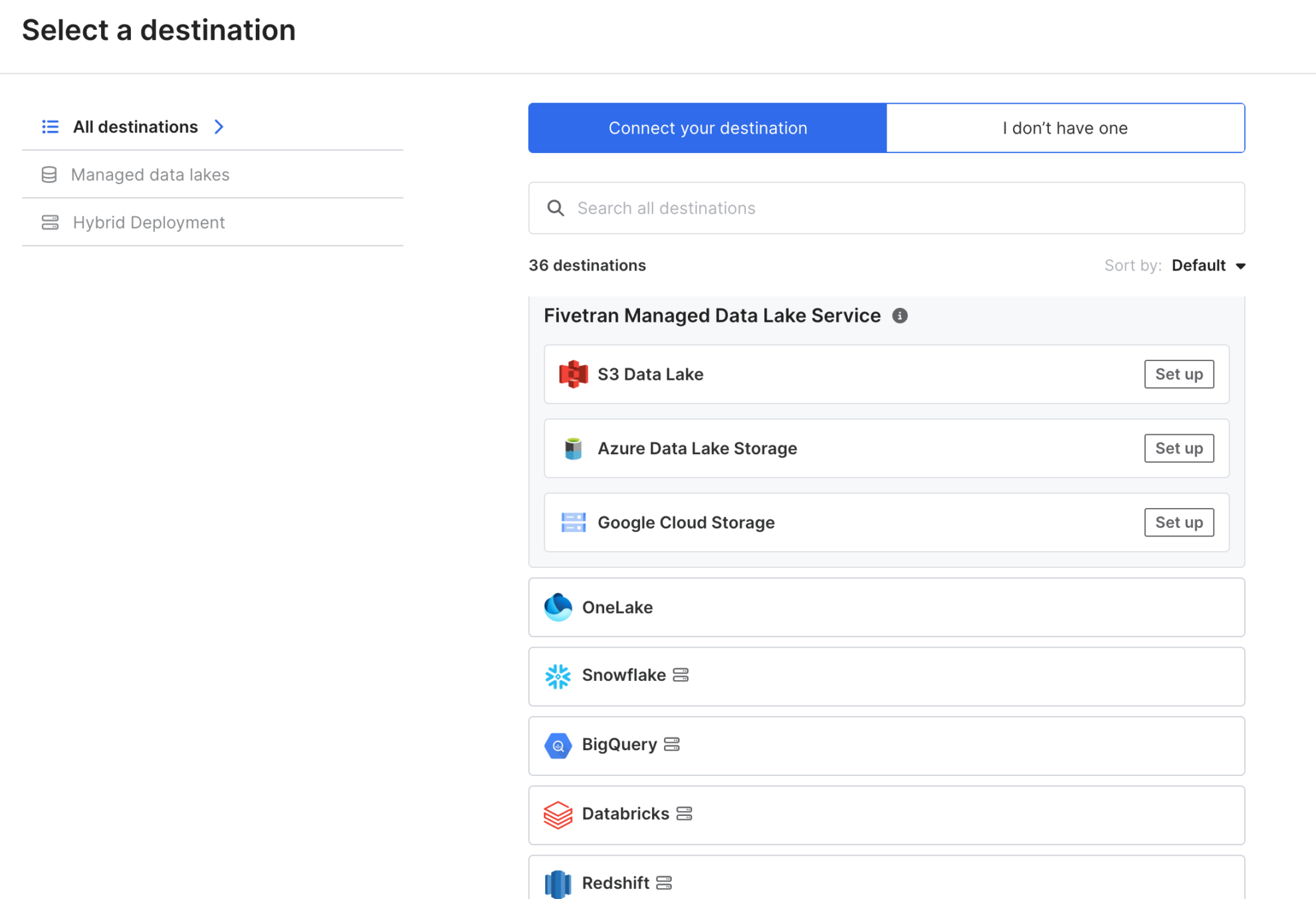
Fivetran offers twice more (600+) connectors across enterprise systems, including applications, storage systems, databases, files, etc. If you’re in a data-intensive organization with extensive engineering resources, this coverage is beneficial.
However, keep in mind that Fivetran doesn’t offer native integrations with business-facing tools like BI platforms or spreadsheets. Data can only be synced to these tools indirectly, by first loading it into a supported data warehouse.
2. Pipeline setup
Windsor.ai overview
Windsor is extremely easy to use, with a no-code interface that allows you to set data pipelines fast and straightforward, with zero SQL. All API configurations are handled under the hood, so you don’t need to worry about authentication, schema mapping, or rate limits.
This makes Windsor ideal for quick-turnaround projects or teams that value speed and autonomy over technical complexity. Even non-technical users can get data flowing into a custom dashboard or a cloud warehouse in just a few minutes.
What’s more, to leverage its native integrations with BI tools and spreadsheets, Windsor offers a vast library of pre-built professional reporting templates for an immediate start with no technical configurations.
Fivetran overview
Fivetran’s setup process, while still streamlined, is geared more toward enterprise-scale deployments. It often requires some initial engineering involvement, especially when connecting high-load systems like ERP or legacy databases.
However, once configured, Fivetran excels in automation, monitoring, and resilience. This makes it a strong fit for organizations with mature data teams that require deep governance and scalability.
3. Data transformation capabilities
Windsor.ai overview
Windsor.ai isn’t just an ELT pipeline tool that streams raw data into a warehouse. It offers built-in transformation capabilities. With features like auto-schema matching, data normalization, and the possibility to create custom metrics or apply filters directly in the UI, Windsor lets you shape and refine your data before loading it into the final destination.
This simplifies reporting, reduces the need for post-processing in SQL or BI tools, optimizes in-warehouse costs, and supports a genuine ELT workflow, where transformation happens efficiently after loading, but with full control upfront.
Additionally, it streamlines post-transformations, so you process data in a warehouse or database using SQL or directly in your BI tool. This reduces complexity; no third layer to manage.
Fivetran overview
Fivetran goes deeper with in-app transformations. Native dbt integration, version control, and environment management are all there. If your team is running production-grade analytics with heavy dependencies, Fivetran does this job well.
3. Automation and scheduling
Windsor.ai overview
Windsor.ai handles near real-time syncs to all destinations with minimal friction. You can set auto-sync intervals, hourly, daily, or custom. For many teams, that’s essential to keep dashboards and databases always fresh without overcomplicating the setup.
Incremental loads are supported, too. Once the first sync is complete, Windsor only pulls new or updated records, saving you money and time, particularly when dealing with big datasets in warehouses.
Windsor offers both batch uploads and scheduled syncs, so you can set the integration frequency based on your analytical needs and data sensitivity.
Also worth noting: Windsor provides sync status, logging, and clear alerts when a pipeline issue occurs. No need to dig through layers of logs. You’ll immediately know when something breaks, and why.
Fivetran overview
Fivetran offers flexible, advanced scheduling features including batch uploads, time-based syncs, and event-driven triggers. It supports Change Data Capture (CDC) for near real-time syncing and incremental loads, which helps reduce compute and storage costs when working with large volumes of data.
These options are particularly useful when data freshness needs to be near real-time, such as in finance or inventory use cases.
4. Usability
Windsor.ai overview
Windsor was initially built with marketing teams in mind and now expands into the data engineering field. Setup is 100% no-code and takes minutes. You just need to connect a data source, select the fields, pick a destination, and schedule the sync. That’s it. No SQL, no YAML, no complex pipelines to debug.
Its interface is clean and intuitive for people of all tech levels. You get instant visibility into all key components, such as available and connected data sources, destinations, query settings, API fields, active syncs, and notifications, all in two primary screens. This enables teams to sync data and extract insights right away without relying on engineering support.

Fivetran overview
Fivetran was originally designed for data engineers and still reflects that focus. While it offers a robust feature set, the interface exposes many technical flows, which can feel overwhelming for non-technical users.
Setup usually requires some familiarity with data concepts, and debugging sync issues may involve reading logs or adjusting schemas. However, for teams with technical ownership, Fivetran delivers strong control and reliability.

Windsor.ai vs Fivetran: performance & scalability comparison
Windsor and Fivetran both automate the ELT workflow end-to-end, but they take different approaches, resulting in certain differences in performance and scalability.
1. Data pipeline efficiency
Windsor.ai overview
Windsor is quick and effective for pipelines of any complexity. You connect your desired platforms, select the account(s), choose the necessary API fields, pick a destination, and set syncing, either directly or via a destination task. No setup scripts or manual coding required.
It seamlessly moves normalized data from point A to point B, handling medium to high-volume loads with ease, even when syncing a set of metrics across hundreds of accounts in a single query.
Fivetran overview
Fivetran smoothly handles heavy-duty pipelines, particularly those involving databases, cloud warehouses, and CDC-based workflows. It scales well with tens of millions of rows and supports robust change tracking. However, getting it properly configured often requires engineering support.
2. Reliability
Windsor.ai overview
Windsor syncs run reliably and on schedule. When issues occur, the cause is clearly displayed, eliminating any guesswork. Most errors are auto-retried, and fixes usually take just a few clicks. For dashboards, reports, and frequent syncs to data warehouses, Windsor consistently delivers day-to-day stability.
Fivetran overview
Fivetran offers enterprise-grade reliability. Its incident history is public, with rare outages and fast recovery times. It’s designed to meet strict SLAs, making it a strong choice for global teams managing mission-critical infrastructure.
Windsor.ai vs Fivetran: pricing comparison
Pricing directly affects how fast your team can move. Windsor and Fivetran take different approaches: one focused on simplicity and predictability, the other on usage-based flexibility.
Windsor.ai pricing model overview
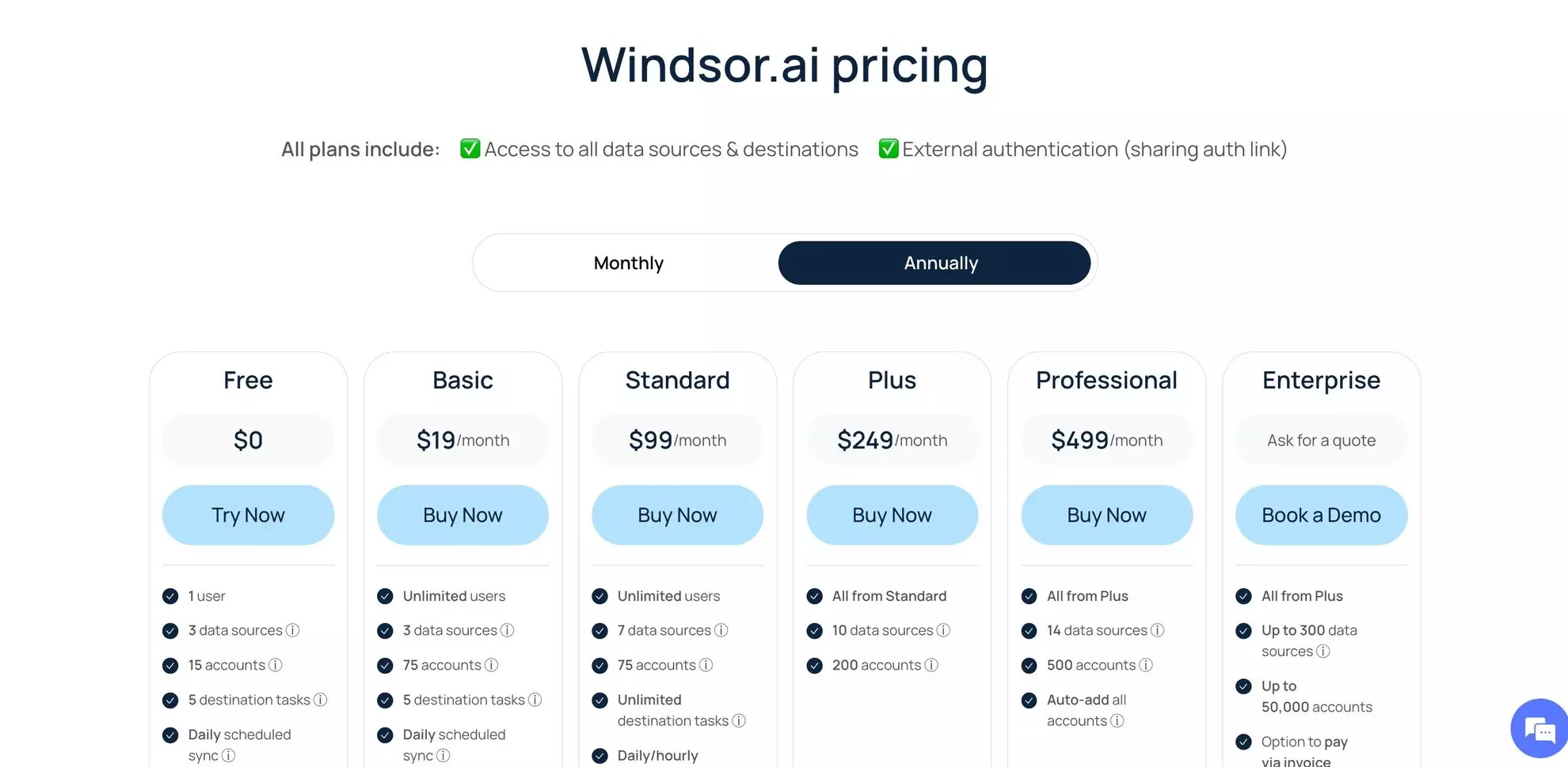
Windsor offers flat-rate plans starting at $19/month, with volume-based add-ons for data warehouses. All connectors and destinations are included. No extra fees for usage spikes.
You get a forever-free plan for lighter use cases. The pricing is transparent and predictable, designed for teams that don’t want to monitor row counts.
Fivetran pricing model overview
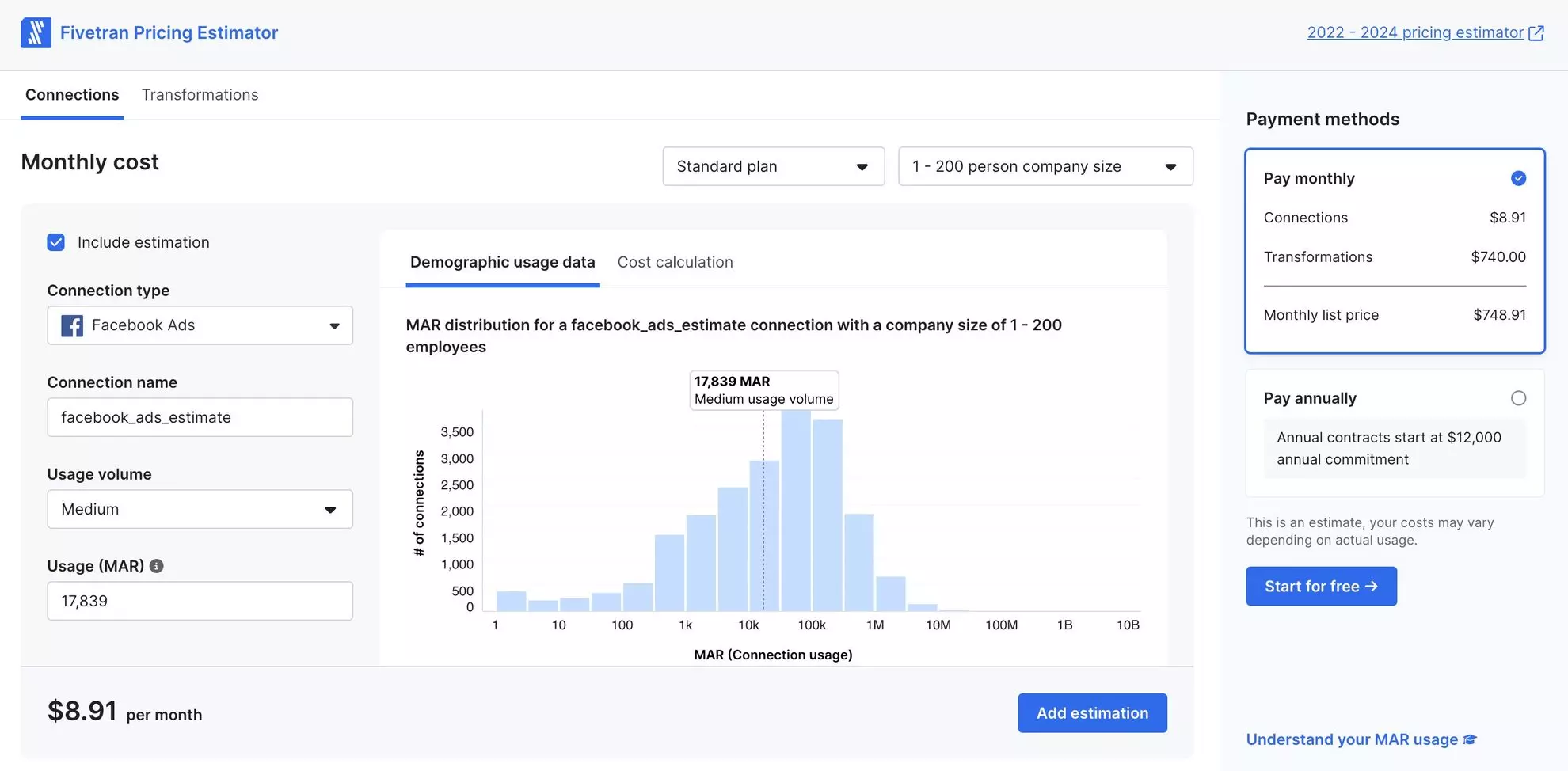
Fivetran uses a usage-based pricing model, starting at around $500/month, based on monthly active rows (MARs). The more data you sync, the more you pay—especially if sources are high-volume or data updates often.
After a 14-day trial, even small teams face enterprise-level pricing. While Fivetran offers depth and control for complex setups, smaller teams may find the MAR-based model unpredictable and harder to manage without engineering support.
Windsor.ai vs Fivetran: security and compliance comparison
Both Windsor.ai and Fivetran take security seriously, offering a robust set of data protection measures.
1. Data privacy and encryption
Windsor.ai overview
Windsor.ai secures data both in transit and at rest using industry-standard AES-256 encryption. TLS is enforced for all communications, ensuring your pipelines remain private from source to destination. OAuth tokens are stored securely in an encrypted infrastructure, not hardcoded or exposed in transit. This layered approach reflects the principles of Zero Trust data protection, where continuous verification and restricted access are key to maintaining control over sensitive data.
For most teams, this model is both practical and secure. You don’t need a full DevOps stack or engineering support to keep sensitive data safe. Windsor’s encryption setup handles the essentials without added complexity.
Fivetran overview
Fivetran is built with deeper controls for enterprise-grade compliance. Role-based access, network policies, and customer-managed keys come standard with Fivetran. However, for marketing teams that simply sync Meta or Google Ads, that level of control is often overkill.
2. Compliance standards
Windsor.ai overview
Windsor.ai meets key compliance standards like GDPR, SOC 2 Type II, and CCPA. These cover what most modern teams need for regulatory alignment.
While it doesn’t delve as deeply as Fivetran into HIPAA or enterprise-specific frameworks, it’s more than sufficient for mid to big companies.
Fivetran overview
Fivetran excels in regulated industries, offering HIPAA support and enterprise-grade certifications that cater to engineering teams handling healthcare or financial data. However, this also comes with higher costs and increased complexity.
Windsor.ai vs Fivetran: customer support & documentation comparison
Let’s see how Windsor.ai and Fivetran compare across support channels, documentation, and self-service resources.
1. Support channels
Windsor.ai overview
Windsor focuses on fast and accessible support for everyone. You can reach the team via email or live chat for instant, real-time response. Our support specialists have strong backgrounds in analytics and data engineering, helping resolve issues quickly without unnecessary back-and-forth.
For enterprise clients, Windsor.ai offers dedicated account managers and guided onboarding as well as video call support to troubleshoot complex issues.
Fivetran overview
Fivetran comes with enterprise-level support tiers. That includes phone support, dedicated account managers, and SLAs. It’s designed for large engineering teams that run complex pipelines at scale.
However, Fivetran does not appear to offer live chat support as a public support option. You can only submit a ticket via their Support Portal or try finding the answer in the FAQs.
2. Documentation
Windsor.ai overview
Windsor’s documentation is straightforward, beginner-friendly, and practical. It covers the basics, explaining the fundamental concepts of the platform, as well as providing advanced API documentation, data fields, and step-by-step data integration instructions for every destination.
Additionally, Windsor shares troubleshooting guides to the most common use cases and in-depth blogs for different ELT/ETL-related topics and specific integrations, f.e, Facebook Ads to BigQuery.
Finally, you can find helpful video tutorials, setup guides, and product demos on Windsor’s YouTube channel for comprehensive visual guidance and better familiarization with the product interface.
Fivetran overview
Fivetran’s documentation goes deeper, especially for engineering-heavy setups. It includes full schema breakdowns, advanced transformation guides, and CDC workflows. They also maintain an active developer community, including GitHub repositories and detailed change logs.
Verdict: Windsor.ai vs Fivetran for ELT – which is better?
Now, let’s summarize all the strengths and gaps of Windsor and Fivetran side-by-side, so you can clearly see which product better fits your needs.
| Criteria | Windsor | Fivetran |
| Ease of use | No-code, easy to start | Simple, but developer-focused |
| Connectors | 350+ connectors | 600+ connectors |
| Pricing | Flat, predictable pricing from $19/month | Usage-based pricing from $500/month; scales with data volume fast |
| ELT features | Fully managed ELT with auto schema matching, daily and hourly syncs, and basic in-app transformations | Enterprise-grade ELT with advanced transformation support via dbt |
| Destinations | Supports integrations into BI tools, spreadsheets, cloud warehouses, data lakes, and databases | Supports integrations into cloud warehouses, data lakes, and databases |
| Enterprise readiness | Includes core enterprise features (SSO, SLAs, onboarding) | Includes full enterprise features (SSO, SLAs, dbt, granular roles, etc.) |
| Documentation | Clear and helpful, with practical guides and video tutorials | Extensive, highly detailed, and developer-focused |
| Support | Fast, personal support via email and live chat; video call support for enterprise | Ticket-based support; no public live chat; phone support on enterprise tiers |
All in all, both Windsor and Fivetran offer great ELT functionality. The right choice ultimately depends on your team structure and use case.
Windsor is best for:
Windsor fits perfectly if you’re part of a data engineering or non-technical team, especially in marketing or analytics, and you don’t want to touch code or spin up any infrastructure. Just plug in your data sources and start syncing to BigQuery, Google Sheets, or Looker Studio in minutes.
Most platforms work out of the box, with no need for custom connectors or constant maintenance. Windsor makes it easy to build clean, repeatable pipelines and keep your team moving fast. Plus, with flat pricing starting at $19/month, it’s far more budget-friendly, often 20x cheaper than Fivetran.
So, if you care about flexibility, speed, and want the data to flow into BI or dev environments without overhead, Windsor gets the job done without getting in your way.
Fivetran is best for:
Fivetran is built for large-scale data operations with structured teams. If you’re dealing with complex environments, like multi-region warehouses, legacy systems, or strict compliance requirements, Fivetran provides the enterprise-grade features you need.
It supports Change Data Capture (CDC), granular role-based access, and native dbt Core integration out of the box. If you’re prioritizing reliability, scalability, and tight control, especially in enterprise or regulated environments, Fivetran is the relevant choice.
Tired of overpaying for ELT? 🚀
Try Windsor.ai for free and get fast, Fivetran-level data pipelines in minutes with no code.
FAQs
Is Windsor better than Fivetran for small businesses?
Yes, if you prioritise speed, simplicity, and cost-effectiveness, Windsor’s setup and pricing are more appropriate.
How does Windsor handle data transformations?
Windsor keeps it simple. It automatically handles essential transformations like schema matching and lets you perform basic in-app transformations without code. No overengineering, just what you need to get your data ready for analysis.
Which tool offers more built-in connectors?
Fivetran offers more connectors overall — over 600 compared to Windsor’s 350+. However, Windsor supports a broader range of destination types, including spreadsheets and BI tools, making it more versatile for non-technical users.
Is Windsor an ELT tool like Fivetran?
Yes. Windsor extracts and loads first, then lets you transform inside the destination.
Who is Windsor best for?
Marketing, analysts, and data teams that want results fast without deep engineering effort or long setup times.
Do I need technical expertise to use Windsor.ai?
Not at all. Most users can build complex pipelines without developer assistance. Setup takes minutes with the completely no-code interface.
Can Windsor replace Fivetran?
For marketing-focused pipelines, yes. If you don’t require deep CDC or enterprise-scale capabilities, Windsor does the job efficiently.
How does Windsor handle data privacy and security?
Windsor encrypts data end-to-end. It’s fully GDPR-compliant and adheres to robust practices for storage, access control, and connector-level security.
Can I use Windsor and Fivetran together?
Yes. Some teams start with Fivetran for dbt transformations or to support legacy systems, and then use Windsor to send the prepared data into BI tools or spreadsheets that Fivetran doesn’t support out of the box.
Is Windsor more affordable than Fivetran?
Absolutely. Windsor is significantly more affordable. Its flat pricing starts at just $19/month, while Fivetran starts at $500/month — and costs can escalate quickly as usage grows.


