 Destinations
 Data sources
 AI insights
 About us
 Careers
 Security
 Customer reviews
 Contact us
 Affiliate program
 Solution partners
 Template gallery
 Looker Studio templates
 Power BI templates
 Excel templates
 Google Sheets templates
 Tableau templates
 Facebook Ads templates
 Google Ads templates
 Data fields & Metrics
 AI prompt library & Guides
 Product documentation
 API documentation
 Case studies
 Blog
Blog Data models
 Windsor vs Supermetrics
 Windsor vs Funnel.io
 Windsor vs Fivetran
 Windsor vs Rivery
 Windsor vs Portermetrics
 Windsor vs Coupler.io





















































































































































































































































Tired of manual data exports? Get started with Windsor.ai today to automate your reporting and extract deeper AI insights
Access all your data from various sources in one place. Get started for free.


ChatGPT connectors are now called apps in ChatGPT. Each app links ChatGPT to a service such as Google Drive or Slack. A plugin packages one or more apps, often with skills, and you install it from Plugins in the ChatGPT sidebar. Plugins reach other services through MCP (Model Context Protocol) servers.
The Windsor.ai plugin is the ChatGPT connector for business data. One install adds 350+ sources, including Meta Ads, Google Ads, GA4, Instagram, Shopify and HubSpot. ChatGPT reads your data through Windsor MCP, and on supported platforms it makes changes after you confirm.
Open Plugins, search for Windsor.ai and select Install plugin, then sign in to Windsor.ai. You do not host a server or paste an MCP address. These integrations start on the free forever plan, with no credit card.
 Free forever plan
No credit card needed
Free forever plan
No credit card needed

















Watch the video tutorial or follow the step-by-step guide to connect your data to ChatGPT with the Windsor.ai plugin.
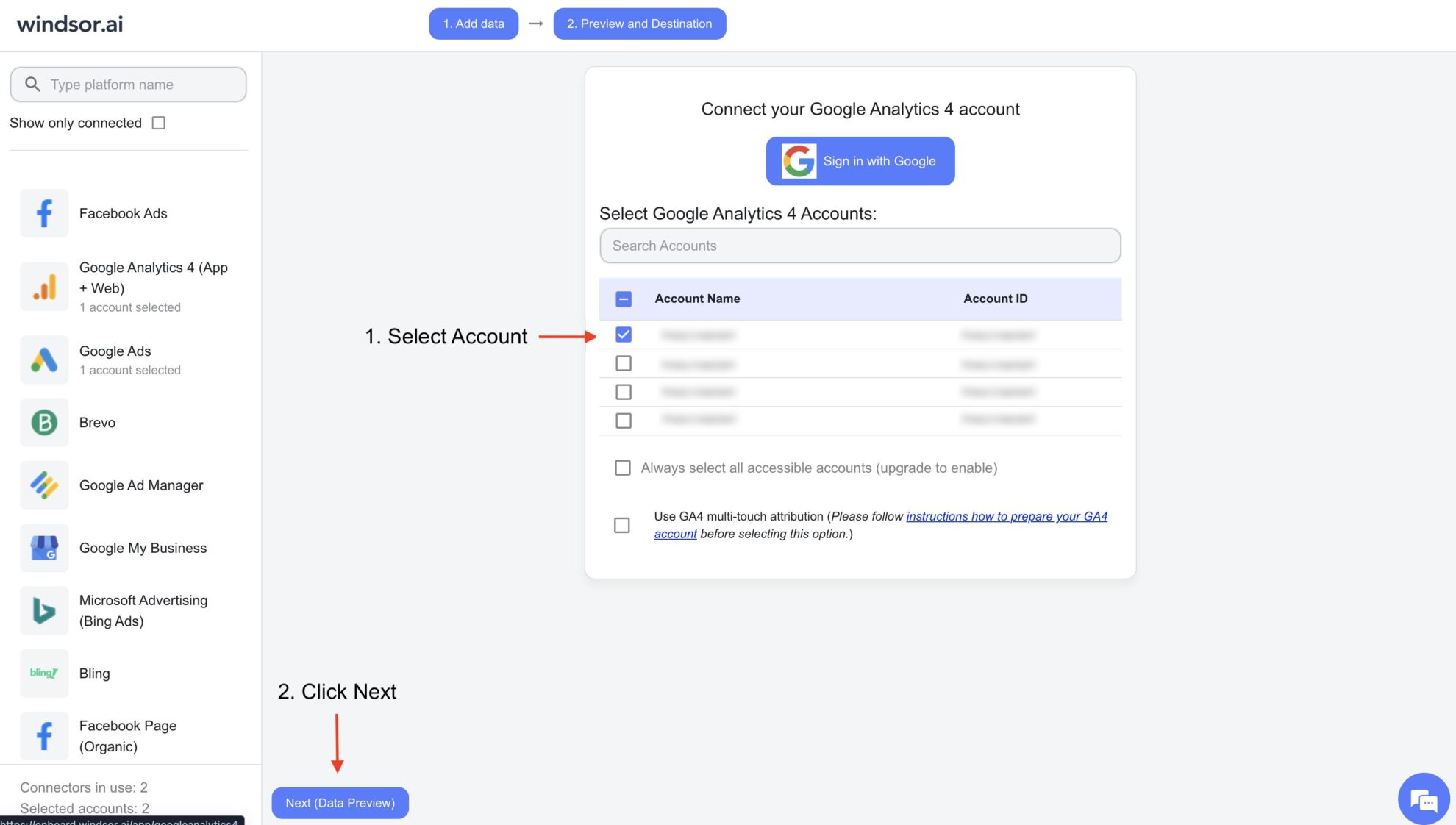
Connect your preferred data sources to Windsor.ai. Select the necessary account(s) you want to pull data from and click “Next.”
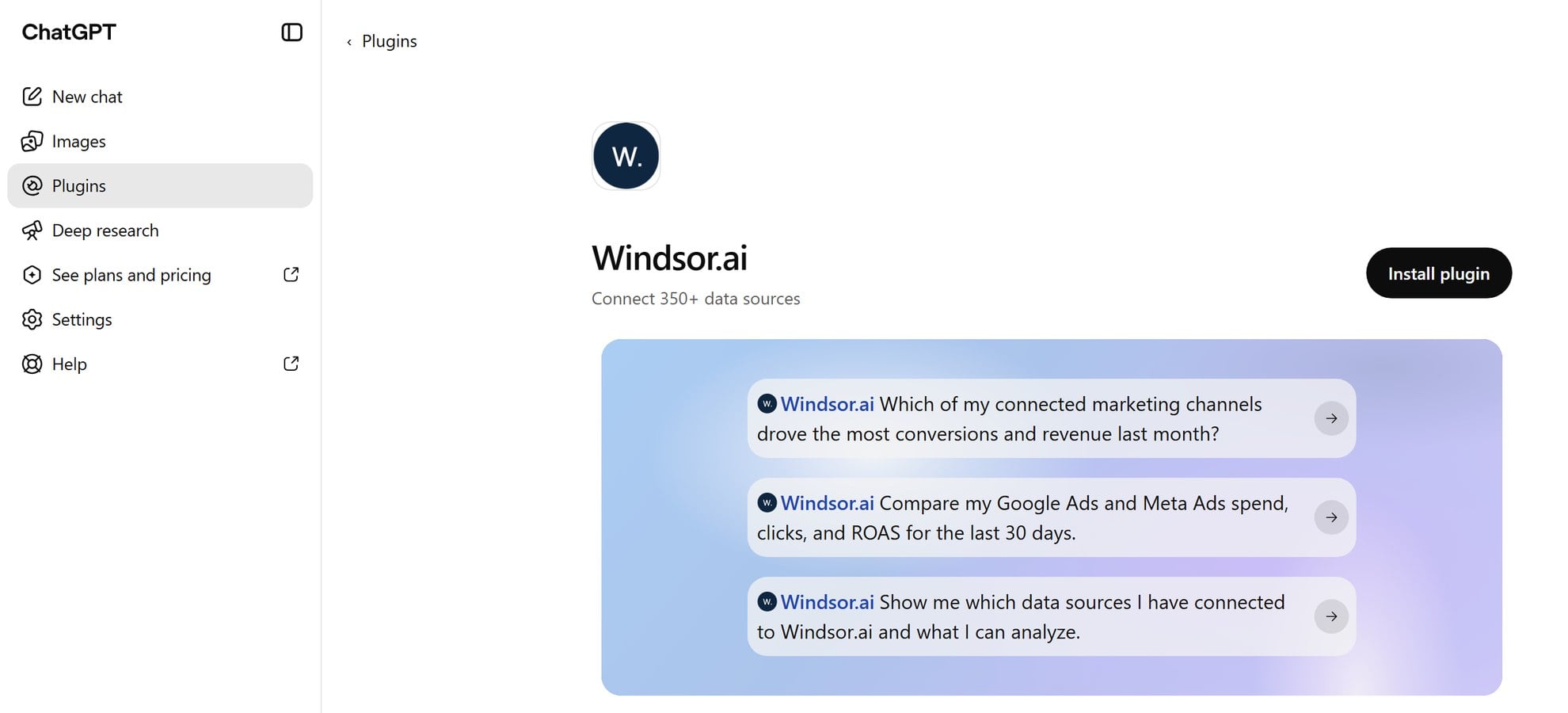
In ChatGPT, select Plugins in the sidebar, search for Windsor.ai and open it, or go straight to the Windsor.ai plugin page.
Select Install plugin, then sign in to your Windsor.ai account and authorize access.
Note: the same install covers write actions such as pausing a campaign or changing a budget. You do not need a second setup.
Open a new chat and ask a question about your connected data in plain English, or tell ChatGPT what to change in a campaign.
ChatGPT uses the plugin when your question needs it. To pick it yourself, type @Windsor.ai in the message box.

Here is what teams do with Windsor.ai in ChatGPT once their sources are connected:
Ask ChatGPT for spend, clicks, conversions and revenue from every connected platform in one answer, by channel or by campaign. Then ask which campaigns cost the most per conversion.

Turn insights into actionable steps. ChatGPT can analyze your Windsor.ai data and provide recommendations for optimizing campaigns, reallocating budgets, or prioritizing tasks, giving you a ready-to-use action plan without the need for manual cross-department analysis.

Windsor MCP also makes changes, with your confirmation each time: pause or enable campaigns, change budgets and create campaigns on Meta Ads, Google Ads, TikTok Ads, LinkedIn Ads and Microsoft Ads, publish posts on Instagram and LinkedIn Pages, and more. See the full list of write actions.
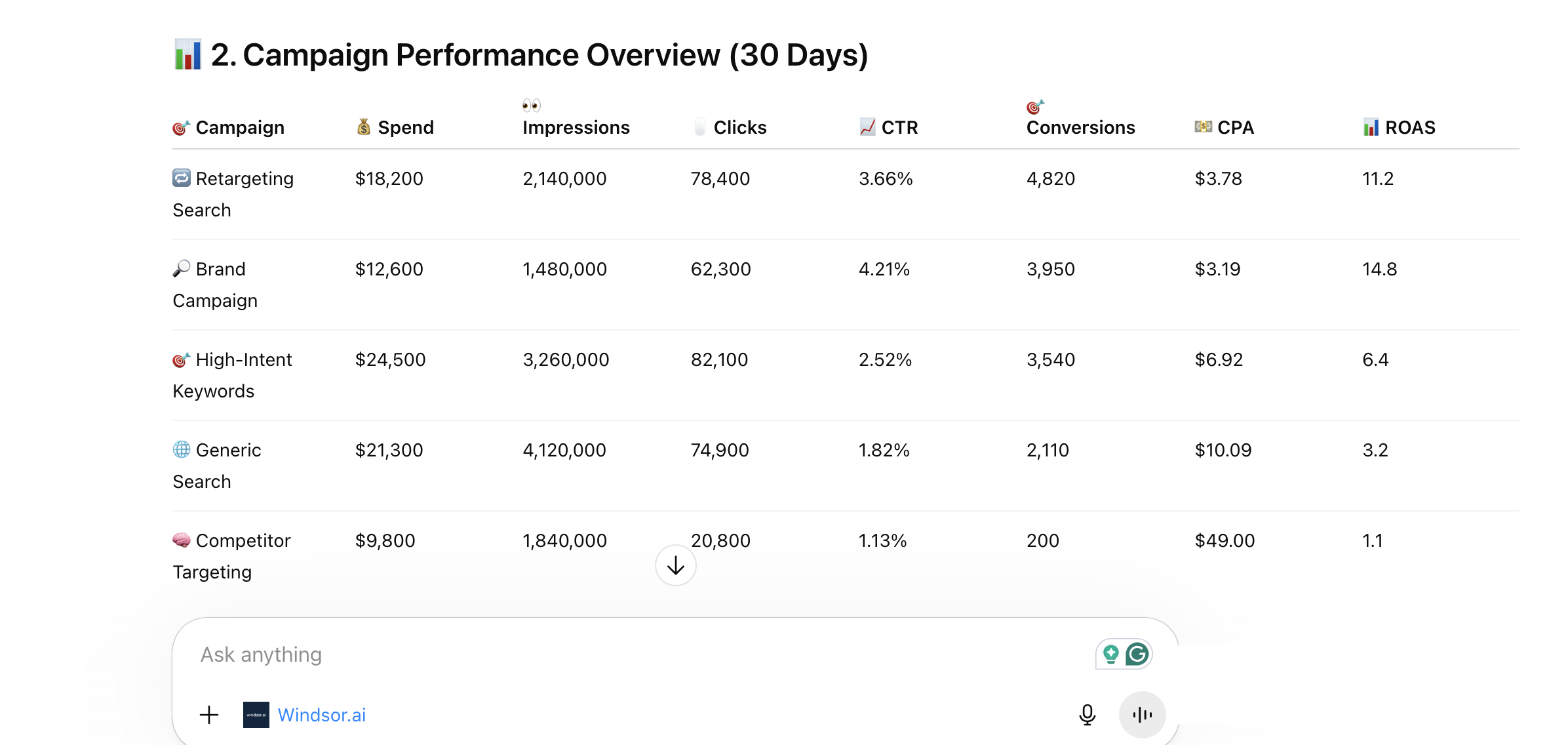
ChatGPT examines your Windsor.ai data to detect patterns, shifts, and trends across channels and time periods, including subtle changes that are easy to miss in static reports. Spot early warning signals, uncover gaps between spend and results, and understand how performance is evolving, so you can act and adjust strategy before issues escalate.

Ask ChatGPT for spend, clicks, conversions and revenue from every connected platform in one answer, by channel or by campaign. Then ask which campaigns cost the most per conversion.
Turn insights into actionable steps. ChatGPT can analyze your Windsor.ai data and provide recommendations for optimizing campaigns, reallocating budgets, or prioritizing tasks, giving you a ready-to-use action plan without the need for manual cross-department analysis.
Windsor MCP also makes changes, with your confirmation each time: pause or enable campaigns, change budgets and create campaigns on Meta Ads, Google Ads, TikTok Ads, LinkedIn Ads and Microsoft Ads, publish posts on Instagram and LinkedIn Pages, and more. See the full list of write actions.
ChatGPT examines your Windsor.ai data to detect patterns, shifts, and trends across channels and time periods, including subtle changes that are easy to miss in static reports. Spot early warning signals, uncover gaps between spend and results, and understand how performance is evolving, so you can act and adjust strategy before issues escalate.
An app connects ChatGPT to one service, such as Google Drive or Slack, so ChatGPT can read its information or take supported actions. A plugin packages one or more apps, skills with instructions, or both. Installing a plugin can start the sign-in for the apps inside it.
The Windsor.ai plugin contains one app and one skill. The app reaches every source you connect in Windsor.ai, and the skill gives ChatGPT instructions for using it.
Yes. MCP (Model Context Protocol) is the standard ChatGPT uses to call tools in other systems, and on ChatGPT web a plugin packages an MCP connection. The Windsor.ai plugin and the other directory plugins that connect to outside services are built on it.
You can also add your own MCP server: open Plugins, select the plus button, then Add custom MCP server. OpenAI offers this on ChatGPT web for Business, Enterprise and Edu workspaces, subject to the admin’s permissions, and Pro users can connect custom servers with read access only. Windsor.ai needs none of this, because it is a listed plugin you install from the directory.
Yes, and it is the same one. The Windsor.ai plugin covers all of them through one install, so you do not need a separate plugin or MCP server for each platform. These are the sources people ask about most, each with its own setup page and example prompts:
Every other source is in the list on this page. Connect two or more and ChatGPT can compare them in one answer, for example Meta Ads spend against Shopify revenue.
Windsor MCP is Windsor.ai’s MCP server for business data, and the Windsor.ai plugin in ChatGPT runs on it. It gives ChatGPT read access to every source you connect in Windsor.ai. On the platforms listed under write actions below, it can also make changes, and each change waits for your confirmation.
The same server, with the same connected sources, works in Claude, Gemini, Copilot, Cursor and other AI tools.
Examples of what teams do with it: How to Use Windsor MCP for AI Data Analysis: Examples & Use Cases.
Step-by-step setup guide: How to integrate data into ChatGPT with Windsor MCP.
Yes, on supported platforms, and every change waits for your confirmation. The list today:
Every other source is read-only through Windsor.ai. The full list of actions per platform is on the Windsor MCP write actions page.
Yes, with a different setup. In chats, you install the Windsor.ai plugin from the directory. In a ChatGPT Business or Enterprise workspace agent, you add Windsor MCP as a custom MCP server, because the listed plugin does not appear in the agent builder yet. The steps are in how to build marketing reports with ChatGPT workspace agents.
Installing the plugin takes a few clicks. Each data source then needs one sign-in in Windsor.ai, or an API key for some platforms.
You can connect data from over 350+ platforms, including Meta Ads, Instagram, Google Ads, GA4, Salesforce, TikTok, Shopify, Klaviyo, HubSpot, and many more. Multiple sources can be unified in a single dataset to analyze your cross-channel performance.
No. You connect your data sources in Windsor.ai, install the Windsor.ai plugin in ChatGPT, and ask questions in plain English. There is no code or configuration.
Yes. Windsor.ai has completed a SOC 2 Type II audit and encrypts data at rest and in transit. ChatGPT sees only the accounts you select in Windsor.ai, and you can disconnect the plugin at any time from Settings, then Plugins, in ChatGPT. Details are on the security page.
Yes. Connect several platforms in Windsor.ai and ChatGPT can compare them in one answer, for example cost per lead across Meta Ads, Google Ads and LinkedIn Ads, or ad spend against Shopify revenue.
Yes, Windsor.ai has a free forever plan with no credit card, for one data source. In the first 30 days you can test more sources. To keep two or more connected after that, paid plans start at $19/month for 3 sources (billed annually). See pricing.
Start with a question about one decision you have to make this week. Three prompts to try after you connect your sources:
More prompts by data source and report type: AI Prompt Library.
Currently, Windsor MCP supports integrations with ChatGPT, Claude, Cursor, Gemini, Perplexity, Antigravity, and Copilot Agent. More tools to come.