 Destinations
 Data sources
 AI insights
 About us
 Careers
 Security
 Customer reviews
 Contact us
 Affiliate program
 Solution partners
 Template gallery
 Looker Studio templates
 Power BI templates
 Excel templates
 Google Sheets templates
 Tableau templates
 Facebook Ads templates
 Google Ads templates
 Data fields & Metrics
 AI prompt library & Guides
 Product documentation
 API documentation
 Case studies
 Blog
Blog Data models
 Windsor vs Supermetrics
 Windsor vs Funnel.io
 Windsor vs Fivetran
 Windsor vs Rivery
 Windsor vs Portermetrics
 Windsor vs Coupler.io



























































































































































































































































Tired of manual data exports? Get started with Windsor.ai today to automate your reporting and extract deeper AI insights
Access all your data from various sources in one place. Get started for free.


Connect 350+ data sources to Copilot Agent in minutes, no code required.
Windsor MCP automatically syncs your marketing and business data with Microsoft Copilot, allowing you to analyze cross-channel performance, uncover trends, generate AI-powered insights, and take actions, all through a single conversation.
 Free forever plan
No credit card needed
Free forever plan
No credit card needed

















Explore our step-by-step guide to seamlessly integrate your data from any source into Copilot with the Windsor.ai connector.
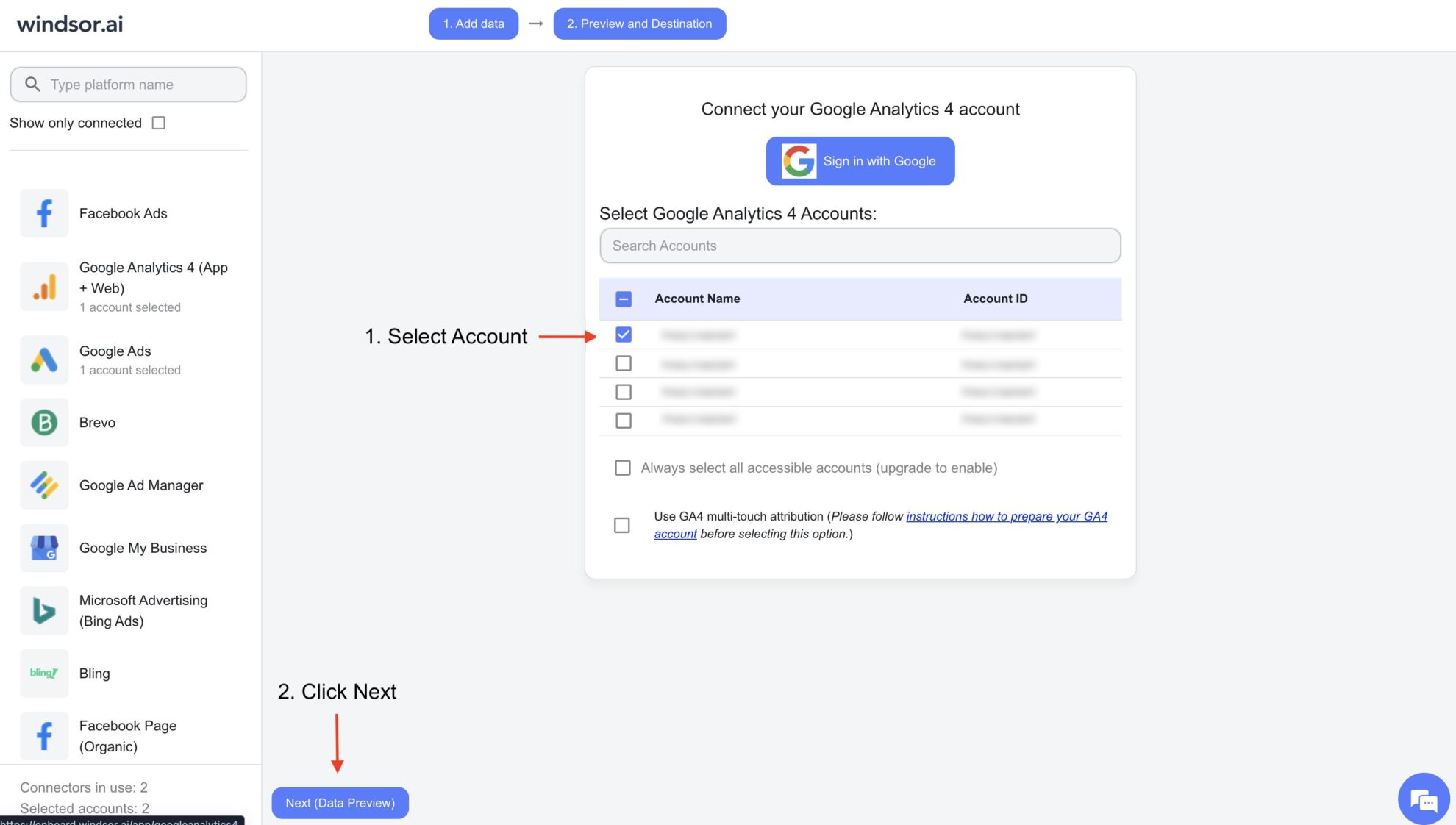
Connect your preferred data sources to Windsor.ai. Select the necessary account(s) you want to pull data from and click “Next.”
In Microsoft Copilot Studio, create a new agent.
Click + Add tool and select + New tool -> Model Context Protocol.

On the next screen, click the dropdown under ‘Not connected’ and select Create new connection.
⚠️ Important: Enter your Windsor API key with the Bearer prefix.

Start a new chat. Copilot will prompt you to connect to Windsor MCP via the Connections manager. Click Connect -> Submit.
Return to the chat and click Retry in your agent prompt.
You can now ask questions about your integrated Windsor.ai data and act on insights.

Eliminate manual exports and data preparation. Automatically sync your business data to Copilot and move from insights to action. Here's what Windsor MCP enables:
Windsor MCP for Copilot consolidates metrics from all connected platforms into one clear performance snapshot. Review revenue, ROAS, acquisition costs, conversions, growth signals, and essential patterns, removing the need to create custom BI dashboards or manage reports in spreadsheets.

Let Copilot translate performance data into strategic optimization plans. Receive clear recommendations on budget allocation and campaign scaling, then pause underperformers, increase budgets on top ad sets, or launch new campaigns right away without switching tools.

Request insights in any format you prefer: concise executive briefs, detailed channel breakdowns, comparison tables, or Excel-ready exports. Copilot adapts outputs instantly based on your prompt.

Use Microsoft Copilot to uncover emerging patterns, channel inefficiencies, seasonal fluctuations, and unexpected performance gaps. Identify risks and opportunities before they affect your bottom line.

Windsor MCP for Copilot consolidates metrics from all connected platforms into one clear performance snapshot. Review revenue, ROAS, acquisition costs, conversions, growth signals, and essential patterns, removing the need to create custom BI dashboards or manage reports in spreadsheets.
Let Copilot translate performance data into strategic optimization plans. Receive clear recommendations on budget allocation and campaign scaling, then pause underperformers, increase budgets on top ad sets, or launch new campaigns right away without switching tools.
Request insights in any format you prefer: concise executive briefs, detailed channel breakdowns, comparison tables, or Excel-ready exports. Copilot adapts outputs instantly based on your prompt.
Use Microsoft Copilot to uncover emerging patterns, channel inefficiencies, seasonal fluctuations, and unexpected performance gaps. Identify risks and opportunities before they affect your bottom line.
Microsoft 365 Copilot Agent for data analysis lets you instantly analyze, visualize, and interpret large-scale datasets, including Excel files, CSVs, databases, or data connected from third-party sources, using natural language queries. It works with the structured data to help you unlock valuable insights, whether you want to identify trends and gaps, generate visual reports, or get an action plan. All without code or advanced technical skills.
By using Windsor MCP for Copilot Agent, you can take data analysis to the next level with the following features and benefits:
Windsor MCP (Model Context Protocol) is Windsor.ai’s infrastructure that securely delivers clean, structured data from your connected sources directly to AI tools like Microsoft Copilot. It covers data aggregation, normalization, and delivery under the hood, so you can instantly proceed with Copilot Agent analysis instead of data preparation.
For supported ad platforms (Facebook Ads/ Google Ads/LinkedIn Ads/Bing Ads/TikTok Ads), Windsor MCP also enables write actions, so you can execute changes directly from the chat.
Things you can do with Windsor.ai for Copilot integration:
Learn more about Windsor MCP use cases: How to Use Windsor MCP for AI Data Analysis: Examples & Use Cases.
Copilot connectors are third-party applications that enable seamless integration between external data sources and the Copilot agent.
For instance, the Windsor MCP connector eliminates the need for manual data exports, cleaning, and transfers by delivering structured, analysis-ready data from over 350+ platforms directly into Copilot within seconds.
With just a few clicks, users can bring in multi-channel data, perform in-depth analyses, and fully leverage Copilot’s capabilities without any technical complexity.
Windsor.ai’s pricing for Microsoft Copilot data integration can vary depending on the number of connected accounts and data sources. We offer absolutely transparent pricing plans for diversified business needs and budgets.
With Windsor.ai’s native connector for Copilot Agent, the integration process takes just a few minutes. No technical expertise or coding is required; connecting data to Copilot is simple, straightforward, and accessible to everyone.
You just need to follow these three simple steps:
Step-by-step setup guide: How to integrate data into Copilot with Windsor MCP.
Yes. Windsor.ai is built to scale with your data needs. As your business grows, you can add more data sources, accounts, and historical data without changing your Copilot Agent setup. The agent continues to analyze your expanded datasets seamlessly through the same connector.
You can connect data from over 350+ platforms, including Meta Ads/Organic, Instagram, Google Ads, GA4, Salesforce, Shopify, TikTok, Klaviyo, HubSpot, and many more. Multiple sources can be unified in a single dataset to analyze your cross-channel performance.
No. Data integration into Copilot Agent through Windsor MCP requires no coding or complex configuration. You simply connect your data sources in Windsor.ai, add Windsor MCP as a new tool in Copilot Agent, and start analyzing your data using natural-language prompts.
Yes. Windsor.ai follows industry-standard security practices to ensure your data is handled safely. Microsoft Copilot only accesses the data you explicitly connect through Windsor MCP.
Absolutely. Windsor.ai allows you to connect data from several platforms and transfer it to Copilot, so you can analyze cross-channel performance, compare results, and spot insights and gaps across your entire martech stack.
Yes. Windsor.ai has a free forever plan that includes 1 data source, 1 account, 1 user, and full access to Windsor MCP for Copilot.
Copilot Agent can answer diversified questions about your connected data, from KPI summaries and automated reports to cross-platform comparisons and trend discovery.
To get started asap, check out our AI Prompt Library, where we provide ready-to-use prompts tailored for different data sources and reporting needs.
Currently, Windsor MCP supports integrations with Microsoft Copilot Agent, ChatGPT, Claude, Cursor, Gemini, and Perplexity. More tools to come.